I don't fucking know why I can't eject USB hard drives. I installed the SysInternals apps, and best they can tell me is that Dropbox is fucking with the drives. I explicitly told Dropbox to not fuck with USB drives. I don't know who's lying, I just want whoever is fucking with the drives to stop fucking with the drives, OK??? OK.
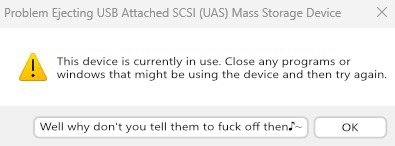
Windows dialogue about failing to eject an USB drive, because an application is using it. Aside of "OK", a new button says "Well why don't you tell them to fuck off♪~"

top 97 comments

sorted by: hot top controversial new old
[–] 218 points 1 year ago (1 child)
  • [–] 120 points 1 year ago (16 children)

    Windows has that button, but only if you right-click the drive in file explorer and select "eject". The dialog is very similar, but has the option to continue anyways. That option doesn't appear when ejecting from the taskbar.

    Which is weird, because it means that Microsoft went out of their way to make two different, almost identical dialogs. And they made the better one harder to reach.

  • source
  • hideshow 16 child comments
  • [–] 81 points 1 year ago (7 children)

    Either that or they were added at different times by two different teams with two different design philosophies.

  • source
  • parent
  • hideshow 7 child comments
  • [–] 7 points 1 year ago* (1 child)

    Reminds me of that story about Windows's format dialog. It's on Xitter, so here's the text:

    Dave W Plummer

    I wrote [Windows's] Format dialog back on a rainy Thursday morning at Microsoft in late 1994, I think it was.

    We were porting the bajillion lines of code from the Windows95 user interface over to NT, and Format was just one of those areas where WindowsNT was different enough from Windows95 that we had to come up with some custom UI.

    I got out a piece of paper and wrote down all the options and choices you could make with respect to formatting a disk, like filesystem, label, cluster size, compression, encryption, and so on.

    Then I busted out VC++2.0 and used the Resource Editor to lay out a simple vertical stack of all the choices you had to make, in the approximate order you had to make. It wasn't elegant, but it would do until the elegant UI arrived.

    That was some 30 years ago, and the dialog is still my temporary one from that Thursday morning, so be careful about checking in "temporary" solutions!

    I also had to decide how much "cluster slack" would be too much, and that wound up constraining the format size of a FAT volume to 32GB. That limit was also an arbitrary choice that morning, and one that has stuck with us as a permanent side effect.

    So remember... there are no "temporary" checkins :)

  • source
  • parent
  • hideshow 1 child comment
  • [–] 6 points 1 year ago (1 child)

    yeah a fresh windows 11 install has like 20 different control panels, all built at different times by different teams using different UI toolkits. It's basically their philosophy to not unify anything but instead just keep bolting new things to different pieces of the OS, no matter how similar

  • source
  • parent
  • hideshow 1 child comment
  • [–] 21 points 1 year ago (6 children)
  • [–] 44 points 1 year ago (5 children)
  • [–] 5 points 1 year ago (4 children)

    This is why nobody likes computer nerds.

  • source
  • parent
  • hideshow 4 child comments
  • [–] 7 points 1 year ago (2 children)

    Puns? Puns are why nobody likes nerds? Of all the things to complain about in the world, puns are such an issue for non-nerds?

    Weakness, get gud scrubs.

  • source
  • parent
  • hideshow 2 child comments
  • load more comments (1 reply)
  • [–] 75 points 1 year ago (29 children)

    Not 99%. Windows has many usability issues. I'd vote for "dont steal focus and stick windows in front of where I'm typing" and "don't move things just as I go to click on them" for a start, and also "don't somehow take an hour to delete 50 files."

  • source
  • hideshow 29 child comments
  • [–] 38 points 1 year ago (7 children)

    "Fun" fact: if you think it's slow normally (and to be fair, it is), NTFS seems to have a pathological performance regression when a directory contains more than 10,000 children, any operations on files in that directory slow down by around 95%.

    I discovered this on our CCTV system at work (that runs on Windows Server 2022), which creates an inordinate number of small files (each containing at most a few seconds of video). It was causing some of its periodic maintenance tasks to fail, as they'd take longer to run than than the configured interval between them.

    Windows also really doesn't like dealing with half-petabyte filesystems, just like... at all.

  • source
  • parent
  • hideshow 7 child comments
  • [–] 10 points 1 year ago

    I can also tell you that if you are working with file numbers in the 10,000, windows will notoriously interfere with their built-in services. When copying or moving, msdefender might delay every file copy because it marks the action as suspicious and begins scanning the files beforehand. And also the trkwrks or however that drive observation service is called may block actions on specific files just because.

    In short, you are not only fighting drive formats at that point, you are also fighting your built-in system services. Source: I wanna die.

  • source
  • parent
  • [–] 3 points 1 year ago (1 child)

    Have you tried turning off thumbnails? In my experience when it slows down on large directories like that it's either trying to generate thumbnails or index a bunch of new files (which is also a possibility in your use case)

  • source
  • parent
  • hideshow 1 child comment
  • [–] 2 points 1 year ago

    A great thought on the thumbnails, but the behavior exhibits even when using command-line tools.

    Indexing is off for the entire drive, I can't even begin to imagine what kind of mess that would make if it was on.

  • source
  • parent
  • [–] 14 points 1 year ago (9 children)

    Deleting files was an amazing one already. Then I recently discovered the joy of deleting 30k emails from Outlook... T-T

  • source
  • parent
  • hideshow 9 child comments
  • [–] 24 points 1 year ago* (3 children)

    I literally cannot understand how Outlook is so awful and unpleasant to use. Constant pauses, regular freezes and a search that will show a document I sent to myself five years ago regardless of search terms but won't surface the perfect match I received yesterday, in the world's most prominent email client.

    The only worse software I have to interact with on a daily basis is Adobe's PDF reader, which gives me five popups within one minute of opening it and takes over a minute to do a text search in a five page document.

  • source
  • parent
  • hideshow 3 child comments
  • [–] 21 points 1 year ago* (4 children)

    I copied 400GB of assorted files in an RDP session today and Windows had to think for a minute or two, then copy them ever so slowly, then stop at 99% done, then crash Explorer and disable the start menu and taskbar and CTRL-ALT-DEL and all ways of getting to the Task Manager, and then freeze the whole machine so that I had to travel to the physical machine and hold down the power button, since when it has been unusably slow because Windows now wants to rebuild the RAID array, which takes days. This was a pretty average Windows session.

  • source
  • parent
  • hideshow 4 child comments
  • [–] 2 points 1 year ago (2 children)

    That thinking is so very annoying. This is all time that could be used to copy files.

  • source
  • parent
  • hideshow 2 child comments
  • [–] 9 points 1 year ago (10 children)

    Shift-Del to delete files is usually much faster, though obviously this skips the recycle bin.

  • source
  • parent
  • hideshow 10 child comments
  • [–] 7 points 1 year ago (9 children)

    Moving files to the recycle bin and deleting files should take the same amount of time, both are essentially just a rewrite of the pointer to the data and don't copy any data at all.

  • source
  • parent
  • hideshow 9 child comments
  • [–] 5 points 1 year ago (8 children)

    Not on Windows, it actually moves your files to a special directory.

  • source
  • parent
  • hideshow 8 child comments
  • [–] 2 points 1 year ago (7 children)

    I take it you don't filesystem much do you?

    Moving a file is literally just changing a pointer in the filesystem table to basically say 'hey, these file contents are now stored in this other folder'. Moving a file on the same drive literally never requires rewriting the actual file contents.

    I'm practically certain that what's slowing Windows down when sending something to the Recycle Bin is the background processing and data compression being performed by System Restore.

  • source
  • parent
  • hideshow 7 child comments
  • [–] 3 points 1 year ago* (6 children)

    I take it you don't filesystem much do you?

    I take it you don't Windows much?

    Windows moves the file from its current folder to the hidden system folder C:\$Recycle.Bin\. That involves copying file metadata, updating NTFS records, and possibly moving the file across volumes (which becomes a full file copy+delete).

    Large files or folders with many entries take longer because NTFS has to record each move, update security descriptors, and maintain the Recycle Bin’s index.

    If the file is on another drive than the C-drive, the system literally copies it into that drive’s recycle bin folder, then deletes the original.

    Nobody said Windows did this stuff efficiently.

    I'm practically certain that what's slowing Windows down when sending something to the Recycle Bin is the background processing and data compression being performed by System Restore.

    Windows doesn't do any recycle bin data compression. And System Restore is a completely separate, unrelated system. So no it doesn't do any of that.

  • source
  • parent
  • hideshow 6 child comments
  • [–] 1 point 1 year ago (5 children)

    I didn't say the Recycle Bin does any data compression, I said System Restore does data compression, and this is indeed a known fact.

  • source
  • parent
  • hideshow 5 child comments
  • [–] 1 point 1 year ago (4 children)

    Sure, but neither is relevant to the recycle bin.

  • source
  • parent
  • hideshow 4 child comments
  • [–] 1 point 1 year ago (3 children)

    Windows has some other features hiding behind the scenes and bogging the system down when files get changed, like Restore Previous Versions...

    https://support.microsoft.com/en-us/windows/backup-and-restore-with-file-history-7bf065bf-f1ea-0a78-c1cf-7dcf51cc8bfc

    I do believe that feature is closely tied with System Restore as well..

  • source
  • parent
  • hideshow 3 child comments
  • [–] 1 point 1 year ago (2 children)

    What? File History is a completely different system. System Restore makes occasional restoration points and is enabled by default, File History needs to be set up to use it. It's disabled by default and Microsoft seems to be actively trying to hide it (try finding it in the Win11 settings screen; you won't find it there) so people use OneDrive to back their stuff up instead.

  • source
  • parent
  • hideshow 2 child comments
  • [–] 1 point 1 year ago* (1 child)

    Coming from Windows 2003, Vista Ultimate and 7 Ultimate era, Restore Previous Versions was enabled by default, and was a side service of System Restore..

  • source
  • parent
  • hideshow 1 child comment
  • [–] 1 point 1 year ago

    Right I get what you mean now. "File History" =/= "Previous Versions". But "Previous Versions" has been entirely replaced since Win8, so not entirely relevant.

    It's also completely unrelated to file deletions, because the VSS system both System Restore and Previous Versions use worked on the block-level, and as you already pointed out blocks aren't written to when a file is deleted, it either gets copied over to the recycle bin or just marked as deleted, but neither affect the block contents (VSS works on a CoW principle, blocks are backed up only if written to, but live performance is basically unaffected by this unless you're doing huge loads like big DB modifications or something.

  • source
  • parent
  • [–] 45 points 1 year ago (2 children)

    It's even more fun when you're trying to do something with a file on a network share. There have been so many times where a user goes "it's telling me i can't save this because Suzie is using it", i close Suzie's abandoned session, and the file is still magically in use by Suzie. Why? Because the dialogue is broken and the file is actually open on John's machine. I fucking hate windows.

  • source
  • hideshow 2 child comments
  • [–] 2 points 1 year ago

    Waiting in windows explorer in a shared directory for write access to a document, with "notify" set. It says filename.doc is available, double click it. "Sorry psud, this file is being used by psud. Open read only or notify when this file is free?"

    Because of course explorer opens the file read/write to show the preview

  • source
  • parent
  • [–] 32 points 1 year ago (6 children)

    just yank it

    fuck whoever is using the drive

  • source
  • hideshow 6 child comments
  • [–] 23 points 1 year ago (5 children)

    I used to do this, because it didn't seem to cause any issues — until it did, and I lost a lot of data.

  • source
  • parent
  • hideshow 5 child comments
  • [–] 11 points 1 year ago* (last edited 1 year ago) (4 children)

    People who say this I'll tell you what actually happens so you can know. When you tell it to safely eject all the volatile memory saved in RAM it actually writes to the permenant storage memory instead of holding it in volatile storage. Every time you yank you're betting that its not in volatile storage anymore and was written to storage. That's what safely eject does, forces the CPU to write to permenant storage.

    Edit: the problem comes from whats doing what at what time and you will see why you can lose everything.

  • source
  • parent
  • hideshow 4 child comments
  • [–] 1 point 1 year ago (2 children)

    Maybe you know why does my microSD card get corrupted any time its pulled unless "ejected"? I need to either "eject" if its on my computer or completely power down the device to keep it from corrupting. Ive tested in both camera and 3dprinter with same result.

    Is it just a crap card (its kingston 32 GB)?

  • source
  • parent
  • hideshow 2 child comments
  • [–] 2 points 1 year ago (1 child)

    From what I learned check to see if the card is set for better performance it makes it write to a cache as consequence but makes it faster on the other hand. I had this problem and this was my answer but other software might be messing with it as well but I always safely eject for good measure anyways.

  • source
  • parent
  • hideshow 1 child comment
  • [–] 27 points 1 year ago (38 children)

    How is linux handle such situations, i'm new using it and haven't looked that up yet, well i didn't got in such a situation yet, but i only used a handful of time a external hard drive

  • source
  • hideshow 38 child comments
  • [–] [S] 32 points 1 year ago (24 children)

    Basically, if you, as a regular user, cannot unmount a device, you can usually just go to root shell (sudo -i), see where the thing is mounted (just use mount) and then unmount it (umount /media/blah/floop). If it says the device is still busy, as root you can remount it as read-only and then unmount it (seeking documentation left as an exericise to the reader, as I'm sitting at a Windows system now).

    There's also lsof ("list open files") tool, which can be used to see which exact programs are using files on that device, which you can then use to kill those sneaky processes (ps, kill).

  • source
  • parent
  • hideshow 24 child comments
  • [–] 17 points 1 year ago (21 children)

    So a complicated set of terminal commands and alternatives you need to have memorized ahead of time. That's definitely the linux solution. You can do it, but no average user would ever be able to when they need it.

    Windows probably has some equally complicated way of finding what is locking a file/folder... or you can just install File Locksmith which is a Microsoft PowerToys tool, and just have it in the context menu everywhere.

  • source
  • parent
  • hideshow 21 child comments
  • [–] 27 points 1 year ago* (6 children)

    No average user would be able to look up what commands to run? Because newsflash: unlike Windows, searching for a common problem on Linux normally turns up a solution written by a human who knows what they're talking about.

    "Windows doesn't even have basic package management like every Unix-like OS does so you don't have to individually update applications and go find them on the Internet, but this one edge case on Linux requires like two terminal commands (the sudo -i is totally superfluous if you just put sudo in front of commands) instead of installing an entire separate tool you'll ever use one time like on Windows and which an average user wouldn't even know exists. Therefore Linux is more complicated."

    Incidentally, here's what Microsoft officially recommends for the "average user" regarding PowerToys:

    It's insane how nose-blind Windows users are to how user-unfriendly their OS is.

  • source
  • parent
  • hideshow 6 child comments
  • [–] 4 points 1 year ago

    Windows doesn’t even have basic package management like every Unix-like OS does so you don’t have to individually update applications and go find them on the Internet

    Funny thing is that it does (winget), but it's a terminal app. Windows users who look down on Linux users for "needing" to use a terminal don't want to bring it up, so Linux users also aren't aware of it and never point to it as a counter example.

  • source
  • parent
  • [–] 14 points 1 year ago (4 children)

    It’s insane how nose-blind Windows users are to how user-unfriendly their OS is.

    Oh the irony. You clearly don't work with any sort of end user.

    For 99% of computer users, if the GUI doesn't have an option, it doesn't exist. They aren't searching past a basic Google of the issue showing them step by step instructions of how to use the GUI to fix the problem. If there is no way to do so in the GUI, it's not getting fixed by them, they'll take it to the Geek Squad if they even decide to fix it at all. They're must more likely to just ignore an issue. In this case, just removing the USB drive and complaining about something being corrupt later on. The idea of the terminal scares the average person.

    Windows doesn’t even have basic package management like every Unix-like OS does Well that's simply wrong. winget upgrade --all I just upgraded 44 apps I definitely didn't install via winget, they were all installed via individually downloaded installers at some point in the past, but all upgrade with a single package manager command in a terminal. Certainly seems similar to me. It may not be everything, but it's certainly the majority of things on this system other than the games.

  • source
  • parent
  • hideshow 4 child comments
  • [–] 16 points 1 year ago

    They aren’t searching past a basic Google of the issue showing them step by step instructions

    Your users are searching for their problems???

    Most wouldn't even do that.

    If the button isn't right there to fix everything automatically, the problem just stays that way until they (maybe) restart

  • source
  • parent
  • [–] 15 points 1 year ago

    Alright, so others went over the "easy" way to see which program is being the offender. But I feel like the average Lemmy user just skips GUI at this point.
    Say hello to KDE:

    KDE also does automatic fsck before mounting, which is why it may take some 2 seconds to mount a drive.

    HDDs it properly spins down and unpowers as well.

  • source
  • parent
  • [–] [S] 20 points 1 year ago*

    For 99% of computer users, if the GUI doesn’t have an option, it doesn’t exist.

    Literally 99% of Windows tech support is

    Have you right clicked on Windows menu, selected Terminal (Admin), then entered sfc /scannow and then DISM /Online /Cleanup-Image /CheckHealth and DISM /Online /Cleanup-Image /ScanHealth and DISM /Online /Cleanup-Image /RestoreHealth? ...ohhh shit you're still fucked up - well, maybe you need to completely reinstall windows, well, here's the page on how to do it.

    That's the difference with Linux. Your average user never uses terminal, and when they do, they find the tools suck.

  • source
  • parent
  • [–] 4 points 1 year ago*

    If there is no way to do so in the GUI, it's not getting fixed by them, they'll take it to the Geek Squad if they even decide to fix it at all.

    The best part is that Geek Squad probably won't even fix it.

    With the amount of time allocated to tasks and the lack of autonomy retail workers are given, the solution to anything not explicitly written in an employee runbook is going to be "we need to reinstall windows" or "it can't be fixed, but we have a new computer you can buy"

  • source
  • parent
  • [–] 3 points 1 year ago (1 child)

    You can also just pull the USB drive out, if you have waited a reasonable time after last writing to it, no harm will be done.

    Also, terminal commands have the advantage that they are the same over the course of 20something years and across all desktop environments, while the tinyfloppy windows moves critical functions around with every second patch so you have to relocate stuff you had just memorized.

  • source
  • parent
  • hideshow 1 child comment
  • [–] [S] 5 points 1 year ago (4 children)

    Well, the commands that I presented (sudo, mount, umount, ps, kill, even lsof) are actually just normal commands that you use to do ordinary things on your system to manage account elevation, mounted disk volumes, processes, and running processes. You need to "memorise" them just as much as you need to memorise their counterparts in a Windows system (Run As/Explorer/Explorer Eject/taskmgr) (...what kind of nerd memorises Ctrl+Alt+Esc anyway?).

    ...except you don't have lsof, you literally need to install SysInternals Process Explorer.

  • source
  • parent
  • hideshow 4 child comments
  • [–] 4 points 1 year ago (2 children)

    Hi, I am that nerd, it's Ctrl+Shift+Esc to open taskmgr, actually.

    ...I hope to be able to develop a similar level of nerd when I switch to Linux soon

  • source
  • parent
  • hideshow 2 child comments
  • [–] 0 points 1 year ago (1 child)

    So a complicated set of terminal commands and alternatives you need to have memorized ahead of time. That’s definitely the linux solution. You can do it, but no average user would ever be able to when they need it.

    As a point of contrast. In Linux Mint you press the eject button. That's it.

    The other guy was getting into more detail for people who want it.

  • source
  • parent
  • hideshow 1 child comment
  • [–] 0 points 1 year ago (4 children)

    complicated

    Stop with the learned helplessness. It's like 3 words.

  • source
  • parent
  • hideshow 4 child comments
  • [–] 3 points 1 year ago (3 children)

    It's nothing about learned helplessness, it's about what the average user experience is for new and inexperienced users. And terminal commands are just not new user friendly. If Linux ever wants to consider being true competition for a Windows replacement with the average user, it has to provide easy to use GUI options for most commands, and it needs to do all basic functionality without a terminal ever being needed.

    Like @user224@lemmy.sdf.org posted elsewhere in the thread, KDE has a good GUI for an end user experience for this exact situation. It shows files are open from the device, and what has them open, in the same interface an end user would use to eject the drive.

  • source
  • parent
  • hideshow 3 child comments
  • [–] 0 points 1 year ago (2 children)

    Maybe it's just because I'm old and remember DOS, but I just don't see having to type such simple words into a terminal as complicated. 🤷‍♂️

  • source
  • parent
  • hideshow 2 child comments
  • [–] 3 points 1 year ago (1 child)

    It is. And so do I. The terminal isn't hard, it's just for the average user, it feels intimidating and/or extremely old and thus inherently bad. They rely on the GUI as the user experience. And to be honest, they're right. A modern system should not require terminal interaction for every day use cases, or even infrequent use cases. It's just not a user-friendly interface for a consumer.

    And that doesn't even get into the youngest generations that have grown up with touchscreens, where many can barely use a mouse. Even those most would probably consider to be more tech-literate, like gamers. PirateSoftware (I know, I know, but it is a real world interaction versus theoretical) brought a demo to one of the conventions, with 2 stations for a game, 1 KB&M and 1 controller. For the few kids that tried to use the KB&M stations, they moved the keyboard out of the way and tried to touch the screen to interact, because they didn't know how to interact with it like that, they knew how to use a controller and a touchscreen. That was how they played games. Their tablets, and controllers probably on consoles. Youtube Shorts video explaining. That's the average user. No one anywhere near a place like lemmy is an average user.

  • source
  • parent
  • hideshow 1 child comment
  • [–] 16 points 1 year ago (3 children)

    Real answer: it depends.

    • Deleting a file in use: no problemo. File is removed from the directory immediately, but exists on disk until last program who had the file open closes. Everyone wins! (Unless you're trying to free up space by deleting a huge file that's being held open by a program and not understanding why the filesystem usage didn't go down)
    • Unmounting a hard drive in use: Will error out similarly to Windows. lsof can tell you which process has which files open. There's nuance with lazy unmounts and whatnot but that should not be used in most cases.

    Now in practice you should be wary of one very important thing that changes compared to Windows: Writes are asynchronous on Linux. First the kernel writes to RAM, then it flushes to disk at a later time for performance reasons (this is one of the reasons why writing a bunch of small files is many times faster on Linux than Windows). The upshot is that just because your file copy is "done" doesn't mean you can just yank the USB cable. Always safely unmount before unplugging a storage device on Linux.

  • source
  • parent
  • hideshow 3 child comments
  • [–] 9 points 1 year ago (2 children)

    Writes are asynchronous on Linux.

    Unless I mount it with sync, which I wish would be default for non-system drives (which are going to be in fstab anyway). I didn't notice any difference, aside from the lack of guessing when the magic is over. 2GiB goes into black hole, now what?

  • source
  • parent
  • hideshow 2 child comments
  • [–] 3 points 1 year ago

    Strongly disagreed. A lot of removable storage benefits very strongly from async writes. The performance benefits are night-and-day and worth the hassle of explicitly unmounting.

    I think a better compromise would be to mount non-journaled + removable storage (e.g. vfat USB keys) as sync.

  • source
  • parent
  • [–] 15 points 1 year ago

    Linux Mint has an eject button that allows any cached writes* to finish, prevents new ones from starting, and un-mounts it. It's actually important to use the eject button as flash drives are slow, and the write cache can obscure the fact that a file isn't done writing yet.

    *Copying a file will add it into the write cache while it writes out to the disk. As soon as it is in the cache, you can use the file as if it was already done copying, including making changes.

  • source
  • parent
  • [–] 11 points 1 year ago (2 children)

    Many files copied to an external disk are cached, and not written immediately unless you run the "sync" command.

    So when you press the "eject" icon, on most frontends a notification will tell you not to unplug it right away, once the write is complete it will send a "it is safe to remove the drive" message. This can take a couple minutes if you are writing a big file to a slow drive.

  • source
  • parent
  • hideshow 2 child comments
  • [–] 4 points 1 year ago

    Linux doesn't care if you have a file open in multiple places. In fact, if you edit it in one place, it might even prompt you to overwrite with the new data, or save-as to a different file, in the other place

  • source
  • parent
  • [–] 5 points 1 year ago

    I basically never have this problem on Linux.

    I think programs can't hold removable media busy by default on Debian. If you remove, you lose whatever changes aren't there. Either way, Linux programs just read files and close them, they mostly don't keep files open.

  • source
  • parent
  • load more comments
    view more: next ›