I don't fucking know why I can't eject USB hard drives. I installed the SysInternals apps, and best they can tell me is that Dropbox is fucking with the drives. I explicitly told Dropbox to not fuck with USB drives. I don't know who's lying, I just want whoever is fucking with the drives to stop fucking with the drives, OK??? OK.
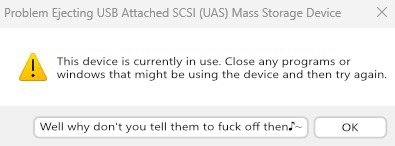
Windows dialogue about failing to eject an USB drive, because an application is using it. Aside of "OK", a new button says "Well why don't you tell them to fuck off♪~"
you are viewing a single comment's thread
view the rest of the comments
[–] 3 points 1 year ago (1 child)

Have you tried turning off thumbnails? In my experience when it slows down on large directories like that it's either trying to generate thumbnails or index a bunch of new files (which is also a possibility in your use case)

  • source
  • parent
  • hideshow 1 child comment
  • [–] 2 points 1 year ago

    A great thought on the thumbnails, but the behavior exhibits even when using command-line tools.

    Indexing is off for the entire drive, I can't even begin to imagine what kind of mess that would make if it was on.

  • source
  • parent