Now that I have time for hobbies again I wanna dive right in to building up a home lab. Right now I just have a Netgear router that reached end of life, and a NAS i'd like to make accessible remotely, and a DIY router seems like the correct next step for me. I'm very interested in ad-blocking network wide and someday I'd like to host my own little webpage, but for now I'm really just barely getting started.

I'm information gathering, I don't know what I don't know and my networking skills are pretty weak anyway. But even if your needs and desires have nothing to do with mine, I also just like to hear people talk about their set ups. Please? 🌞

top 100 comments

sorted by: hot top controversial new old
[–] 17 points 3 weeks ago* (last edited 3 weeks ago) (3 children)

I bought a firewall appliance based on an Intel CPU, with 4x 2.5gbps Ethernet ports, 8gb ram. Installed opnSense on it and been super happy even since!

A bit pricey the hardware, but it's been totally rock solid for almost two years now.

I have configured unbound with ad blocking on opnSense, and it has every single option I would ever want on it. Amazing stuff.
  • source
  • hideshow 3 child comments
  • [–] [S] 1 point 3 weeks ago (1 child)

    I've seen a lot of people on YouTube talking about this or that cast off networking device that they turned into a router. I do find the idea of repurposing especially old tech appealing. Or did you buy it brand new?

  • source
  • parent
  • hideshow 1 child comment
  • [–] 12 points 3 weeks ago (5 children)

    Not sure how "DIY" you want to go. I've been liking OPNSense though. Running it on an air cooled Protectli box.

    Handles a symmetric 2Gbps connection just fine.

  • source
  • hideshow 5 child comments
  • [–] [S] 1 point 3 weeks ago (3 children)

    Originally I was thinking I'd find a used business mini pc and put some open source router OS on there, still haven't picked which one. But I've gotten super into, like, being cautious about power consumption and some of the little boxes you can get on AliExpress seem like that might be a better option? I'm not sure yet. What's a Protectli, if you don't mind?

  • source
  • parent
  • hideshow 3 child comments
  • [–] 1 point 3 weeks ago (2 children)

    This is protectli: https://protectli.com/

    If you're especially looking for good power consumption, I'd look into some embedded system with OpenWRT. I was especially looking for something that could handle high bandwidth and manage some higher level features that OPNSense has.

  • source
  • parent
  • hideshow 2 child comments
  • [–] [S] 1 point 3 weeks ago (1 child)

    Thank you!

    Someone suggested seeing if I could install openWRT on my current router, I might start there instead of buying anything right away, I can always grow more later as I find I'm ready to start doing x, y. or z if I find I need to.

    But I'd never heard of protectli. I have a feeling that, since I was just browsing youtube to start, I mostly only learned about companies that are doing youtube sponsorships lol

  • source
  • parent
  • hideshow 1 child comment
  • [–] 2 points 3 weeks ago

    Someone suggested seeing if I could install openWRT on my current router, I might start there instead of buying anything right away, I can always grow more later as I find I'm ready to start doing x, y. or z if I find I need to.

    I like the spirit! That's an excellent place to start. If you find you need more later, there's plenty of options to grow.

  • source
  • parent
  • [–] 15 points 3 weeks ago (1 child)

    Opnsense on whatever. Plus pihole for DNS/adblock.

  • source
  • hideshow 1 child comment
  • [–] 6 points 3 weeks ago (3 children)

    OpenWrt on Raspberry Pi 4 with UE300 dongle for the WAN side. 7 years of trouble-free operation so far.

  • source
  • hideshow 3 child comments
  • [–] 6 points 3 weeks ago (2 children)

    I had a virtualized PFsense box for a while doing my inherent. Was actually pretty solid even when having to wrangle the quirks having a virtualized firewall/router caused.

  • source
  • hideshow 2 child comments
  • I do this at work. If you don’t do pass through for the NICs I’d highly suggest it. When it’s a router it’s insane how much the overhead can be.

    We have a 4 gig connection and with the virtual nics got maybe just over 1gbit on a Xeon silver based R640. But after pass through solid 3.5ish. Not sure where the bottleneck is currently, but our other servers do >4 just fine.

  • source
  • parent
  • [–] 6 points 3 weeks ago* (last edited 3 weeks ago) (4 children)

    When I retire my desktop PC, the old parts become my router. If you have two network ports, it can do it.

    To warrant the power bill, it's also a NAS, NVR, mail server, print server and web server.

    All my Wifi APs are various home routers flashed with OpenWRT.

  • source
  • hideshow 4 child comments
  • [–] [S] 3 points 3 weeks ago (3 children)

    Running an email server sounds super super difficult

  • source
  • parent
  • hideshow 3 child comments
  • [–] 3 points 3 weeks ago

    I’ve been running mine for over 20 years. It’s certainly got more difficult, especially to be able to reliably communicate with Gmail-hosted servers and outlook.com addresses, but SPF, DMARC, and DKIM are all pretty straightforward to set up. Tightening the encryption/hash algorithms you accept and “anonymizing” your server greetings takes some finesse as well, but I definitely prefer it this way.

    I avoid the entire webmail and spam filtering aspects, smtp(s) and imap(s) only.

  • source
  • parent
  • [–] 5 points 3 weeks ago (4 children)

    I was using an N100 based mini PC and it did fine at 1gbit. But now that I have 3, and it’s realistically closer to 4 or 5 it doesn’t cut the mustard.

    Proper hardware based routers are also just so much more efficient. That N100 machine was constantly hot to the touch. My new UniFi router uses less power and does 10 gig easily.

  • source
  • hideshow 4 child comments
  • [–] 1 point 3 weeks ago

    I have 2.5G N100 and it works wonderfully at that rate. I think higher might be tough, but it still pushes that throughput even with IPS enabled in OPNsense.

    The complained about heat is right though. I stuck a noctua fan on the top and it's been happy since. It lives my closet, so noise isn't a facto anyways

  • source
  • parent
  • [–] [S] 1 point 3 weeks ago (2 children)

    Can I ask what the 10 gig is for?

  • source
  • parent
  • hideshow 2 child comments
  • [–] 9 points 3 weeks ago* (last edited 3 weeks ago) (8 children)

    OpenWRT all the way.

    Skynet firewall

    PiHole

    Stable IP addresses and a private interface for family phones/laptops/pcs

    Guest network for nasty Roku TV/peleton

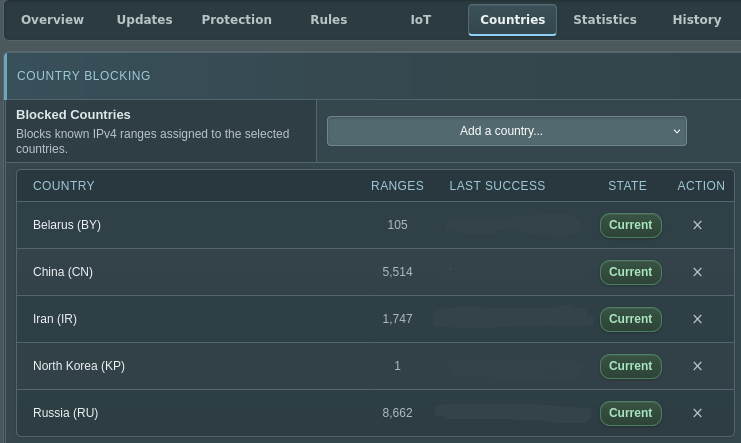
    EDIT: my favorite thing about Skynet is the new-ish ability to filter by country

    image

  • source
  • hideshow 8 child comments
  • [–] [S] 1 point 3 weeks ago (7 children)

    I never even thought about a guest network for different services. Why do you do that, if you don't mind? Privacy?

  • source
  • parent
  • hideshow 7 child comments
  • [–] 6 points 3 weeks ago (4 children)

    You could configure different settings, such as preventing the device from connecting to ad servers. You also prevent it from scanning your network to learn about all your devices, since all it would be limited to that isolated network.

  • source
  • parent
  • hideshow 4 child comments
  • [–] [S] 3 points 3 weeks ago (3 children)
  • [–] 3 points 3 weeks ago (2 children)

    I don't know. Is it internet connected? If so I wouldn't trust it...

    Many home grade routers allow you to set up a guest WiFi network though so you may be able to isolate it that way if you're concerned/can determine what telemetry it's sending from the privacy policy or other reports.

    This article talks about their website's standard creepy tracking cookies and stuff, which depressingly everyone does. https://blog.avast.com/what-peloton-knows-about-you-avast

    But if it has Bluetooth and WiFi it has a lot of potential for tracking all sorts of things. I don't have one and don't know if they're using that potential, but it's there. It would be interesting to investigate.

  • source
  • parent
  • hideshow 2 child comments
  • [–] [S] 2 points 3 weeks ago (1 child)

    I only got into privacy stuff like a year ago, but I was really focused on thinking about my phone and not as much my home network (unless we're talking like, cloud services that are also accessed on desktop, I was already worried about those). That's a spooky but totally valid thought imo. Agree, would be a good new rabbit hole to explore.

  • source
  • parent
  • hideshow 1 child comment
  • [–] 1 point 3 weeks ago (1 child)

    Guest Network in OpenWRT prevents inter-device communication on the LAN. So the thing can talk to its cloud service or whatever but can't see my phone/laptop/PCs.

    This means that untrusted devices which get pw0ned (or are surveillance-by-design) can't then get into your more important machines. Most people use guest networks for IoT devices like Ring cams and smart washing machines but I don't even own shit like that.

  • source
  • parent
  • hideshow 1 child comment
  • [–] [S] 1 point 3 weeks ago

    Lol I also passed up on ring cameras, i'd like to have a camera someday but I don't want to go through Amazon.

    I wonder if I should set up a guest network for my mother-in-law. 🤔 My husband is very on-board with my privacy-focused desires and cautious about what we invite into the home but my MIL, well, is old.

  • source
  • parent
  • [–] 4 points 3 weeks ago (6 children)

    OPNsense on used dell optiplex. Very easy but it can do whatever you want to grow into as you learn more.

  • source
  • hideshow 6 child comments
  • [–] 2 points 3 weeks ago (2 children)

    This is what I did before I went to all unifi gear.

  • source
  • parent
  • hideshow 2 child comments
  • [–] 2 points 3 weeks ago (1 child)

    dell optiplex

    How many NICs can you cram in these? I added a second one to my Lenovo Tinys but some more are nice for a FW..

  • source
  • parent
  • hideshow 1 child comment
  • [–] 2 points 3 weeks ago* (last edited 3 weeks ago)

    Two NIC. I'm usually using the SFF. I went 10G last year and it's been so great. Single, used, low profile, dual port SFP+ module. One port has SFP+ to RJ45 to my modem. Other port is SFP+ passive DAC to a used Brocade ICX 2750.

  • source
  • parent
  • [–] 4 points 3 weeks ago* (last edited 3 weeks ago) (1 child)

    I just put OpenWRT on a (at this point quite old) TP-Link non-DIY home router. The only thing wrong with it is that it isn't a rack-mountable rectangle, which offends my perfectionism.

    I don't care if TP-Link thinks it's EOL as long as OpenWRT doesn't. You should check the supported devices list for your current hardware.

  • source
  • hideshow 1 child comment
  • [–] 4 points 3 weeks ago (3 children)

    I have a Flint 2 with OpenWRT installed, it handles all my home networking. I have a handful of vLANs and I think the count is still 5 APs. I am currently considering adding a 6th for HA to TV vLAN, one that cannot access the WAN just HA. People have disagreements over OpenWRT and pfsense, or opensense not sure which is the “FOSS” version, but OpenWRT is not going to try and upsell you.

    I am sure OpenWRT offers some ad blocking but I already had two finally tuned piholes. There are arguments between pihole and adguard home. I started with pihole I have tried adguard but went back to pihole.

  • source
  • hideshow 3 child comments
  • [–] [S] 1 point 3 weeks ago (2 children)

    Can I ask why you didn't like adguard as much? :o

  • source
  • parent
  • hideshow 2 child comments
  • [–] 4 points 3 weeks ago (2 children)

    I got a spiffy little fanless micro PC with five Ethernet ports, installed Ubuntu, and wrote my own iptables rules and installed pihole.

  • source
  • hideshow 2 child comments
  • [–] 4 points 3 weeks ago (3 children)

    i had a cheap made in china consumer router with mt7621 on it, porting openwrt was surprisingly easy and its been running well enough for the past 5 years. adguard home runs on it and handles dns adblocking

  • source
  • hideshow 3 child comments
  • [–] [S] 1 point 3 weeks ago (2 children)

    someone else suggested openwrt on my current EOL router, i might just try that! like, i think eventually I might still want something more robust, but it sounds like a pretty good starting point

  • source
  • parent
  • hideshow 2 child comments
  • [–] 2 points 3 weeks ago* (1 child)

    even cheap consumer router these days are actually surprisingly capable. mine's from 2015! what model do you have? might be hard if it's a realtek/brcm chipset.. mediatek(ralink) and qualcomm(atheros) are mostly well supported

  • source
  • parent
  • hideshow 1 child comment
  • [–] 4 points 3 weeks ago (2 children)

    Got a “Dell Wyze 5070 extended”, the extended is important because it lets it have a half height PCIe card. Put a dual NIC Intel card in it. It came with 8 GB of RAM and a 64 GB SATA M.2 drive, plenty. Price out a power brick if it doesn’t come with one, which is a Dell laptop one; it refuses to turn on with a PCIe card in and if the power brick is less than 130W (DA130PE1-00 is a product # of it)!! Very annoying. Note the Intel atom processor in it lacks AVX2 instructions which makes mongoDB past v4 not work on it, so you can’t run the Unifi controller, which has vexed me. But it’s fine for internet routing! Never tested throughput but others have online.

    (Note: I would not do this now!) I put proxmox on it then did opnsense (passing through the PCIe NICs) and Debian. I chose opnsense over openwrt because opnsense had an automatic update functionality, while openwrt required you to manually wipe the OS and reinstall - when they fix nasty upgrade path that I’ll come knockin. (Openwrt is like that because that’s how routers do upgrades)

    I would not choose proxmox now because its upgrade path is fraught since the free level is rolling and they’ve had critical breaking update errors in the past. No good for your router setup. I want upgrades on and automatic so I don’t get kiddie script hacked.

    I’m prepping to do either opnsense only and not in a VM or Debian with Incus (VM manager like promox, but not its own OS) installed and then opnsense in a VM. I’m leaning opnsense direct to just make sure my router works, but I’ve never had trouble with Debian yet so still pondering.

    I run a pihole and wireguard on the current Debian VM, and opnsense can do wireguard so most of the way there. In the future I’ll switch that pihole instance (wherever it is) to adguardhome, the local rewrite rules in pihole don’t support wildcards so it’s annoying af to have to load in every local domain I set up.

    This has worked well for years and I’ve never measured power but I presume it is low.

    Hope this infodump helps!

  • source
  • hideshow 2 child comments
  • [–] [S] 2 points 3 weeks ago (1 child)

    It really did, thank you :) No one else mentioned updating as far as I know, and that wasn't something I really thought about at all, coming from a commercial router. Plus I just enjoyed your journey. I think I'll need wireguard to safely access my NAS remotely so that's good to know too.

  • source
  • parent
  • hideshow 1 child comment
  • [–] 2 points 3 weeks ago* (last edited 3 weeks ago)

    Feel free to ask any Qs if any come up, there is ?likely? better value than the Wyze 5070 extended now a days, I looked and bozos still want like $100 for it. Getting AVX2 would be a solid W for software in the future and worth a minor increase in cost. An ARM board (as long as it has UEFI and can boot regular Debian - not a custom distro for the board) would be a solid move too, but you’ll not get Opnsense then - it’s openwrt only for ARM.

    This of course is me thinking of pricing when it wasn’t AI bro “lemme order all your RAM on an IOU” stupid, good luck there!! Just opnsense does not need much RAM - like 3 GB is easily safe (mine is given 2GB right now; uses 600 MB right now but I’ve seen it go past 1.5 GB sometimes). Straight Debian will add a gig or so. So even 4 GB would be fine. Proxmox is needy so it’s not fine there, but cutting it out of the equation would make 4 work if you want to save. And you’d prob get away with a $5 16 GB optane M.2 drive from China (aliexpress) with just opnsense - it’s using 3.2 GB of the 16 I’ve given it. And the Optane drive will never wear out as a bonus.

    Edit: I’d estimate stock Debian at ~6 GB used. I think both can fit in 16 GB, even with Debian loaded with Incus to run the Opnsense in a VM.

  • source
  • parent
  • [–] 4 points 3 weeks ago (2 children)

    It’s currently a N100 mini-pc running Debian, but in the past it’s been all kinds of random hardware including a busted old laptop with an expresscard-PCIe riser for the second NIC. Anything can be a router if you know what you’re doing!

    https://nbailey.ca/post/router/

  • source
  • hideshow 2 child comments
  • [–] 6 points 3 weeks ago* (last edited 3 weeks ago) (1 child)

    I usually just use proper network devices. OpenWRT will generally run on anything with Mediatec or Qualcomm based assuming it has support

  • source
  • hideshow 1 child comment
  • [–] 3 points 3 weeks ago* (last edited 3 weeks ago)

    A used Lenovo ThinkCentre Tiny M720q mini PC, with the PCIe riser and an Intel chipset (Huawei) dual-10 Gbit NIC, running a pretty basic install of OpenWrt. Has no issue with 10 Gbit throughput, maxes out at about maybe 12 Gbit if you do a full duplex test, which I think may be a limitation of the limited PCIe lanes in the riser.

    I got 10 Gbit internet at home, looked at the prices of 10 Gbit routers and noted right out! Built this for maybe $100 in stuff off of auctions.

  • source
  • [–] 3 points 3 weeks ago* (last edited 3 weeks ago) (3 children)

    Right now I'm using a Fortigate 101E, but eons back I used a simple PC built as cheaply as possible, installed Linux, ip_forward = 1, and iptables.

    I am, however, tempted to build something semi-professional based on a banana pi, as I need something custom for work.

  • source
  • hideshow 3 child comments
  • [–] [S] 1 point 3 weeks ago (2 children)

    Can I ask why you need something custom for work? I'm myself curious how I'll make my DIY set up play nice with my job's VPN 😅

  • source
  • parent
  • hideshow 2 child comments
  • [–] 3 points 3 weeks ago (1 child)

    A fanless thin client with Opnsense and a four-port Intel NIC.

  • source
  • hideshow 1 child comment
  • [–] 3 points 3 weeks ago* (last edited 3 weeks ago)

    I run some china box with 5 integrated 2.5GBe NICs, 48GB RAM and 2x 500GB SSD/NVMe. CPU is Celeron(R) 6305 @ 1.80GHz, two cores or HT, who knows....

    On this I run Proxmox. I didn't like Proxmox integrated firewall, so I rolled my own.

    all containers unprivileged

    one container is the firewall. it has all up+down stream NICs mapped via bridges, cable internet, backup 5g internet on dedicated ports. one port to the switch with a few VLANs, and one bridge that is local to the Proxmox for the local VLANs.

    Every service I operate sits in its own network/segment, usually with a /30 netmask. VMs/containers have a eth0 device in this and the firewall defined as default gw. On the firewall the VLAN interfaces are named as the container/service. So the interfaces are not eth0 but wan, wan5g, frigate etc. Great for readability.

    Some networks like "family" or "guest" or the one with the APs/WLAN-controller are /24. Bit big, but what ever.

    I have a structured netfilter firewall script, fw.sh calling it's parts under fw.d/*fw. Each service is managed individually, sometimes widely open (iptables -A FORWARD -i frigate -o wan* -j ACCEPT) but usually down to the required ports. Database, reverse proxy etc all on separate containers.

    There is also like 30 VPN configs from 2 VPN providers. I have a home assistant dashboard where I can direct specific devices to use specifig VPNs. My webradio is routed via UK so I can enjoy BBC2.

    root@mercury:~# ip rule show
    0:      from all lookup local
    20:     from all lookup main suppress_prefixlength 1
    300:    from XXX lookup wan_table
    310:    from XXX lookup wan5g_table
    1000:   from all fwmark 0x1 lookup bbc-ss-lon
    1001:   from all fwmark 0x1 lookup bbc-ss-man
    3000:   from XXX lookup pm-gb
    4000:   from all lookup wan_table
    5000:   from all lookup wan_table
    5100:   from all lookup wan5g_table
    32766:  from all lookup main
    32767:  from all lookup default
    

    ip rule also does the fail over to wan5g if required. There are some rules where I tried to auto-filter BBC traffic with marked connections via dnsmasq, but BBC knows all my VPNs (not BBC radio it seems).

    IPSec VPNs and other OpenVPNs (dialup, site2site) are handled via a dedicated LXC. There is a tor entry node container, for a few services and one of the public WLANs. Firewall makes sure certain traffic can only exit via certain upstream interfaces, vpn*, wan, wan*... very helpful

    I didn't like opensense... don't know why. Work a lot with firewalls in my job (mainly check point, fortigate) so have some professional background.

    Also: client isolated WiFi for all iot shit. No internet for TV (jellyfin), PV controllers and most others.

  • source
  • [–] 3 points 3 weeks ago* (last edited 3 weeks ago) (1 child)

    Router is a bunch of old PCs I frankensteined and put opnsense on.

    Ended up i5-7500, 8gb mem, 500gb SSD.

    Put in a dual-port SFP+ NIC and a dual port 2.5GbaseT nic.

    One of the 2.5gb ports goes to my cable modem.

    One of the 10gb ports takes Twinax to my dumb LAN switch, the other to my dumb server switch, which right now is really just my storage network...the link to the firewall isn't doing anytuhing.

    The dumb switches I have here, though, they've got some sort of weird MAC learning disability. It cannot handle macflaps, which I found out about because I had a hard time roaming between APs.

    So I got a Netgear GS108T and put OpenWRT on it, and that switches between my APs.

    My APs are Linksys MX4200v1's. Also openwrt. Got four of them...one upstairs, two in the ground floor, one in the basement. Can get very close to 1Gbps anywhere in the house on wifi. Not the best platform for openwrt (ipq807x), as I've found out...but it was a hella cheap deal for tri-band AX APs.

  • source
  • hideshow 1 child comment
  • [–] [S] 1 point 3 weeks ago

    I don't think this is what I'm gonna end up doing, but I LOVE STORIES LIKE THIS. Frankensteining a bunch of shit together just makes me feel so nostalgic for how I got into PCs in the first place. MAC learning disability also made me laugh.

  • source
  • parent
  • [–] 3 points 3 weeks ago (3 children)

    I'm running pfSense on an old Intel Atom fanless mini PC with 6 ethernet ports. I use pfBlocker for ad blocking. I also installed a GPS module in it. That's the clock source for the NTP server. I was planning on replacing it with something newer, but that's not happening until memory prices come down.

    I would not recommend using pfSense anymore. My next router will be running OPNsense. I will probably install Adguard Home on that for ad blocking.

  • source
  • hideshow 3 child comments
  • [–] [S] 1 point 3 weeks ago (2 children)

    Why wouldn't you recommend pfsense anymore? Also what's an NTS server for?

  • source
  • parent
  • hideshow 2 child comments
  • [–] 1 point 3 weeks ago (1 child)

    There are a number of issues with pfSense. The updates for the community edition are slow. They are trying to push everyone to the paid version. You can't even download an ISO to install it offline anymore. You have to make a Netgate account to download an installer that needs an internet connection to run.

    NTP is network time protocol. It's used to get the time over the network. Using a GPS receiver as the clock source makes it more accurate and allows it to work without an internet connection.

  • source
  • parent
  • hideshow 1 child comment
  • [–] [S] 1 point 3 weeks ago

    Ooooo that's really good to know. See, I think starting my journey on youtube, I was kind of getting some slightly biased perspectives, like, a lot more exposure to firms that are more likely to do youtube sponsorships, for example.

    Thank you!

  • source
  • parent
  • [–] 3 points 3 weeks ago (3 children)

    Currently running OPNsense on a small Dual-Nic Shuttle PC with an Pentium G4560 and 4 gigs of ram and it's been handling everything I throw at it perfectly fine. Ive got 16 Interfaces, around 10 Wireguard Peers and a SIT tunnel to HE and Im still getting Line Speeds through the firewall.

  • source
  • hideshow 3 child comments
  • [–] 1 point 4 days ago (1 child)

    I might be able to snag that same model with an i5-6500 for around 60€. Could you tell me more about your experience with it? In particular, how are the thermals and the power consumption, can it handle 1Gb/s on both ethernet ports, and have you encountered any compatibility issues with OPNsense?

  • source
  • parent
  • hideshow 1 child comment
  • [–] 2 points 3 days ago

    Thermals are pretty much ok as long as you dont have the cpu at 100% 24/7. I've never had it go over ~50°C in normal use in my basement. Not sure if it can handle gbit on 2 ports but Iperf between two vlans on the same NIC works flawlessly with lots of cpu to spare

    Mine sits at around ~11W during normal usage (~40mbps into a wireguard tunnel)

  • source
  • parent
  • [–] 3 points 3 weeks ago*

    I used to run opnsense on a Xeon blade in my old C6100. It worked well enough but was a waste. Now it’s just a stock ER605 without the Omada controller.

  • source
  • [–] 3 points 3 weeks ago* (last edited 3 weeks ago) (2 children)

    My setup consists of an x86 “network appliance”. They’re low-cost, low-power, sometime headless units that can run most any open-source software solution. Even with RAM as bad as it is, you can find these for less than $200 from multiple sources if you’re okay with 2.5Gbps. If you did need more than that, you’d have to build something custom likely, unless it’s a small-business class device.

    If you’re just getting into the network software side of things, I recommend experimenting off-Internet for a while with a few different operating systems. Find which one has a user-interface you enjoy and can wrap your head around since in a personal homelab, they almost all meet the requirements. My personal choice for software ended up being OPNSense.

    I run all of my other services that aren’t network related on separate hardware via a managed switch just to keep things isolated and the rest is up to you.

  • source
  • hideshow 2 child comments
  • [–] [S] 1 point 3 weeks ago (1 child)

    That actually sounds fantastic, low power, low cost, repurposed tech meets a trifecta I didn't really know was possible and is exactly what I'd want.

    I'm not really sure what anyone would need > 2.5 for tbh. If anyone wants to tell me, I'd appreciate it, I see so many network guys on YouTube talking about 10gig, and I don't know why 😅

  • source
  • parent
  • hideshow 1 child comment
  • [–] 3 points 3 weeks ago

    it’s worth mentioning mine is over 10 years old and was that cheap when I bought it. If you can find a fanless design, these will last ages since there’s a few simple non-moving components that do the same kind of work all day every day and don’t take a ton of abuse. Even after all these years, the CPU on mine sits mostly idle even with heavy traffic. Modern software is just very efficient.

    Another reason the router/firewall lasts is because I use a dedicated WiFi antenna. This is another part that gets the same work every day. I’ve upgraded mine twice, but it was almost double the speed each time, and I didn’t have to spend extra money on routing hardware that was still plenty powerful.

  • source
  • parent
  • [–] 3 points 3 weeks ago (1 child)

    I build a Linux system with multiple NICs. It's heavyweight for a router, and probably not very efficient, but it does the job very well and I love it. I'm using foomuuri to manage the NFTables and NAT and it was very easy (although it's a very obscure piece of software and the documentation and community isn't excessively comprehensive, you might have better luck with something more common but it works nicely for me). It can pull in all the adblocking lists and all that fun stuff. I find it pretty intuitive to configure, at least compared to the horrors of most networking/routing configuration nonsense.

    For DHCP I tried using the ISC's new "kea" in the hopes it would be modern and clean alternative to the venerable old isc-dhcp-server but it turned out to be a horrible mistake. They made some awful, insane, unjustifiable design decisions in that software. It gets confused about IP addresses already being claimed (by the exact same host/MAC) address because some arbitrary value changed in how it identifies itself, and then does absurd things with static leases, it just randomly decides to give it a dynamic lease instead, and then will fixate on that dynamic lease and never let it have the static lease back, I fought with it for months, it kept breaking my network for absolutely no reason and it was a nightmare.

    Back to trusty old isc-dhcp-server for me. And of course bind for DNS, I'm a bit old-school but it's very comfortable.

    dnsmasq might be a lighter-weight and easier alternative you could consider, I think it does DHCP as well, convenient.

    And of course, being a full Linux server means you can put all kinds of other stuff on it too. Stuff that needs to be both publicly visible and privately visible on the LAN seems like an obvious fit, but in fact it's probably the worst place to put those services, because you run into issues with NAT hairpinning and other nonsense. For services that are strictly intended for the private LAN/VPN, or services that are strictly public facing, it can handle those just fine by restricting them to a specific interface. But you should avoid stuff that needs to listen on both sides of the connection, it can be done, but it's tricky and annoying and not ideal.

    If you need both internal and external access, port-forwarding from the outside through the NAT to another dedicated internal host is a much better solution if possible, it's still a bit tricky (you may have to override the DNS for that domain internally to use the private IP instead of the public one) but it's quite reliable and functional once you have it set up.

    None of this is really for the faint of heart, it'll likely require a fair bit of trial and error and physical access to the machine to resolve issues. But it's a fun project and I think the end result is worth it.

  • source
  • hideshow 1 child comment
  • [–] 2 points 2 days ago (1 child)

    You can get fanless mini PCs bare from aliexpress for cheap then buy laptop ram and ssd seperetly (chepeast you can find)

  • source
  • hideshow 1 child comment
  • [–] 2 points 3 weeks ago* (last edited 3 weeks ago)

    I have OPNsense running on a 2nd-hand Dell Optiplex SFF, which I added 2-port NIC(s) to (initially Gigabit RJ45, then later 10Gbit SFP).

    Currently it's running bridged from my ISP router, but I'm in the process of wiring the fibre directly via a SFP transceiver to the NIC. I believe you can do adblocking on OPNsense itself via Unbound, but I prefer to do that via a separate PiHole (VM).

  • source
  • [–] 2 points 3 weeks ago (4 children)

    OpnSense running on an ex-lease HP i3-something SFF desktop. Added several cheap half-height GigEth PCIe cards for the LAN bridge.

    It is way over spec for what OpnSense needs but it was cheap and extensible.

    UPS power supply.

    There's a tangle of PoE injectors which makes me sad. PoE PCIe cards appear to be ludicrously expensive here for no apparent reason.

  • source
  • hideshow 4 child comments
  • [–] [S] 1 point 3 weeks ago (3 children)

    I'm gonna ask you the same question I'm asking everyone using office mini PCs, do you know what kind of power draw? I'm really into the idea of cheap, but I'm also getting super into green energy.

  • source
  • parent
  • hideshow 3 child comments
  • [–] 3 points 3 weeks ago* (last edited 3 weeks ago) (1 child)

    Different person. But I have proxmox on multiple mini PC (Lenovo and HP600). They max out at 65w but pull less most of the time. I suppose I should check the weekly average, but my power monitor is on the other side of the UPS and there are multiple mini PC, devices, switches, modem, wireless AP... All on the monitor. If I had to guess I'd say the router/pihole pulls <30w and the media rig with its HDDs pulls ~100 but only when it's read/writing. The full stack idles <100 including AP/switches, way less then my gaming PC just on idle (>700 when the GPU is GPing).

    (Power efficiency is nice, but the ROI for a new ARM / RISK system is probably not great now. Better to use a recycled rig pulling 40-100w now and upgrading in a few years. It's not like you need a server rack pulling over a kilowatt, and the efficiency gain from 5-10 year old x86 vs ARM/RISK is less then swapping out an old incandescent light to an LED.

  • source
  • parent
  • hideshow 1 child comment
  • [–] [S] 2 points 3 weeks ago

    Thank you that's EXTREMELY helpful! I agree that maxing out at 65w and pulling maybe 30 the rest of the time isn't so bad, but I really wasn't sure what to expect.

    That also means if I find I actually hate it and in a year I'm like "fuck it I'm done tinkering" I didn't spend a ton of extra money on equipment.

  • source
  • parent
  • [–] 3 points 3 weeks ago*

    No idea, I'm not monitoring power consumption at all.

    I'm just assuming that the Intel CPU based system will idle at X Watts, peak as Y Watts, and that an ARM based appliance would idle at X and peak lower than X.

    If any thing, I noticed that my UPS batter didn't last as long during an extended ded outage once I deploy the SFF PC.

    Also, TCO, if I save $100 on the price of the device (that draws more power) that is a lot of power savings required to break even.

  • source
  • parent
  • [–] 2 points 3 weeks ago (1 child)

    I ran a linux box with two gigabit Intel NICs for years with iptables. Almost any device can do it.

    Like others say, opnsense is prob your best bet unless you like the abstraction of iptables

  • source
  • hideshow 1 child comment
  • load more comments
    view more: next ›