all 65 comments

sorted by: hot top controversial new old
[–] 81 points 1 year ago (12 children)

My favorite is when laptops mount their USB ports upside down and I have to lift the laptop for my interactive peripherals.

  • source
  • hideshow 12 child comments
  • [–] 29 points 1 year ago (7 children)
  • [–] 45 points 1 year ago (6 children)

    Sigh, the fact that this even exists make me sad.

  • source
  • parent
  • hideshow 6 child comments
  • [–] 5 points 1 year ago* (4 children)
  • [–] 1 point 1 year ago (3 children)

    How would this help? If the USB socket in the laptop is upside down, the angle would point downwards, making it impossible to put anything in it, and even if it were angled sideways, along the laptop, it is still an adapter to solve a problem, that should never have been an issue to begin with.

  • source
  • parent
  • hideshow 3 child comments
  • [–] 2 points 1 year ago* (last edited 1 year ago) (2 children)

    What help? No, in the vein of "that this even exists". It's silly. I should have explained that better.

    Btw, we need a unidirectional display connector.

  • source
  • parent
  • hideshow 2 child comments
  • [–] 3 points 1 year ago (3 children)

    I don't get it. Any pictures to show what you mean? If the port if upside down you would just flip the cable or adapter right?

  • source
  • parent
  • hideshow 3 child comments
  • [–] 15 points 1 year ago (2 children)

    Sure, how about using one of these when the buttons point downwards

  • source
  • parent
  • hideshow 2 child comments
  • [–] 21 points 1 year ago* (8 children)

    Chaotic-er Evil: forces USB cable into HDMI port

  • source
  • hideshow 8 child comments
  • [–] 4 points 1 year ago (3 children)

    I had some gear about a decade ago that had USB 3 and eSata on the same port. Wild times

  • source
  • parent
  • hideshow 3 child comments
  • [–] 0 points 1 year ago (2 children)

    I want one of those laptops with eSATA.
    Would greatly help with testing HDDs right in the store.

  • source
  • parent
  • hideshow 2 child comments
  • [–] 11 points 1 year ago (9 children)
  • [–] 9 points 1 year ago (5 children)

    A single dustrag. Preferably a clorox wipe. Please, I'm begging.

  • source
  • parent
  • hideshow 5 child comments
  • [–] 3 points 1 year ago* (last edited 1 year ago) (1 child)

    Duster sheets like swiffer wiped gently are excellent dusters.

  • source
  • parent
  • hideshow 1 child comment
  • [–] 3 points 1 year ago

    You can also get a roll of like 50 reusable microfiber cloths from any home store for less than ten bucks. They work just as well as any overpriced branded duster wipes, and are washable/reusable as an added bonus.

  • source
  • parent
  • [–] 10 points 1 year ago (2 children)

    This is why I do both ways everytime

  • source
  • hideshow 2 child comments
  • [–] 18 points 1 year ago (8 children)

    I'm so glad that the USB-C connector is reversible. Just think about the couple seconds it's taken trying to plug into a USB-A the wrong way, having to flip it over to plug it in properly. Now multiply that by the billions of attempts over time, very detrimental.

  • source
  • hideshow 8 child comments
  • [–] 14 points 1 year ago (5 children)

    You mean, the couple of seconds it takes trying to plug in a USB-A the wrong way, having to flip it over, discovering you had it the right way the first time because USB-A ports are bastards, and having to flip it over again?

  • source
  • parent
  • hideshow 5 child comments
  • [–] 2 points 1 year ago (3 children)

    Am I in the minority if I inspect both the port and the plug before trying to plug a USB-A device in? Why frustrate yourself by attempting to plug it in blind?

  • source
  • parent
  • hideshow 3 child comments
  • [–] 1 point 1 year ago

    I try to plug it in without closely inspecting the port because I can with just about every other type of port. It's easy to plug in an HDMI, Display Port, or Ethernet cable on the first try because of the asymmetrical shape, and things that use barrel plugs like headphone jacks just don't care about orientation. USB-A is one of the few port types that combines the worst of both worlds.

  • source
  • parent
  • [–] 1 point 1 year ago

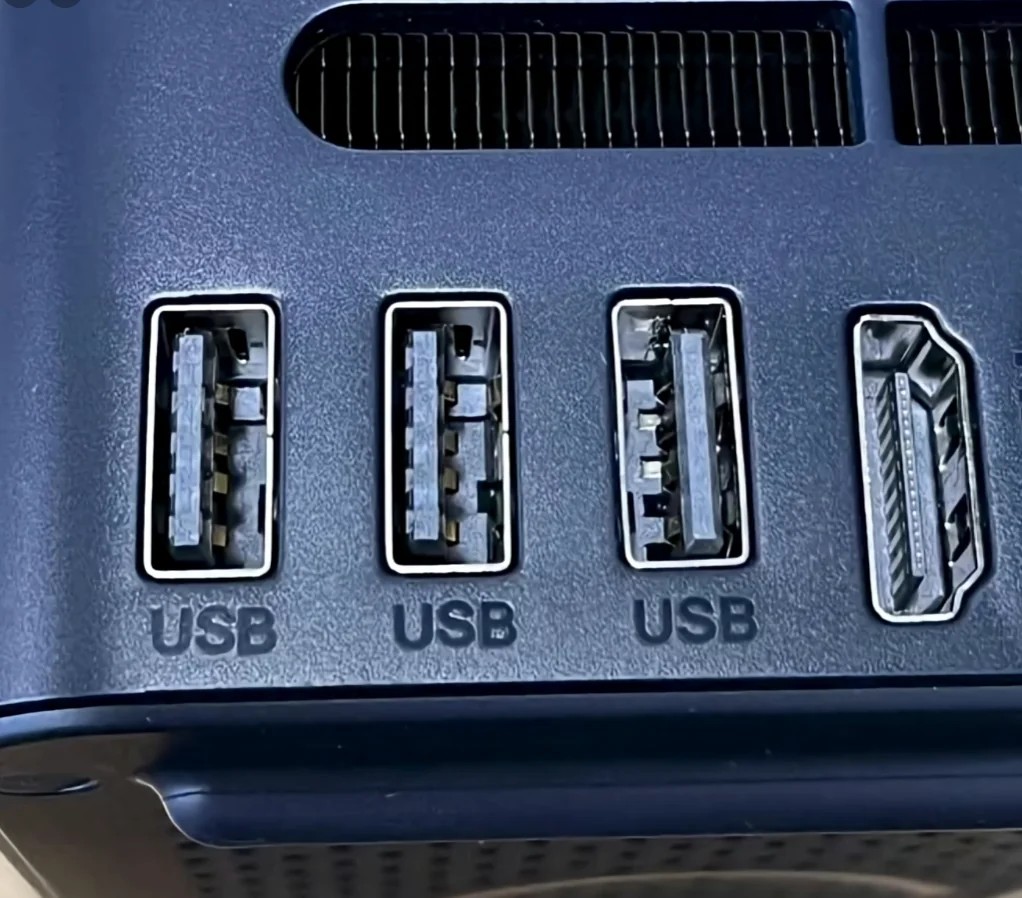
    Alright, devil's advocate here - maybe this setup can prevent it. You plug something permanent, like a mouse & keyboard, into the leftmost port and leave the right two open. Then when you try the first one and it's misaligned, move to the other port and it's correct. No flipping of the USB connector required.

    I don't think that's why they did it but hey...

  • source
  • parent
  • [–] 14 points 1 year ago* (3 children)

    For all USB 1.0 (assuming color is being used correctly) that is of more questionable use.

    But, generally, stuff like this is actually ridiculously useful. If you are just dealing with a tower on the table next to you? Yeah, that is stupid.

    If you are dealing with supporting an office (or facility) full of computers that are all mounted under desks or smushed between the desk and wall and waiting for someone to sit down too aggressively? Stuff like this is ridiculously useful because you can feel out what port you plug what device into AND have the orientation to make sure you do put the thumb drive full of offline updates into the blue or red port and don't waste 3.0 on a mouse and so forth.

    So more "Neutral Good" in the sense that things might not be immediately obvious and everyone is going to clown on them for being lame.

  • source
  • hideshow 3 child comments
  • [–] 7 points 1 year ago (1 child)

    I didn't notice the USB port on the right, I was so focused on the shitty alignments. Like how can you fuck up only some of the 'S's? I get that the ports are a result of the outline of the parts soldered to the board. And getting the HDMI vertically centered, or having the single USB port not turned 180°, would require both effort and a bit pricier BOM ... But! The engraving? It's the one thing that's not relying on external factors.

  • source
  • hideshow 1 child comment
  • [–] 1 point 1 year ago

    To me it looks like the U to the far left is also messed up — it could be some kind of misalignment that's applying more pressure on specifically that part of the press.

    Idk, maybe there was an earthquake or something – I actually kind of like imperfections like this.

  • source
  • parent
  • [–] 5 points 1 year ago

    I see this and raise you Mini DisplayPort.

  • source
  • [–] 4 points 1 year ago (2 children)

    Should have used display port instead of HDMI because from certain angles you only really see the rectangular side. Not that I ever tried to plug a USB thing into mine.

  • source
  • hideshow 2 child comments
  • [–] 2 points 1 year ago

    On my laptop there's two USB ports on the back and an Ethernet port in between. Ethernet is exactly as wide that an USB A connector fits into it and feels close enough to the real thing.

    There's also the Lenovo proprietary power connector, which has almost identical dimensions to USB A, so it feels like putting an USB A connector in the wrong way.

    It's basically impossible to plug in a USB connector blindly into this laptop. I always have to shut the lid to plug in USB.

  • source
  • parent
  • [–] 3 points 1 year ago

    That's so that you don't need to turn your plur three times because you refuse to learn the USB standards. Now you need to just try to plug in something three times at least.

  • source
  • [–] 3 points 1 year ago

    This disturbs me. Someone designed this ... it was purposeful.

  • source
  • [–] 2 points 1 year ago
    [–] 1 point 1 year ago (1 child)

    Is CE the backward USB or the HDMI? The former would be a cause for far more annoyance, especially when I'm plugging something in by feel.

  • source
  • hideshow 1 child comment
  • [–] 1 point 1 year ago (1 child)

    needs an ethernet there for good measure.

  • source
  • hideshow 1 child comment
  • [–] 1 point 1 year ago (3 children)

    Can someone explain to me what is evil about this? That the HDMI port is not labeled but all USB ports are?

  • source
  • hideshow 3 child comments
  • [–] 6 points 1 year ago (2 children)
    • HDMI isn't labeled.
    • The third usb port is flipped
    • HDMI port isn't parallel with other ports.
  • source
  • parent
  • hideshow 2 child comments