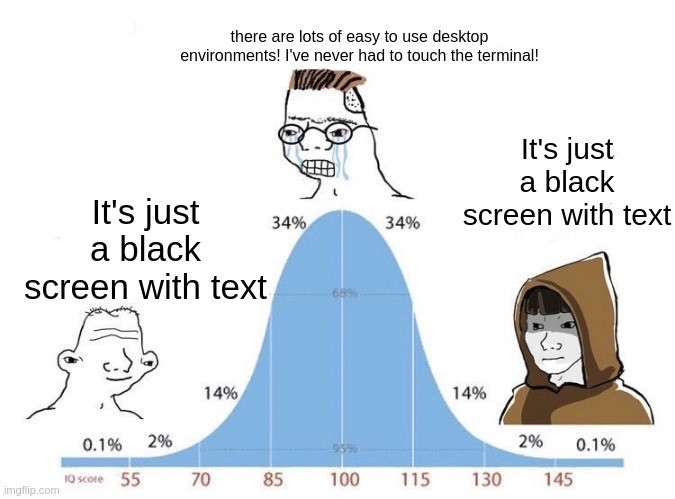
I feel like the meme got it backwards. People fussing over WMs in the middle, while newbies and veterans just using whatever comes by default on Fedora
post
Not all terminals are black!!
I would say we should burn the light-mode heritics, but they've already done it to their own eyes.
*heretics
And I wouldn't be so sure that light mode is more harmful than dark mode and not vice versa.
Depends on the ambiental conditions and the brightness; If you use dark mode outside? That's kinda on you if you get eye strain
Fuck Linux
All my homies use FreeDOS
Fuck FreeDOS
All my homies use Plan9
Fuck plan9
All my homies use EFI SHELL
In defense of the creators of Unix, you cannot fuck plan9.
Fuck EFI SHELL.
All my Amish brothers and sisters use a Typewriter.
Friend of Luke smith I see.
Ok I was kidding I actually love my systemdOSd it runs seamlessly on my IBM systemdbookd so fuck FreeDOS and everything else cause they aren't d
Somehow I am all three of these people at the same time.
Why is it constantly booting to a black screen with text?
This is easy, just install steam and go
Ahh the beauty of this Debian server, don't even need to get out of my sofa because I have SSH on my phone.
The HTC Dream was the peak of Phone SSH.
There was no key combo I couldn't input, no vim mode I couldn't use!
There was a VNC client! I could RDP to Windows machines!
I could have even used EMACS!
I mean, I wouldn't, I'm not some kind of monster, but I could have, and that's what's important!
It's not a blank screen. It's a canvas. You just don't know how to paint.
I think itβs just been stigmatized by society as a whole for some mysterious reason. Didnβt a lot of our grandmothers slashed through terminals like fruit ninjas back in the day?
Heck yeah they did! I remember going over to my grandmothers house to use Word on her computer running DOS. She used that computer to keep her personal budget, do the accounting for her office supply business, write letters, and the newsletters for her church and social clubs. No gui, just a command line and some things that we would now call a TUI.
It was stigmatized by Windows, because the Windows terminal was terminally shitty. People swear to me that their new terminal is awesome, but I have my doubts. Microsoft seems to have a problem with making stuff that doesn't suck.
My dream is the Linux kernel with the BeOS/Haiku filesystem and display system on top. It could easily put Wayland to shame and gaming would be pretty awesome.
My other dream is Haiku having as much hardware and software support as modern Linux. Imagine running a version of qemu kvm on an os that already screams.
Neither will happen but I can still wish.
Itβs still somewhat early days, but you might want to check out https://v-os.dev/
Iβve also been playing with Haiku on an old laptop and itβs pretty decent as a daily driver for the basics.
Can you explain why are you fond of haiku? What are it's strong points?
I had it in a VM, and liked the UI design. It was retro and unique. but that's about it.
the big one for me is tagged filesystems. they exist on other oses but beos embraced them fully, and haiku does the same.
"music" is no longer a directory, but a view of your filesystem that shows everything tagged "music". you want everything from an artist, or a year, or a genre? just create that directory and they're in there.
The filesystem is basically a database and files have associated metadata like a description or whatever, searches are nearly instant. The email app for example uses this, I've never seen anything even come close to how well this worked.
Under the hood it uses a server model for pretty much everything.
The programming APIs are elegant.
There's a lot to it you wouldn't have noticed immediately by just starting it and opening a few apps.
its a very solid and user friendly gui/desktop oriented operating system
Flags have always been poorly standardized outside of system apps and tools. Generally, -u should equal --update (and depending on how the app was written, may warn for --up: "Did you mean --update?") Single tick flags are generally combinable: -ua or -ls. I have seen long single tick flags somewhere, but can't remember where. (Your -update example.) Various python libraries than handle flags have helped a ton with getting people to use the same patterns, so that is nice.
You just summed up my first experience with systemd many years ago.
systemctl != sysctl. Both somehow got wedged into the same index in my brain and took years for me to correct. On top of that, was reversed to . (Or was it the other way around?)
I was convinced from my first experience with systemd that the person who wrote it was the purest form of evil. (It's leveled out a bit over the years, so it's tolerable to use these days. Still not a fan though.)
You should try "the fuck". Wrong command? Just type fuck! It will fix itself. 100% AI free.
I can't use Linux, it's too hard!
The whole idea of someone not being sure if they want to use Linux while having an aversion to systemd, a system they likely donβt even have full context for, is just bizarre.
Youβre either new and donβt know what you want or youβre someone who already knows well enough if Linux is for you or not, and likely exactly which version you want to use.
Someone could just read into it regardless of what OS they're on and decide from there if they want systemd or not.
Exactly. The only thing a new user is really going to care about or even notice is if their hardware is well supported in first install and that the desktop environment feels like what they are used to. All of the fighting about things like systemd, snap, flatpak, deb vs rpm, etc are somewhere between a distraction and scary sounding words.
yeah, my first boot into KDE Plasma (technically Linux Mint/ Cinnamon) brought me the strange inner peace that i am now used to when I decided to try Windows vista on an old PC (at least the first few minutes, you really can't do anything without a graphics card).
I know youβre trying to be helpful, but I clicked the link, sure that I was ready. Now Iβm scared again.
Iβve got a laptop to give it a go. Gonna save the good files and let err rip. It always comes down to just wanting something that works. I really would rather learn something else with my limited spare time.
Still scared. Getting closer to making the switch every day though.
Me, not being a programmer or sysadmin or whatever, booting into TTY just for shits and giggles, playing videos via mpv with -vo=tct just cause I think it looks funny
Neat. Nearly watchable. I tried kitty/sixel options but those are too high-res and cause even more frame-drops (at least on the older hardware I tested it on, no drops playing with normal mpv), with a 360p video it's isn't scaled up.
Then again, I guess it's a whole lot more watchable than the blinkenlights (Starwars) thing via telnet.
my poor cpu. You don't even need to use -vo=tct as mpv will draw to the frame buffer if x server is not available. There's also fbi and fbpdf for displaying images and pdfs to the frame buffer
I'm a CLI enjoyer. It's easier for me to define what I often do as a bash function than to remember which button to click in a GUI app. It's easier for me to copy paste a StackOverflow answer than to zoom the screenshot only to find out that the UI has changed. And I'm too lazy to move my mouse when I can do it with a Neovim keymap.
Look I just switched over from Windows, I'm new to this shit lol. I enjoy using commands while I'm learning them but mostly I just copy/paste from instruction manuals on how to install shit I want installed. Makes me feel like a master hacker.
Terminal gang!
It does everything you need with ONE exception I've found: if you use it for your file manager (I do) and you find that you need to quickly select a few items based on image preview, it is not great. Now you can solve this with vifm or something, or just launch dolphin or something every once in awhile.
I use the terminal for terminal shit. File manager is not terminal shit (for me).
Have you used a terminal file manager with image preview like yazi? Or just a thumbnail viewer like lsix?
I didn't know a thumbnail viewer existed, I will have to try. Historically I have used sxiv in tabbed mode and just tried to remember filenames which is obnoxious.
Oof, yeah thatβs hard. yazi is a full tui file manager that can do image and other file previews, so you can flip through a directory, mark the files you want to move/delete/whatever, then hit the command to do it. lsix is basically ls for images, it generates and displays thumbnails for each file. Or can just do it from emacs.
Give me at least windows 98 levels or I'm not touching linux
Linux has a wide selection of GUIs. For those comfortable with Windows I would recommend either Mint's Cinnamon or KDE.
Don't most GUI's follow the same ancient desktop paradigms? Nevermind W98, they were there in Windows 1.x and in UNIX window systems like W before 1985, and I even remember DOS TUI's in products made by Borland as early as 1983 that basically worked the same.
A clone of MS DOS Shell and maybe Win 3.1 is all anyone really needs.
you can literally replicate Windows 98 if you wanted. XFCE is possible, KDE is easy to replicate. there's a very good git repo of this called Chicago95 that does everything, even the old Windows 95/98 boot screen.
Hell I had my KDE Plasma desktop looking exactly like NeXTUP for awhile. someone even recently made a spot on version of MacOS9 for KDE Plasma.
GUI is simpler because you have to remember a sequence of steps for every action you want to take and then memorize a bunch of keyboard shortcuts and then do it all again when they reinvent their product in two weeks.
CLI requires you to learn how your system is structured and where things are located and then you create scripts that last years. Not everyone wants to put in a bunch of effort just to use their computer.
Anyways Firefox just updated and they moved "save to collection" and a few other things so now I need to relearn some stuff. I hope my other apps don't reinvent themselves anytime soon. Every update I know how to use them less and less.
A regular user will never in a million years create a script.
How will they transfer their pirated media to their NAS? Manually? Every time?
I think that depends how you define "regular user".
(I assume this is like regulars in a "well regulated militia" right?)
With ai they can
Meanwhile many open source GUI apps are better or at least on par with their proprietary counterpart, but you can't flex with them onto noobs.

top 98 comments