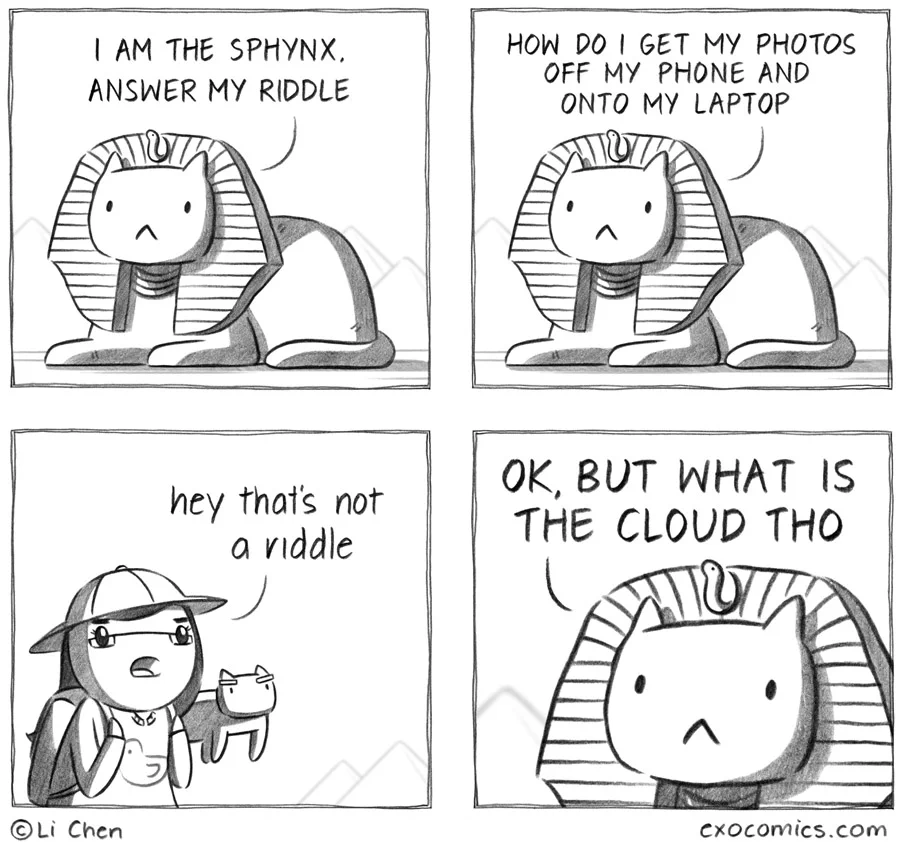
as a millenial, i avoid the cloud whenever possible
post
I thought it was a riddle that I didn't understand. But I also thought "photos" said "potatos" until I zoomed in.
So. Riddle. How do you move your potatos from your phone to your PC?
Do not try and move the potatoes. That's impossible. Instead... only try to realize the truth:
There are no potatoes.
Well, you see the first step is to boil the potatoes. It softens the starches and makes the next step easier.
The second step is to mash roughly one half of the potatoes and set them aside.
For the third step, you will cut the remaining potatoes into roughly one inch (2.5cm) cubes. After that you will, and this is critical, stick them in a stew.
Let the stew simmer until the onions dissolve and the carrots soften.
Now you can serve the stew over the mashed potatoes and then smuggle them out of the phone in your stomache.
Trick question, in this economy my phone and my PC are my potatoes
Depends.
Android? Easy. Just plug it in and then just do the old drag'n'drop.
iPhone? Oof. Um. Yeah..... Uh...
My iPhone syncs to my Mac wirelessly. I open Photos, I drag and drop to desktop.
Iβm trying to figure out how to replicate this on Linux before I switch to Graphene and Linux fully.
The main issue is/was when you have and iPhone and you don't have a Mac and you don't have an iTunes sync account.
Sure, for an iPhone it's all fine and dandy when you're fully buying into their closed and restricted ecosystem. But try to step one tippy toe out of it and you're in for pain.
Anyway, as for the latter; KDE Connect, like the other guy said.
That is also not an issue. There are loads of ways. You can literally drag them out of the phone on a windows machine, it appears as a camera when plugged in. I can even open the files app on my iphone and drag them directly onto my windows server share. Or plug a usb-c thumb drive into the phone and whack em on there.
It's no longer 2009 lol.
I know that today it's not as awful as it was, but those are fairly recent changes. Not something that was only briefly around at the beginning of the iPhone.
fairly recent changes
By fairly recent you mean the last decade?
The files app was added in 2017, and you could do some of these methods even before that. Got a bee in your bonnet there or something mate?
Still required iTunes sync feature back then.
I have stepped out of it. Itβs not that painful. I keep hearing this walled garden stuff applied to Macs, yet somehow I play Switch games on Mac OS π€
How do I get my photos off my phone, automatically and without feeding the cloud.
That looks good for computers
There's an Android app for it too.
The cloud is a tool to charge you money to do simple tasks you could already do like move photos from a phone to a computer.
It's 2026 and Android MTP is about as stable as the US economy was in 2008 and Apple MTP is literally just a turd wearing a trench coat with the apple logo slapped on.
God forbid I want to transfer a file over a USB cable at USB cable speeds like a normal adult.
Cloud: a hard drive in a rack in some country somewhere.
Personal NAS: Cloud, but better (amongst other things)
So, a hard drive in a rack in a better country?
Is her cat floating?
Immich is a bit of a heavyweight solution, but itβs what I ended up using.
Just wait until you find out that the photo in question is of their screen.
I don't get the whole "flood" angle but I liked the comic.
I use a USB cable or pairdrop.net
KDE connect
That is way too unreliable to recommend.
At least based on my anecdote of trying it throughout the years across 4 phones and 5 machines, only having success on 1 phone and a laptop specifically.
I'm positively surprised by it ever since i started using openSuse. They seem to do something different, since i didn't have any connection problems with it.
killall kdeconnectd ; kdeconnect-cli -l
Fixes connection problems instantly. Yeah, I've put that into my crontab.
It's worked on my computer and phone. Mind you I'm on iOS and windows. It works outside of the windows specific limitations.
Seems good, I just wish they'd let you fucking remove it if you don't want to use it. Of all of the apps to stop the end user from removing, the one that's made specifically to communicate with outside devices...
I don't like that.
What? Where do you see it preinstalled that you can't remove it? It's an open source app, I don't see why a vendor would install it and keep you from removing it.
It's part of KDE Plasma and you cannot remove it completely. In my experience. You can kind of disable it in some ways. And block it in your firewall or whatever, but it's part of the DE from what I understand.
Maybe it's just the distros I've chosen.
Edit: well I've been on immutable for a handful of years now so maybe it's on me. But I do remember it being annoying to remove on EndeavourOS as well but that was several years ago so maybe it's better now
I suppose that's an issue in how your distro packages it and makes it a required dependency. It's absolutely not a required dependency of KDE Plasma and it's optional. On Arch for instance it's not even marked as optional and I can just do pacman -Rns kdeconnect and remove it freely.
https://localsend.org/ if both devices are connected to the same network access point.
This always failed for me even when they were on the same network. Syncthing works really well, though, as do P2P transfer websites like ToffeeShare.com or CheezyPizza.in.
KDE Connect
Termux and rclone for the non apple folks.
KDE Connect
I strongly prefer using USB for this, but it is unnecessarily complicated, it's like
Plug in USB > Settings > Connected devices > USB > Select "File Transfer"
...Every time. Then the files will show up on your computer (hopefully), but it will still be complicated to figure out where the files you want are because phones are designed to mostly not expose the file system to users (no idea wtf DCIM stands for or why this is where photos are kept). My theory is they do this on purpose to discourage people from using it in favor of their cloud options where all your files are now directly accessible to them.
Took me 10 seconds to look it up: Digital Camera IMages, which I'm pretty sure existed before clouds were ever popularized, BTW. I've just memorized the path. You can also Bluetooth stuff over, though long vids may take longer... except to the walled garden of Apple, gross!
I've memorized it too but there's no denying that all this stuff represents a learning curve that imo is totally artificial and does not need to exist
Um yeah, it could probably be optimized, but remember that computers carry a lot of history. I would guess that there may be Linux distros that set out to solve this matter.
I guess that's the significantly smaller issue anyway, I'd settle for not having to go into the settings of my phone every time I want to transfer files
You can set up macros! There are macros that can launch apps and even simulate touches and finger-dragging. If you can't do this, you can use scrcpy and run scripts on the computer to interact with your phone that way. There's almost always a way to automate whatever you do repetitively.
Or at least favorite or create shortcuts to your most commonly accessed folders. Eliminate as much travel time as possible if you already know your destination.
Sure, but the real problem is that users of mobile phones as a whole are pushed away from local file transfer by a default UI that disfavors it. There could be a single toggle for this in the top menu alongside wifi, airplane mode and the flashlight, it could even connect the file systems by default like any other USB storage device does, or at least not require taking extra manual action every time beyond plugging the thing in. If someone is wondering how they can transfer their files, this is not likely to be the option they land on, even though on a technical level it is the simplest and most reliable.
Apparently you can enable automatically connecting with "Default USB configuration", which seems to be the most straightforward solution, but it's a developer setting so there are extra hoops to go through.
While strictly the four diseases are considered viruses in the game, the symbol for red represents protozoans. According to this thread, the best match for the disease caused by the red is malaria.
As for exocomics, we know from 772, that the robot wishes to destroy earth, so maybe some kind of nanobot?
Upload to yourself on your preferred message app.
Open web broswer version of said app on laptop.
Download your stuff.
Now get back to work.
Abandon the cloud, embrace p2p filesharing. KDE Connect and localsend are both great apps
all 67 comments