A new study published in Nature by University of Cambridge researchers just dropped a pixelated bomb on the entire Ultra-HD market, but as anyone with myopia can tell you, if you take your glasses off, even SD still looks pretty good :)

top 89 comments

sorted by: hot top controversial new old
[–] 277 points 1 year ago (15 children)

Kind of a tangent, but properly encoded 1080p video with a decent bitrate actually looks pretty damn good.

A big problem is that we've gotten so used to streaming services delivering visual slop, like YouTube's 1080p option which is basically just upscaled 720p and can even look as bad as 480p.
  • source
  • hideshow 15 child comments
  • [+] 111 points 1 year ago (6 children)
  • [–] 2 points 1 year ago (1 child)

    I was wondering when we’d get to the snake oil portion of the video hobby that audiophiles have been suffering. 8k vs. 4k is the new lossy vs. lossless argument.

  • source
  • parent
  • hideshow 1 child comment
  • [–] 14 points 1 year ago (1 child)

    I can still find 480p videos from when YouTube first started that rival the quality of the compressed crap “1080p” we get from YouTube today. It’s outrageous.

  • source
  • parent
  • hideshow 1 child comment
  • [–] 10 points 1 year ago* (last edited 1 year ago)

    Sadly most of those older YouTube videos have been run through multiple re-compressions and look so much worse than they did at upload. It's a major bummer.

  • source
  • parent
  • [–] 43 points 1 year ago (1 child)

    A big problem is that we’ve gotten so used to streaming services delivering visual slop, like YouTube’s 1080p option which is basically just upscaled 720p and can even look as bad as 480p.

    YouTube is locking the good bitrates behind the premium paywall and even as a premium users you don't get to select a high bitrate when the source video was low res.

    That's why videos should be upscaled before upload to force YouTube into offering high bitrate options at all. A good upscaler produces better results than simply stretching low-res videos.

  • source
  • parent
  • hideshow 1 child comment
  • [–] 1 point 1 year ago

    I think the premium thing is a channel option. Some channels consistently have it, some don't.

    Regular YouTube 1080p is bad and feels like 720p. The encoding on videos with "Premium 1080p" is catastrophic. It's significantly worse than decently encoded 480p. Creators will put a lot of time and effort in their lighting and camera gear, then the compression artifacting makes the video feel like watching a porn bootleg on a shady site. I guess there must be a strong financial incentive to nuke their video quality this way.

  • source
  • parent
  • [–] 149 points 1 year ago* (23 children)

    I can pretty confidently say that 4k is noticeable if you're sitting close to a big tv. I don't know that 8k would ever really be noticeable, unless the screen is strapped to your face, a la VR. For most cases, 1080p is fine, and there are other factors that start to matter way more than resolution after HD. Bit-rate, compression type, dynamic range, etc.

  • source
  • hideshow 23 child comments
  • [–] 84 points 1 year ago* (5 children)

    Seriously, articles like this are just clickbait.

    They also ignore all sorts of usecases.

    Like for a desktop monitor, 4k is extremely noticeable vs even 1440P or 1080P/2k

    Unless you're sitting very far away, the sharpness of text and therefore amount of readable information you can fit on the screen changes dramatically.

  • source
  • parent
  • hideshow 5 child comments
  • [–] 27 points 1 year ago (1 child)

    The article was about TVs, not computer monitors. Most people don't sit nearly as close to a TV as they do a monitor.

  • source
  • parent
  • hideshow 1 child comment
  • [–] 5 points 1 year ago (1 child)

    Complete bullshit articles. The same thing happened when 720p became 1080p. So many echos of “oh you won’t see the difference unless the screen is huge”… like no, you can see the difference on a tiny screen.

    We’ll have these same bullshit arguments when 8k becomes the standard, and for every large upgrade from there.

  • source
  • parent
  • hideshow 1 child comment
  • [–] 5 points 1 year ago

    I agree to a certain extent but there are diminishing returns, same with refreshrates. The leap from 1080 to 4k is big. I don't know how noticeable upgrading from 4k to 8k would be for the average TV setup.

    For vr it would be awesome though

  • source
  • parent
  • [–] 10 points 1 year ago* (last edited 1 year ago) (9 children)

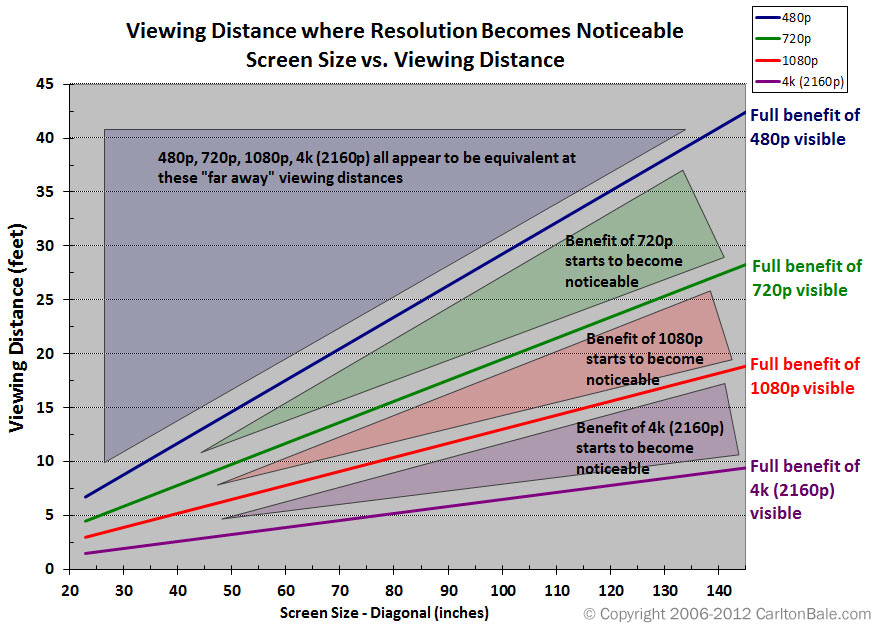
    So, a 55-inch TV, which is pretty much the smallest 4k TV you could get when they were new, has benefits over 1080p at a distance of 7.5 feet... how far away do people watch their TVs from? Am I weird?

    And at the size of computer monitors, for the distance they are from your face, they would always have full benefit on this chart. And even working into 8k a decent amount.

    And that's only for people with typical vision, for people with above-average acuity, the benefits would start further away.

    But yeah, for VR for sure, since having an 8k screen there would directly determine how far away a 4k flat screen can be properly re-created. If your headset is only 4k, a 4k flat screen in VR is only worth it when it takes up most of your field of view. That's how I have mine set up, but I would imagine most people would prefer it to be half the size or twice the distance away, or a combination.

    So 8k screens in VR will be very relevant for augmented reality, since performance costs there are pretty low anyway. And still convey benefits if you are running actual VR games at half the physical panel resolution due to performance demand being too high otherwise. You get some relatively free upscaling then. Won't look as good as native 8k, but benefits a bit anyway.

    There is also fixed and dynamic foveated rendering to think about, with an 8k screen, even running only 10% of it at that resolution and 20% at 4k, 30% at 1080p, and the remaining 40% at 540p, even with the overhead of so many foveation steps, you'll get a notable reduction in performance cost. Fixed foveated would likely need to lean higher towards bigger percentages of higher res, but has the performance advantage of not having to move around at all from frame to frame. Can benefit from more pre-planning and optimization.

  • source
  • parent
  • hideshow 9 child comments
  • [–] 4 points 1 year ago* (6 children)

    I've got a LCD 55" TV and a 14" laptop. Ok the couch, the TV screen looks to me about as big as the laptop screen on my belly/lap, and I've got perfect vision; on the laptop I can clearly see the difference between 4k and FULL HD, on the TV, not so much.

    I think TV screens aren't as good as PC ones, but also the TVs' image processors turn the 1080p files into better images than what computers do.

  • source
  • parent
  • hideshow 6 child comments
  • [–] 4 points 1 year ago* (last edited 1 year ago) (5 children)

    Hmm, I suppose quality of TV might matter. Not to mention actually going through the settings and making sure it isn't doing anything to process the signal. And also not streaming compressed crap to it. I do visit other peoples houses sometimes and definitely wouldn't know they were using a 4k screen to watch what they are watching.

    But I am assuming actually displaying 4k content to be part of the testing parameters.

  • source
  • parent
  • hideshow 5 child comments
  • [–] 1 point 1 year ago (4 children)

    Yeah well my comparisons are all with local files, no streaming compression

  • source
  • parent
  • hideshow 4 child comments
  • [–] 1 point 1 year ago (3 children)

    Also, usually when people use the term "perfect" vision, they mean 20/20, is that the case for you too. Another term for that is average vision, with people that have better vision than that having "better than average" vision.

  • source
  • parent
  • hideshow 3 child comments
  • [–] 1 point 1 year ago (2 children)

    Idk what 20/20 is, I guess you guys use a different scale, last mandatory vision test at work was 12/10 with 6/7 on I don't remember which color recognition range, but I'm not sure about the latter 'cause it was ok last year and 6/7 the year before also. IIRC the best score for visual acuity is 18/10, but I don't think they test that far during work visits, I'd have to go to the ophthalmologist to know.

  • source
  • parent
  • hideshow 2 child comments
  • [–] 1 point 1 year ago (1 child)

    I would imagine it's the same scale, just a base 10 feet instead of 20 feet. So in yours you would see at 24 feet what the average person would see at 20 feet. Assuming there is a linear relation, and no circumstantial drop off.

  • source
  • parent
  • hideshow 1 child comment
  • [–] 6 points 1 year ago

    There's a giant TV at my gym that is mounted right in front of some of the equipment, so my face is inches away. It must have some insane resolution because everything is still as sharp as a standard LCD panel.

  • source
  • parent
  • [–] 3 points 1 year ago

    8K would probably be really good for large computer monitors, due to viewing distances. It would be really taxing on the hardware if you were using it for gaming, but reasonable for tasks that aren't graphically intense.

    Computer monitors (for productivity tasks) are a little different though in that you are looking at section of the screen rather than the screen as a whole as one might with video. So having extra screen real estate can be rather valuable.

  • source
  • parent
  • [–] 3 points 1 year ago

    The counterpoint is that if you're sitting that close to a big TV, it's going to fill your field of view to an uncomfortable degree.

    4k and higher is for small screens close up (desktop monitor), or very large screens in dedicated home theater spaces. The kind that would only fit in a McMansion, anyway.

  • source
  • parent
  • [–] 1 point 1 year ago

    Would be a more useful graph if the y axis cut off at 10, less than a quarter of what it plots.

    Not sure what universe where discussing the merits of 480p at 45 ft is relevant, but it ain't this one. If I'm sitting 8 ft away from my TV, I will notice the difference if my screen is over 60 inches, which is where a vast majority of consumers operate.

  • source
  • parent
  • [–] 25 points 1 year ago (8 children)

    An overly compressed 4k stream will look far worse than a good quality 1080p. We keep upping the resolution without getting newer codecs and not adjusting the bitrate.

  • source
  • hideshow 8 child comments
  • [–] 6 points 1 year ago*

    This is true. That said, if can't tell the difference between 1080p and 4K from the pixels alone, then either your TV is too small, or you're sitting too far away. In which case there's no point in going with 4K.

    At the right seating distance, there is a benefit to be had even by going with an 8K TV. However, very few people sit close enough/have a large enough screen to benefit from going any higher than 4K:


    Source: https://www.rtings.com/tv/learn/what-is-the-resolution

  • source
  • parent
  • [–] 1 point 1 year ago (6 children)

    I went looking for a quick explainer on this and that side of youtube goes so indepth I am more confused.

  • source
  • parent
  • hideshow 6 child comments
  • [–] 2 points 1 year ago

    I'll add another explanation for bitrate that I find understandable: You can think of resolution as basically the max quality of a display, no matter the bitrate, you can't display more information/pixwls than the screen possess. Bitrate, on the other hand, represents how much information you are receiving from e.g. Netflix. If you didn't use any compression, in HDR each pixel would require 30 bits, or 3.75 bytes of data. A 4k screen has 8 million pixels. An HDR stream running at 60 fps would require about 1.7GB/s of download wihout any compression. Bitrate is basically the measure of that, how much we've managed to compress that data flow. There are many ways you can achieve this compression, and a lot of it relates to how individual codecs work, but put simply, one of the many methods effectively involves grouping pixels into larger blocks (e.g. 32x32 pixels) and saying they all have the same colour. As a result, at low bitrates you'll start to see blocking and other visual artifacts that significantly degrade the viewing experience.

    As a side note, one cool thing that codecs do (not sure if literally all of them do it, but I think most by far), is that not each frame is encoded in its entirety. You have, I, P and B frames. I frames (also known as keyframes) are a full frame, they're fully defined and are basically like a picture. P frames don't define every pixel, instead they define the difference between their frame and the previous frame, e.g. that the pixel at x: 210 y: 925 changed from red to orange. B frames do the same, but they use both previous and future frames for reference. That's why you might sometimes notice that in a stream, even when the quality isn't changing, every couple of seconds the picture will become really clear, before gradually degrading in quality, and then suddenly jumping up in quality again.

  • source
  • parent
  • [–] 2 points 1 year ago (2 children)

    On codecs and bitrate? It's basically codec = file type (.avi, .mp4) and bitrate is how much data is sent per second for the video. Videos only track what changed between frames, so a video of a still image can be 4k with a really low bitrate, but if things are moving it'll get really blurry with a low bitrate even in 4k.

  • source
  • parent
  • hideshow 2 child comments
  • [–] 1 point 1 year ago (1 child)

    "File types" like avi, mp4, etc are container formats. Codecs encode video streams that can be held in different container formats. Some container formats can only hold video streams encoded with specific codecs.

  • source
  • parent
  • hideshow 1 child comment
  • [–] 1 point 1 year ago

    The resolution (4k in this case) defines the number of pixels to be shown to the user. The bitrate defines how much data is provided in the file or stream. A codec is the method for converting data to pixels.

    Suppose you've recorded something in 1080p (low resolution). You could convert it to 4k, but the codec has to make up the pixels that can't be computed from the data.

    In summary, the TV in my living room might be more capable, but my streaming provider probably isn't sending enough data to really use it.

  • source
  • parent
  • [–] 25 points 1 year ago (1 child)

    4k with shit streaming bitrate is barely better than high bitrate 1080p

    But full bitrate 4k from a Blu-ray IS better.

  • source
  • hideshow 1 child comment
  • [–] 6 points 1 year ago*

    But full bitrate 4k from a Blu-ray IS better.

    Full Blu-Ray quality 1080p sources will look significantly better than Netflix 4K.

    Hence why "4K" doesn't actually matter unless your panel is gigantic or you're sitting very close to it. Resolution is a very small part of our perceived notion of quality.

  • source
  • parent
  • [–] 22 points 1 year ago (1 child)

    Highly depends on screen size and viewing distance, but nothing reasonable for a normal home probably ever needs more than 8k for a high end setup, and 4K for most cases.

    Contrast ratio/HDR and per-pixel backlighting type technology is where the real magic is happening.

  • source
  • hideshow 1 child comment
  • [–] 4 points 1 year ago

    Depends on your eyes quite a bit, too. If I'm sitting more than 15' back from a 55" screen, 1080p is just fine. Put on my distance glasses and I might be able to tell the difference with 4K.

  • source
  • parent
  • [–] 40 points 1 year ago (3 children)

    The study used a 44 inch TV at 2.5m. The most commonly used calculator for minimum TV to distance says that at 2.5m the TV should be a least 60 inches.

    My own informal tests at home with a 65 inch TV looking at 1080 versus 4K Remux of the same movie seems to go along with the distance calculator. At the appropriate distance or nearer I can see a difference if I am viewing critically (as opposed to casually). Beyond a certain distance the difference is not apparent.

  • source
  • hideshow 3 child comments
  • [–] 27 points 1 year ago (2 children)

    Exactly. This title is just clickbait.

    The actual study's title is "Resolution limit of the eye — how many pixels can we see?".

  • source
  • parent
  • hideshow 2 child comments
  • [–] 2 points 1 year ago

    Can't believe I had to scroll down this far to find this:

    Here’s the gut-punch for the typical living room, however. If you’re sitting the average 2.5 meters away from a 44-inch set, a simple Quad HD (QHD) display already packs more detail than your eye can possibly distinguish. The scientists made it crystal clear: once your setup hits that threshold, any further increase in pixel count, like moving from 4K to an 8K model of the same size and distance, hits the law of diminishing returns because your eye simply can't detect the added detail.

    On a computer monitor, it's easily apparent because you're not sitting 2+ m away, and in a living room, 44" is tiny, by recent standards.

  • source
  • parent
  • [–] 18 points 1 year ago (5 children)

    Honestly after using the steam deck (800p) I'm starting to wonder if res matters that much. Like I can definitely see the difference, but it's not that big a deal? All I feel like I got out of my 4k monitor is lower frame rates.

  • source
  • hideshow 5 child comments
  • [–] 11 points 1 year ago* (last edited 1 year ago) (4 children)

    Pixel density is what makes content appear sharp rather than raw resolution. 800p on a 7" screen is plenty, if you think about it a 50" 1080p TV is almost 10x the size more than 50x the size with a ~25% increase in (vertical) resolution

  • source
  • parent
  • hideshow 4 child comments
  • [–] 2 points 1 year ago (2 children)

    if you think about it

    I tried that, and I'm not totally sure about the correctness of my numbers, but your numbers intuitively seem off to me:

    a 50" 1080p TV is almost 10x the size [of a 7" screen]

    How did you arrive at this? I'd argue a 50" screen is much more than 10 times the size of a 7" screen.

    The inches are measured diagonally, and I see how 50" is somewhat "almost 10x" of 7", as 49" would be 7 times longer diagonally than a 7", and 7.something is " almost" 10.

    But if we assume both screens have a 16:9 ratio, the 50" screen has a width of ≈110.69 cm and height of ≈62.26 cm, while the 7" is only ≈15.50 by ≈8.72 cm.

    The area of the 7" is 135.08 cm² while for the 50" it's ≈6891.92 cm². The ratio between these two numbers is ≈51.02, which I believe means the 50" screen is more than 51x the physical size.

    At least, that number seems more realistic to me. I'm looking at my 6.7" phone screen right now and comparing it to my 55" TV screen, and it seems very possible that the phone screen could fit more than 50 times inside the TV screen, not just "almost 10x".

    If I totally misunderstood you, please explain what you mean.

    My numbers for width and height were calculated using this display calculator site that someone else mentioned somewhere under this post, and I rounded the decimals after doing the calculations with all decimals included.

  • source
  • parent
  • hideshow 2 child comments
  • [–] 2 points 1 year ago* (last edited 1 year ago) (1 child)

    Haha no, you have not misunderstood at all! I was just driving a point and I did no calculations whatsoever, by that «50" is almost 10x 7"» I did mean that 50 is "almost" 70 and nothing else x) As your calculations show, it's actually a much bigger difference in area, but that stat seemed enough to make my point and easier to understand :)

    Thank you for actually thinking about it and taking the time to do the math ^^

  • source
  • parent
  • hideshow 1 child comment
  • [–] 1 point 1 year ago

    Yes, but wouldn't we be using % of your vision vs pixels in display? Steam deck being right in front of my face and tv 5 or 6 metres away etc.

    Absolutely higher res does look sharper though, which is great for movies etc. I'm more coming from a performance vs visual fidelity ratio. What I'm trying to express is that given 800p still looks surprisingly good, I'm starting to question the industry pushing higher resolution displays for gaming applications.

  • source
  • parent
  • [–] 17 points 1 year ago (4 children)

    Sure but, hear me out, imagine having most of your project sourcecode on the screen at the same time without having to line-wrap.

  • source
  • hideshow 4 child comments
  • [–] 8 points 1 year ago

    I've been using "cheap" 43" 4k TVs as my main monitor for over a decade now. I used to go purely with Hisense, they have great colour and PC text clarity, and I could get them most places for $250 CAD. But this year's model they switched from RGB subpixel layout to BGR, which is tricky to get working cleanly on a computer, even when forcing a BGR layout in the OS. One trick is to just flip the TV upside down (yes it actually works) but it just made the whole physical setup awkward. I went with a Sony recently for significantly more, but the picture quality is fantastic.

  • source
  • parent
  • [–] 6 points 1 year ago* (2 children)

    And then there’s the dev that still insists on limiting lines to 80 chars & you have all that blank space to the side & have to scroll forever per file, sigh….

  • source
  • parent
  • hideshow 2 child comments
  • [–] 16 points 1 year ago

    with all the menus now days I mainly want sharp text

  • source
  • [–] 30 points 1 year ago (10 children)

    8k no. 4k with a 4k Blu-ray player on actual non upscaled 4k movies is fucking amazing.

  • source
  • hideshow 10 child comments
  • [–] 12 points 1 year ago* (7 children)

    I don't know if this will age like my previous belief that PS1 had photo-realistic graphics, but I feel like 4k is the peak for TVs. I recently bought a 65" 4k TV and not only is it the clearest image I've ever seen, but it takes up a good chunk of my livingroom. Any larger would just look ridiculous.

    Unless the average person starts using abandoned cathedrals as their livingrooms, I don't see how larger TVs with even higher definition would even be practical. Especially if you consider we already have 8k for those who do use cathedral entertainment systems.

  • source
  • parent
  • hideshow 7 child comments
  • [–] 12 points 1 year ago* (6 children)

    (Most) TVs still have a long way to go with color space and brightness. AKA HDR. Not to speak of more sane color/calibration standards to make the picture more consistent, and higher 'standard' framerates than 24FPS.

    But yeah, 8K... I dunno about that. Seems like a massive waste. And I am a pixel peeper.

  • source
  • parent
  • hideshow 6 child comments
  • [–] -1 points 1 year ago (1 child)

    The frame rate really doesn't need to be higher. I fully understand filmmakers who balk at the idea of 48 or 60 fps movies. It really does change the feel of them and imo not in a necessarily positive way.

  • source
  • parent
  • hideshow 1 child comment
  • [–] 4 points 1 year ago*

    I respectfully disagree. Folk's eyes are 'used' to 24P, but native 48 or 60 looks infinitely better, especially when stuff is filmed/produced with that in mind.

    But at a bare minimum, baseline TVs should at least eliminate jitter with 24P content by default, and offer better motion clarity by moving on from LCDs, using black frame insertion or whatever.

  • source
  • parent
  • [–] 1 point 1 year ago (3 children)

    For media I highly agree. 8k doesn't seem to add much. For computer screens I can see the purpose though as it adds more screen real estate which is hard to get enough of for some of us. I'd love to have multiple 8k screens so I can organize and spread out my work.

  • source
  • parent
  • hideshow 3 child comments
  • [–] 3 points 1 year ago (2 children)

    Are you sure about that? You likely use DPI scaling at 4K, and you’re likely limited by physical screen size unless you already use a 50” TV (which is equivalent to 4x standard 25” 1080p monitors).

    8K would only help at like 65”+, which is kinda crazy for a monitor on a desk… Awesome if you can swing it, but most can’t.


    I tangentially agree though. PCs can use “extra” resolution for various things like upscaling, better text rendering and such rather easily.

  • source
  • parent
  • hideshow 2 child comments
  • [–] 1 point 1 year ago (1 child)

    Truthfully I haven't gotten a chance to use an 8k screen, so my statement is more hypothetical "I can see a possible benefit".

  • source
  • parent
  • hideshow 1 child comment
  • [–] 1 point 1 year ago*

    I’ve used 5K some.

    IMO the only ostensible benefit is for computer type stuff. It gives them more headroom to upscale content well, to avoid anti aliasing or blurry, scaled UI rendering, stuff like that. 4:1 rendering (to save power) would be quite viable too.

    Another example would be editing workflows, for 1:1 pixel mapping of content while leaving plenty of room for the UI.

    But for native content? Like movies?

    Pointless, unless you are ridiculously close to a huge display, even if your vision is 20/20. And it’s too expensive to be worth it: I’d rather that money go into other technical aspects, easily.

  • source
  • parent
  • [–] 2 points 1 year ago

    I think you're right but how many movies are available in UHD? Not too many I'd think. On my thrifting runs I've picked up 200 Blurays vs 3 UHDs. If we can map that ratio to the retail market that's ~1% UHD content.

  • source
  • parent
  • [–] 14 points 1 year ago (2 children)

    I have 65" 4K TV that runs in tandem with Beelink S12 pro mini-pc. I ran mini in FHD mode to ease up on resources and usually just watch streams/online content on it which is 99% 1080p@60. Unless compression is bad, I don't feel much difference. In fact, my digitalized DVDs look good even in their native resolution.

    For me 4K is a nice-to-have but not a necessity when consuming media. 1080p still looks crisp with enough bitrate.

    I'd add that maybe this 4K-8K race is sort of like mp3@320kbps vs flac/wav. Both sound good when played on a decent system. But say, flac is nicer on a specific hardware that a typical consumer wouldn't buy. Almost none of us own studio-grade 7.1 sytems at home. JBL speaker is what we have and I doubt flac sounds noticeably better on it against mp3@192kbps.

  • source
  • hideshow 2 child comments
  • [–] 3 points 1 year ago

    Interestingly enough, I was casually window browsing TVs and was surprised to find that LG killed off their OLED 8K TVs a couple years ago!

    Until/if we get to a point where more people want/can fit 110in+ TVs into their living rooms - 8K will likely remain a niche for the wealthy to show off, more than anything.

  • source
  • parent
  • [–] 2 points 1 year ago

    Yeah, when I got my most recent GPU, my plan had been to also get a 4k monitor and step up from 1440p to 4k. But when I was sorting through the options to find the few with decent specs all around, I realized that there was nothing about 1440p that left me dissapointed and the 4k monitor I had used at work already indicated that I'd just be zooming the UI anyways.

    Plus even with the new GPU, 4k numbers weren't as good as 1440p numbers, and stutters/frame drops are still annoying... So I ended up just getting an ultra-wide 1440p monitor that was much easier to find good specs for and won't bother with 4k for a monitor until maybe one day if it becomes the minimum, kinda like how analog displays have become much less available than digital displays, even if some people still prefer the old ones for some purposes. I won't dig my heels in and refuse to move on to 4k, but I don't see any value added over 1440p. Same goes for 8k TVs.

  • source
  • parent
  • [–] 13 points 1 year ago

    I didn’t get why HD tv was relevant at all. I really did not understand that for a couple years.

    Then I got glasses.

    I suspect 4k matters for screens of a certain size or if you sit really close, but most of us don’t so it doesn’t matter.

  • source
  • [–] 13 points 1 year ago (2 children)

    My desktop monitor is a 54" 4K TV that I sit about 3' from. It's somewhat difficult for me to pick out individual pixels even when I lean in. My living room TV is 70" 4K, but I sit 15' away from it. There's no way I could tell the difference in 4K and 1080 from pixel density alone. I can however tell the difference between 4K and 1080 streams because of how shitty low bitrates look. 4K streams crush all of the dark colors and leave you with these nasty banding effects that I don't see as often on lower resolution streams.

  • source
  • hideshow 2 child comments
  • [–] 4 points 1 year ago (1 child)

    4K streams crush all of the dark colors and leave you with these nasty banding effects that I don’t see as often on lower resolution streams.

    Reason #123798 why I watch archived copies of blu-rays (that were legally purchased completely legally) via Jellyfin/Plex.

  • source
  • parent
  • hideshow 1 child comment
  • [–] 13 points 1 year ago (2 children)

    i suspect screen size would make the difference. you won't notice 4K or 8K on small screens.

  • source
  • hideshow 2 child comments
  • [–] 5 points 1 year ago (1 child)

    It's the ratio of screen size to distance from the screen. But typically you sit further from larger screens, so there's an optimization problem in there somewhere.

  • source
  • parent
  • hideshow 1 child comment
  • [–] 3 points 1 year ago

    so there's an optimization problem in there somewhere

    The optimization problem is actually the point of the study, encoded as PPD, which represents the density of a display's pixel per degree of your eye's field of vision. It says that any more than 53-94 PPD is imperceptible to most. You can see if your display makes the cutoff if you have the viewing distance and screen size here:

    https://www.cl.cam.ac.uk/research/rainbow/projects/display_calc/

  • source
  • parent
  • load more comments
    view more: next ›
    25 comments in c/technology@beehaw.org view that post