1


Overview page: https://www.gog.com/en/anniversary

Direct sign up for Galaxy Linux beta: https://www.smartsurvey.co.uk/t/YEF5EV/

2


I am building a game using the Super Tux assets. It is NOT an asset flip, game has a totally different main concept, new mechanics, 4 new boss fights, built with a different engine.

When I first started building the game, it was supposed to be a FOSS game. But after spending a ton of sleepless nights working on it, I would like to get compensated.

Donations will probably not cut it, judging by what most FOSS games go through. I'm a huge fan of FOSS, so it does feel wrong releasing a commercial games where 80% of the assets are from volunteer work.

On the other hand, the license approves of this. If they have an issue with it, they would have chosen another license, correct?

What do you think?

3


Do native source ports exist? Or should I go with running the game using wine?

4
5
6


Patch notes in spoiler

spoilerChanges since GE-Proton11-11.

Component Updates

  • Wine: Valve bleeding-edge 2026-10-31, plus newer bleeding-edge commits:

  • XInput now rescans controllers only when a device could have changed. This replaces the Far Cry 4 and Witcher 3 rescan hacks.

  • The thread pool worker timeout is now 60 seconds.

  • Voice Capture DSP (mfwmaaec) supports audio capture.

  • HID input reports are cut to their declared length.

  • The Radeon Software version is now set in the registry.

  • nvapi is disabled for every game when the NVIDIA driver isn't loaded.

  • Xalia was updated to 0.5.0.1.

  • wineopenxr was updated to OpenXR 1.1.65, adds initial support for D3D-consumed swapchains and fixes extension string lengths.

  • lsteamclient: better path resolution for ISteamApps::GetFileDetails(), and matchmaking request handles are now validated.

  • DXVK: v3.1.1-174:

  • Command submission throttling and memory eviction rework.

  • Present timing fixes, including an NVIDIA fence workaround.

  • D3D9 YUV conversion fix and D3D11 ForcedSampleCount fix.

  • D7VK: large DirectDraw/D3D7 and older rework:

  • Viewport, material and texture objects are shared between interface versions.

  • Gamma, display mode and present handling fixes.

  • New legacy aspect-ratio and overlay options.

  • VKD3D-Proton: v3.1:

  • Arc Raiders wave32 workaround.

  • UE4 ray tracing glitch fix on AMD.

  • Memory allocation fallback across memory types.

  • Fence event and present timing fixes.

  • VKD3D: shader compiler updates (HLSL namespaces, .mips[][], d3dbc parsing).

  • DXVK-NVAPI: v0.9.3. Available video memory now matches nvidia-smi.

  • FEX: FEX-2610-116. Adds AVX-NE-CONVERT and x87 FIP, plus decoder fixes.

  • DXVK, D7VK and VKD3D-Proton built from a GE-patched tree now carry -GE-Proton(dirty) in their version string. This lets upstream developers see in bug reports that the build is modified.

Controllers

  • Final Fantasy VII Rebirth, Horizon Forbidden West and Horizon Zero Dawn Remastered: Duariggers now work together over USB. These games now default toPROTON_SONY_WINDOWS_DEVICE_NAMES=1 (#860).

  • Armored Core VI: controllers now work through the Steam Input fallback with Steam Inpute received no input.

  • The automatic Sony Steam Input fallback is kept when Steam Input is disabled for one game but enabled globally for PlayStation controllers.

  • Added PROTON_STEAM_INPUT_XBOX_PROMPTS. It reports the Steam Deck and Steam Controllermes show controller prompts instead of keyboard prompts. Enabled by default for RuneFactory 5 (#841).

  • Where Winds Meet now defaults to PROTON_SONY_AUTO_XINPUT=0, which fixes the DualSenseeplugged (#829).

  • The Forest: fixed a crash when joining a dedicated server from the in-game browser.

Steam Overlay

  • Wine-Wayland on niri and other Smithay compositors: fixed the overlay cursor drifting or staying in place, and the overlay responding late to input (#904, thanks @yahya637).

  • Fixed the overlay cursor freezing in pointer-locked games on compositors that skip `wl_

Wayland and Windowing

  • Hyprland: fixed fullscreen games dropping to a tiled or maximized window. Examples are UT2004 rendering into a tile-sized viewport and UT4 losing fullscreen at the menu. This was a regression since GE-Proton11-7 (#871).

  • Fixed IME input (Fcitx5) freezing games with PROTON_ENABLE_WAYLAND=1 (#798).

  • Fixed a Wine-Wayland deadlock during present and focus changes, and a hang on exit, in Galaxy Idle Clicker (#908).

  • GNOME: fixed tray icons of Wine-Wayland applications not appearing. This was a regression in GE-Proton11-11 (#872).

  • Wine-Wayland: animated game cursors now animate (#919).

  • RuneScape (Vulkan beta): fixed the game window never appearing on Wine-Wayland with NVIDIA and antialiasing enabled (#837).

  • Cinnamon: windows keep their title bars and borders again. GE-Proton now treats Muffin ke Valve's Proton does(#767).

  • X11: games no longer hang waiting for a pointer grab on focus changes (#920, thanks @Syrupdesu).

  • Layered overlay windows such as Desktop Mate (#897, thanks @Mihnea8848):

  • Fast readback is now kept for windows larger than the screen.

  • New opt-in WINE_LAYERED_OVERLAY_DIRECT=1 presents directly, which avoids duplicated

  • Fixed DXVK and VKD3D-Proton device creation failing on Wayland when an OpenXR runtime iyZ (#852).

Video Playback

  • MSFS 2024: 4K intro videos no longer play in slow motion. The faster GPU conversion path is enabled again (#389).

  • Warrior Cats: Clans of the Forest: intro videos with AAC audio no longer stop playback https://github.com/GloriousEggroll/proton-ge-custom/issues/882)).

  • VRChat TopazPlayer: RTSP streams are now reported as live, so AVPro Video no longer reloads them as stalled. Patch by @l12436 (#896).

  • The Godfather: FMVs no longer flicker or flash at the edges (#909, thanks @AITUS95).

  • Arcade and Konami movie fixes, thanks @aderumier (#880, #884,#894, #895, #905,

#915, #918):

  • Silent Hill: The Arcade: movies no longer stay black.

  • Cooper's 9: MP42 movies play.

  • Yu-Gi-Oh! 5D's Duel Terminal 6: mode previews no longer turn grey.

  • Wangan Midnight Maximum Tune 5: WMV movies play.

  • Need for Speed Underground (Global VR): no longer crashes at the first movie frame.

  • Madden NFL Football Season 2 (Global VR): no longer crashes at the end of attract mov

  • PGA TOUR Golf Championship Edition III: gray blocks after fades are gone.

  • khdays-port: the game now gets past the first cutscene. Fixes a work queue shutdown deacom/GloriousEggroll/proton-ge-custom/issues/899)).

Rendering and HDR

  • RuneScape: colors no longer look washed out. Swapchains now report the same first surfahttps://github.com/GloriousEggroll/proton-ge-custom/issues/837)).

  • KDE Plasma 6.8: MangoHud and the Steam overlay no longer look oversaturated in HDR10 games on Wine-Wayland. WINE_WAYLAND_HDR_PASSTHROUGH=1 restores the previous behavior (#898, #916).

  • HDR detection on KDE no longer uses KWin's private protocol and now uses the same stands (#838).

  • Added PROTON_FORCE_HDR=1. It reports HDR when KDE's SDR brightness is set to the monitor's peak, and on compositors that switch to HDR only for fullscreen HDR clients, such as Hyprland's cm_auto_hdr.

  • Star Citizen: DLSS works on NVIDIA again without disabling bottom-up allocation. GE-Proton now keeps free the address range the NVIDIA driver reserves for DLSS.

  • Titanfall 2 and the EA app on Wine-Wayland with NVIDIA: fixed the EA app crashing at stVIDIA driver bug when Vulkan instances are destroyed(#881).

  • Arc Raiders: fixed an NVIDIA crash when the window is unfocused while a level loads (#891).

  • StarCraft II: the GPU hang workaround now applies only to Navi 10 (RX 5000) GPUs. Otherreaming (#845).

  • Warhammer 40,000: Darktide: on AMD-only systems the game now uses its native AGS library without amdxc64, restoring the FSR 4 option on RDNA3. This is skipped when PROTON_FSR4_UPGRADE is set or amdxc64

is overridden (#869).

Protonfixes

  • Added PROTON_STREAMLINE_UPGRADE. It downloads a current NVIDIA Streamline so the DLSSrks in games that ship an old one(#875).

  • Upscalers:

  • User-defined DLLs can now be passed.

  • PROTON_FSR4_UPGRADE and PROTON_MLFG_UPGRADE are now passed through.

  • The FFX4 version is controlled through the FSR4 version when OptiScaler is used.

  • Setup is skipped when the fix's conditions aren't met.

  • The Witcher 3: the Wine version is hidden for the other store versions too (#879).

  • Kingdoms of Amalur: Re-Reckoning: installs d3dcompiler_43 and d3dcompiler_47 (umu-database#159).

  • Star Citizen:

  • The libcuda workaround was replaced by the DLSS address-range fix above.

  • PROTON_DLL_COPY is applied early for the .NET install.

  • Added a fix for Ultima Online (ClassicUO Launcher).

  • Removed the Gray Zone Warfare EAC hash fix.

  • Updated the umu database.

  • The protonfixes debug output now shows the Proton build and the prefix version.

Other Changes

  • Helldivers 2:

  • Fixed a memory leak of about 34 GiB of address space and 360 MiB of RAM per hour (#917, thanks @jegglest).

  • Fixed threads and file descriptors piling up during a session (#921, thanks @jegglest).

  • Both leaks come from killed threads not being cleaned up.

  • Fixed unbounded heap growth. In EVE Online with 5 clients, memory growth went from 292 ttps://github.com/GloriousEggroll/proton-ge-custom/pull/907), thanks @greg2010).

  • Space Marine 2: fixed crashes after long play sessions. This is Proton-JE's `RtlWaitOnA

  • ntsync: a mutex whose owner dies is now abandoned even after its handles were closed, aer block forever.

  • Persona 5 Royal: fixed crashes with Reloaded-II mods (#873).

  • The Last of Us Part II: daily-run leaderboards work again (#463).

  • NCSOFT PURPLE launcher (#870): - Runs in WoW64 mode.

  • No longer stays closed after restarting itself for an update, which fixes cmd /C choice /T timeouts.

  • EA app: fixed installs failing with INST-14-1603. New prefixes include the Wine Mono support package again (#857, #881).

  • Prefixes moved from Valve's Proton to GE-Proton no longer fail .NET 4.0 and 4.8 installs. Leftover read-only links to the other install are replaced.

  • Prefix upgrades:

  • Prefix upgrade and downgrade logic runs again (#900).

  • The prefix version now follows Valve's (11.0-100). The log shows the GE build name.

  • 32-bit OpenXR applications are now supported (#906).

  • Liarsoft games (codeX RScript): reduced audio crackling. The high-quality resampler is buffers (#521).

  • Fixed WoW64 processes crashing on exit with the Wayland driver.

  • The compatibility report template now asks for Wine-Wayland and launcher details, and spresets for common problem areas.

  • Release workflow: an already uploaded release build is never replaced.

7


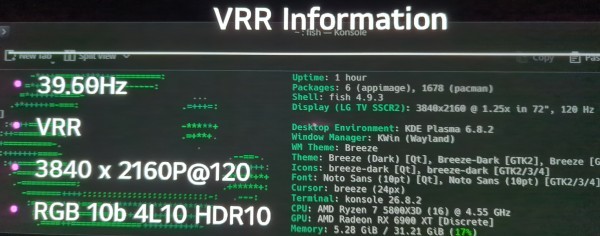
This is probably only interesting for a minority. But eg for those few poor souls using a linux based living room setup with an AMD GPU hooked up to a 4K120 capable TV the struggles are finally over! No more shitty DP adapters which may or may not work with VRR.

Proof:
p8pW2LKYN7B3MvT.jpg

I thought VRR would only start working with 7.4. But here we are. 4L10 stands for 4 Lanes 10Gbits which isnt the full 48Gbits but the LG CX series can only do 40gbits for whatever reason. Its still 10bit 4:4:4.

It isnt activated by default from what i understand. In my case on CachyOS with Limine i had to add:

KERNEL_CMDLINE[default]+=" amdgpu.dcfeaturemask=0x400"

to /etc/default/limine

and to apply the changes run the following in your terminal:

sudo limine-mkinitcpio

After that reboot.

If you see VRR flickering on your KDE desktop go to the display configuration and set Adaptive sync from "always" to "automatic". With that it shouldnt switch between 40hz and 120hz and vice versa when you stop or start using the mouse in desktop use. But when a game starts it should detect it and switch VRR automatically on.

You could also just wait a few weeks/months until 7.4 drops. Anyway, this makes me so fucking happy. Fuck the HDMI Forum!

Feel free to discuss what a dumbass i am for not buying a display port cabable display device.

8
9


Came across this great option, coming to steam soon but currently available on itch.io. works well to play immersive VR videos on the steam frame.

It looks like streaming VR content from websites is not something that can easily be done current state on the frame. If you have VR videos loaded on a local hard drive, this app works great to view them via the 6ghz dongle.

Hope this helps someone because I was not having success with deovr or other players on steam.

Edit: Realizing this might not be gaming related but steam frame related. If there's a better community for this sort of content would you please let me know?

10


So I'm new to modding PC games. I wanted to recommend a way using a mod manager called Amethyst-Mod-Manager, which installs and manages game mods from Nexus Mods. It has native support for almost 100 games listed at https://github.com/ChrisDKN/Amethyst-Mod-Manager/wiki#supported-games . But one can add manually more games to the list, but I didn't test that out. Just tried out modding Stardew Valley for the first time, and plan on trying Cyberpunk 2077 too.

My little documentary of the steps and what is needed:

  1. Download and install the application. Choose from https://github.com/ChrisDKN/Amethyst-Mod-Manager#install options, I chose the AppImage for testing. If it doesn't have self updating, I might go for Flatpak later.
  2. To download and manage mods from the app, you need an account on Nexus Mods. There is a free tier (which I use) with limitations such as download speed, but it does not cost any money. A new account can be created at: https://users.nexusmods.com/register For me it took a few minutes before the verification email landed, so have this in mind.
  3. If not already connected, in the Amythyst App go to Settings > Connections and click "Login via SSO". You should be connected to Nexus Mods now and can start adding mods.
  4. Add a game to the list. But first you need to download the game, in order it to be detected. I play on Steam and downloaded Stardew Valley in Steam (because its small, and I wanted to test it quickly). Then come back to the Amythist App and add the game, it should automatically find the location and configure it.
  5. Then I clicked the "Wizard" button on the app and installed "Install SMAPI".
  6. On the main page of the App, click "Nexus" button, and choose "Open Nexus Mods". This will open a new tab in the App, listing all mods for the game. Choose what you want to install, in my case I chose "SMAPI" again, the "Content Patcher" and "CJB Cheats Menu". Click the "Install" button for the mod.
  7. This should open the page in your external web browser (in my case Firefox) and ask you to open the link. Click it and select "Slow download" (if you are on free tier) and the download process should start. It will install the mod for you.

It's exciting to finally be able to mod PC games as well. And I hope this helps you figure this out, if you are new to this too. Especially so on Linux, where modding was always a bit problematic before. But this makes it so much easier for me to finally try it out. Have a nice day.

11
12
13


I got a gaming computer a few months ago and installed Pop OS on it. No particular reason for this distro-choice. When I buy a computer, I run with the first distro that installs easily.

I was gonna dual-boot with Windows, but well why assume Linux won't work and pre-empt. Let's try monobooting first.


The computer is basically offline. I connect to the internet when I need to download a driver or something like that. Was thinking of making the computer 100% offline, but that introduces headaches with certain uploads and installs. So all one-player-games, the way I like, might be hard for the amongus generation to relate.

I download games from Fitgirl to a Raspberry Pi and external drive. It's more energy-efficient anyway to leave my Pi running than a gaming computer. Then I transfer the games to the big computer.

I don't use Steam, not even sure what that is. I have never seen a microtransaction, online multiplayer, or ads. My games come with all DLCs bundled.


Do I have tech trouble making games work on Linux?

Sometimes. Standard operating procedure is run the installer on Bottles (https://usebottles.com/) and then run the game with wine game.exe

The more games you install, the more likely it is to be an error you've seen before, so gaming on Linux becomes easier over time. I keep a .txt file of how I got each game working so I can re-try solutions.

Two important tricks to save the headache of troubleshooting –

  • go to Plan B. If the Fitgirl repack didn't work, try the Dodi Repack. Or a different version number. No point wasting your time dealing with tech problems.
  • a gaming computer is the same thing as an AI computer. I run Qwen locally and show it the error messages, tell it to fix it, then come back after a few hours. This works great. Culture warriors will be like "oooh AI bad"... mate it just figured out my game was using Wine D3D instead of DXVK and the wrong card, and autonomously changed the settings. I don't care if you think "AI bad", I put in two minutes of effort instead of two hours and the problem got fixed.
14
15
16


Hey everyone!

I’ve tried digging on the web, GitHub and last resort asking the stupid robots (Claude) and I can’t figure this one out.

When I’m booted into Bazzite Gamescope (bazzite-deck) if I use my Steam Controller, the color looks fine, as soon as I use the trackpad or my mouse, I’ll see a reddish tint to the colors. It’s like it gets warmer and then when I switch back to controller it’s normal again. Doesn’t happen in Desktop mode.

I noticed initially when I first built my BC-250, internet suggested turning off HDR because I’m using a passive DisplayPort to HDMI adapter. This seemed to work and I hadn’t noticed it since. Then I booted up and ran updates the other day and noticed it’s back. Really frustrating if I want to play a RTS with my Steam Controller, color changes every time I use the mouse.

I found some stale issues on GitHub and they all suggest turning on Use Native Color Temperature, but this doesn’t make a difference for me.

Curious if anyone else has experienced similar issues?

  • BC-250
  • LG CX
  • JSAUX DP to HDMI Adapter
  • Steam Controller (2026)
  • Logitech Mouse
  • Bazzite (version 44, stable, bazzite-deck)

Let me know if I can share any additional information

17
18
19
20


A quick test I did to showcase how the Bloodborne Linux port runs.

The port is a simple appimage that runs natively on your machine. This means no CPU, GPU or any other emulation. It utilizes your actual CPU and memory and save games and configurations are mounted from a directory on your file system.

I got it from here but this obviously does not include the actual game files: https://github.com/deadinside28/bloodborne_pc

21


I have been working on theming my setup and made some fun little plymouth themes (just static not animated idk how to do all that and didn't feel like figuring it out), and figured I would share them. They're based on different things from fallout and are made using stuff I found online. The art itself is not mine I just put them together into plymouth themes.

I'd always wanted some New Vegas splash screens but couldn't find any premade. Hope some people who are New Vegas fans like me enjoy them! I might do some more for other factions eventually, but am currently preoccupied with other things. Here's an example of one:

22


Hello! When running any video game in Lutris (LMDE 7) it crashes. It doesn't matter if they're Windows (run via Wine) or ProtonDB based. It worked almost flawlessly some days before it suddenly stopped working. Maybe I did some configuration that broke it all. When using Steam, it runs flawlessly. It's only Lutris and even Heroic.

The log when opening Metro 2033 Redux as reference:

Started initial process 19668 from gamescope -w 2560 -h 1440 -W 2560 -H 1440 -f -- gamemoderun (...)/lutris/runners/wine/lutris-7.2-2-x86_64/bin/wine (...)/drive_c/GOG Games/Metro 2033 Redux/metro.exe Start monitoring process. No CAP_SYS_NICE, falling back to regular-priority compute and threads. Performance will be affected. wlserver: [backend/headless/backend.c:82] Creating headless backend vulkan: selecting physical device 'NVIDIA GeForce RTX 3070 Ti': queue family 2 vulkan: physical device supports DRM format modifiers vulkan: vkCreateDevice failed (VkResult: -7) Failed to initialize Vulkan Monitored process exited. Initial process has exited (return code: 256) All processes have quit Exit with return code 256

I have had no clue of how to solve this for at least one week.

For context: I'm a total beginner in Linux. Came from windows 10 just like 2 months ago. No background in programing or anything related.

If I'm missing any info of value let me know. Thanks!

EDIT:

Here's the process I followed to solve it:

  1. Disabled Gamescope. It made all games work except one that was installed via Bottles and linked to Lutris later. I have to fix gamescope.

  2. Ran this script by u/dgdft and solved the gamescope issue:

echo 'options nvidia-drm modeset=1' | sudo tee /etc/modprobe.d/nvidia-drm-modeset.conf
sudo update-initramfs -u
sudo reboot
  1. Tried installing another windows based game. It worked. The problem wasn't Lutris or even windows games, just that one single game.

  2. Added the game that was giving me trouble in Steam as a non steam game. To do that you make the new blank non steam game target the .exe of the game you want it to run. Then link the savefiles (located in "/steamapps/compatdata/{game's app ID}/pfx") and the game was working flawless.

  3. Came back to Lutris and "Add locally installed game": [Game info] Runner: Wine (bc I want to run a Windows game) [Game options] Executable: The same .exe as the steam game [Game options] Working directory: Same as steam game [Runner options] Wine version: Same as steam game (Proton Experimental)

  4. Looked at the differences between the original Lutris game runner and the new I created and tested each one. Realised it was just the runner; I thought I tried each one I had available: totally wrong haha.

Extra non-related tip: Metro 2033 Redux made my GPU and fans go nuts. Enabled Vsync and solved it.

Summary: Turning on kernel mode setting (KMS) for NVIDIA's DRM driver for the gamescope issue and using a different wine version (Proton Experimental in my case)

Thank you everybody and specially u/dgdft, u/LeighWeighTacoma, u/exupulosion@sh.itjust.works, u/yaroto98 for giving me the tips that helped me the most solve it.

23


So, my group has recently tried Ignite the Depths demo, and now we're looking for something else to scratch that itch.

Most of the time 2-4 of us will play at once.

In case you haven't read the community name, it has to run on Linux, I don't have Windows installed and another member plays on Steam Deck. Whether the game runs through proton or natively doesn't really matter.

Our schedules don't match too often, and we usually use it to play TTRPGs, which means we generally don't play all at once, so a tens of hours long campaign would be hard to play without someone having to grind up or fall behind.

Suggested games don't have play too similar to Ignite the Depths, we find the combat too simple, but we're looking for RPG elements like classes we could choose before starting a run and level up on the way.
There was also not enough variety among the enemies and locations, bu Ignite the Depths devs will probably add them along the Early Access.
AFAIK we don't have any more strong combat preferences regarding tempo and pace, so we're fine with, for example, something closer to Dark Souls series.

We've tried playing with friendly fire on and off. Playing with it turned on was harder, but we enjoyed the additional communication challenge.

Any sort of in-game story end goal would be a huge advantage. It'd help a lot with bringing us back, and convincing me - the group's rogue-like hater. BTW if you'd like a deck builder rogue-like with a really good story, try Chrono Ark.

And now, the personal preferences you can treat as a bonus:

Me
  • progress even on the worst runs
  • flashy combat, as long as everyone can see what happens; I know it's hard to do in multiplayer
  • low on progress-blocking grind
  • core class gameplay doesn't change depending on the loot - see Loop Hero, you can focus on certain aspects of the class, but no matter what you pick, necromancer will summon minions to fight and tank for him
Member 1
  • low price, short on money for the next month or two, but we'd rather wait than waste our time on a mediocre Free to Play
  • magic restricted to certain classes, low availability of elemental weapons and such (might conflict with Member 2's preference)
Member 2
  • loves magic, more = better (might conflict with Member 1's preference)
Member 3
  • likes dragons - they didn't express it, but I know them well enough I included it

Other people have not specified any special preferences.

One game we've found interesting, but haven't bought yet, is Elden Ring Nightreign. Seems to check most of the boxes. Still, more options to choose from would be nice.

24


SteamOS 3.9 General

Updated Arch Linux base
Updated Desktop Mode from Plasma 6.4.3 to Plasma 6.7.3
    For more information, see
    https://kde.org/announcements/plasma/6/6.7.0/
    https://kde.org/announcements/plasma/6/6.6.0/
    https://kde.org/announcements/plasma/6/6.5.0/
Improved support for Steam Frame wireless adapter
Improved idle power consumption on Steam Deck when no audio is playing
Fixed a bug causing hidden WiFi networks to fail to connect on the first attempt
Fixed Steam Remote Play not working on Steam Machine when booting with no external display connected
Fixed "Disable Frame Limiter" toggle not working when VRR is enabled
Fixed the frame limiter incorrectly applying to VR titles when streaming from Steam Machine to Steam Frame
Fixed loss of input if a launcher window is accidentally dragged around in Game Mode
Fixed an issue causing frame limits to result in lower than intended FPS on certain external displays
Fixed issues with suspend/resume on systems with RDNA1 or RDNA2 based dedicated GPUs
Fixed audio issues on hotplug of certain monitors in a multi-monitor setup
Fixed an issue causing firmware updates to occasionally fail to apply on Steam Machine
Fixed a system crash when launching Forza Horizon 6 on Legion Go 2
Added preliminary support for Legion Go 2 brightness control
Fixed an issue causing certain games (incl. ELDEN RING and DARK SOULS™ III) to fail to run on recent Panther Lake Intel CPUs
Fixed performance issues in STAR WARS: Galactic Racer on resume from suspend on Steam Machine
Fixed an issue that could lead to GPU errors in The Crew Motorfest
Worked around a firmware issue on some ASUS devices causing excessive fan speed upon waking from sleep
Fixed boot screen corruption on Intel PTL+ devices
Fixed a bug wherein changing the timezone could prevent switching to Desktop Mode until a reboot
Security and stability updates
    Revoked compromised eMudhra CA certificates

Misc

Updated the bootloader to improve compatibility with certain motherboards
The Desktop Mode lockscreen is no longer prevented from being explicitly enabled in settings (but remains off by default)
Fixed logging in to Desktop Mode via RDP with system users when enabled

Developer

Switched WiFi backend to wpa_supplicant by default, improving compatibility with various WiFi networks
    Enhanced wpa_supplicant to support fast WiFi reconnect on resume from sleep, previously only available in the iwd backend
Linux kernel rebased on Linux 7.2
Added preliminary support for hibernation, not yet exposed in Game Mode UI
    Enhanced Linux kernel hibernation support to enable interrupting hibernate requests and fixed various driver issues
    Not yet enabled on Steam Deck due to an outstanding driver bug
Various scripts and packages have been renamed from `steamos-` to `holo-`, with aliases to the former names where appropriate
Improved support for running SteamOS as a VM guest with accelerated graphics (virtio-gpu, venus)
Updated included renderdoc version
Reintroduced support for Android binder IPC
25
 
 
view more: next ›