You don't have to explain yourself. Atp any kind of engagement is good for lemmy 😕.
comments
comment on
Wine 11 can run native wayland
comment on
Wine 11 can run native wayland
with WSL it runs X11, I'm curious if they'll ever port wayland to WSL. Probably a lot harder to do than X11.
comment on
Wine 11 can run native wayland
fingers crossed
(sorry these are my engagement replies when I have nothing more to say, got the habbit from YouTube)
comment on
Wine 11 can run native wayland
holy crap I need more coffee........ I read the title as "windows 11 can run Wayland"
and was subsequently both horrendously confused, and incredibly impressed LOL
comment on
Wine 11 can run native wayland
The upstream Proton versions have had it in place for awhile, but they need to make and deploy client changes for the defaults. From the change log, I'm guessing they've been prepping initial support for the new hardware coming out, but no announcements yet.
comment on
Wine 11 can run native wayland
Yeah, they've been working on that for a while now. 10 was the first version with preliminary support and it's getting better and better. My guess is we'll see it as the default in 12 or 13.
Hopefully Steam will get native Wayland support as well. Gaming Mode on the Steam Deck is a Wayland compositor that starts two XWayland instances, one for Steam and one for the game.
comment on
What about HDR?
It's fairly straightforward nowadays and will get even easier this year.
In KDE, you can just enable HDR and hit apply. There's also a calibration tool integrated that is a little bit barebones but it does the job.
For gaming, you currently still need Proton-GE until Valve's Proton ships with the necessary libraries. You can easily download them using ProtonUp-Qt.
Once that is done:
- Restart Steam
- Right click the game ->
Properties... - Set the launch options to
PROTON_ENABLE_WAYLAND=1 PROTON_ENABLE_HDR=1 %command% - Under Compatibility set the checkmark "Force the use of a specific Steam Play compatibility tool" and select the Proton-GE version you just installed before.
That's it, you can now enable HDR ingame.
comment on
What about HDR?
@domi @artyom Interesting. I didn't think KDE supported it well yet.I'll give it another try, because my gaming rig is the last Windows I have (while still using 50% of the time FreeBSD via ssh and Linux via WSL 🤣) and I'm really fed up with it.
i program on bazzite-dx just fine no issues, in fact a lot of people dev on immutables because it encourages you to create proper containers for your code
I've been running EndeavourOS on my server for about 3 years, and on desktop for about 18 months. My DE is KDE plasma which is perfect for me, being similar to windows but customisable.
You can deploy the CachyOS performance tweaks and kernel to EndeavourOS if you fancy best of both. (See the CachyOS install guide).
Personally I prefer the barebones of EOS to something that has already made software choices for me.
Sorry, I misspoke; Discover is part of the KDE suite which makes sense considering I use Plasma. And when selecting Plasma as my DM, it did come installed by default.
It is recommended not to install packages from Discover that aren't flatpaks for an Arch based system.
Yeah, I got my vm up and running to try it out. Because i'm on xfce I don't even have that by default. For a second I thought I was crazy though lol.
They could install octopi or that one other alternative for a pacman gui, same as cachy has preinstalled. It's fairly barebones though.
CachyOS has cachy-update which is still a terminal window for updates but has a tray config and will be there to let you know when stuff changes. I don't remember where I saw it though, the updater tray wasn't default.
eos-update seems similar on the surface and they have eos-update-notifier for a tray update notifier. After installing the thing though it's anything but the same. It's very user-unfriendly compared to cachy-update. I shouldn't have to dig for a man page to configure an application with a gui presence (tray icon) imo but i'm being nitpicky.
I'm not sure, but they might be talking about Discover, the Plasma software installer. It doesn't manage arch packages but can be used for flatpaks.
I used Endeavor for a long time, then out of curiosity I put CachyOS on my laptop. On CachyOS, games seem to have been a shade faster, but that's it. The updates got stuck after a while, the system kept running into some errors during the update process. Not to mention that after a while I always ran out of storage space on the hard drive, I had to manually delete the limine+btrfs backups, even though it was set that the last four could be max on the vinyon. So I switched from CachyOS back to Endeavor. I like the command line and its minimalism better.
Currently I prefer Windows versions of games. I understand the people who much rather have a native port, but I've come to view Windows (Wine, Proton) as the Linux Gaming API Layer. When you think of it like that, it doesn't really matter if the game has a native port or not.
Last week I installed a game on Steam (can't remember the title, sorry) that had a Feral native port. It complained about my card not being supported and crashed. I then installed the Proton version and it simply worked.
Even if there is a native port, it probably takes work to keep up with Linux rapidly evolving features than to keep it running on Windows relatively static APIs.
So I thank Microsoft for the Linux Gaming API (and the intrepid Wine devs), I'm sure they didn't intend it to be this way but here we are.
Interesting, they don't list it under package management.
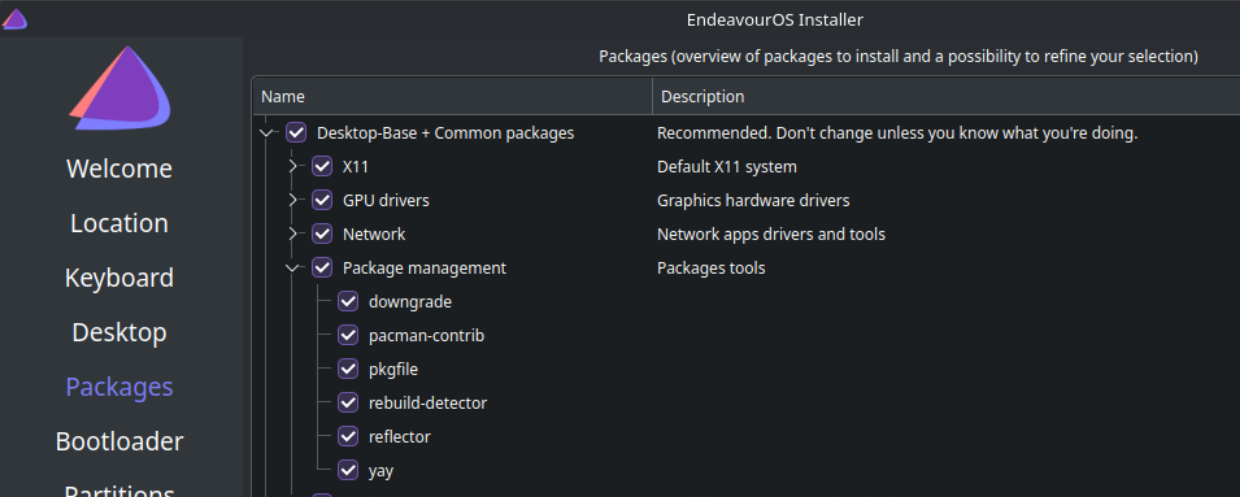
Reinstalling with xfce this time to see how it looks. I swore all I had was pacman / yay.
Sure, its not up to me to decide what you use. Was just a suggestion that others might find handy if they don't want to write and maintain scripts.
100% of endeavor is using command line pacman for all your application installs and updates.
This is not accurate by the way. It ships with its own Discovery app store too. I primarily use pacman/yay but some apps I use from Discovery that are installed as flatpaks. You could likely flip that and install most everything that way, it's just not my preference.
Steam wouldn't start with that, apparently I'm missing some UI & pipewire libraries. Probably safer for me to keep using steams runtimes anyway.
I just grepped the log for gperftools and came up with nothing.
Do you see any messages about gperftools? I had memory issues with another steam game (TF2) and it turned out to be a bug in gperftools.
The LD_PRELOAD one is actually harmless and annoyingly spams everyone. Steam tries to preload the 32 and 64 bit overlay library into every process and depends on one or the other failing.
The free assert is bad and likely related to the crash. The stacktrace might be interesting if you want to share it.
The only cause that comes to mind is something like a libc conflict between the game and your graphics driver. That's going to be annoying to diagnose/fix though.
Switching to flatpak steam will often fix these weird steam problems.
For actually troubleshooting it, I'm guessing you have an issue with your steam runtime for Linux games. Try running steam with the console command:
STEAM_RUNTIME=0 steam
and see if your games work. Basically by default Steam bundles it's own runtime packages to run Linux games with. Setting steam runtime to 0 as part of the launch will disable this functionality, and use your systems packages instead.
Another thing you could try, you can open game properties and go to the compatibility section. There you can check "force compatibility layer" and try different steam Linux runtimes (if you have them installed).
Try the version hosted on Steam's website