1


Hey guys! So, I'm pretty new to all of this fingerprinting stuff, I don't know how if uniformity is better or randomization is, I don't really know anything tbh. I use FF nightly on my phone right now and I have it turned on, and I just want to ask, how effective is it? Does it work on Uniformity like Mullvad, randomization like Brave or both? And on coveryourtracks, I'm still unique unlike Helium or Brave. Sorry, like I said, I don't really know how all of this works, and if or not being unique is actually bad. Thanks in advance!

2


I'm on librewolf but I'm half sure this stuff is probably on vanilla firefox and all that too, apologies if it's not... unless the post still fits in here anyways.

Anyways. So like you go to the hamburger menu and there's this thing that says more tools. there, you can find cool stuff like a translator, eyedropper, task manager and a bunch of other stuff. Is there a way I add any of those to the toolbar or whatever? I don't see them when I try to edit the toolbar and It would be very convenient.

Thanks!

3


Right-click menu is completely blank.

4
5


Before 155->157 update history sidebar was very snappy. Now it's laggy and using keyboard to move and delete items no longer works. Probably this bug.

6


it used to work with clearurls till last month I guess. But since then now longer works. Tried with clearurls, ublock fitlers.

7


Only way to disable this is to open about:config and change some value. Why this has no dismiss button?

There is couple more settings that are on by default and i hate those; but mostly those are subjective. However who wants 80px long "SIGN IN SO WE STORE YOUR BOOKMARKS, HISTORY IN OUR SERVERS" stuff on their screen?

8
 
 
9


New

Screenshot of Firefox visual refresh

Firefox's biggest visual refresh in years is now available, with a modernized look across the browser toolbars, sidebar, menus and individual features, built with our updated design system. It also includes:

  • New built-in themes with light and dark versions, to personalize the look of Firefox in one click.
  • A new compact mode that reduces toolbar and tab spacing to leave more room for web content, useful on smaller screens and in split-screen layouts.

WebRTC video calls can now use hardware AV1 decoding on devices that support it, instead of always decoding AV1 video in software.

Firefox now shows a warning in the site information panel (the shield icon in the address bar) and in Settings when it has been set up to record its encryption keys, which could let other software on the computer read encrypted web traffic.

Firefox Suggest now offers suggestions in the address bar in Austria, Belgium, Czech Republic, Denmark, Finland, Hungary, Ireland, Luxembourg, Netherlands, Norway, Poland, Portugal, Slovakia, Spain, Sweden, and Switzerland. They can be controlled in the Firefox Suggest settings. Learn more.

10


Waterfox will not incorporate LLMs into the browser. However, AI predates chatbots, so implementing a blanket ban on AI would mean opting out of modern computing. [...]

11


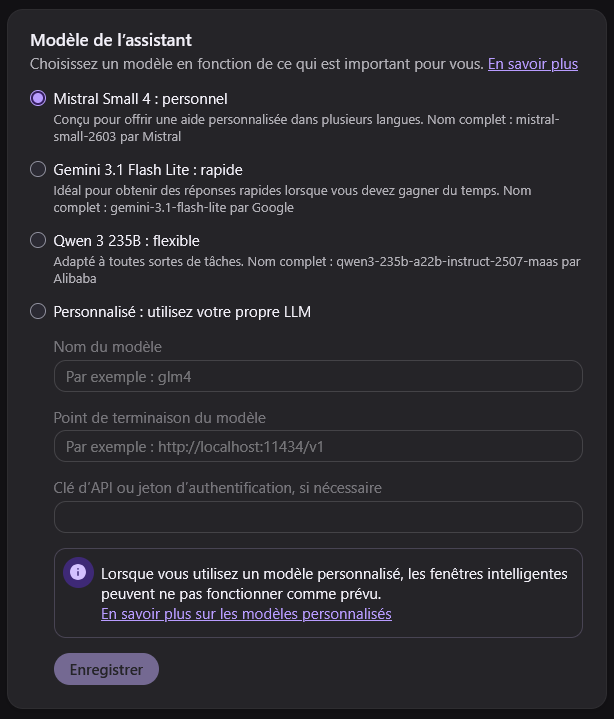
Voilà, on peut maintenant choisir Mistral dans les options IA de Firefox 🦊Petit plus très intéressant : on peut aussi choisir son propre LLM localBien joué @firefox 👏 C’est une très bonne idée !

12


My combinedfox project contains user.js combining arkenfox, Betterfox, and combinedfox overrides for Firefox-based browsers for desktop, and instructions and extensions settings for Firefox-based browsers for desktop and Android, for privacy, security, and usability.

The v2.0.0 release switches to dev branch of arkenfox since their latest release was 5 months ago for Firefox v144.

I'll quote fingerprint and telemetry, the most easily misunderstood and the most controversial part in my opinion, of combinedfox wiki Explanations below in hope that they may be helpful. Some quotes, lists, and links are removed here due to character limit of Lemmy.

No artificial intelligence except for machine translation of references is used in the development of this project, including its wiki, and this post.

Fingerprint

Only Tor Browser and Mullvad Browser with a truthworthy VPN achieve nearly identical fingerprint across their users. Use them if your threat model calls for it.

links and quote removed

Fingerprinting protection in Firefox:

  • Known Fingerprinters: It is enabled by default for Enhanced Tracking Protection (ETP) Standard mode. The “Known Fingerprinters” protection feature works by blocking scripts listed in Disconnect's fingerprinting list. This prevents companies specializing in fingerprinting from examining your device and obtaining details about their hardware, software or IP address. While this serves as an initial defense, it does not safeguard you against companies that are not included in the list. Additionally, we sometimes have to create exceptions for this list to ensure that websites continue to work as intended.

  • RFPTargets: The list of all targets can be viewed at RFPTargets.inc. They, as of the time writing this, are listed below, some with descriptions found in links removed

    • list removed
  • baselineFingerprintingProtection (bFPP) (privacy.baselineFingerprintingProtection): It is enabled by default for Enhanced Tracking Protection (ETP) Standard mode. The list of all targets in bFPP can be viewed at RFPTargetsDefaultBaseline.inc. They, as of the time writing this, are listed below.

    • list removed
  • fingerprintingProtection (FPP) (privacy.fingerprintingProtection): It is enabled by default for Enhanced Tracking Protection (ETP) Strict mode. The list of all targets in FPP can be viewed at RFPTargetsDefault.inc. They, as of the time writing this, are listed below.

    • list removed
  • resistFingeprinting / Resist Fingerprinting (RFP) (privacy.resistFingerprinting): It is not enabled by default. It includes all RFPTargets. RFP is a built-in solution in Firefox that blocks or randomizes many metrics without requiring a crowd like Tor Browser. However, expect site-breakings when using it, which is mostly due to canvas randomizing. links removed

  • Global RFPTarget overrides: You can use only a few RFPTargets globally by setting privacy.resistFingerprinting to false and setting privacy.fingerprintingProtection.overrides (if you use FPP) or privacy.baselineFingerprintingProtection.overrides (if you use bFPP) to the RFPTargets you want. The value is a comma-separated list that is either +AllTargets and then - targets you don't want or -AllTargets and then + targets you want. arkenfox uses FPP, while combinedfox adds user_pref("privacy.fingerprintingProtection.overrides", "+AllTargets,-CSSPrefersColorScheme,-CanvasImageExtractionPrompt,-CanvasExtractionBeforeUserInputIsBlocked,-CanvasExtractionFromThirdPartiesIsBlocked,-JSDateTimeUTC,-FrameRate");.

  • Site-specific RFPTarget overrides: You can use only a few RFPTargets for specific sites by setting privacy.resistFingerprinting to false and setting privacy.fingerprintingProtection.granularOverrides (if you use FPP) or privacy.baselineFingerprintingProtection.granularOverrides (if you use bFPP) to the sites and their site-specific RFPTargets you want. The value is a JSON list of objects where sites are firstPartyDomain entry and overrides are in overrides entry, e.g. [ { "firstPartyDomain": "jeffersonscher.com" , "overrides": "+WindowOuterSize" }, { "firstPartyDomain": "reddit.com" , "overrides": "+JSDateTimeUTC" } ], according to Mozilla Support Correct syntax for privacy.fingerprintingProtection.granularOverrides?.

  • Request English versions of web pages for enhanced privacy (privacy.spoof_english) (default: false, combinedfox: true): When privacy.resistFingerprinting = true, a new option becomes available in General > Choose your preferred language for displaying pages > Choose > Request English versions of web pages for enhanced privacy, which changes three config settings: intl.accept_languages = en-US, en, javascript.use_us_english_locale = true, privacy.spoof_english = 2. When privacy.resistFingerprinting = false, javascript.use_us_english_locale and privacy.spoof_english are not available in UI but can be set in user.js or about:config.

  • Letterboxing (privacy.resistFingerprinting.letterboxing) (default: false, combinedfox: true): Dynamically resizes the inner window by applying margins in stepped ranges when privacy.resistFingerprinting.letterboxing = true. This is independent of RFP.

  • Fingerprinting protection extensions: Use FPP, RFP, or FPP+RFPTargets overrdies instead of extensions for fingerprinting protection. The built-in RFPTargets are more robust and performant, defeats naive scripts, and defeats some advanced scripts by standarding fingerprints of users to fewer buckets, according to arkenfox issue 1775. links removed

    quote removed

    As a memorial, CanvasBlocker extension was the best solution for fingerprinting protection without Tor Browser or Mullvad Browser before RFPTargets growed to cover enough metrics. Reasons of not using each CanvasBlocker option now are listed below. Some are according to arkenfox user.js wiki before CanvasBlocker is removed from its recommendation, e.g., links removed

    • list removed

Telemetry

According to links removed, if browser.profiles.enabled is set to true (default since FF150 and set to true in Peskyfox), all profiles share the same settings for Settings > Permissions and data > Firefox data collection and use and the corresponding user.js prefs are not honored. You might want to check and manually adjust those settings in the GUI of one of your profiles.

combinedfox overrides for arkenfox user.js arkenfox-overrides.js link removed re-enables the disabled telemetry in TELEMETRY section in arkenfox because

  • Arkenfox and combinedfox do not consider these Firefox telemetry to be a privacy or security concern.
  • Building a browser is hard; building a good browser inevitably requires gathering a lot of data to make sure that things that work in the lab work in the field, according to moz://a HACKS Testing Privacy-Preserving Telemetry with Prio.
  • There are several problems with opt-in telemetry and asking users: they are prone to inaccurate and misleading data, they're undiscoverable for less technical users, and if they are discoverable, then they are usually displayed in such a way they aggressively shift users' focus, according to Opt-in Telemetry and Asking Users for Feedback May Not Work in Practice.
  • No Personally Identifiable Information (PII) is collected, according to arkenfox commit 3d76c74c.
  • Every new profile on first use provides data collection and use policy and the ability to opt-out.
  • It can be disabled at any time.
  • Data collected can be viewed in about:telemetry.

Refer to the following sources for more information:

  • list removed

Reverse them to disabled in your overrides if your threat model calls for it.

However, the followings that are disabled in arkenfox and remain disabled in combinedfox.

  • Crash Reports: arkenfox/combinedfox modify a lot of preferences, which makes the crash reports not productive to be sent to Mozilla, and the recommended way is to reproduce it in a new profile then send your crash report, according to links removed.
  • Firefox Home/Activity Stream telemetry: links removed
  • Shield Studies/Normandy (Shield Recipe Client): Refer to
    • list removed
  • Nimbus rollouts/experiments: Refer to:
    • list removed

There are two main ways of gathering data in Firefox:

  • Desktop Telemetry, which is used in Firefox Desktop. Refer to:
    • list removed
  • Glean, which is Mozilla's newer telemetry framework and used in all Mozilla projects needing data collection. Refer to:
    • list removed

There are three way of sending collected data:

  • Regular telemetry: It discards your IP immediately, according to ritter.vg telemetry helps. you still get to turn it off
  • Oblivious HTTP (OHTTP): It works by routing encrypted data through an intermediary to conceal its source. Refer to
    • list removed
  • Prio/Distributed Aggregation Protocol (DAP): It splits the data into two shares and sends each share to a different server. Refer to
    • list removed
13


I want to test my screensharing setup with pipewire-screenaudio. Is there a webrtc test site that can show me that my stream indeed has audio? E.g. that can record a snippet of my stream so I can see how it sounds.

inb4 calling someone on discord and asking them

14


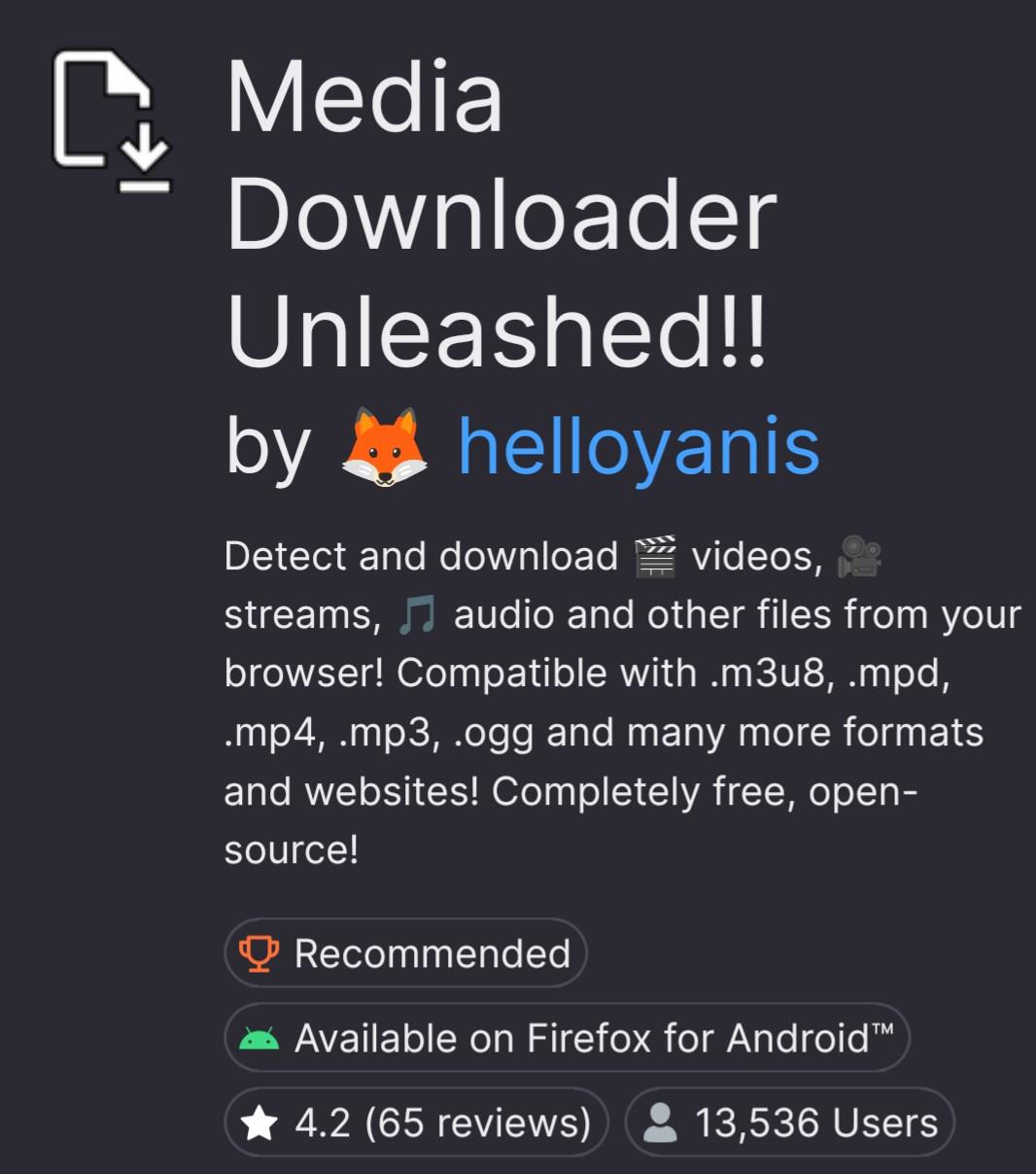
🎉 My open-source downloader extension is now "Recommended by Mozilla" !Great news! Mozilla reached out and my free and #opensource #browserextension , "Media Downloader Unleashed!!", to download audio and videos is now listed as recommended by #Mozilla !It's a great personal achievement! When I started working on it out of frustration that you can't right click and save videos on Android, I never expected it would reach above 13k users and become recommended by Mozilla!! Thanks to everyone who uses it! I hope it will continue to work and improve for the years to come! ✨THANK YOU!✨🧩 The add-on : addons.mozilla.org/addon/media💻 Its source code : github.com/helloyanis/media-do🏆 What " Recommended extension" actually means : support.mozilla.org/en-US/kb/r(Note : If you want to try it on Android, it looks like a recent Firefox update broke downloading, use the Nightly or Beta app!)@mozilla @firefox @opensource#firefox #web #webdev #dev #foss

The store page of Media Downloader Unleashed!!, with the "Recommended" badge.
15
Open in apps (lemmy.world)
submitted 2 months ago by to c/firefox@lemmy.ml


Is there a way to set it up so it always stays in Firefox for certain links? I prefer to watch YouTube in Firefox and having to see the popup everytime is kind of annoying.

16
 
 
17
18
Hang on to your Firefox! (www.newsonaut.com)
submitted 2 months ago by to c/firefox@lemmy.ml
19


Edit: After reading the recommendations & arguments at arkenfox, I have opted to remove CookieAutoDelete as well as PrivacyBadger and CanvasBlocker. Instead I have:

  • set Enhanced Tracking Protection to "Strict";
  • setup uBlock Origin to level "medium";
  • tweaked some extra about:config entries as recommended here and here, except for privacy.resistFingerprinting.

I'll also consider setting network.cookie.lifetimePolicy to 2 for having all cookies session-only (apart from whitelisted ones).

I observe a much faster loading of the pages now!


cross-posted from: https://lemmy.ca/post/69883263

My preference is to immediately remove cookies from domains, as soon as (or just some seconds after) a tab with that domain is closed. Except some whitelisted domains specified by me.

To do this, I've used – for years – Cookie Autodelete. But I've discovered now that it doesn't work with Firefox's Strict Mode (the extension says "strict mode is not supported").

All in all I think my understanding of Firefox's capabilities and policies regarding cookies and similar extensions is outdated. I'd be grateful to anyone who can offer insights or links to well-informed sites about this.

20
Tab Notes in Firefox (support.mozilla.org)
submitted 2 months ago by to c/firefox@lemmy.ml


Experimental feature but can be enabled in firefox stable in Settings, Firefox Labs, Tab notes under Productivity.

I found it really useful for when Im researching something and have lots of papers open in separate tabs. Though Im using it more like tab tags, since notes show up when you hover over tabs. It lets me see at a glance which specific topic a tab is related to if I forget.

What do you all think? I was kinda surprised how little discussion I have seen on this, considering that no other browser have something like it. Firefoxs implementation is pretty smart too, instead of just being a sticky notes widget in the browser (like the one in Vivaldi).

21
22
submitted 2 months ago by to c/firefox@lemmy.ml


Has anyone else experienced this? Guessing its a recent update because its never had this issue before… Thinking to make a bug report just wanted to see if anyone else has the issue or if its just me.

23


Edit: I found out that the add-on warns about high CPU usage for some of its presets (Preferences->General->Presets). Using a different preset has removed that ~10% CPU usage.

cross-posted from: https://lemmy.ca/post/69070329

Some preliminary context: Since one or two updates ago, I've noticed that Firefox is using around 10% CPU even then all tabs are unloaded. This didn't happen before. The add-ons I use are still the same, and I have blocked the new LLM functionality. (Maybe someone else noticed the same?) Anyway, in order to investigate, I'm switching off the add-ons one by one, as usually done, checking if the situation improves.

While doing so I was wondering whether I still need Canvas Blocker. I see its most recent reviews are 4 years old now. Does anyone know whether it's still needed for privacy, or if Firefox now provides some of the same functionality built-in? I do use AdBlock Origin as well.

Thank you for info and opinions!

24
aaa (lemmy.ml)
submitted 3 months ago by to c/firefox@lemmy.ml
25


This is driving me up the wall. I have a bunch of tab groups but for some reason the feature keeps disappearing for me then reappearing later on.

view more: next ›