How it started: mp80
I bought a MiniPC (Blackview MP-80) to run Home Assistant and some lights etc. to go with it.

It's now exactly one year later this is what my setup looks like now:
BMAX B2 Pro --> Home Assistant OS Blackview MP-80 --> Proxmox --> Nextcloud-AIO & Immich
ODROID H4+ --> Proxmox --> TrueNAS

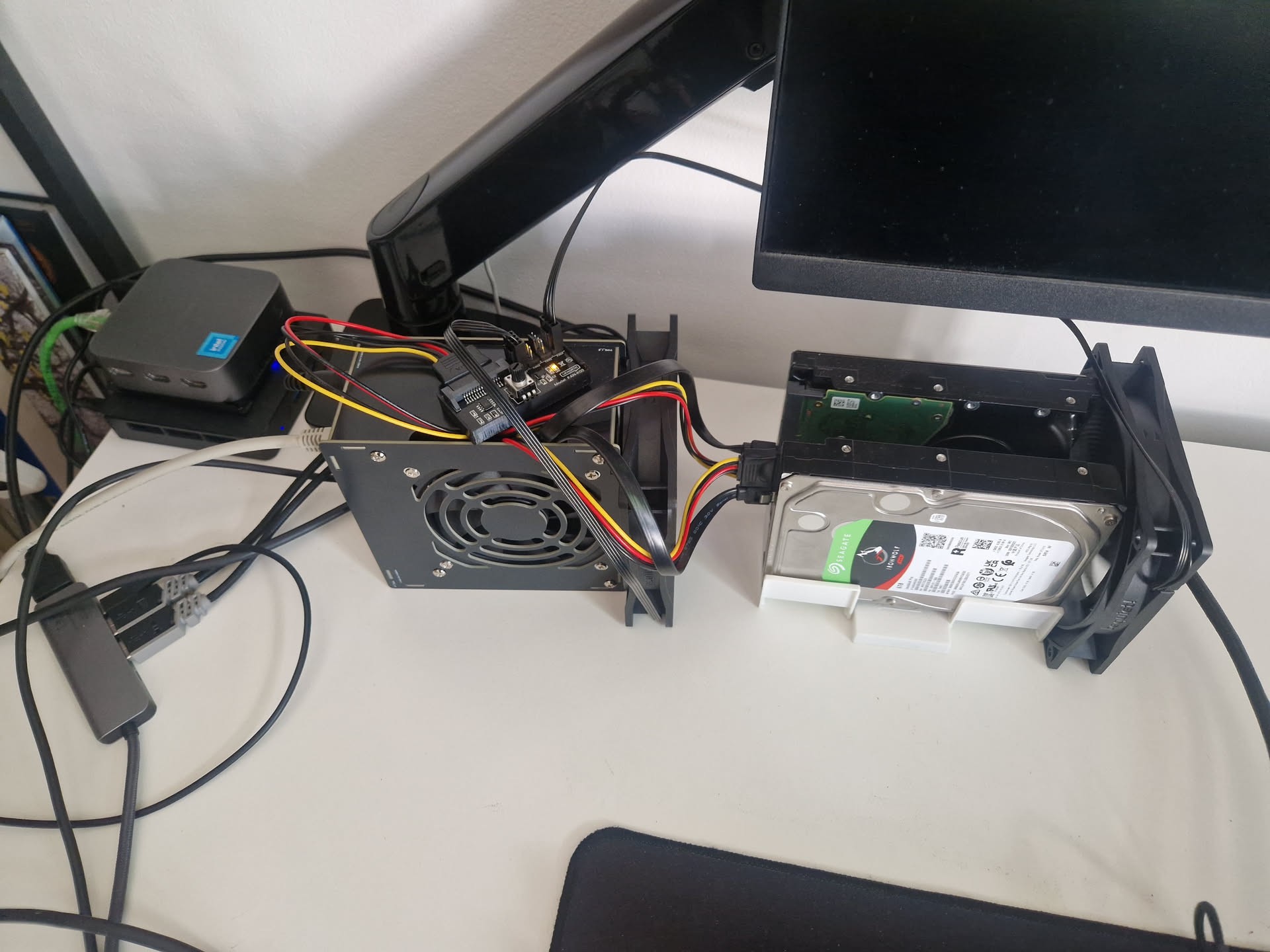
How it's going: odroid
With the heatwave in Europe I've now installed cooling to keep my HDD's from heating up.

I know it's Janky as hell, but I love it. The plan going forward is to buy a 3D Printer so that I can 3D Print a custom 10" rack, and I'll build my own cooling and temperature monitoring system with ESP32 and create a dashboard for it in Home Assistant and sorting out networking.

It's a work in progress, having a lot of fun learning and adding new things.
Update: https://piefed.social/post/1356740

Rate my one year old homelab.

top 43 comments

sorted by: hot top controversial new old
[–] [S] 34 points 1 year ago (3 children)

A lesson I learnt along the way:

HDD's on your desk are loud AF when you're constantly writing to a database
Solution: Everything except backups and Media run on SSD's

  • source
  • hideshow 3 child comments
  • [–] 10 points 1 year ago (1 child)

    Depends on the drive too, I have some insanely loud Ironwolf drives and you would never guess they're from the same manufacturer as my practically silent Exos X18s.

  • source
  • parent
  • hideshow 1 child comment
  • [–] [S] 2 points 1 year ago

    The other HDD I have is a WD Gold, it's definitely the louder of the two, both of them are ~5 years old. Now that I moved the databases off of them, they are quieter than my work laptop, so they don't bug me.

    But oh boy, it really did sound like a train yard at one point.

  • source
  • parent
  • [–] 2 points 1 year ago*

    Some drives are worse than others and higher capacities get worse and worse, in my experience, Seagate drives are extremely loud.

    If you get helium drives (like wd red plus > 8TB i think),or 2nd hand hgst/ WD enterprise drives) they are significantly quieter.

    But, having an ssd is cheaper probably. I have an SSD for the boot drive and all databases, configuration folders, etc... In docker so general IO is fast, then media, documents, pictures, etc... On the big HDDs.

  • source
  • parent
  • [–] 22 points 1 year ago (4 children)

    Nice, 8/10. Don't buy bambu lab, they will suck you soul.

  • source
  • hideshow 4 child comments
  • [–] [S] 6 points 1 year ago* (1 child)

    Thanks <3

    I'm going to go with the Sovol SV06 Plus ACE , I'm a big advocate for Open Source, so anything that requires proprietary software isn't really an option for me.

    I live in a tiny apartment, so my biggest hurdle with getting a 3D printer right now is space.

  • source
  • parent
  • hideshow 1 child comment
  • [–] 3 points 1 year ago (1 child)

    Yea not super thrilled with bambu lab for the privacy concerns but the printer itself is good. I just use it in lan only mode and block any outgoing network traffic on my router.

    But there are other brands that are good. Ive heard prusa is nice but never tried them.

  • source
  • parent
  • hideshow 1 child comment
  • [–] 11 points 1 year ago

    All homelabs are 5 star

  • source
  • [–] 8 points 1 year ago (5 children)

    Just needs a 10" cardboard box with proper holes

  • source
  • hideshow 5 child comments
  • [–] 5 points 1 year ago (3 children)

    Don't get too carried away, it's just a homelab

  • source
  • parent
  • hideshow 3 child comments
  • [–] 6 points 1 year ago (2 children)

    but, think of it... RACING STRIPES!!!! or FLAMES!!!

    You use bamboo skewers to mount the things off the bottom and dampen vibration. mabey use an internal flap and bent the disks out the front and the PSU out the back. If you have enough cardboard, you could even bend it a bit and do like a jet engine with the fan sticking out the front.

    cardboard papercraft homelab... I almost want to get rid of my 42 U rand and make a voltron now.

  • source
  • parent
  • hideshow 2 child comments
  • [–] 8 points 1 year ago
    [–] 7 points 1 year ago

    I adore every piece of this

    My OG system had the whole side panel on the case ripped out where I stuck a fan because the CPU fan died, that was over a decade ago I love your setup <3

  • source
  • [–] 6 points 1 year ago

    10/10 best value

  • source
  • [–] 5 points 1 year ago

    Function over form, I love it!

  • source
  • a proper hobbyist setup, well done!

  • source
  • [–] 5 points 1 year ago (3 children)

    It's great but that fan is an overkill. 😂

  • source
  • hideshow 3 child comments
  • [–] [S] 5 points 1 year ago (2 children)

    Very much so, but I do enjoy gross overkill.

    I'll build them into a future case then they won't be as overkill

  • source
  • parent
  • hideshow 2 child comments
  • [–] 3 points 1 year ago* (last edited 1 year ago) (4 children)

    Yeah, it's fine ... wait, IronWolves in a living space? Paired with that acoustic desk it must be like a train yard, but with more vibrations :D.

    Edit: wrote this before I saw your comment acknowledging the same.
    Well, with HDD there is the noise of the drive itself (the constant one & the searches, spin-ups), and the vibrations which can get acoustically amplified. For the former you need a case, any case, maybe a case in a case (ventilated ofc), for the latter I've always (since late 90s) had my HDD on full rubber, no non-rubber connection to the case.

    My current NASies all use these (in desktop cases, I don't like server hardware if it isn't necessary, like with disks):

    (They cost like 2 monies with shipping.)

    So if going the 3D-print way, as you mentioned, I would def add the suggestion of incorporating thicc rubber pads or rubber straps into your design, like these ones (I've used them a lot decades ago, the only commercial option for silent PC enthusiasts at the time, but I've built then myself too):

    (It's rigid, the disks won't fall out.)

  • source
  • hideshow 4 child comments
  • [–] 3 points 1 year ago (1 child)

    Hi, which is the name of this kind of cases? I'm looking a similar way in order to add an external HDD on my local server which is a Lenovo Thinkcentre SFF, so with 3 disks of space (1 hdd 3.5" + 1 2.5" + 1 nvme). Thanks!

  • source
  • parent
  • hideshow 1 child comment
  • [–] 2 points 1 year ago* (last edited 1 year ago)

    The key search words in your (Chinese? better than rewarding Amazon with even more extra fees) store of choice I wound suggest:

    3.5" to 5.25" Internal Hard Disk Mount Rubber

    But don't get the ones where the inner mount (of the 3.5" drive) is the same piece or bolted/screwed into the outer mount (5.25").

    The ones in my pic have fairy big rubber nips in between (each secured on both sides), 4 at the bottom (that support the weight of the disk too), and two on the sides.

    Also such 5" brackets you can mount anywhere rally, even on the outside of the case, lol.
    In one case without the 5.25" bays (at my parents, quick job) I mounted two disks on such mounts on that metal mesh between the PSU compartment and the main compartment.

  • source
  • parent
  • [–] [S] 1 point 1 year ago

    The one is a Iron Wolf, the other is a WD Gold, both of which are ~5 years old, they were LOUD when I had a database running on them. They are now a lot quieter than my work laptop so they don't bug me anymore.

    Thanks for the advice, I really like these solutions I'll definitely look into them

  • source
  • parent
  • [–] 3 points 1 year ago*

    I think u friki and i like u a lot. Hehehhe you should see mine, is all made of old repurposed garbage. Wtb Corsair peripherals ftw!

  • source
  • [–] 3 points 1 year ago (2 children)

    10/10

    What's the black pcb on top of the odroid?

  • source
  • hideshow 2 child comments
  • [–] 3 points 1 year ago (4 children)

    That's beautiful but I don't understand why two pair of cables go into the fan (is that a PSU?) and only one yellow wire comes out. Also where the motherboard. Need answer

  • source
  • hideshow 4 child comments
  • [–] 1 point 1 year ago* (3 children)

    The black box is the mini PC (note the Ethernet cable going into it) and the yellow/red/black cable is a single SATA power cable, that is daisy chained. Going from the PC to the drive and then going back to the fan control board

    Edit: looks like it's actually 3 SATA cables. Not daisy chained

  • source
  • parent
  • hideshow 3 child comments
  • [–] 2 points 1 year ago

    Lol, brilliant.

    At first you are thinking "this is going to be so nice and compact and tidy" and then....

    Love it though

  • source
  • [–] 2 points 1 year ago (2 children)

    Nice setup. I also started with a mini PC but couldn't find a reasonable way to add drives, how are yours attached? In general I would love to find some reasonable prices DAS/JBOD options

  • source
  • hideshow 2 child comments
  • [–] [S] 0 points 1 year ago (1 child)

    Thanks. ODROID allows 4 drives with sata, it's a really nice solution.

    You could attach even more with using nvme

    https://www.hardkernel.com/shop/odroid-h4-plus/

  • source
  • parent
  • hideshow 1 child comment