I've had various wireless mice for years, and never really had problems with latency or connections. My biggest concern is always battery life. I've had various Logitech wireless mice that run off a single AA and last for years, as well as "higher end" razer mice with rechargeable batteries that I put on the charger every night (but still last ~14 hours on a charge no problem). Really it comes down to the same things buying mice always do: does it fit your grip style? Does the weight work for you? Does it have the right number of extra buttons for you? Just add the extra consideration of battery life.
post
replies:
Wireless connectivity between mouse and computer is largely a solved issue. There may be some minute latency with low tier mice but not noticeable most of the time. Battery life is generally quite long nowadays but having a mouse die during something important or having to deal with Apple putting the charging port on the bottom of the mouse (so you can't use it while it charges) and I'll personally take a crappier wired mouse over a technically better wireless any day.
Logitech MX Master 3. I've had it for many years. Happy, except the scroll wheel is stiff and hard to click (remap the SmartShift to middle button with Solaar).
Does either Bluetooth or dongle.
The battery lasts for months (I'ven't measured, but it feels like I recharge it a couple of times per year. When it feels peckish, it lights a LED, at which point I turn it into a wired mouse for the night (it eats USB-C).
Input lag? If you want input lag, run a Teams call. I'm not a FPS gamer, so I wouldn't know, but I don't notice any.
replies:
Most mice use 2.4 GHz dongles. There's no input lag at all.
I have the Glorious Model I 2, which is super lightweight. It also came with a very light cable that I hardly notice while charging.
It also has a blutooth mode that I set up to pair with my laptop without a dongle. That mode does have a slight input delay, probably about 20 ms.
tl; dr: Wireless with dongle has no input lag. Bluetooth has input lag.
Wireless is always more expensive.
I have a wireless mouse from work that I use occasionally with zero complains (I think a Logitech G502), but as a trackball enthusiast I'd be remiss not to ask if you've considered one.
When set up properly, a trackball is the more ergonomic option, and for me more satisfying and accurate to use. All the disadvantages of a wired mouse disappear with a wired trackball (well, aside from the visible cable).
I have a CST L-Trac with some custom mods and it's one of my favorite peripherals that I own, aside from my two self-built ergonomic mechanical keyboards.
EDIT: Just noticed that you need it for gaming and I'll concede that for that it's harder to justify as there is a learning curve when using for e.g. FPSes. But I'll leave my comment up, perhaps it will plant some seeds in other minds 😉
Not a fan of wireless mice. Sure, the desk looks cleaner but you have to worry about batteries and the danger of losing the dongle. If you don't need to travel with your stuff, a wired mouse is preferable.
replies:
I like a wired thumbball but they virtually disapeared like over a decade ago so I have had to live with wireless. its a waste of batteries as it does not need to move.
replies:
I like my glorious o2 mouse. It's wireless, charges off USB-C, and can be plugged into the computer and used while off (while also charging.) It's charge lasts for a bit more than a week, and I can't tell a difference with latency.
I love my Logitech g502 wireless but I had to get an usb extension to have the wireless receiver closer to the mouse
Once you experience wireless you will never wanna go back to wired
I have some basic logitech one (~100€), there's no latency and the battery lasts well over 2 weeks with 2h for a full charge
I have been using Logitech G305 for almost 6 years now. It has been basically perfect the entire time. Zero latency or connectivity issues.
My son is a serious online gamer, and loves his ultralight, wired mouse. Maybe if you're that serious, it's worth it.
I've never had a problem with wireless. I'm playing Cyberpunk 2077 right now, and my Logitech m720 is flawless. I've had a series of Logi mice, and if this gets discontinued I'll buy a dozen to get me into my 90s.
The technology is entirely mature now. I'm not really convinced that even hardcore gamers can honestly tell the difference.
I was just thinking how I love my Logitech anywhere 3S. I have several devices, and this thing pairs up to three separate ones with no issues. Connection is immediate and it never fails to connect. It has no meaningful lag, and the battery lasts me so long I don't remember how many months ago I charged it.
It's nothing too fancy, but it really accomplishes its tasks well.
What do you need it for? I can't speak to gaming, but normal computer tasks, no problem.
replies:
No issues with that. I've got a mouse that can either connect with a USB dongle or directly to BT. Works like a charm. Flawless, fast, no latency I'd have noticed.
Only downside: Have a fresh battery at hand. I've got a pack of two in my laptop bag. It lasts for ages (many months), but when it fails, it fails. And due to Murphy, it always fails at the most inconvenient moment...
Pretty reputable website doing latency test: https://www.igorslab.de/en/latency-measurements-in-the-test-many-with-and-without-cable/
replies:
I've used various wireless mice for a years, though still use wired for gaming so I don't have to worry about battery (even this many new nice get 12+ hours wireless now). As with anything quality matters. Buy an unknown $5 mouse and yeah you likely will have issues, buy a Razer Deathadder v3 or Logitech whatever, something known and decent, and you'll never have an issue.
Logitech G602 is big and heavy so I don't get hand cramps using it. Mine died but I really liked it.
You're always gonna run into things like interference. I use the Logitech Ergo M575, on a Mac. It has a receiver for wireless, or it can do Bluetooth. So I have it on Bluetooth. Sometimes it lags. When I had a Windows machine, I used the adapter, but now ports are at a premium and I don't have a dock, so I just went Bluetooth. The adapter is a good choice for Logitech, especially if you have multiple parts, since one receiver can support several devices (you don't need one for each).
My keyboard is also Bluetooth though, and it has zero issues. They're both about 18" from the Mac (which sits above my monitor on a shelf). Keyboard is also wired, but I think when the switch is on BT, it only uses the wire to keep itself charged. If I pull the plug, it'll run for a while without needing to be plugged in, but I have no reason to rely on the battery.
I like my Zowie mouse. They don't require a bloated software/driver app to bog down your computer.
Behold: the Rapoo MT750S
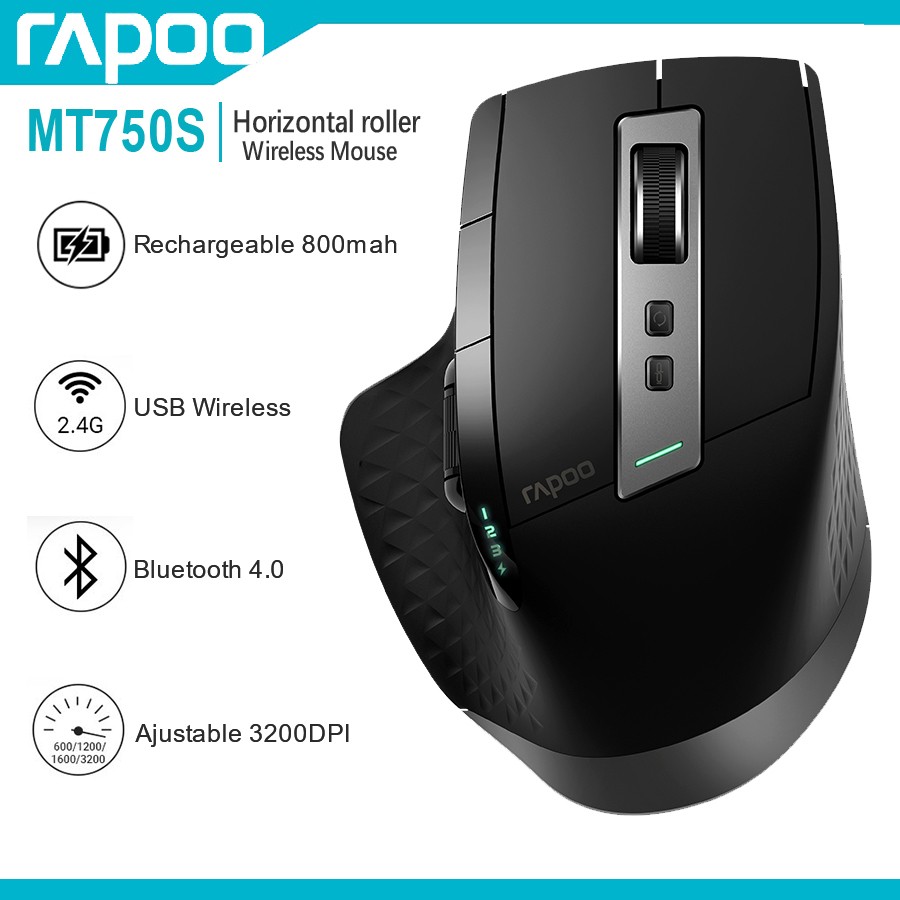
I've bought a cool dozen of these so far, as they're affordable, have 2 scrollers and nav buttons, a good USB dongle, and I can also connect them to other devices by BT. Oh, and I've only ever thrown away 2 of them, as the silicone cover tends to come off after more than a decade of heavy use.
I'm so afraid of these enshittifying, I'ma buy myself another batch. For the apocalypse.
top 44 comments