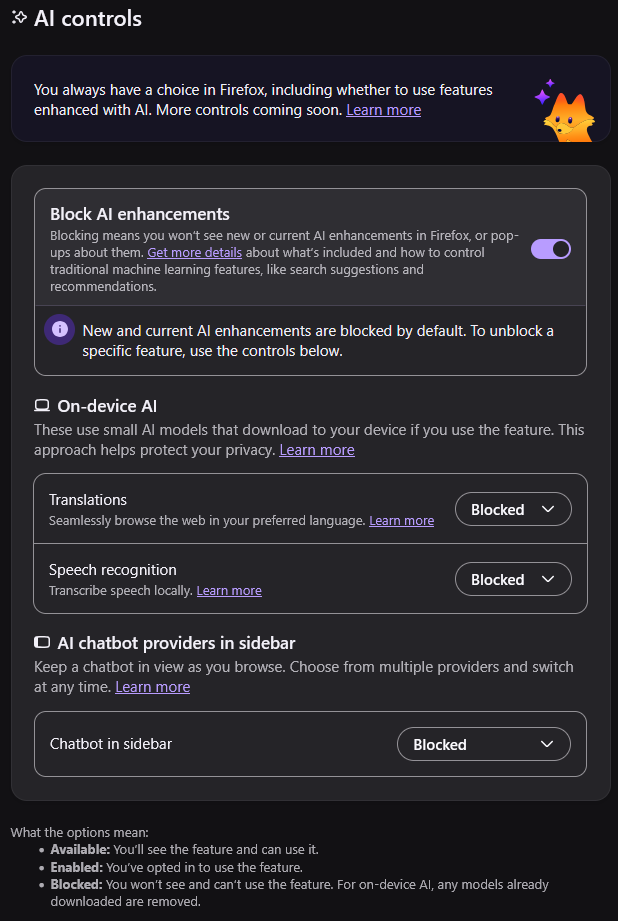
I'm sorry, I'm not often someone to whine about Firefox UI. Usually their changes have been for good actually. BUT! But but but. Proper UI design would require AI features to be disabled if the toggle is disabled. This is both highly silly and very confusing.

In Firefox settings, "Block AI enhancements" needs to be Enabled for the AI features to be "blocked".

all 74 comments

sorted by: hot top controversial new old
[–] 62 points 1 month ago (1 child)

On device translation is amazing and exactly what this software should be approved for, I think it’s good that they let you pick this separately. I don’t care for surrendering my cognitive functions to an advertising panopticon machine, but translating pages without letting Google know what sites I’m looking at? Yes please

  • source
  • hideshow 1 child comment
  • [–] 23 points 1 month ago (4 children)

    If you refer to a traffic light as a "stop" light then you can interpret red as "do not stop".

  • source
  • hideshow 4 child comments
  • [–] 16 points 1 month ago

    I hate inverted booleans with an agenda

  • source
  • [–] 110 points 1 month ago (3 children)

    I don't see the problem. The paragraph of text explains exactly what it's doing. Do you also have a problem with the "enabling" of your ad blocker "disabling" the ads? There's nothing "dark pattern" about this at all.

  • source
  • hideshow 3 child comments
  • [–] 22 points 1 month ago

    I could see that, but I think the key difference.

    Adblocker is an active block of something from outside.

    AI block is telling firefox not to use any of it's own.

    Kind of a do this, versus don't.

    "Do protect me from attackers."

    "Don't attack me"

  • source
  • parent
  • [+] -6 points 1 month ago* (last edited 1 month ago)

    Hehe. 47 people here think "enabling the disable-ation of ads" is clear language?! I'd like browsers / distributions include uBlock per default so there's less spying. And if you want to enable all the ads and trackers, you'd go to the top right and press uBlock's power button (to turn uBlock off - and ads on). I think that's a clear and straightforward UX. At least that's how I set up Linux computers and nobody ever complained 😄.

    I mean it surely is a dark pattern to trick people into giving away their personal data to all those companies? Most of the users aren't even aware. And their consent is fabricated by making this backwards?!

  • source
  • parent
  • [–] 12 points 1 month ago* (2 children)

    What exactly is this disabling? Firefox's built-in AI tools? Or is it disabling AI tools on websites you visit? Because "blocking" seems like a very misleading term to be using if it's an internal presence being turned off. We typically only "block" remote things we know to be harmful to our experience, like harassing users on internet platforms or websites known to contain malware.

    This is honestly some selfawarewolves shit at this point, Mozilla.

  • source
  • hideshow 2 child comments
  • [–] 23 points 1 month ago

    Yes but I would argue that its function is properly described. I mean, it says what it does and if you want you can enable what it actually says.

  • source
  • [–] 7 points 1 month ago*

    As they say, no AI is a feature.

    Luckily, due to the nature of Firefox, this feature is free

  • source
  • [–] 6 points 1 month ago

    I'm okay with this one, since it's effectively an opt-in/opt-out toggle. One click on the toggle, then confirm and all the AI features get disabled as a result. Two clicks versus five is easier in my book, and at least it wasn't one of those awful, non-compliant cookie popups where there's no "reject all" button and you have to manually go through each toggle if it's on a site you actually need to access.

  • source
  • [–] 6 points 1 month ago

    i think you just blocked things you already blocked. that button is for blocking all at once, as per their statement

  • source
  • [–] 22 points 1 month ago* (last edited 1 month ago) (9 children)

    This is just my opinion, but I think it's reasonable to require your user to go to the settings if they want to remove a context menu item.

    In fact, I think they're going above and beyond here. Most people never use "Inspect Accessibility Properties", yet they added it here with no option to remove it, and yet no one's complaining.

    I think the cause of this outrage is people reading too much into Firefox's AI features. Firefox doesn't bundle an LLM or make requests without your permission. It doesn't put AI overviews on your pages. It didn't remove existing functionality to make room for the new buttons. And it doesn't shove any of the features into your face. It's just a context menu item that opens a website in the sidebar if you choose to click on it.

  • source
  • hideshow 9 child comments
  • [–] 9 points 1 month ago

    I think thats not what OP is mildly infuriated about though. If I understood correctly its that you have to enable the setting "disable AI" instead of having a setting "use AI" (possibly enabled by default), which you would disable. Its just counterintuitive semantics

  • source
  • parent
  • [–] 2 points 1 month ago (7 children)

    If it's not an opt-IN feature, then it's malicious, anti-consumer design. Full stop.

    The lengths people will go to defend Mozilla are astounding. If Chrome did this, you'd be throwing a fit.

  • source
  • parent
  • hideshow 7 child comments
  • [–] 3 points 1 month ago (3 children)

    Most features in most software are either opt-out or unremovable, though. It's clearly not about that to you, it's about the association with AI

  • source
  • parent
  • hideshow 3 child comments
  • [–] 0 points 1 month ago (2 children)

    I'm also largely against opt-out in other uses, too. The fact that this is AI only makes it that much worse.

  • source
  • parent
  • hideshow 2 child comments
  • [–] 5 points 1 month ago (1 child)

    No one's against a feature being opt-out unless they actively dislike that feature. You're not going to make a post about the context menu items you don't use unless you have some political opposition against them.

    Nobody complains about the ¤ key on their phone's English QWERTY keyboard, or the "generate QR code from tab" feature in Firefox that I'm sure you've never used. Neither of these features is opt-in, and yet you're content with them. It's because you don't have any political opinions about the features themselves. You don't actually care about opt-out when the feature doesn't bother you.

  • source
  • parent
  • hideshow 1 child comment
  • [–] 1 point 1 month ago

    The "AI translation" feature here has been on Firefox for years now. It was once an extension then just baked in to Firefox. So it was always enabled by default that automatically translates a site if it found a compatible language and it is on-device so doesn't use the cloud. They just added the "AI" label recently I guess to appease a certain demographic. I guess there are other people who really relate AI to being bad. But guys, these have been ON firefox for a long time, just renamed as an AI feature.

  • source
  • parent
  • [–] 10 points 1 month ago (3 children)

    its a kill switch to disable everything otherwise you can enable or disable the things you don't want

  • source
  • hideshow 3 child comments
  • [–] [S] 1 point 1 month ago (2 children)

    It's functionally a killswitch, yes, but it's presented as a confusing mess. Enabling a disabling is still silly no matter what.

  • source
  • parent
  • hideshow 2 child comments
  • [–] 5 points 1 month ago* (1 child)

    I have to go into chrome://flags and disable AI in Chrome too. Fuck that “CIA sniffer” on my “typing.”

    And I believe my Firefox… eh, I gotta check because why this opt-in to disable?

    As soon as someone forks a “AI free” browser, I’m switching. Goddamm, this is all a setup for “too big to fail” (or get a Y2K disaster thingy) so gimme a bail out. Thieves in a few years.

  • source
  • hideshow 1 child comment
  • [–] 2 points 1 month ago

    Librewolf is AI free their default search engine is even ai free duck duck go. You can also easily opt into some of the functions that usually break web pages when they arent enabled at the cost of some privacy

  • source
  • parent
  • [–] 4 points 1 month ago

    This is proper UI design. What they're doing is defaulting to have AI updates installed automatically. If you don't want that to happen you can stop it.

  • source
  • [–] 12 points 1 month ago (3 children)

    Using Librewolf solves the issues.

  • source
  • hideshow 3 child comments
  • [–] 20 points 1 month ago

    i would say it's an intentional dark pattern

  • source
  • [–] 3 points 1 month ago (3 children)

    I agree. This is a double negative. Language usually goes with positive statements instead of double negative. You don't say "I didn't fail". You say "I succeeded". With that logic, the UI should say "Enable AI features" instead of "Disable AI blocker".

  • source
  • hideshow 3 child comments
  • [–] 3 points 1 month ago (1 child)

    You do the same thing with ad blockers. They are on when you are blocking ads. This is on for blocking AI.

  • source
  • parent
  • hideshow 1 child comment
  • [–] 2 points 1 month ago

    Ask yourself what's the main purpose. For an ad blocker, the purpose is to block ads. The dev spent hours developing the blocking mechanism, so it's normal that it's called an ad-BLOCKER. For the Firefox AI features, they spent hours implementing the AI tools. Look at the pop-up blocker in Firefox. It says "block pop-ups" because that's the feature the dev worked on.

  • source
  • parent
  • [–] 1 point 1 month ago

    It really depends on the context. e.g. if you just barely pass an exam, that's not really a success - but you truly didn't fail, which was probably your objective instead of being successful (i.e. getting a good score/grade) on the exam.

  • source
  • parent
  • [–] 3 points 1 month ago

    At least they are brave enough to make the switch for free.

  • source
  • [–] 3 points 1 month ago

    I don't recommend disabling the on-device translations and speech to text feature. Yes, they are "AI" but they are the good on-device offline AI services that are actually useful. Without the on-device translation feature, you'll have to rely on web based Google Translate. Same with the speech to text feature.

  • source
  • [–] 5 points 1 month ago (3 children)

    As someone who has gone through Windows group policy, the amount of weird policies and regedits we have to do to disable AI, recall, anayltics, etc. it's insane and the process flip flops with tricky wording. Enabling something here and disabling stuff somewhere else, it gets annoying

  • source
  • hideshow 3 child comments
  • [–] 6 points 1 month ago* (last edited 1 month ago) (2 children)

    You are comparing it to the worst of the worst

  • source
  • parent
  • hideshow 2 child comments
  • [–] 5 points 1 month ago (3 children)

    Also, why does it say "blocked" instead of "disabled"? This kinda leads me to imply that their AI features are spyware

  • source
  • hideshow 3 child comments
  • [–] 3 points 1 month ago (2 children)

    When they first announced this they called it the "AI kill switch", so they already toned it down.

  • source
  • parent
  • hideshow 2 child comments
  • [–] 8 points 1 month ago

    It's intentional.

  • source
  • [–] 2 points 1 month ago (1 child)

    Some dynamic text under the toggle that reads "AI Anti-Feature 'X' is on/off" could ensure absolute double-certain clarity.

  • source
  • hideshow 1 child comment
  • [–] 2 points 1 month ago*

    So, was it blocked by default?

    If yes, I wouldn't read too much into it.

  • source
  • [–] 2 points 1 month ago

    Someone has been studying up on the Microsoft Group Policy way of wording things.

  • source
  • [–] 3 points 1 month ago

    Pushing the opt out responsibility on the user is why I left Windows and never looked back. I recommend Waterfox which I started using a couple months back when Firefox started going in this direction. Waterfox is great on desktop and Android (which I'll hopefully shed soon too when my current phone stops working).

  • source
  • [–] [S] 3 points 1 month ago (5 children)

    For the record, I know it was marketed as "AI killswitch". I know it functions as one.

    But it's still hella confusing as presented in the configuration! Don't do double negatives! If your design goal is "disable everything", maybe give the users the option to, I don't know, "disable everything".

  • source
  • hideshow 5 child comments
  • [–] 14 points 1 month ago (4 children)

    Isn't that what it does? Except in your mind it would say "enable ai" and you'd have to enable it to access the options below.

    That makes sense to me

  • source
  • parent
  • hideshow 4 child comments
  • [–] -1 points 1 month ago (3 children)

    It's a dark pattern to confuse those who don't read word by word. In daily life, if i have to turn on the switch to switch off the light, it just wouldn't make sense, unless when it's intentionally want to confuse and make you switch on the light.

    An On/Off switch for AI Enhancement reads significantly better than On/Off switch to block AI Enhancement, the first one is just basic intuition.

  • source
  • parent
  • hideshow 3 child comments
  • [–] 2 points 1 month ago (2 children)

    Totally, they really should change those ad blocker buttons. Off to indicate ads are off right? Definitely not 'on' to indicate that ads have been disabled. Because that would be too confusing for people.

  • source
  • parent
  • hideshow 2 child comments
  • [–] 2 points 1 month ago (1 child)

    Is this AI Blocker 3rd party plugin or first party setting? In the same sense if those ad blocker are first party stuff that's build into, say, youtube or news site, then yes, that would totally be a better option, off to turn off ads, on to turn on ads. If it's third party tools made literally to turn off ads, then it make sense to turn on to block ads and turn off to allow ads. Common sense, yeah?

  • source
  • parent
  • hideshow 1 child comment
  • [–] 1 point 1 month ago

    hey, just be happy there is an option at all, and a granular one at that.

  • source
  • [–] 1 point 1 month ago

    I think whoever coded that views toggles as a yes/no.

    Mistaaaaake

  • source
  • [–] 1 point 1 month ago (2 children)

    I know it's chromium, but Vivaldi has no AI crap at all. I find it refreshing

  • source
  • hideshow 2 child comments
  • [–] 1 point 1 month ago (1 child)

    Vivaldi is really nice, have build in adblocker as well, but then it has the problem all non-mainstream browser have, some site just refuse to work with it. It's annoying as heck when it happen. Luckily it's really just a few site at this point.

  • source
  • parent
  • hideshow 1 child comment
  • [–] 1 point 1 month ago

    it's what i use for a 'chromium' but it's got even more defaults to flip than firefox does and has some other issues that just simply get in the way too often. but i do like how you can completely rearrange the toolbar like in firefox.

  • source
  • parent
  • [–] -2 points 1 month ago* (last edited 1 month ago)

    We're talking about Mozilla here. They always do the wrong thing. -edited for brevity

  • source