1

It's a work in progress, but I decided to try to make the theme we talked about in an earlier post I made. I'm trying to get it as close as I can to the Menu UI in Morrowind.

It's a work in progress, but I decided to try to make the theme we talked about in an earlier post I made. I'm trying to get it as close as I can to the Menu UI in Morrowind.
thought i'd share my minimal sway setup. It is simply designed with a utility focused in mind, I don't plan to implement UI/UX graphics, although i might add a dark theme to it.
distro: arch linux tty emulator: alacritty file manager: alacritty menu: rofi editor: vim wm bar: swaybar background utility: swaybg etc: swayidle, swaylock
the swaybar configuration is simply a shell script to fetch information such as battery, ram, cpu, and workspace data. again, this won't be modified for asthetics.


Censored out some PII. The Desktop cycles through a bunch of different Deimos Fallout New Vegas art. If you don't know the artist they're awesome: https://deimosart.com/
I'm pretty in love with the way my computer looks now lol. Even the Plymouth theme is a Sunset Sarsaparilla thing I made (check my post history for that).

cross-posted from: https://lemmy.blahaj.zone/post/48783005
I wrote a simple greeting script for fish as a fetch/motd alternative
Repo: codeberg.org/Lunar267/fish_cute-greeting
A very tiny bit of code but I figured some other ricing enthusiast might like use it

it started from a broken search bar then when I tried to fix it something else broke, then it became the most annoying whack a mole game of all time so I removed everything and start from scratch.

cross-posted from: https://leminal.space/post/40418939
Catppuccin Mauve my beloved.
CachyOS's Niri install came pretty barebones, so it took a lot of configuring and troubleshooting, especially since it's my first time using something other than GNOME/KDE. But I'm really happy with how it turned out! The scrolling tiling behavior is really cool, and I love using workspaces. I've even come to appreciate window tabbing. Being able to apply transparency to any window is so fun.
Not sure what other details are needed that aren't present in the screenshot. Let me know if you want to know anything!

cross-posted from: https://slrpnk.net/post/43069591
- OS: Gentoo Linux (arm64)
- DS: X11 (Xorg; may switch to Xylophone in the future)
- WM: Openbox
- Theme: Dracula
- Openbox Theme: Surreal_Gentoo (modified to use Dracula colours)
- Icons: Papirus-Dark
- Browsers: Tor Browser, Librewolf, Lynx
- Terminal: XTerm
- Shell: ksh93
- Editor: GNU nano
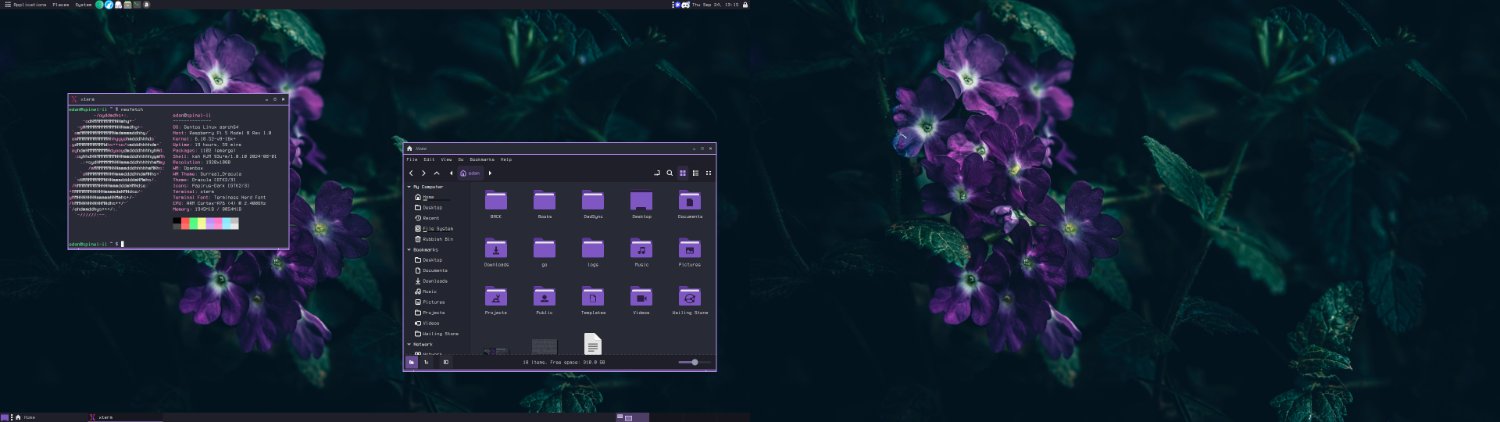
This has been my daily driver since 2021. I spent the latter half of the 2010s with the BSDs and when I got this device I was sad to learn that NetBSD didn't support the wifi driver... so I moved to Artix.

xdg portal here is not gnome or gtk, it's kde it the screenshot are
also installed are

cross-posted from: https://lemmy.world/post/51365919
Gnome on surface pro 4.
Finally have a fantastic setup for my surface to act as a tablet. the extension Touchup is doing some heavy lifting for usability. apps are: files, Riff, Librewolf, Voyager. Heres more screenshots.
Edit: i forgot to show some portrait screenshots! Ill grab some when i get a min!

cross-posted from: https://lemmy.ml/post/51712940
lambdock is a lightweight, hyper-hackable desktop dock for Wayland compositors that bridges a high-performance C graphics engine with an embedded GNU Guile Scheme runtime.
Repository: https://codeberg.org/jjba23/lambdock
License: GPLv3+
Whether you are looking for a smooth macOS-style dock, a minimal launcher, or a Lisp-powered desktop widget bar, lambdock was built to offer extreme flexibility without bloating system resources and remaining flexible but easy to use, with good defaults.
Why would you consider lambdock? Modern Stack & Ultra-Low Footprint: Built on GTK4 and gtk4-layer-shell in C for minimal resource usage, rich graphics and animations (opt-in) with smooth cubic-eased auto-hiding.
Embedded Guile Scheme Engine: Declarative Lisp configuration (
~/.config/lambdock/settings*.scm). Easily construct custom app launchers, separators, or dynamic polling widgets (RAM, CPU load/temp, Battery, Clock) using standard Scheme procedures and macros.Live Interactive REPL & Hot-Reloading: Connect straight into the running dock over a Unix domain socket (
/tmp/lambdock-repl.sock) via Emacs/Geiser or socat or whatever you like. Hot-reload configuration files and GTK CSS overrides on the fly via GFileMonitor or the(reload-dock!)REPL hook without dropping Wayland frames or UI thread freezes.Dynamic Wayland Window Tracking: Uses zwlr_foreign_toplevel_manager_v1 for running app indicators, active window titles, and interactive popover HUDs to focus or close specific instances.
Opt-In Fisheye Magnification: Includes a native, fluid cosine-bell curve hover magnification effect (macOS-style) that can be toggled on or off per item or globally.
Multi-Dock & Multi-Monitor Support: Run independent dock instances across screen edges or monitors simply by dropping additional settings-*.scm files into your config directory.
Built-in Themes & CSS Overrides: Ships with presets (Vanilla, Snow Leopard, Solarized, Unity, Nature) and supports full user CSS customization via ~/.config/lambdock/styles.css.
lambdock works seamlessly across all wlr-layer-shell and foreign-toplevel compliant compositors: Sway, Hyprland, Niri, River, Wayfire, COSMIC, and KDE Plasma (Wayland).
(Note: GNOME/Mutter is currently not supported as GNOME does not implement the layer-shell protocol).
Installation & Packaging (a bit WIP)
lambdock provides multiple ways to build and install across distros:
GNU Guix: Packaged via guix.scm and available in channels.
openSUSE: Packaged as an RPM on openSUSE OBS.
Nix / NixOS: Ships with flake.nix / package.nix (and a PR has been submitted upstream to nixpkgs).
Debian / Ubuntu: Debian packaging helpers included (debuild).
Podman / Docker: Containers are available and also pre-built ones on DockerHub
Build System: Builds cleanly with Meson (meson setup build && ninja -C build).
Since this is my first GTK4 project, all feedback, suggestions, bug reports, and contributions are very welcome!

Muted, opinionated, and subtle. Keeping my environment out of the way and not distracting.

I never want to touch a network script again.
How does wpa_supplicant still suck major butt?
It's FreeBSD this time... am I a real Unix pornographer now?
Edit, folks asked for the wallpaper: https://images.hdqwalls.com/download/bliss-windows-xp-remastered-2025-5k-vt-3440x1440.jpg

First time using WM and Waybar and I can't for the life of me find a good OSD for volume and brightness, so I created one using Waybar and Niri keybind spawn function

I love retro aesthetics :3

cross-posted from: https://programming.dev/post/52571973
This is absolutely 100% real. I am ashamed at my actions.
bbLean is cool though.
Go ahead, sharpen your pitchforks. I've been learning windows, there's no pain worse than that.

WM: niri
distro: arch BTW
terminal: foot
notification: fnott made by the same developer of foot
web browser: qutebrowser
statusbar: i3bar-river and powered by i3status-rs
I made my own bash script to randomize wallpapers that took me long time to make. If you want to try it out: randwall
My dotfiles are not very organized yet that's why I haven't git them for now but I will do soon ....

I've never been too fond of Wayland, with it's corporate sponsors and project architecture that threatens to kill-off smaller desktops and window managers: hurting one of *NIX's best qualities IMO, it's fragmentation and user-choice.
So, when I heard about the X11 revival effort, XLibre, and read that they had a mostly stable release, I switched over.
It's been a drop-in replacement, my package manager (pacman) prompted me that xorg-xserver and xlibre-xserver would be in-conflict, and thus automatically removed xorg-* in favour of xlibre-*. Everything else has just worked.
Immediately off-the-bat XLibre has TearFree enabled by default, which improves the feel of the desktop massively. But that's about the only change I can "feel", a lot of the work is under-the-hood with code-cleanup efforts and refactoring.
System Details:

I am really impressed with Artix! everything runs just like how it would on arch. I am on OpenRC
I'm going to try to config/rice sway later in the week.


