Impressive to see the work done. 🤩
comments
comment on
GIMP 3.2.8 Released
comment on
GIMP - Interview with Liam Quin
From here it looks like a rather ordinary well-cared for mouth; maybe the smell is coming from somewhere else.
comment on
GIMP - Interview with Liam Quin
[deleted]
comment on
Why doesn't GIMP do a major UI/UX overhaul update like Blender did with 2.8 a couple years ago?
I made my own GIMP themes and am happy with how it looks now. Dark and middle grey if anyone is interested. I have clients looking over my shoulder every week and no one has even asked what I'm using.
Been using both Photoshop and GIMP for professional reproduction work for years and both have their pros and cons in terms of their behaviour and layout.
Having taken some time to learn GIMP (which I also had to do once upon a time with Photoshop btw), I personally don't see it as a big priority for them to work on the UI/UX.
Yes a few things could benefit from a tweak, but I don't think it needs an overhaul.
Whoaa, spectral blending is so cool!!
To be fair gtk moved away from them first lol. But this sounds like a good thing either way. It's off doing its own thing now. I think allowing GIMP to integrate with its host system better we'll make for a much more pleasant experience for everyone using it.
I'm old enough to remember when there were no binaries provided for gimp. Had to compile it yourself LOL. It's come a long way. Even if I do tend to use krita far more often anymore.
comment on
Why doesn't GIMP do a major UI/UX overhaul update like Blender did with 2.8 a couple years ago?
They did. Though you may be too young to remember. 👨🦳 Unfortunately the problem is unless they completely ape a more popular product. Many will still be unhappy. People still complain about blender as well.
That isn't to say the UI still couldn't use more Polish and decluttering. But with what money and who's time? I think that's the bigger issue. I know there are soft forks that imitate adobe. They could pull that into the main branch perhaps unless there's a licensing conflict. But who's to say adobe is right, not just familiar.
Honestly I think GIMP being it's own thing is fine. But here's the thing. UI/UX is much easier to participate in open source as a non coder. Look at the toolkit they are using. GTK 3 IIRC, and try to do a design based off that. There may even be a GUI builder like with QT. Where you could even define the GUI in a GUI, to make code for them. Or perhaps something basic like tool icon redesign.
Point is. While a lot of coders like to code in their free time. Or at least on tools they use. UX/UI or graphic designers are actually scarce comparatively in the space.
comment on
Why doesn't GIMP do a major UI/UX overhaul update like Blender did with 2.8 a couple years ago?
I was going to say that 3.0 updated the UI, but I’ve honestly found it worse than the previous at almost every turn. I think the only thing I noticed is an ungodly amount of padding around everything now, wasting a ton of screen space and ruining the layout of plugin design.
If they were to redesign their UI properly, it would take literal years of development time which is incredibly expensive to fund. The reason Blender was able to do this is everyone from high schoolers to industry specialists were able to use it, so it got tons of contributions, both in code and funding.
GIMP has always fallen in the middle zone. Too daunting for beginners and too cumbersome for professionals. Great for most basic stuff, but once you have a serious project in mind, it quickly starts to show its faults.
Where it shines imho is its robust and approachable scripting language via Python. You can approach batch processing like nothing else I’ve used and without decades of image processing knowledge. You just learn the correct inputs for the native tools, then script that with variables in a surprisingly readable syntax. But that’s for an even more niche audience.
comment on
Why doesn't GIMP do a major UI/UX overhaul update like Blender did with 2.8 a couple years ago?
I can only assume it's because the people in charge of the project don't want to.
Therefore, Alx Sa has begun porting GIMP’s file choosers to the “native” option provided in GTK3. This means that when you open or save a file, you will see your platform’s standard file chooser dialog instead of the GTK dialog (unless your platform uses that already, in which case there will be no change!)
Ironic that GIMP itself is moving away from the GIMP ToolKit file chooser dialog, LOL.
(For those who aren't aware, GTK was created for GIMP and was only subsequently adopted by other projects like GNOME.)
comment on
Why doesn't GIMP do a major UI/UX overhaul update like Blender did with 2.8 a couple years ago?
I mean, GIMP 3.0 was already a larger rework last year. And they had that in the making for 7 years...
Spectral blending looks really neat, and I'm really happy to see that gradients are now going to be editable. That's always been a huge pain.
comment on
GIMP 3.2.6 Released
Windows.
(I know)
And that's why I asked if bugs can be mentioned here.
comment on
GIMP 3.2.6 Released
I meant for the recent updates like 3.2.5. The issues there are all very old.
It also doesn't work for me, I just see the "Create Issue" button loading continuously, can't get passed the first step.
Where do you see that? I see how that website leads to their Gitlab instance.
https://gitlab.gnome.org/GNOME/gimp/-/work_items
Of the items there which are actually tagged with a version number, they are all recent versions:
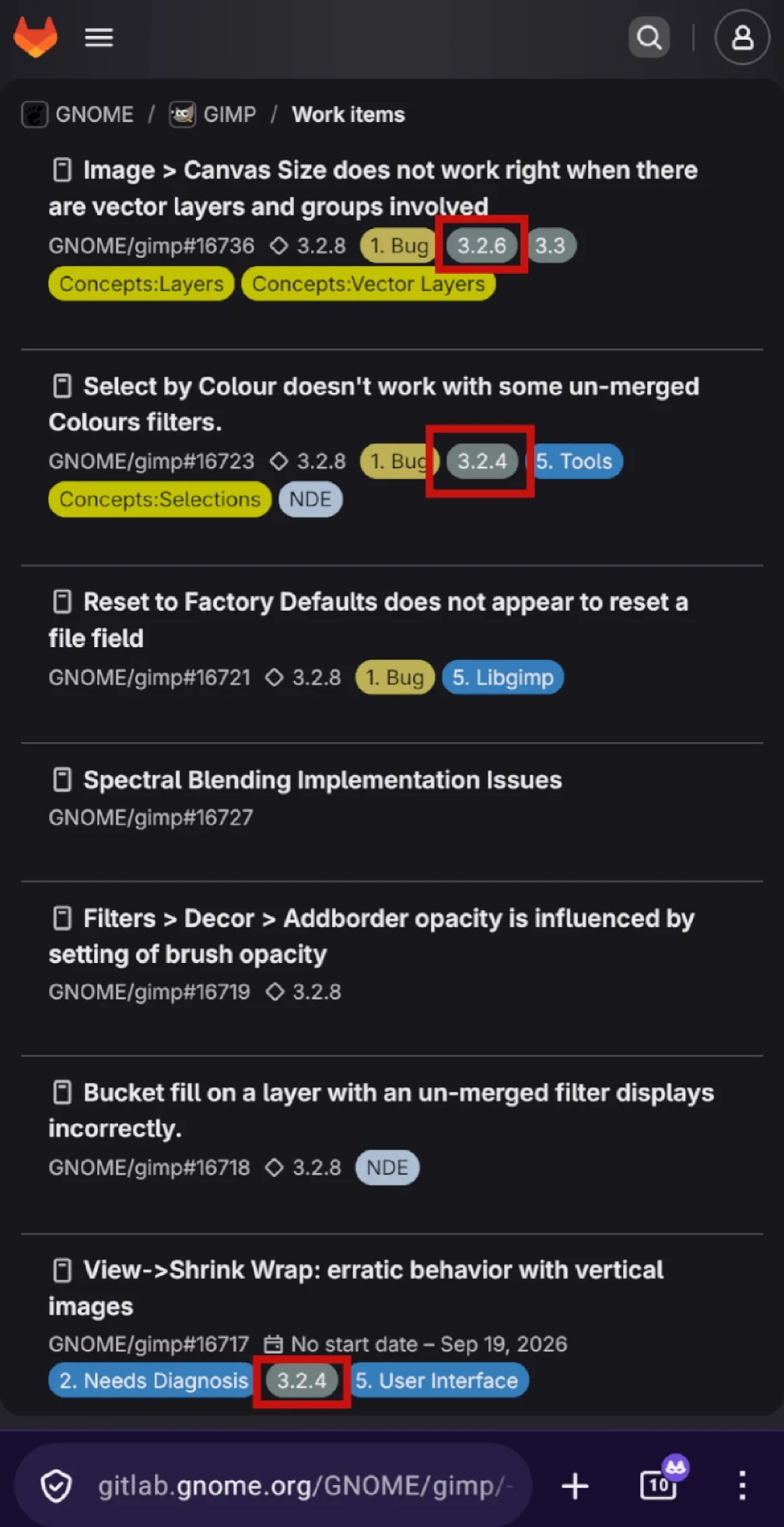
I'm not creating an account, so unless I see an error about requiring an account there, I won't make one.
That is certainly a concern with formal bug reporting for any software project. It requires you to create an account with whatever git service that the project uses (GitHub, Codeberg, Gitlab, etc.).
comment on
GIMP 3.2.6 Released
I meant for the recent updates like 3.2.5. The issues there are all very old.
It also doesn't work for me, I just see the "Create Issue" button loading continuously, can't get passed the first step.
I'm not creating an account, so unless I see an error about requiring an account there, I won't make one.
comment on
GIMP 3.2.6 Released
You can sure mention bugs here and we can discuss it, but I doubt any developers are actually watching this community. Reporting a bug here is not the right way to actually request that a developer resolves it.
I like to use PieFed to discuss software bugs with other users to determine if it is actually a valid problem and worth posting a formal issue report on their git repo or whatever.
This seems to be the formal way to report bugs for this project: https://www.gimp.org/bugs/
comment on
GIMP 3.2.6 Released
can we report bugs here?
comment on
How do i read a .gif comment?
It's metadata. Lots of image formats allow you to have auxiliary information attached to the image file like lens info, creation date, location data etc.
People who make use of certain types of metadata will be using software which uses it or displays it, and GIMP kindly provides for this.
comment on
How do i read a .gif comment?
https://en.wikipedia.org/wiki/GIF#Metadata
Should be visible if you're looking at the file properties (details vary slightly depending on OS) or you can use something like ExifTool.
comment on
How do i read a .gif comment?
exiftool can read them. I'd expect other tools that show image metadata would likely be able to read it as well, but I'm not sure about examples off the top of my head.
Testing a few GIFs I have on hand, a few have comments about which tool made the file and that's about it.
Calm down Satan.
then i would probably duplicate the problem in a standard debian stable desktop install, and submit the bug report there. let them pester gimp.
Yeah, except GIMP heard of The principle of least astonishment and took it as a fucking challenge. If it astonishes you by behaving in an unexpected way, it's probably a deliberate GIMP design choice who's goal is to defy your expectations.
if the save dialog closes and the application allows itself to also be closed--both without the save in progress completing fully, resulting in no save or a corrupted save and essentially a lost file and work... i would consider that a serious bug and report it as such.
OK hear me out, so I've been out drinking but I had this idea. You need to know when the save is done, right? Assuming you are on linux, you could use itnotify to alert you each time a save completes of your gimp files by ringing the console bell. Then you know you can't quit until you hear the bell.
I don't know if it would work. Maybe something like this
#!/bin/bash

# Target directory to watch (where the gimp files are)
WATCH_DIR="$HOME/Projects"

echo "Listening for completed GIMP saves in $WATCH_DIR..."

# Monitor for files closed after being written to
inotifywait -m -r -e close_write --format '%f' "$WATCH_DIR" | while read -r FILE
do
    # Check if the modified file is a GIMP file (.xcf)
    if [[ "$FILE" == *.xcf ]]; then
        echo "Finished saving: $FILE"

        # Trigger the system bell (or substitute with an 'aplay' command for a custom sound)
        echo -e "\a"
    fi
done
view more:
next ›