[–] [S] 2 points 6 days ago*

I can second this. I currently have the Teracube 2s (2025) from Murena. Its a decent phone if you keep the apps light, otherwise its a glitchy mess cause 4GB nowadays really isnt enough ram for these phones. Standard at this point for these lower end phones really should be 6GB. But the screen size is 6.1 inches though, so not really on the compact side. Also for the love of god, do not use their stock apps, replace them. They're stock apps are garbage and slow.

  • source
  • parent
  • context
  • [–] 1 point 6 days ago
    1. Hiking, along with doing competitive hiking
    2. Photography (mostly nature or photography that has anything to do with water) - i do it for fun, not a pro.
    3. Found a phone along the highway and grabbed it to see if i can charge it and tinker with it.
  • source
  • [–] [S] 1 point 1 week ago* (3 children)

    That if anything sounds more like a bug on Dolphin's part. I'm not gonna do that just to get it to read the micro sd card.
    Honesly, im getting annoyed with dealing with these stupid, very tedious bugs, and the crazy amount of updates that have been going on within Fedora lately are not helping.

  • source
  • parent
  • context
  • [–] [S] 1 point 1 week ago* (5 children)

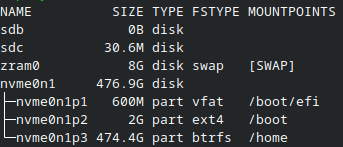
    No it’s not formatted. It came as is when I bought it and I have not done anything to it besides putting my microsd cards in it. And you are right, that disk under sdc is the SD card reader.

    Crazy thing, this SD card reader was reading fine when I was using Pop Os (even though cosmic was hella buggy). Idk… I kinda find this freaking ridiculous that it cant read it when this is the default file manager.

    but let me see if it’s labeled as exfat…

  • source
  • parent
  • context
  • [–] [S] 1 point 1 week ago (7 children)

    the /run/media is identifying my USBC flashdrive (this is not the SD card reader,btw) Dolphin recognizes it and puts it under "Removable devices" section and I can access my folders. Now, this is me taking out the USBC flashdrive but i still have my SD card reader in: its like Dolphin dosent recongize the SD card reader
  • source
  • parent
  • context
  •  

    Since switching to fedora, I have been testing out its features and i just now ran into my first problem; Since my laptop doesn't have a SD card reader, I have to use an external SD card reader when i want to access my microSD cards. I recently tried to put in my Acer 2-in-1 SD Card reader and my system did not pick up that i inserted the card reader. I'm not sure on what I am supposed to do about that, so if anyone can give me any advice I'll appreciate it.

    Update: So I decided to put in a different brand of SD card into the card reader (to test if the card could be an problem) and Dolphin immediately read and put it in the removable device section. The sd card that is having issues was a Sandisk card. Verbatim was mounted easily, so something is going on with my Standisk card.


    I’ve been looking at phones lately and I’ve seen this company called Enough from their YouTube kickstarter video. It’s them and SLEKE (maker of OdesseyOS) working on building a nice size phone. I’m thinking of supporting their kickstarter because I am tired of these humongous phablets, and I can’t stand on how they feel in my hand when holding them.

    The phone has everything I want but I am really wondering if the bootloader will be unlockable.

    —-———————————————————————————————————

    Some important edits that should be added; (after looking on Enough’s website and kickstarter)

    1. No unlockable bootloader
    2. No sideloading
    3. On Enough’s website, storage is expandable by MicroSD or that same space is using a physical SIM card and you have the option for eSIM
    4. No headphone jack, but a USBC to 3.5mm converter is given if you do the kickstarter
    5. Stock android or OdessyOS only (from SLEKE); no flashing capabilities at all
    6. Replaceable battery
    7. Price of phone from kickstarter:
    8. Super Early bird price: $399 USD (sold out)
    9. Early bird: $449 USD
    10. Kickstarter special; $499 USD
    11. Retail price after campaign: $599 USD
     

    I recently distro hopped from Pop OS Cosmic to Fedora KDE Plasma; omg I love it. There are very small bugs, but i really like that they have a feature where you can self report them to fedora. But overall, everything about this distro is already running better on my laptop and not chewing up my battery, and it just works.

    Fedora really outdid themselves with these customizations, like holy crap.

     

    Continuation from last post……

    After performing the following hardware testing:

    1. Check Logs for Hardware Issues
    2. Stress tested the CPU,GPU and RAM
    3. Checked my Disk Health
    4. Stress tested network bandwidth

    All of my hardware of my laptop passed but I still continued to had issues when using my flash drive and transporting documents. I’m getting tired of this,and have decided to flash Fedora KDE Plasma and will be switching over soon.


    I am five seconds away from deciding to hop onto another distro because I am tired of the constant frustrations I am going through just to get anything done. I just want to search and get documents done on my laptop, but the freezing, lagging and bugs I’ve been seeing, is getting on my nerves.

    For example these are the issues I’ve been running into lately,

    1. Libreoffice documents freezing while saving
    2. Flash drive not being read by the laptop, even though it’s plugged in and it shows that a flash drive is into the laptop
    3. Sometimes the laptop stays on the PopOS screen for a longer time than usual while powering down the laptop.
    4. (I’m not sure if this is a browser issue or a OS issue for this one) I’m constantly hopping from one browser to the next to get anything done or researched. Sometimes I have to turn off all of my extensions just for the browser to read on what I’m trying to search up.
    5. Some of my updates are refusing to go through and update within the system.
    6. I cant open certain emails. Like at all, it doesn’t matter what browser I use, it just reads that something is wrong and I don’t know on how to fix it (this was never an issue until updates started coming along)

    For anyone asking about the specs: here it is from Best Buy. I purchased the laptop in March 2026.

    https://www.bestbuy.com/product/asus-zenbook-14-14-fhd-oled-touch-screen-laptop-intel-core-ultra-7-16gb-ram-512gb-ssd-jasper-gray/JJGGLH7HXW


    I have been noticing an increasing amount of apps on droidify, that are not supposed to have trackers, obtain trackers after being updated. I dont know if its amongst the developers themselves or Google's forced pushed on getting apps approved through their store, but it should be put in the description of these apps before they are downloaded that trackers have been added.

    For example, these are some apps that are NOT supposed to have trackers, in fact do have trackers:

    Or

    Some of these apps, my phone dosent pick up that it contains trackers unless i look at Tracker Control

    1. Blorp (Lemmy)
    2. FossWallet (this one just happened, this wallet NEVER had trackers until a recent update)
    3. All of the browser apps on drodify (even the private ones) - the only one that admits to have anti-privacy features is Tor.
    4. Rush (Music Lyrics App) (description has been updated to show it has trackers) i dont understand why a music lyrics app has trackers on it
    5. PipePipe (viewed on tracker control)
    6. Tuta(viewed on tracker control)
    7. Droidify (yes, droidify itself contains trackers)
    8. AntennaPod(viewed on tracker control)
     

    I picked this phone from Backmarket for 70 USD. I cleaned it up and started debloating and slightly degoogling it. The bootloader is locked unfortunately, but you can debug this phone.

    It runs very smooth for being 7 years old and running on Android 11 (upgraded from Android 9).

    Wifi calling and texting from Delta chat works, i even tried the video calling and suprisingly, it worked really well too. Now i just gotta try out the data.
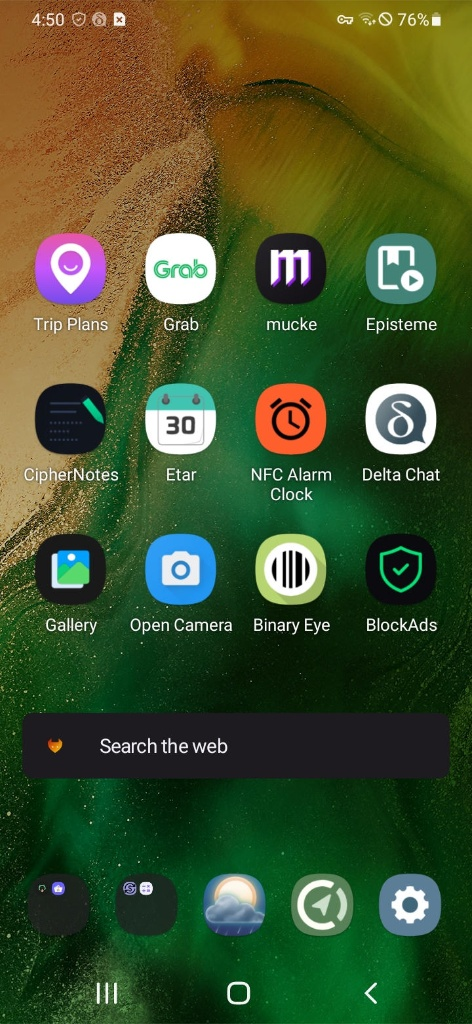

    1. Apps being used: (everything except from Trip Plans and Grab are downloaded from Droid-ify)
    • Trip Plans: this is the app i gotta use to communicate with my group on my trip. This and Grab are the only "Google" apps on here.
    • Grab: Southeast Asia version of Uber
    • Mucke: Music Player
    • Episteme: Book/PDF reader
    • Ciphernotes: Note taking app
    • Etar: Calander
    • NFC Alarm Clock: setting alarms and timers
    • Binary Eye: app to read bar codes and QR codes
    • BlockAds: ad and tracker blocker
    • GeauxWeather: Weather App
    • Cache Cleaner: (not located on screen) this app helps clean out all cache in your system and user apps. Can also be set to remove and delete data.
    • Keyboard: AnySoftKeyboard
    • Browser: Ironfox
    • Ripple( not located on screen) a app to trigger an action to protect privacy, depending on what app it is. Some apps hide/disguise or delete data,, etc.
     

    Im going to be going on vacation and travel in November, and honestly, this is needed. I'm on the lookout for a secondary phone that i can degoogle real quick, put the neccessary apps that i need and just call it a day. I'm already prepping my family and stating that im not gonna bring my primary phone. I was wondering what do you guys use, if any of yall bring a secondary phone. (FYI: I am in the US and will be traveling internationally)


    I'm finally on the journey of buying my music, with completely stopping the use of streaming services. Ive seen this app being recommended as a cool music player and decided to try it out. I never had the original iPod Classic, but an IPod Touch, so I would assume thisll be the closest I can get to experience that. Works immediately as soon I put my music on my SD card. 😍😍😍😍

    view more: next ›