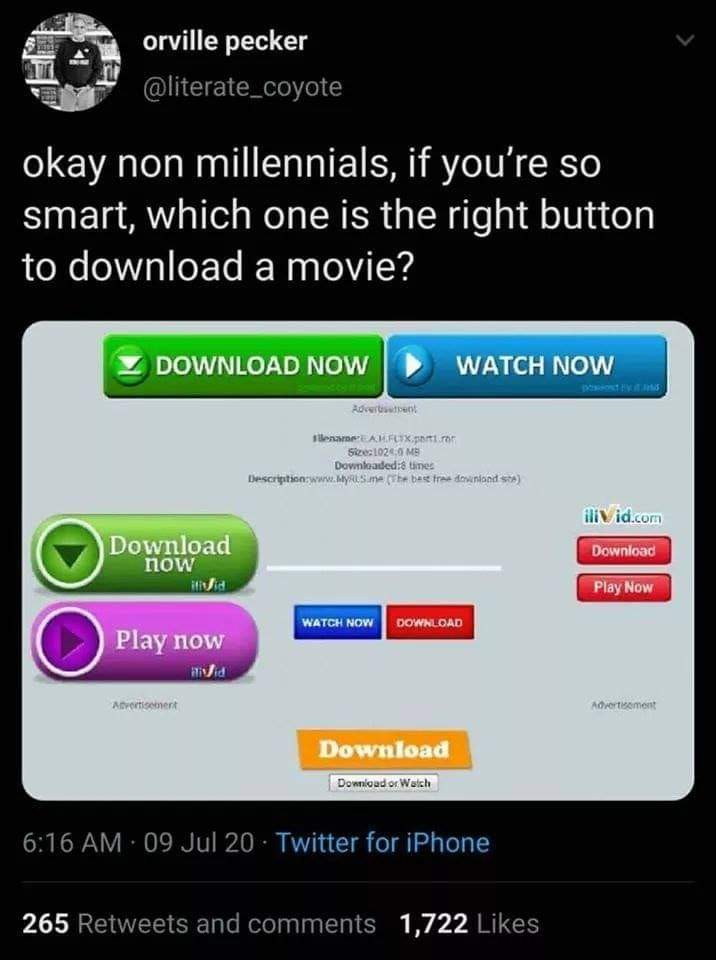
Millennial here. The true answer is None Of The Above. The actual download button is just a blue link somewhere on the page, probably among all of the torrent info.
post
You drag the button. If it takes with it more than just a button, it is an ad.
Stop. Install your favorite ad blocker, like ublock origin. Refresh.
Work smarter not harder
Why was it ever disabled to start with?
Every time a dodgy site has asked me to disable it, it still doesn't work, and now you have a bunch of tracking cookies and has to look at ads for other porn sites.
YEA! We just kept closing popups till we got the right one!!!!
That moment of panic when a DOS window appears and then disappears.
Time to unplug the network cable, reboot to safe mode, and dig out that copy of Malwarebytes Antimalware.
And then your friend sends you a link to the "You Are An Idiot" gag site so you just have to reboot.
Forgot to turn the volume down, instant regret as the speakers on the family computer scream ”HI EVERYBODY I’M LOOKING AT GAY PORNO”
I remember that time. Unlock saved me. Now every time I borrow a computer I have ten or 20 seconds to find the "right button" knowledge from the depth of my mind.
No lie, this is how I learnt keyboard hotkeys as a kid. I'd click middle mouse to open a link on the site in a new tab, with my hand ready to go on Ctrl + W. The nanosecond I detected a fake site, I'd closer that sucker and move onto the next link.
Oh boy did I bring a lot of viruses on my computer in the process in the name of efficiency & greed (& hefty amount of stupidity).
About 2 years ago I spent most of a Christmas sorting out my MIL's new laptop, uninstalling junk and whatnot, and I tossed ublock origin on there. A few days ago I came back to sort out the Realtek audio drivers which uninstalled themselves via Windows Update. I find she has an entirely different laptop now, branded as"Acemagic" but through the magic of forced Microsoft Sign-in ublock origin synced to Edge on this new laptop, and there was no crapware installed despite the laptop clearly being in use for about 6 months already!
TL;DR install ublock origin on your parents computers to save yourself some trouble down the line
Even with uBlock Origin, some pirate sites still have this problem because the ads either are not typical ad elements or are not in the block list. Very common with sites that host pirated android apps, in my experience.
If you didn't give your parents computer, digital syphilis are you really a millennial?
No matter where you click, it'll open some pop-unders for the first few clicks.
In the very top right of the browser window, there should be a little 'X' button. That's the one you wanna click.
The vanilla HTML button on the bottom
Trick question, the link is a plain blue hyoerlink near the bottom of the page you haven't scrolled to yet
Or the download is already under way, and started once you arrived at the page
The little grey button at the bottom of the screen
But only if that’s what your OS’s native dialog buttons look like
Jpeg of a windows dialog button while you’re using Linux? That’s a trap.
It's a trick question. This window is a pop-up
I honestly don't see one that looks right.
The ones that don't say "advertisement" under.. as a gen z that commits regular piracy
There are 3 "downloads" there without advertisement written under them. Just use the most basic looking button, it's like how the holy grail is the most plain looking one.
That or just use devtools/inspect elements.
When you hover your mouse over a clickable area that will send you somewhere, the address shows up at the bottom of your browser. You look at where the link is pointing in order to choose correctly.
Also, none of the above. I use VPN + LibreWolf browser with built in good adblocking + a site like thepiratebay.org + using the magnet links from my search and download my movies and shows with QBittorrent.
Nah, I back out if that Frankenstein curse of a website and go somewhere else to find the download. There is no glory to be found here.
That's all fine and dandy until you're trying to download a .bin file containing a 12 year old version of the firmware that an ancient piece of tech your entire network relies on up and running again. Sometimes you do what you gotta do.
It's such a rush tho, it's like using LimeWire again.
How do dev tools help? As a web dev, I know that easily may provide no valuable info
You can check if a button is just a link to www.freerobbux.ru
(I hope that's not a real site)
Inspect the element and check the url to see its destination. It's not perfect but it usually shows what links go to unknown sites.
But that assume it's not a form or javascript driven button. I would agree if you say both of those methods are sketchier, but that doesn't mean they aren't legit for sure.
Maybe they aren't legit, but I have had success using these methods.
Edited my comment as I thought I was replying to the other guy.
I'm saying your method can work but also just because you don't see a link that looks right, it's not necessarily proof of malfeasance. Could just be a weird web dev choice, or a concerted effort to keep other services from scraping links from their page. Which maybe you already know, just adding that for anyone who does not know.
I'm saying your method can work but also just because you don't see a link that looks right, it's not necessarily proof of malfeasance.
True, but with as many links as the post has it's a good way to narrow down your options, plus I assume every link on a site like this is probably malicious in some way; no risk no reward I guess.
And in situations where this method doesn't work I can just revert to the ole' holy grail strategy (which is clearly perfect in every way).
That leaves four
non, you wait for the donwload to start automatically, if not, update all your adblocks and try the button with no url when you hover over it
Look at all the peasants with no arrs.
Peasants have 35 Rs!
Guess how many strawberries with 5 R's I'm holding on my left hand while riding a pterosaur?
What a fun and imaginative scenario! Riding a pterosaur and holding strawberries (with 5 R’s!) in your left hand—now that’s a scene straight out of a fantastical adventure.
Let me guess… You’re holding fouRRRRR strawberries! (That’s four with five R’s, for extra emphasis and strawberry power.)
If I’m wrong, maybe you can give me a clue—or tell me if the pterosaur is jealous of your fruity snack! 🍓🦖
bottom most
🧲 links ftw, simply ctrl-u ctrl-f magnet:
Why are you looking for magnet links on a direct download site?
As a millenial: i have no idea. I haven't seen ads on a download page in such a long time. Really takes me back...
Install an adblocker and take the guesswork away, but likely the orange one at the bottom.
It’s actually the one below that. It says “Download or watch”
"or watch" part is still pretty sus
An adblock doesn't necessarily help here. Those work by blocking pictures from being loaded from domains that usually serve ads. Here, they're likely hosting the download link images on their own server, but they'll send you someplace you don't want to go.
I'll go with the small red download button in the middle.
It could be the very bottom one, but it probably says advertisement under that and it's just been cropped out.
But even the correct button is likely to launch you into a popup to try and get you to download a "downloader" of some description, as if that's not literally the sole function of a fucking web browser, and then suddenly you've been taken to livejasmin.com or a sketchy gambling site targetted at Asians.


top 100 comments