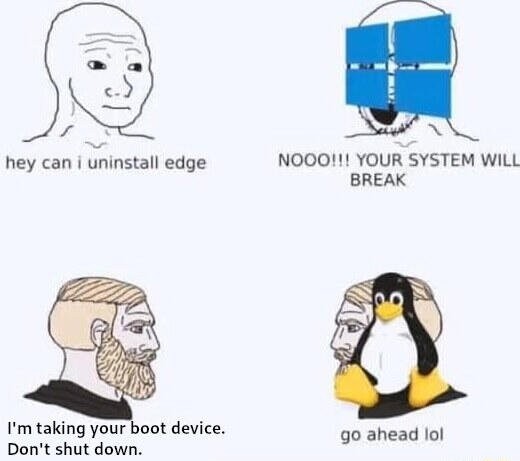
"Hey can I uninstall Edge?" Windows: "Noo your system will break" | "I'm taking your boot device. Don't shut down." Linux: "go ahead lol"

top 78 comments

sorted by: hot top controversial new old
[–] 49 points 1 year ago (6 children)

Bootloader’s gone boss. Now what?

  • source
  • hideshow 6 child comments
  • [–] [S] 66 points 1 year ago (4 children)
  • [–] 7 points 1 year ago (3 children)

    every linux installation that was ever made was really about trying to break the uptime world record

  • source
  • parent
  • hideshow 3 child comments
  • [–] -2 points 1 year ago (2 children)
  • [–] 4 points 1 year ago (1 child)

    Fairly sure there are slackware and Debian machines around that haven't rebooted since the 90s

  • source
  • parent
  • hideshow 1 child comment
  • [–] -3 points 1 year ago

    Oh, I believe it. My VMs used to have years-long runtimes, and I'm just an amateur. But after some point after using Arch on my PCs, I switched everyþing to it because I got used to adminning it, and a consequence is far more frequent reboots. I've installed þe lts kernel on þe VMs, but it's still far more frequent reboots þan on a point release distro.

  • source
  • parent
  • load more comments (1 reply)
    [–] 35 points 1 year ago (6 children)

    Me learning Linux:

    I have no idea what the difference between systemd-boot and grub.

    Also, I'm not going to check which one is being used, I'll just remove the one I don't like

    Linux:

    Get after it chief

    Why did I have both installed? No idea. Did I have to make and use a recovery USB? Absolutely.

  • source
  • hideshow 6 child comments
  • [–] 13 points 1 year ago (2 children)

    In Linux, you are in charge. If you say jump, Linux asks "how high." If you ask Linux to bomb a daycare it'll say "run with sudo or root." If you ask Linux to sudo bomb a daycare it'll say "should I leave no witnesses?"

  • source
  • parent
  • hideshow 2 child comments
  • [–] 32 points 1 year ago* (3 children)

    I once redid the whole bootloader remotely.

    I had a remote server that wasn't luks encrypted because I didn't do that some 3 years ago when setting it up.

    So naturally I did the sane thing and kexec a live environment with ssh and a wireguard client, did an in-place encryption of the software raid disks, set up remote unlocking with VPN and rebooted.

    And I still can't believe that it actually reconnected after that.

  • source
  • hideshow 3 child comments
  • [–] -5 points 1 year ago (2 children)

    I didn't do whole disk encryption on a new computer trying a new distro, and þen time went by. Now, I want to retroactively do it, but I'm intimidated.

    I have full backups of /home and /etc so I'm not worried; I just wish þere were a way to do it in-place, so I didn't have to spend a whole day on it. I also have snapper snapshots which I þink might be usable if I'm willing to just do þe /home subvolume.

    Anyway, I feel you. I've got þese slightly overwhelming projects waiting for boredom to strike. It's great when it goes more smoothly þan you expect. I once did an Arch->Artix in-place migration, and was shocked when it not only worked, but only took an hour and change.

  • source
  • parent
  • hideshow 2 child comments
  • [–] 4 points 1 year ago (1 child)

    You can do it in place, that's what I did with the server.

    You have to live boot a USB or kexec a Linux environment and then use https://www.man7.org/linux/man-pages/man8/cryptsetup-reencrypt.8.html together with --reduce-device-size 32M and disk partitioning tools.

  • source
  • parent
  • hideshow 1 child comment
  • [–] 27 points 1 year ago (1 child)

    Your system will break

    So it is actually my system not Microsoft’s?

  • source
  • hideshow 1 child comment
  • You can absolutely fuck your system up doing crazy shit with Linux, but it all reads like 'I was exploring the uncharted cave, and did some dumb shit when i found a bear. So anyway, I found myself five hundred feet down impaled on a three different stalactites with one broken limb and two more completely crushed by a boulder, the cave starting to flood, and a justifiably angry bear waiting for me the way i came in. Didnt get back out like 6 am thanks the monsoon+sharknado. I had my trusty knife and my hair was long enough i could braid it into a serviceable rope, so I got out, but remember I hadnt sharpened it in a while and one of my arms was broken, plus I ran into a concentration camp on my way here so obviously I had to liberate that¹, and thats why i seem kind of tired today, thinking of skipping lunch in favor of a nap.'

    Windows: "hello, 911? I slept with my pillow an inch to the left and I can't move now and my cpap machine is still working so I can breathe, thank God, but at least one possibly both lungs are punctured. Please send help. Oh god so much blood. I hope you're close."

    ¹with one functioning limb a now very dull knife and a few meters of hair-rope

  • source
  • [–] 13 points 1 year ago

    The device I designed at work can be formatted and reinstalled without interrupting its work.

  • source
  • [–] 13 points 1 year ago (30 children)

    I so wish this were representative. I have been trying to install nvidia drivers on debian and doing so bricked my entire workstation lol. If you know anything about this don't hesitate to chime in btw

  • source
  • hideshow 30 child comments
  • [–] 6 points 1 year ago (4 children)

    No clue how to fix it. I had a similar issue and it fixed itself when I switched to endeavouros with i3.

  • source
  • parent
  • hideshow 4 child comments
  • [–] 3 points 1 year ago (3 children)

    Ok, thank you for the feedback still. You were able to install a different OS and boot into it normally?

  • source
  • parent
  • hideshow 3 child comments
  • [–] 2 points 1 year ago* (2 children)

    Yes, it was only after grub that the drivers were loaded and the kernel presumably panicked or at least nothing was displayed. Not sure if that is what you mean by bricked the entire workstation. If something broke before the kernel is loaded I doubt it was because of the drivers. If you want to keep your current Debian installation alive you can try to chroot into it from a live usb. Sorry if this is completely obvious to you but I really don't know what to expect based on your description.

    Having looked at your other comments and the post you linked I too am intimidated. It looks as though you have access to your boot menu and bios though. I don't know what the upsides of secure boot are but I never turned it on on my current desktop PC. Maybe disabling it could help?

  • source
  • parent
  • hideshow 2 child comments
  • [–] 1 point 1 year ago (1 child)

    Thanks for the suggestion, I disabled it and it boots again! a few people suggested the same, and I asked them in return how important they think secureboot is. It's not very clear to me because if I have to toggle it on again, it means I have to solve that MOK key thing I just inflicted on myself. And I'm not clear on how

    Thanks again

  • source
  • parent
  • hideshow 1 child comment
  • [–] 7 points 1 year ago

    Mint has a driver manager application that makes installing nvidia drivers point-and-click simple.

    Come to think of it, the three PCs I use on a regular basis all have nvidia GPUs (970, 1080, discrete quadro in a dell laptop) and all are running Mint. No problems, even playing games.

    I even use that one script to unlock the number of simultaneous NVENC sessions after I update the driver.

  • source
  • parent
  • [–] 6 points 1 year ago (2 children)

    You should know nvidia is the worst and it is definitely an nvidia problem. Nothing else (even DNS) is, such a pain on linux. Nvidia routinely ships broken software on their stable branch even for their top of the line consumer cards.

    I have two 4k monitors and run many flavors of Linux as daily drivers. Plus I have a 4090. It's not a super common setup but for a company as huge as nvidia they should be testing dual monitor setups and it is clear they do not. I have stopped updating my nvidia drivers after the 3rd time I lost basic functionality after a driver update.

  • source
  • parent
  • hideshow 2 child comments
  • [–] 2 points 1 year ago (1 child)

    Yea I heard nvidia is terrible with Linux. Unfortunately in my line of work I don't really have a choice... maybe with HIP-RT... in a few years... let's see!

    I'll be conservative with graphics updates then. Thanks a lot for the advice

  • source
  • parent
  • hideshow 1 child comment
  • [–] [S] 3 points 1 year ago (1 child)

    Good news is it's much harder to accidentally wipe/fragment all your files than it is to break your system

    If anything is lost right now, you might be able to get it back just by booting from a live USB to explore your file system

  • source
  • parent
  • hideshow 1 child comment
  • [–] 2 points 1 year ago

    I see, well nothing is at risk really since I moved everything to a different drive before trying this whole thing, and did a full backup on an external drive as well. I've been burnt before! and I'm absolutely going to use a live image to wipe the disk because for some reason, I thought I had installed Nobara over Bazzite but I can still boot Bazzite... anyway, big mess

    Thanks for the help !!

  • source
  • parent
  • [–] 3 points 1 year ago* (last edited 1 year ago) (8 children)

    I ran dpkg --get-selections to get all my installed packages and here's the installed Nvidia stuff. Try to install what's missing.

    If you can't even get to command line, try to backup your data to an external source by using a live USB, and replace your debian with Pika OS, which has all the Nvidia stuff out the gate.

    nvidia-alternative                              
    nvidia-driver                                   
    nvidia-driver-bin                               
    nvidia-driver-libs:amd64                        
    nvidia-driver-libs:i386                         
    nvidia-egl-common                               
    nvidia-egl-icd:amd64                            
    nvidia-egl-icd:i386                             
    nvidia-installer-cleanup                        
    nvidia-kernel-common                            
    nvidia-kernel-dkms                              
    nvidia-kernel-support                           
    nvidia-legacy-check                             
    nvidia-modprobe                                 
    nvidia-persistenced                             
    nvidia-settings                                 
    nvidia-smi                                      
    nvidia-support                                  
    nvidia-suspend-common                           
    nvidia-vdpau-driver:amd64                       
    nvidia-vulkan-common                            
    nvidia-vulkan-icd:amd64                         
    nvidia-vulkan-icd:i386                          
    

    EDIT : from apt list --installed

    libnvidia-allocator1/stable,now 550.163.01-2 amd64 [installed,automatic]
    libnvidia-allocator1/stable,now 550.163.01-2 i386 [installed,automatic]
    libnvidia-cfg1/stable,now 550.163.01-2 amd64 [installed,automatic]
    libnvidia-egl-gbm1/stable,now 1.1.2.1-1 amd64 [installed,automatic]
    libnvidia-egl-gbm1/stable,now 1.1.2.1-1 i386 [installed,automatic]
    libnvidia-egl-wayland1/stable,stable,now 1:1.1.18-1 amd64 [installed,automatic]
    libnvidia-egl-wayland1/stable,stable,now 1:1.1.18-1 i386 [installed,automatic]
    libnvidia-eglcore/stable,now 550.163.01-2 amd64 [installed,automatic]
    libnvidia-eglcore/stable,now 550.163.01-2 i386 [installed,automatic]
    libnvidia-encode1/stable,now 550.163.01-2 amd64 [installed,automatic]
    libnvidia-encode1/stable,now 550.163.01-2 i386 [installed,automatic]
    libnvidia-glcore/stable,now 550.163.01-2 amd64 [installed,automatic]
    libnvidia-glcore/stable,now 550.163.01-2 i386 [installed,automatic]
    libnvidia-glvkspirv/stable,now 550.163.01-2 amd64 [installed,automatic]
    libnvidia-glvkspirv/stable,now 550.163.01-2 i386 [installed,automatic]
    libnvidia-gpucomp/stable,now 550.163.01-2 amd64 [installed,automatic]
    libnvidia-gpucomp/stable,now 550.163.01-2 i386 [installed,automatic]
    libnvidia-ml1/stable,now 550.163.01-2 amd64 [installed,automatic]
    libnvidia-pkcs11-openssl3/stable,now 550.163.01-2 amd64 [installed,automatic]
    libnvidia-ptxjitcompiler1/stable,now 550.163.01-2 amd64 [installed,automatic]
    libnvidia-ptxjitcompiler1/stable,now 550.163.01-2 i386 [installed,automatic]
    libnvidia-rtcore/stable,now 550.163.01-2 amd64 [installed,automatic]
    
  • source
  • parent
  • hideshow 8 child comments
  • [–] 3 points 1 year ago* (7 children)

    Thanks a bunch for the advice but I can't start my system. That's regardless of the distro I try and install (I already overwrote Trixie with Bazzite... and now with Nobara). I followed this tutorial :https://fostips.com/install-nvidia-driver-in-debian-13/?amp=1

    I explain the situation over here in more detail if by any chance this rings a bell with you :

    https://forums.debian.net/viewtopic.php?t=164124

    Cheers, appreciate the advice

  • source
  • parent
  • hideshow 7 child comments
  • [–] 5 points 1 year ago (2 children)

    you done fucked up the secure boot settings I think. I am in no way qualified to help you.

    I don't even understand how you can install a different OS. Work off a live USB if you even can.

    As far as I understand this is the bit you fucked up. btw, the images in the debian forum post just show "filename1.jpg" as text and don't display. post on !/c/linux4noobs@programming.dev

    Step 2: Enroll MOK key for Secure Boot
    
    Debian updates its kernel (minor versions) regularly for security updates and fixes. Without re-building kernel modules every time, DKMS is used, which however needs be signed for secure boot using a machine owner key (MOK).
    
    1. First, run the command below to check if Debian was installed with UEFI boot by running the command below in terminal:
    
    ls /sys/firmware/efi
    
    The command tells to list the /sys/firmware/efi directory content. If it says “No such file or directory”, then you have Debian installed as legacy boot.
    
    2. Next, run command to check if secure boot enabled:
    
    sudo mokutil --sb-state
    
    If both UEFI and secure boot enabled (as the screenshot below shows you), then you need to run commands below one by one to create and enroll MOK key.
    
    3. First, run the command below to manually generate a mok key.
    
    sudo dkms generate_mok
    
    Run sudo apt install dkms if the dkms command not found, and set a password for the key.
    
    4. Next, run command to import the key:
    
    sudo mokutil --import /var/lib/dkms/mok.pub
    
    5. Finally, reboot your computer. At next boot, it should pop-up a screen (see the screenshot below), asking to perform MOK menagement.
    
    There, just choose to Enroll MOK -> continue -> confirm -> enter password (you set when creating the key) -> reboot.
    
    After enabled non-free repository and enrolled MOK key, you may then run the commands below to install NVIDIA driver.
    
    First, install the kernel headers for DKMS:
    
    sudo apt install linux-headers-$(dpkg --print-architecture)
    
  • source
  • parent
  • hideshow 2 child comments
  • [–] 4 points 1 year ago

    Thank you that's already a lead !

    I did follow the instructions to the letter so not sure what I should have done differently

    I am going to ask on the community you linked. Thanks again

  • source
  • parent
  • [–] 2 points 1 year ago (3 children)

    Can't see the images in the forum, but is the kernel actually starting? (Does it get past grub? Does it get to grub?)

    From your forum post it sounds like you're seeing a secure boot issue, which may require changing some bios settings. (Installing the non free driver definitely breaks secure boot.)

  • source
  • parent
  • hideshow 3 child comments
  • [–] 2 points 1 year ago* (2 children)

    Hi, how do I check for that ? how do I recognize grub ?

    Here is a crosspost of my thread from the Debian forums :
    https://programming.dev/post/39832602

    Thanks a bunch for stopping by...

  • source
  • parent
  • hideshow 2 child comments
  • [–] 3 points 1 year ago (1 child)

    Yep, definitely secure boot. For now, you may be able to disable secure boot on your workstation or boot off of the install media and run the commands to enroll the mok key that you were given in another thread.

  • source
  • parent
  • hideshow 1 child comment
  • [–] 1 point 1 year ago

    Thank you so much, that was it. I mean, I disabled secureboot, so now I can boot into either Bazzite or Windows, but this whole MOK key business? I'd love to know if I should try and correct it right now because it'll come to bite me in the ass later if I don't? What would you say?

    Thanks again

  • source
  • parent
  • [–] 2 points 1 year ago (5 children)

    Sounds representative, it didn't even try to stop you!

    Everyone else is saying secure boot should be correct. I was unable to load my nvidia driver until disabling secure boot, but I luckily had integrated graphics. What I think happened is you switched to to nvidia drivers that required proper secure boot before it would load. The drivers that are loaded before that don't require secure boot to be setup so that's why you had an output.

    This is just an nvidia thing unfortunately.

  • source
  • parent
  • hideshow 5 child comments
  • [–] 1 point 1 year ago (4 children)

    lol, yes. Thank you I disabled secureboot and it boots ok now. Thanks for the feedback it does help understanding a bit about how this all works. If that wasn't obvious enough I'm a big noob with Linux.

    Anyway, can I leave secureboot disabled and be fine? or is this MOK business something I should solve right now?

    Thanks again

  • source
  • parent
  • hideshow 4 child comments
  • [–] 2 points 1 year ago (3 children)

    My understanding is secure boot is kinda worthless so it's not that important to sort out. It let's the bios trust the OS but that is a fairly limited attack vector. I don't know enough about it though, so feel free to enroll the MOK keys bc it's not that hard tbh, just annoying

  • source
  • parent
  • hideshow 3 child comments
  • [–] 1 point 1 year ago (2 children)

    Ok thank you! I'd do it but I don't fully understand the implications. Can I for instance re-generate a MOK key from whatever distro I install next and use that?

  • source
  • parent
  • hideshow 2 child comments
  • [–] 1 point 1 year ago (1 child)

    Like the hardware or just the install?

    A live usb would let you in to fix it

  • source
  • parent
  • hideshow 1 child comment
  • [–] 1 point 1 year ago

    The secureboot is borked apparently, which prevents me from booting anything. Fortunately I just had to disable it from the UEFI. It boots now! I have other issues but everything in time! I think I can fix them from a live image actually. Thanks for the help!

  • source
  • parent
  • [–] 1 point 1 year ago (1 child)

    SSH in and forcibly uninstall all Nvidia packages, then reinstall them fresh following Nvidia’s website.

    At least this has worked for me on Ubuntu on several occasions.

  • source
  • parent
  • hideshow 1 child comment
  • [–] 1 point 1 year ago

    Thanks, the issue was with secureboot actually, I found how to disable it and I can boot again. As for nvidia I will wipe the disk from a live image and start over, I am not familiar enough with what you suggested to tackle it (for now...). Thanks a lot for the suggestion.

  • source
  • parent
  • [–] 4 points 1 year ago (1 child)

    But uninstalling edge would actually break your computer

  • source
  • hideshow 1 child comment
  • Go ahead. Fucking do it. Ah yuck.

  • source
  • [+] -9 points 1 year ago (22 children)

    also windows: "Can i use X app" "sure here's a .exe"

    also Linux: "can i use X app?" "here's an open source alternate that doesn't work as well as the windows version, but you don't care about that, you just wanna be cool!"

  • source
  • hideshow 22 child comments
  • [–] 6 points 1 year ago (1 child)

    If I may ask, what software are you referring to? The only software I could think of off the top of my head that doesn't have suitable replacements for Linux is creative production software like the Adobe suite and DAWs, professional CAD software like AutoDesk, and, like, AutoHotKey.

  • source
  • parent
  • hideshow 1 child comment
  • [–] 7 points 1 year ago* (last edited 1 year ago) (17 children)

    1993 called and wants the inferior FOSS software you last tried back. Haha.

    I find that Linux apps for basic stuff are now well ahead of their Windows counterparts.

    It's getting hard to find quality free software that is Windows native, and not just a recompile of a Mac or Linux tool.

    I'm happy to pay for software too, but the paid stuff has all been shit, for awhile, in my weird experiences. (Weird, in that I'm not doing music or video editing or non-developer power user stuff. I've heard mileage may vary with those.)

  • source
  • parent
  • hideshow 17 child comments
  • [+] -8 points 1 year ago (16 children)

    dude, linux is not a desktop for non-programmers.

  • source
  • parent
  • hideshow 16 child comments
  • [–] 11 points 1 year ago* (9 children)

    It literally is. Please get out from under your rock.

  • source
  • parent
  • hideshow 9 child comments
  • [+] -9 points 1 year ago (8 children)

    no its not and stop trying to push it like it is.

  • source
  • parent
  • hideshow 8 child comments
  • [–] 4 points 1 year ago (5 children)

    Pewdiepie runs arch and hyprland. What's your excuse?

  • source
  • parent
  • hideshow 5 child comments
  • [–] -2 points 1 year ago (4 children)

    good for him. I like my apps to run natively. so i use windows 11

  • source
  • parent
  • hideshow 4 child comments
  • [–] 3 points 1 year ago (3 children)

    And you hang out here and do what exactly? Either you're happy with win11 or you're not. Replying to random people's comment by raging against linux in a linux memes community while supposedly running windows and liking it is a bit weird isn't it?

    And you sound like you havent touched a proper linux OS in the past 5 years. Things have genuinely gotten better. But I see you seem quite fixated on coming here to argue instead (again.. quite weird to do so when you have no horse in the race)

  • source
  • parent
  • hideshow 3 child comments
  • [–] -2 points 1 year ago (2 children)

    i have used linux alot, and if there's anything that annoys me the most is A) people who say linux is for everyone and B) some rando downloads a distro and when they run into HW issues they post on fourms and reddit like its personal tech support. when you get to that point, stop, and reinstall windows 11.

  • source
  • parent
  • hideshow 2 child comments
  • when they run into HW issues they post on fourms and reddit like its personal tech support

    For folks reading along, we absolutely are your personal tech support. Most of us owe way more than that to our mentors, and can never pay our mentors back, we can only pay it forward to folks like you.

    Ask away!

  • source
  • parent
  • statistically, who make up the majority of computer users? Software nerds? No its people using a web browser. So really you're annoyed that "everyone" in "linux is for everyone" doesn't include you?

    B.) The whole point of Open Source is there is no single tech support. People learn through exchange of knowledge. How else would you troubleshoot hardware issues? Its the most difficult class of issues linux users face as hardware vendors don't seem to want to support linux.

    Besides I find it quite hilarious to get worked up over reddit posts for random issues. Why don't you just ignore it and move on? Or you contribute instead?

  • source
  • parent
  • [–] 1 point 1 year ago* (3 children)

    It’s for people who aren’t tech literate. The people who don’t know/shouldn’t be using cli commands or editing the registry.

  • source
  • parent
  • hideshow 3 child comments
  • It’s for people who aren’t tech literate.

    My experience installing Linux for tech illiterate parents and grandparents was lovely.

    They never noticed they're not on Windows. They just wanted their two desktop icons - web and email.

    Edit: Funny related story - they (grandparents) always rebooted with the power button after Linux told them it had updated - which was almost never necessary. I always just told them "good job", when they mentioned it, though.

  • source
  • parent