I wish there was an option to always see upvotes and downvotes separately
Feature request
(feddit.online)
EDIT: Ignore this. It works on PyLova, but not vanilla PieFed. I see PyLova has this feature as an optional setting anyway: Settings > Look & Feel > Vote display > Separated
Funny enough, I had just started making a userscript to do this. Running this JavaScript on a page displays all the votes separated:
document.querySelectorAll(".score").forEach(score => {
  //get individual upvote/downvote values
  let voteString = score.getAttribute("data-bs-original-title");
  let upString = voteString.split(", ")[0];
  let downString = voteString.split(", ")[1];
  //reformat vote string
  voteString = `+${upString} | -${downString}`;
  //replace combined vote string
  score.innerText = voteString;
});
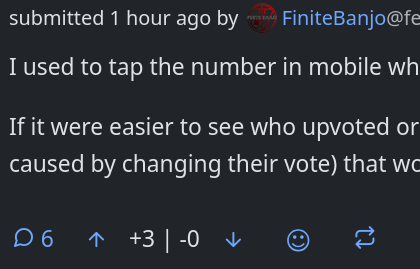
I can't seem to get this to work reliably as a userscript. If anyone is experienced with making userscripts and can help fix this, I would appreciate it:
// ==UserScript==
// @name        PieFed vote split
// @namespace   Violentmonkey Scripts
// @match       *://quokk.au/*
// @grant       none
// @version     1.0
// @author      -
// @description 9/23/2026, 1:43:00 AM
// ==/UserScript==

//displays both upvotes/downvotes separately
(function () {
  window.addEventListener('load', function () {
    document.querySelectorAll(".score").forEach(score => {
      //get individual upvote/downvote values
      let voteString = score.getAttribute("data-bs-original-title");
      let upString = voteString.split(", ")[0];
      let downString = voteString.split(", ")[1];
      //reformat vote string
      voteString = `+${upString} | -${downString}`;
      //replace combined vote string
      score.innerText = voteString;
    });
  });
})();