[–] 12 points 4 months ago* (last edited 4 months ago) (1 child)

There is a trick I learned from Firebelley Games (a youtube channel) that is just as simple to spin up and use as the Enum + match strategy but without sacrificing any versatility.

I actually like it better than the Node-based pattern because you don't have to set up much boilerplate, and you really don't need to think about how different state classes might share data. Plus, none of it will clog up your scene tree or need to be pointlessly instantiated by the engine.

Tap for code

If you're on mobile, I would recommend reading this in horizontal view.

This is all it takes to spin one up:

class_name Player2D extends Node2D

var _state_machine := CallableStateMachine.new();

func _ready() -> void:
  _state_machine.add_state(
    _state_idle_update,
    Callable(),
    Callable()
  );
  _state_machine.add_state(
    _state_jump_update,
    _state_jump_enter,
    Callable()
  );
  # Set first state
  _state_machine.switch_to(_state_idle_update);

func _process(_delta: float) -> void:
  _state_machine.update();

# These are your state functions.
func _state_idle_update() -> void;
func _state_jump_update() -> void;
func _state_jump_enter() -> void;

The only thing your state machine actually needs to know is which functions are paired together. You can use Callable() to fill in any steps you're not actually using.

func _ready() -> void:
  _state_machine.add_state(
    _state_idle_update, # update
    _state_idle_enter,  # enter
    Callable(),         # exit
  );

You call update() yourself, so its timing is completely under your control.

func _process(delta: float) -> void:
  velocity.y += 9.8 * delta;
  _state_machine.update();
  move_and_slide();

States are keyed by their own update step, so there's no extra overhead for string names or Enums or the like, and you still get your IDE's tab autocomplete to help you with 'em.

func _state_idle_update() -> void:
  if Input.is_action_pressed('jump'):
    _state_machine.switch_to(_state_jump_update);

All state functions exist within the Player2D script, so you have complete access to any shared data or component that Player2D does.

var _anim: AnimatedSprite2D = $An...;
var _jump_times := 0;

func _state_idle_enter() -> void:
  _anim.play('idle');
  _jump_times = 0;

func _state_jump_enter() -> void:
  _anim.play('jump');
  _jump_times += 1;

A basic implementation of CallableStateMachine is none too complicated, and you can reuse it anywhere.

class_name CallableStateMachine extends RefCounted

var _states_map := {} as Dictionary[Callable, CallableState];
var _current_state: CallableState = null;

func add_state(update: Callable, enter: Callable, exit: Callable) -> void:
  _states_map.set(update, CallableState.new(update, enter, exit));

func switch_to(update: Callable) -> void:
  if not _states_map.has(update):
    return;
  exit();
  _current_state = _states_map.get(update);
  enter();

func update() -> void:
  if _current_state:
    _current_state.update.call();

func enter() -> void:
  if _current_state:
    _current_state.enter.call();

func exit() -> void:
  if _current_state:
    _current_state.exit.call();

# This is just a struct to package the set of functions.
class CallableState extends RefCounted:
  var update: Callable;
  var enter: Callable;
  var exit: Callable;
  func _init(update: Callable, enter: Callable, exit: Callable) -> void:
    self.update = update;
    self.enter = enter;
    self.exit = exit;

You can do a lot from this base setup, too. I have mine setup such that if I name my functions like this:

func _state_idle() -> void;
func _state_idle__update(delta: float) -> void;
func _state_idle__unhandled_input(event: InputEvent) -> void;
func _state_idle__exit() -> void;

My state machine automatically knows which step each function is for by the keyword after the double-unders (e.g. '__update'), as well as that the nameless _state_idle() is the enter step and the key that I use to switch_to().
  • source
  • [–] 5 points 4 months ago* (last edited 4 months ago)

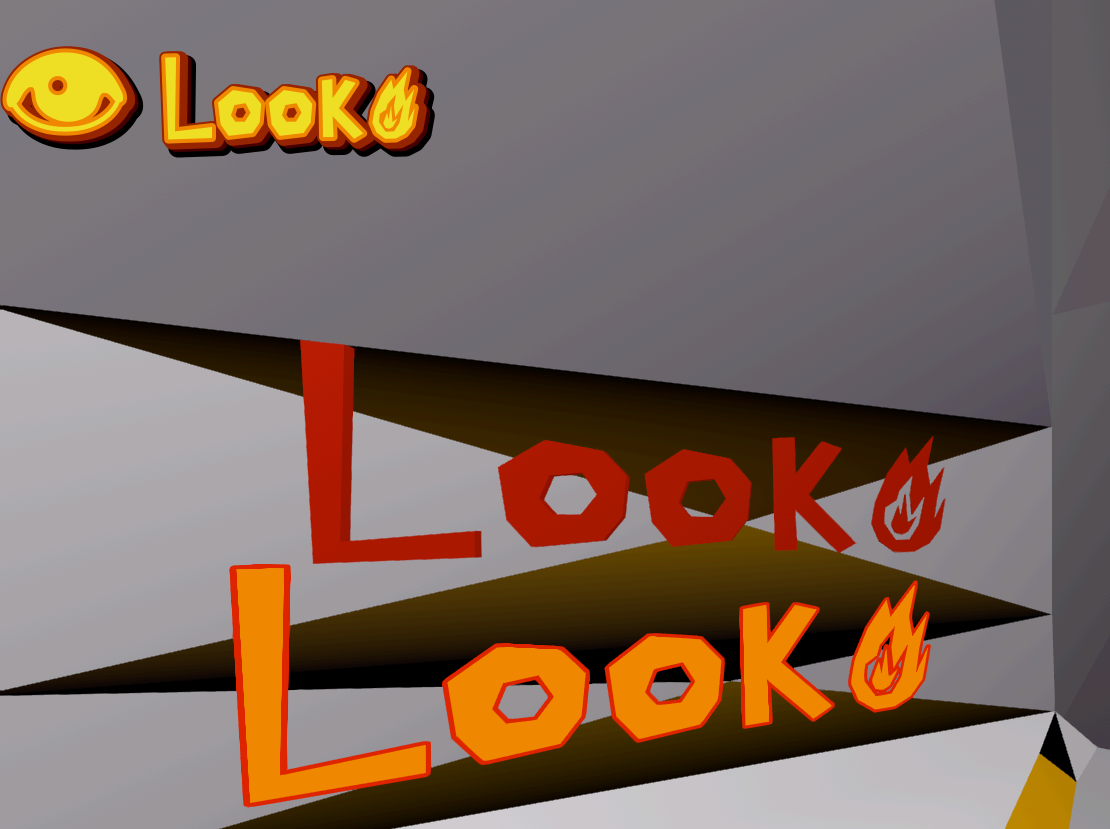
    Not-an-anything but tinkered with custom fonts a bit. I didn't have any issue replacing a couple of (grayscale) glyphs (fire / U+1F525, and upwards arrow / U+2191 ). So I wonder if it's something else for you.

    I did have an issue with double glyphs (and this gave an error too) but it was at higher ranges (with eye / U+1F441) and not even with a custom glyph.

    I don't know if it makes a difference, but the fallback font I made with FontForge. Also I did a few normal letters, too:

    Low-poly, freeform text in 3 forms: 2D, Textmesh, and label3D. They each say "Look" with a single-color fire icon, though the label3D has an outline and the 2D text has stacked outlines/shadows which add color (also, a default eye emoji on the 2D text).

    Also (not shown), I made a color override script (e.g. turn the upwards arrow green) but that only works for 2D text (uses RichTextEffects, a bit clunky IMO). That, and also color emojis are a bit wonky too, only 2D and outlines a bit off but that may be a font issue.

    EDIT: Technically it wasn't a fallback font because the letters are part of it. But I just tested it as one (with Cantarell as the SystemFont) and the fire glyph still works. Tried with your listed font too (FontVariation, though), so it must be an export or import issue with your glyphs (or some other setting issue).

  • source
  • [–] 8 points 4 months ago

    You were practically unable to move/rotate/scale control nodes inside of containers, and when you tried the containers would often override it and cause weird behavior. This made animating or moving control nodes in general super finicky and messy.

    Transform offsets let you offset the control node and move it around without actually affecting the normal transform, allowing you to do cool effects and animations regardless of whether it's a container or not. It's also something you can easily reset or enable/disable so you can just play the animation and move the offsets back to zero, rather than having to keep track of where the node is actually supposed to be.

  • source
  • parent
  • context
  • [–] 5 points 4 months ago

    If you have a dynamic container, it is sized based on its contents and everything inside of it is positioned based on everything else. If you move something, that impacts everything around it, including the container itself. There are workarounds like having an invisible placeholder and a separate graphical element, but they aren't user-friendly.

    Offset transforms allow you to leave the logical version of a thing in place while moving the visual. The demo in the release notes has a grid of icons which get bigger and move when you mouse over them, which would have reflowed the other icons or resized the box before.

  • source
  • parent
  • context
  • [–] 21 points 4 months ago (3 children)

    Control node offset transforms is finally in, I almost shed a tear reading this. I've been following the PR for the longest time and even upgraded some projects to 4.7 beta specifically to make animating UI not a pain in the ass. Now it's finally in stable. THE WAIT FOR GODOT IS FINALLY OVER.

  • source
  • [–] 5 points 5 months ago*

    ?utm_source=chatgpt.com on "W4 Games" link. Did they summarize or generate through chatgpt and copied from chatgpt? It certainly doesn't seem like deliberately designed link handling.

    Linksource tracking/marketing chatgptcom doesn't make sense to me on other websites. But it's interesting that it effectively produces distributed chatgpt-source links.

  • source
  • [–] 1 point 5 months ago (2 children)

    I am someone who uses my phone in desktop mode (windowed apps, etc) with a portable monitor, bluetooth keyboard/mouse setup.

    I figure most people doing Godot development on phone were using an external screen too.

  • source
  • parent
  • context
  • [–] [S] 2 points 5 months ago (1 child)

    Thank you!

    Looking in to both, but I think I might still have a problem with either approach since it will see all of the pixels and not just those of my TileMapLayer. I don't want to detect white/black pixels from anywhere else on screen.

  • source
  • parent
  • context
  • [–] 9 points 5 months ago (2 children)

    To do what you are trying to do, you need the TileMapLayer to already be rendered before the shader runs. That's called a post processing effect. There are two routes, the easy and the hard way:

    Easy: Put an object in front of the camera, covering the whole view. Put your screen-reading shader on it. It needs to be sorted on top of the things you want it to shade. This is conceptually similar to what you tried with 2b, but what matters is the sort order on screen, not the node structure.

    Hard but better: Compositor effects. These are true post processing shaders that can be ran at various points in the rendering process. They require a bunch of boilerplate gdscript to run and use a slightly different shader language, but they are the proper method of doing post-fx. I don't know if they work in 2D, however.

  • source
  • [–] 1 point 5 months ago

    At a high level, there's two main ways to handle increasing/decreasing scores: event-focused or state-focused.

    For event-focused, you basically have different events that can affect the score. Adding clothing with trigger an event that adds score if it's a good placement or reduces if it's bad, and then vice versa for removing clothes. You can have other modifiers like maybe the first time something is worn, extra points are awarded or maybe preferences are modified.

    For state-focused scoring, you'll pretty much recalculate the score from 0 each update. Clothes being worn get added to the score and clothes not worn don't affect it. This one has less flexibility but is more likely to end up with a coherent score because it's being recalculated from scratch each time (so any bugs will be easier to reproduce).

  • source
  • [–] 2 points 5 months ago

    @vv0ltz @godot I haven't taken the time to disect your code (use comments where neccessary and try to make one function do one thing, your future self will thank you) and I don't know the rest of your project. I've still come up with a solution for scores that dampens the impact of forgetting to decrement it.

  • source
  • [–] 7 points 5 months ago* (last edited 5 months ago)

    I've only just started with Godot so I can't give you anything Godot-specific, but it sounds like you're asking for the logic to link things together. I'll make some recommendations here but you'll definitely have to adapt it to work for you. There's a few different ways to do this and it depends on exactly how you want your system to work. From what you've said it seems like you have (or want) two classes, a PointManager and an EquipableItem (or whatever you've called the class in your pastebin).

    What do you mean by groups here? You've identified global groups as a potential approach and that does seem to be a reasonable approach to access your EquipableItems from your PointManager, but I'm not sure that's what you're actually asking about. You'd have to set up a group for each category of item and add your items to the appropriate groups as they spawn, that seems a bit excessive.

    The first approach to grouping objects I'd use would be with enums, this gives you fixed pre-defined categories so is useful for assigning an equip slot to each item, for instance.

    /// Set up enum
    enum ItemSlot {
        HEAD,
        TORSO,
        LEG,
        // ...
    }
    
    // Assign slot to item
    @export var slot = ItemSlot.HEAD;
    

    You can then verify this at two points: when you try to equip a new item you can verify that that slot isn't already used, and when you count points you can make sure you only count each slot once. If you want to put an item in multiple slots (eg a dress is torso+leg) you can look into bitwise enums and bitwise logic, but that's a little more advanced so I'd recommend getting the groundwork in first.

    The second approach I'd use is a tags system, this is more flexible and can be be used for categorising outfits into as many categories as you want. The simplest way to do this is just an array of string IDs or ints, but this is more prone to user error since you can typo the string or enter the wrong number. On the plus side there's no central enum so you can add new categories whenever you want, even creating a custom category at runtime if you need to.

    @export var categories = ["Outfit.Clown", "Color.Yellow", "Type.Fun"] // Any arbitrary tags can be added
    

    My first approach here is just to fire an event to make your PointManager recalculate. Ideally your manager would be doing all of the calculation and the equipped items wouldn't hold any of that logic, but you would need a function on the items themselves to they can check if they can be counted (ie in the correct position). I believe in Godot that would be using the Signals system, full tutorial in the docs here. Event-driven programming is incredibly useful for game dev, even if you decide not to use this approach here I'd still recommend trying to get the hang of it.

    Your drag function is doing a lot so it does need split up and simplified a bit, but for our purposes it'll be enough to combine the two elif branches since they're doing the same thing, that lets us fire the event in one place for both successful and unsuccessful drag so we can recalculate the score. You'll end up with something along these lines:

    /* EquipableItem */
    signal on_equipment_updated;
    
    func _on_area_2d_input_event(_viewport: Node, event: InputEvent, _shape_idx: int) -> void:
       if event is InputEventMouseButton:
          if event.pressed:
             // [..]
             pass
          else:
             if positionIsPerfect: // add position check here
                position = perfect_position
             dragging = false
             audio_stream_player.pitch_scale =0.5
             audio_stream_player.play()
             
             // Fire the event
             on_equipment_updated.emit() // We can optionally pass this item to the event too if needed
    
    // Might need an export or something to be accessible to point manager?
    func is_scoring():
       // Check position or any other issues here, return true to score this item
       return position == perfect_position;
    
    /* PointManager */
    var score = 0;
    
    func _on_equipment_updated():
       // Reset score
       score = 0;
    
       // Get equipment (assuming using groups), might need a bit more to access the item script?
       var items = get_tree().get_nodes_in_group("equipped_items")
       
       // Count scoring objects
       for item in items:
          if !item.is_scoring():
             continue;
          // This is also where you'll check tags/categories/etc for bonus points or preventing duplicates
          score += 1;
    

    The major benefit to using events here is that it almost completely decouples your scoring system from your items, your items shouldn't need to reference your scoring system at all but they'll still be counted as needed. You can swap in different items without touching the point manager, and you can write a completely new point manager without having to update anything on the items. There's exceptions for everything, but as a general rule of thumb the more tightly coupled your code is the harder it is to maintain.

    This depends on exactly how you want the items to score together, but we can handle that with the tags we set up before. Let's say for instance we're only scoring items with a specific category, we can simply check if the item has that specific tag before we score it.

    /* PointManager */
    @export var scoring_category = "Outfit.Casual"
    
    func _on_equipment_updated():
       // [...]
       for item in items:
          if !item.is_scoring():
             continue;
          if !item.categories.has(scoring_category):
             continue;
          score += 1;
    

    Or we could use the same idea to, for instance, only score whatever outfit category appears the most

    /* PointManager */
    func _on_equipment_updated():
       // [...]
       var scored_categories = {}
       for item in items:
          if !item.is_scoring():
             continue;
          for cat in item.categories:
             if cat.beings_with("Outfit."):
                scored_categories[cat] = (scored_categories[cat] or 0) + 1
       // Use best outfit score
       score = scored_categories.values().max()
    

    Obviously this is all very rough but it should at least give you somewhere to start with your logic.

  • source
  • [–] -1 points 5 months ago (1 child)

    Stop Killing Games is an example of customers pushing back against (uncute) game-devs taking advantage of them. The devs justify their actions as just earning a living.

    Godot gives devs the choice to free their games' code but Xbox forces devs to make it proprietary - to have unjust power over their users.

    You do you but I feel blessed to game-dev without the pressure of those bad incentives.

  • source
  • parent
  • context
  • view more: ‹ prev next ›