1


Hello, everyone! This is the second part of our tutorial on creating a sky shader in Godot 4. So far, we've created the daytime half of the effect, and in this episode, we'll tackle the nighttime version.

2


@godot Free Godot 4 UI sound starter: 20 UI sounds plus a drop-in script and a playable demo. Commercial use OK (CC BY 4.0). Audio is procedural DSP synthesis; scripts and text are AI-assisted. bigshadex.itch.io/pulselite-ui What UI sound is always missing from packs?

3
4
5


Option 1:

func set_default_value(section:String,key:String,value:Variant)->Variant:  
	if !self.has_section_key(section,key):  
		self.set_value(section,key,value)  
	return self.get_value(section,key)  

Option 2:

func set_default_value(section:String,key:String,value:Variant)->Variant:  
	value=self.get_value(section,key,value)  
	self.set_value(section,key,value)  
	return value  
6
7


Hello, everyone! Are you working on a 3D game in the Godot engine and would like to simulate day and night based on the current time? This sky shader might be just what you need for your project. Let’s take a look at how it works and how to program it.

8


I'm working on this template for some time. This is what I use to quickly start a game prototype and explore an idea. After this is ready I can polish this better and make it the next step in this. Right now I'm discussing the Logger class that I use across my prototypes.

Keep in mind, all code is AGPL, so if you copy this code your codebase will be AGPL.

All feedback is welcomed.

9


Hello, everyone! In this video, we'll create a cracked screen or shattered glass effect through which we can observe the game scene. We'll combine several programming techniques we've used in previous tutorials, and the result will definitely be worth it.

10
 
 
11
12


I have always wanted to create a game and finally did. After almost 2 years of solo development, spending nights and weekends learning the godot game engine, the demo releases next week. Still got a ways to go but its an exiting milestone.

https://store.steampowered.com/app/4711950/Robits_Quantum_Descent/

13


Uhh yeah I think this might actually work. I'm using 2dog (for which I built a zero-copy GPU context to embed in other applications) and since it's 2dog.editor I have editor tools.

https://youtu.be/agaBILUUAis

(this is definitely earliest prototype jank but wow I am excited at how good this actually works... Java Swing window layouts are my nemesis, though...)

14


Hewwo, fellow Gamedevs!

While listening to the stupidly hard drum and bass by Rat Syndicate, my inner cozy fluffy being came out and this is a small celebration for Fall.

Here it is (youtube.com)

tweens.gd is a free, libre, and open source tweening addon for Godot 4.7 and up. Looking for beta testers and early adopters :3

15


Why don't all games do this? it would make loading so much faster!

Link to the original post on Reddit.

16


Hello, everyone! Let's create a simple shader that distorts an image into a spiral, simulating flying through some kind of abstract tunnel. It's a very simple piece of code, which I will now explain in detail.

17


I got the idea for this some time last week, I think. Pretty good, but it doesn't yet work on everything, such as ShaderMaterials.

18
Building the pond (atsaturn-dev.github.io)
19


Found this post on Reddit, decided to cross-post:

Found a paper on Weighted Blended Order-Independent Transparency https://www.jcgt.org/published/0002/02/09/ posted in 2013.

Turned out it was the key to 3D translucent billboard clouds where the order doesn't flip-flop. Think it turned out pretty cool!

Link to the original post.

20


Hopefully this is the last time I have to implement the backend for this - I'm going to reuse the code for this from now on. (The display, however, could definitely use some work.)

You don't have to go through the same ordeal. Get the source code from my Codeberg repo - it's MIT licensed and GenAI-free.

You can also follow the plugin development on my:
Mastodon
Bluesky
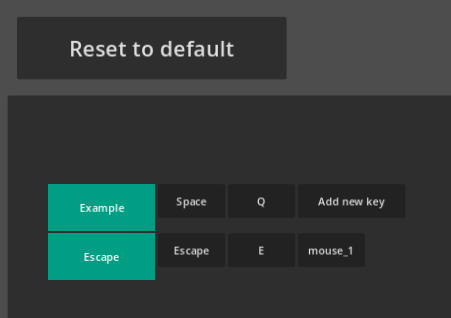
A screenshot of the keybinds list UI, featuring a "Reset to default" button and a table of inputs, each row containing an action name, a list of input buttons, and an option to add a new input button.
21


I had this idea lying around in pieces for a while, a much, much tighter and more flexible tweening API for Godot.

What inspired was this repo (unity-tweens) by Jeffrey Lanters, I used it a few times for Unity and after an upgrade, the API got super weird. All the fluent stuff was gone...

... until I realized it was so, so, so much better this way. ♥️

Well, Godot is full of fluent API for tweens, and I always found it bewildering and a bit clunky to use; even though Godot is my absolute favourite game engine right now.

Long (very looooong, tweens.gd users will get the joke later) story short - tweens.gd became a bit of a monster project, not gonna lie. Godot has, surprise!, a boatload of nodes, each with boatloads of properties.

... here it is. Still a little rough around the edges (generated docs at the end are dense, and the Godot in-engine samples are still very much WIP).

This has been a really fun practice effort to make a 'nice' asset/plugin for the Godot Asset Store. I want to keep maintaining it, of course (I run a small org on github called ⤜outfox⤏, making tools and libraries for fun rather than profit.

https://store.godotengine.org/asset/outfox/tweens/

Call to action - I would absolutely love for some indie devs to try it out and let me know what you think.

  • does the API make sense? (both C# and GDScript ... I know I'm getting kind of cute with a few of the concepts to eke out more legibility and less verbosity)

  • is the performance and stability okay? (I have a super basic benchmark that says it's doing okay, comparable to the built-in Godot Tween class.)

  • what's missing? what's needed from your end?

Cheers, and thanks in advance. I'll be here in the thread to answer questions.

22


Hello, everyone! It's time for another simple tutorial that could find its use in a 2D game. We've covered something similar here before, but in a much more simplified form. This time, we'll be shaking an image or the screen using a slightly more sophisticated algorithm. So let's program it.

23


https://youtu.be/hPN2TpN3FSs

I've been working on CSG Blockout, a Godot plugin for blocking out levels with Godot's built-in CSG nodes. Version 3.0 is out today. It's the first version I'd call a level prototyping tool rather than a shape helper. It's free and MIT licensed.

What it does

  • Build. Drag on any surface to draw a box or a whole room, click a wall to cut a door or a window, push faces with arrows, type exact sizes.
  • Measure. A player reference shows your character's height, jump height and sprint-jump arc. Select two platforms to check whether the gap is jumpable, or run a level check that flags slopes too steep to walk and ceilings too low to stand under.
  • Play. Play From Here drops a first-person test character where you're looking. It jumps exactly as high and as far as your player metrics say, the same numbers the checks use, so when the jump check says a gap is jumpable, the character can actually make it.
  • Freeze. A finished room becomes a plain mesh with collision, and Unfreeze gives you the exact CSG back. When the level moves on, you can export to a MeshLibrary for GridMap, or send it to Blender as .glb and swap the refined mesh back in.

It's just Godot nodes

Every shape you draw is a stock CSGBox3D, CSGCylinder3D and so on. There's no level format of its own and no hidden data. Disable the plugin and your scenes open and run exactly as before.

If you delete it entirely, here's what changes: stairs are a CSGPolygon3D underneath and keep their shape; frozen blockout stays a regular MeshInstance3D with collision, you just can't unfreeze it; the grid materials live in the addon folder, so copy them out first; and bake any Repeater/Spreader before you go.

"Isn't CSG slow?"

It can be, so I measured it. Godot only rebuilds the CSG tree you change. With one tree per room, moving a wall takes about 2 ms no matter how big the level is; with 400 primitives in a single tree, it's about 30 ms. In a running game, live CSG costs nothing per frame, but it has to compute everything while the scene loads: on my machine a 400-primitive level started in 166 ms live and 38 ms frozen. Freezing it takes under 0.1 s, and exports strip the stored CSG. The benchmark is in the repo if you want to run it on your own hardware.

What it isn't

It's not a brush editor: there's no vertex editing and no per-face UVs. If that's what you need, Cyclops Level Builder or TrenchBroom with func_godot are good choices. CSG Blockout is for the step before that: getting the layout right and knowing it plays.

Godot 4.6+. Interface in 7 languages.

It started as a rewrite of LuckyTepot's CSG Toolkit. I'd love to hear what's missing from your blockout workflow, and bug reports are very welcome.

24
25


The closest tag on the official forums is "networking" which I don't think is relevant. I'm talking Paid, Unpaid, on Contract, Part Time, Full Time, the works.

view more: next ›