1
submitted 1 week ago by [A] to c/pylova


image

PyLova (Python+Pavlova) is a soft fork of PieFed, aimed at improving the user experience through UI overhauls, empowering users and admins with agency, improved administration and moderation functions, and general bug fixing.

New in V0.5.0

New & Improved

  • Shareable Blocklists: Users can create, maintain, and share block lists of users, communities, instances, or domains. Users can be hidden completely or muffled.
  • Roles: Permissions have been changed into 'Roles', these offer expanded functionality. Admins can create multiple roles choosing what permissions they can be given, if any. As well as setting upload and storage limits, ability to post video, etc. Posts can be restricted to certain roles for matters of voting and commenting.
  • Temporary Bans: Now users can be banned from an instance for a limited range of time. This also fixes the nasty bug that leads to temp bans from Lemmy never expiring on PieFed instances.
  • Instance Chooser: Discovers new instances from Fediseer, as well as polling other instances. This removes any singular point of authority in seeding new instances and helps disperse discovery. Instances in the chooser also show Fediseer endorsements, and Fediseer tags can be searched for to help find instances based on content.
  • New User Experience: New users are better presented topics when joining to help discover content, and a user with no subscriptions is shown a list of popular communities and feeds they may want to join.

Bug-Fixes & Misc

  • Inline Comment Editing: Edit your comments without leaving your position on the conversation.
  • Visual Changes: Small changes to create a more unified modern look.
  • Bento Tiles: Masonry Tiles are revamped into Bento boxes, masonry-wide has been removed. Removed security issue in tiles.
  • Instance Vote Settings: Admins can select if up/downvotes are accepted from an instance.
  • Instance Overview: When browsing instances additional information about them is displayed.
  • New Fonts: Ubuntu and Open Dyslexic have been added. Ubuntu is now the default font for new instances.
  • New Post: Starting a new post no longer changes targetted community when switching post type, non-allowed post types are hidden if that community does not accept them.
  • Themes: PhpBB and Trans theme are currently removed awaiting some much needed fixing, they will return in the future.
2
3


First, does PyLova even have a hidden list of communities blocked at the admin level? Lemmy does, for example this one at programming.dev: https://legal.programming.dev/docs/hidden-communities/, and blocking things without telling people seems like something that Rimu would do so I presume PieFed does as well, but... does it?

The instance federation/defederation lists shown on Lemmy are very helpful, but annoyingly the list of those communities blocked at the admin level, unlike instances, is not something that is exposed for people to be able to read (or if it is, since there is no link to it from any page that I've ever seen, people do not know how to find it). Nor, I would guess, are users blocked at the admin level (like instances or communities).

Being able to read an instance's hidden blocklist of communities, like the defederation listing, would be useful to people evaluating whether they want to join it or not.

Plus who doesn't like transparency, rather than opaqueness!? Do it, do it, do it... you know, if you want to 😜. I think it would be cool anyway 😎.

Unless PyLova, unlike PieFed, aims to block nothing and therefore doesn't need to expose an empty list? Though I would think that someone spinning up a new instance might choose to block certain well-known (cough Jordanlund cough) communities on Lemmy.World, for example, but someone else considering whether to join it or not would have no way of checking which communities are pre-blocked that way, except by checking for each and every case one by one. So even if used rarely, the transparency makes people feel welcomed, like their preferences matter to the software devs who go out of the way to expose such information. Like using (Arch) Linux btw!! :-P

4
submitted 3 weeks ago by [A] to c/pylova


image

PyLova (Python+Pavlova) is a soft fork of PieFed, aimed at improving the user experience through UI overhauls, empowering users and admins with agency, improved administration and moderation functions, and general bug fixing.

New in V0.4.1

New & Improved

  • Customisable Sidebar Widgets: You can now choose what widgets appear (if any) and in what order. Selection is small for now, this feature will be expanded upon further in future updates. Please suggest any ideas for widgets you would like to use.

Bug-Fixes & Misc

  • Can Sort Communities by Sub Count
  • Comms can now be assigned into multiple communities.
  • Fixed security vulnerability with markdown injection.
  • New Communities without post body were breaking daily cron jobs.
  • Updated requirements. For older instances this should enable AVIF in post thumbnails.
  • Images upload into WebP to reduce storage needs.
5
submitted 1 month ago by to c/pylova


When on a page that has a text box (for example, open any thread), on mobile, the text box is wider than the rest of the page, which makes for weird/poor UX on mobile.

Notice that if I scroll to the bottom of the page, the "Search" and "Settings" links are not even visible. The footer seems to stretch to fit the width of the widest page element.

CmBHrHkpytV8A6Y.webp

If I zoom out, I can make everything fit onscreen. But then things look weird.

F5AiXGRMaqjEFT2.webp

If you visit any page that does not have a text box (i.e. the front page or any community), the page looks fine. No zooming out or horizontal scrolling necessary.

Playing around with window sizes on desktop, it seems like the textbox dynamically sizes with the window, but only down to a certain width. The textbox width grows when you expand the window and shrinks when you narrow the window, but it only shrinks to a certain width. If you keep making the window more narrow, the text box won't keep shrinking. Without actually knowing the first thing about this codebase, I assume there is just some minimum width value on the textbox that needs to be lowered.

6
submitted 1 month ago by [A] to c/pylova
aaaa 1


image

PyLova (Python+Pavlova) is a soft fork of PieFed, aimed at improving the user experience through UI overhauls, empowering users and admins with agency, improved administration and moderation functions, and general bug fixing.

New in V0.4.0

New & Improved

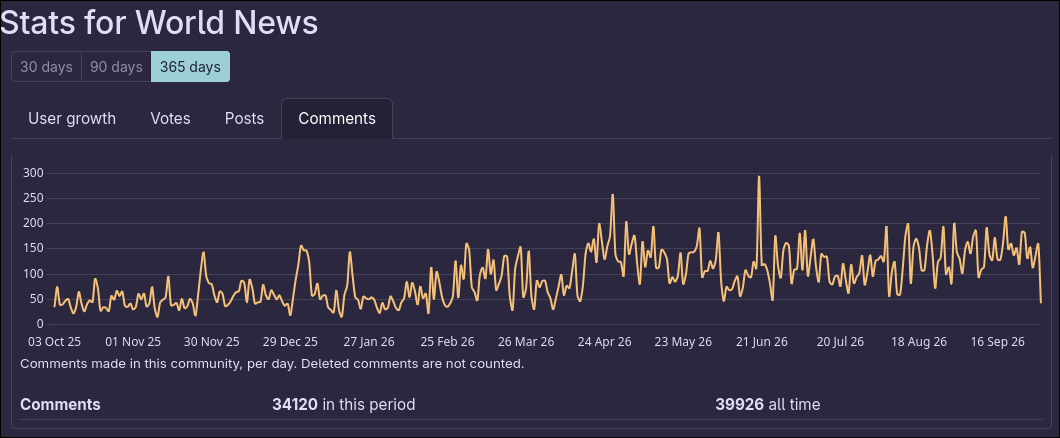
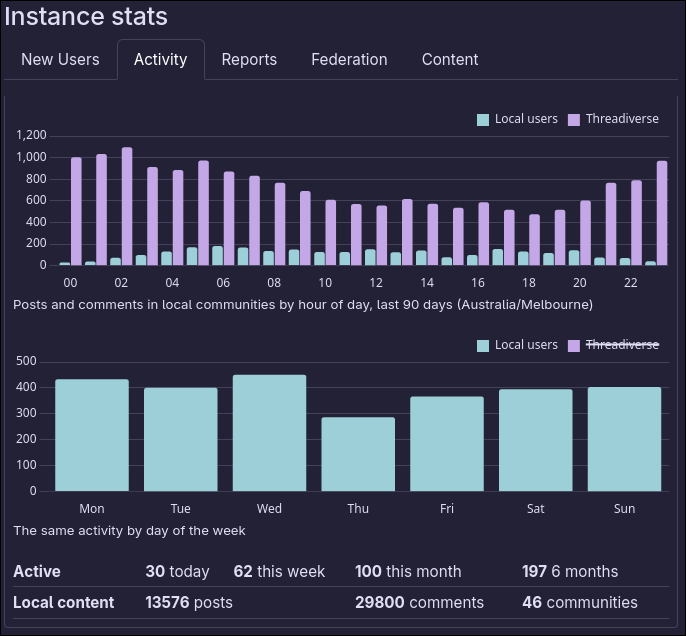
  • Instance & Community Stats: Mods and admins get a stats page for their community, tracking total subscribers, new subscribers, votes, posts and comments over time.

Example
image

image

  • Ban Appeals: Banned users can appeal a community ban with a written reason. Appeals federate to other PyLova instances as a queued notification, for other software (Lemmy, MBin) the head mod will receive a PM with the requet.
  • Community Post Requirements: Mods can set rules for posting in their community, things such as requiring flair, specific keywords (Rule) in post titles, ban specific words in titles, and disallow post types.
  • Notification Settings: Users can set what notification types they wish to receive.
  • Markdown Editor Overhaul: New options for tables, strike-through, horizontal rules, headings and footnotes, alongside support for ruby annotations, inline hashtags and Mbin-style details/spoiler blocks.
  • Markdown in Chats: Direct messages now use the full markdown editor and render formatting. Images are offered as a link, due to potential for misuse in unmoderated messages (i.e. tracking/doxxing).
  • Modlog Suppression: Admins and staff can hide a modlog entry's reason from everyone else, which displays as " Reason suppressed by AdminName ". It is intended for use cases such as doxxing or harassment through modlog entries. This replaces the PieFed behaviour of outright hiding all modlog entries if not from a trusted instance.

Bug-Fixes & Misc

  • Ranking Algorithm Rework : Scaled sorting now weighs communities by monthly active users instead of raw subscriber count.
  • Unsaved Draft Warning : Closing a tab or hitting Ctrl-W with a part-written post or comment now asks for confirmation first.
  • Chat Deduplication : Starting a chat with someone you have already messaged opens the existing conversation instead of creating a second thread.
  • Lemmy/Mbin support for Multi-Image Posts : Extra images now render correctly on Lemmy instances that run an image proxy.
  • Markdown Editor Fixes : The link and image buttons no longer prefill https:// or add a leading space, the cursor now lands inside the () ready for a paste, and the redundant quick/email link options are gone.
  • Vote History: Users can now view their own upvote and downvote history, linked from a new activity card on the profile page alongside bookmarks and scheduled posts.
  • Indented Code Blocks : A ``` inside a four-space indented block no longer breaks the rest of the comment.
  • Animated Images: WebP, APNG, Gifs no longer resized in ways that strip the animation.
  • Notifications : Expanded by default rather than collapsed.
  • User Preview Card : Rebuilt to show flair, flags, pronouns and admin/staff badges, using thumbnails rather than full-size avatars.
7
submitted 1 month ago by to c/pylova


When drafting a new post/comment or editing a post, below the text box is a preview button that renders the Markdown so that the user can preview it and confirm that it looks right before submitting. But for some reason, that button does not exist when editing a comment. There is no way to preview that edit before posting it. Could that feature be added?

8


WMBHnQSLXBGAllA.webp

When drafting a new post or comment, the top of the text box has a bunch of useful buttons (Bold, Italic, etc.). One of them is the "Image" button, which places the string ![](https://) in the textbox and moves the cursor within the square brackets. This is actually a little annoying to me, as any time I use this button, I always have a full URL already copied to my clipboard, meaning that I have to remove the https:// part before pasting the URL. I would prefer it to just not have anything between the parentheses at all. Furthermore, I would prefer the cursor to be automatically placed in between the parentheses, not in between the square brackets. Lastly, there is an extra space character added before the exclamation point that I always find myself having to remove. As a more advanced user, this button is fairly useless to me. Every time I use it, I ask myself if it would have been quicker and less effort to just manually type ![]().

In all, the changes I am requesting:

  1. Do not include anything between the parentheses
  2. Do not include the space character at the beginning
  3. Automatically place the cursor between the parentheses

If these changes were made, I could see myself actually using that button often.

With all that said, I do understand that there are benefits to the current behaviour for most users. For users who might not be too familiar with Markdown, having the https:// there makes it very obvious where the URL is supposed to go, and removing/replacing that bit is really not all that difficult for a user to do. Placing the cursor in the square brackets also subtly encourages users to add alt text, which should always be encouraged. I don't know if the space is really all that beneficial to anyone, but I can potentially see users arguing that it is useful. All that to say that I think the current behaviour should remain the default, I just want an option in the settings that enables the changes that I am suggesting. Call it "Advanced Markdown URL/Image buttons" or something.

A compromise that I could imagine would be to automatically select the https:// (if that is possible). Instead of automatically placing the cursor between the square brackets, if the https:// is automatically selected, that would mean that I would be able to just paste and overwrite it. Very simple. The only downside to this is that it is no longer subtly encouraging alt text.

This is all not necessarily a big deal. Feel free to ignore this request.

9


Markdown supports syntax highlighting hints on code blocks. But when I use a dark theme, PyLova seems to be rendering all code blocks that have syntax highlighting with a light background and light text. This often leads to most of the code in the block being entirely illegible because it is nearly the same color as the background. It seems that the text is being rendered in dark mode as it should, but for whatever reason, the background of the code block is using the light mode background.

Random example, here are some lines taken from https://codeberg.org/quokkau/PyLova/src/branch/main/app/instance/routes.py to use as glorified lorem ipsum to help illustrate the issue:

from collections import namedtuple  

from flask import request, url_for, g, abort, flash, redirect, make_response  
from flask_babel import _  
from flask_login import current_user  
from sqlalchemy import or_, desc, text  
from collections import namedtuple  

from flask import request, url_for, g, abort, flash, redirect, make_response  
from flask_babel import _  
from flask_login import current_user  
from sqlalchemy import or_, desc, text  

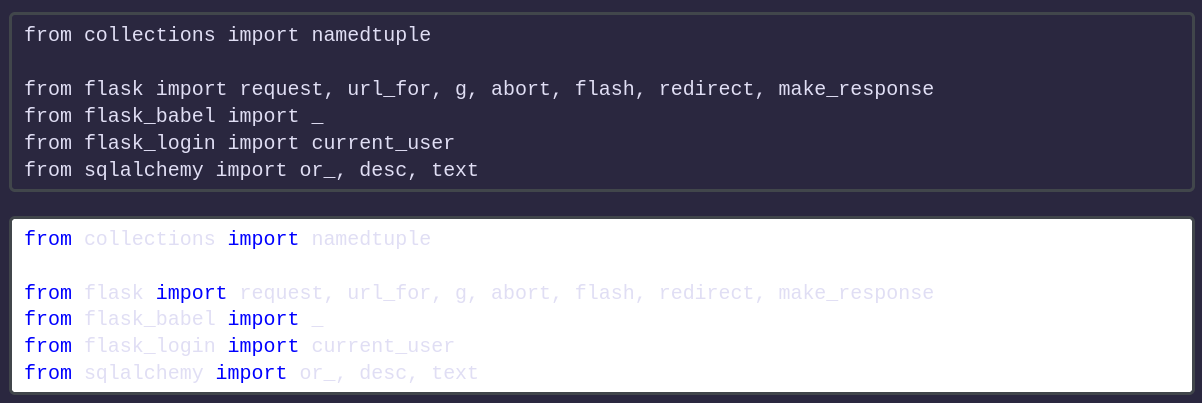
This is what those two code blocks look like with dark mode enabled:

image

The first code block looks fine, just there is no syntax highlighting (which is not a problem at all, as that is indeed what the Markdown is). But the second code block looks illegible because I had specified that the code block is Python, which makes the code block use syntax highlighting and for whatever reason use dark mode text colors with a light mode background.

As a refresher, a code block is added in Markdown using three backticks before and after the code block:

```  
code  
goes  
here  
```  

And to use syntax highlighting, you add a language hint after the first three backticks:

```py  
python  
goes  
here  
```  
```c  
c  
goes  
here  
```  
```rust  
rust  
goes  
here  
```  

I think this is an issue that is specific to PyLova because if I check a post that has code block with syntax highlighting on here and on a PieFed instance, it looks fine on PieFed and only looks wrong here. Example:

If it helps you chase down the offending commit or anything, I think I had initially noticed this start happening suddenly a couple months or so ago.

If you think it would be worthwhile/helpful, I can make a Codeberg issue about this.

10
submitted 2 months ago by to c/pylova


I noticed while looking at the repo that there is a mention of a website, however it doesn't seem to exist yet. Is it being worked on? In any case I think the link should probably be removed untill the website is setup.

Also thanks for the new release, it looks cool

11
submitted 2 months ago by [A] to c/pylova
:aa_transgender: 2 🥰 2 🤯 1


image

PyLova (Python+Pavlova) is a soft fork of PieFed, aimed at improving the user experience through UI overhauls, empowering users and admins with agency, improved administration and moderation functions, and general bug fixing.

New in V0.3.2

New & Improved

  • Muffle Users : Instead of outright blocking a user, you can now 'Muffle' them. This will place their content behind a spoiler. This functionality has also been extended to the filter system.
  • Live Posts : Mods can designate a post as a Live Post. A Live Post will continuously update with new posts coming through will sorting by new. This is great for keeping track on currently happening events such as global news or sports.
  • Reel View : This is a new way to browse the site, putting it into 'Reel' view shows one post per scroll. Cuts out the noise, allowing you to appreciate one post at a time.
  • User Flags : Want to show off who you are? Add a flag next to your pronouns. These small flags can be set by instance admins, great show showing Pride Flags, Sports Teams, Nationalities, Political Ideologies, etc.
  • Bookmark Organisation : Users can now sort their bookmarked posts and comments by folders.
  • Admin Notes : Admins and Instance Moderators can share notes about users on their profile page, this can be handy in building a history of bad behaviour or sharing concerns.
  • Account Oversight : Admins and Instance Moderators have greater ability to search through a users upvoted and downvoted content.
  • New Theme : Nocturne Core @luminous5481@anarchist.nexus has wonderfully created a Sci-Fi inspired theme you can apply.

Bug-Fixes & Misc

  • Lemmy/Mbin support for Multi-Image Posts : Multi-Image Posts will now add the extra images into the post body for users on Lemmy and Mbin so they don't have to miss out on your amazing content.
  • Censorship Transparency : On the instance about page, there is now a one-stop location for viewing what sort of things are being censored by your instance.
  • Options Menu : The menu has been updated with a more navigable UI in 3 Panel Mode.
  • Reactions Only Mode : A small setting for instance admins to 'turn off' up and downvotes, letting posts only have emoji reactions. Note, emoji reacts do technically count as an upvote and this is more of a visual change in regards to user view.
  • Trusted Instances Only Federation : Communities can already be set to local only, this feature allows communities to only be visible on those in your instances trusted list.
  • Banned Users can now unsubscribe from a community, allowing them to remove it from their feed.
  • Blocked/Unfederated Instances now show more information, such as allowing for reasons why it was removed.
  • Poll Post Type teasers had a slight visual inconsistency, their icon should now align properly with every other post type.
  • Flair, Tags, & Live Status all follow the same visual format. Also now visible on post teasers.
  • General Performance Improvements.
  • Code Refactoring to follow a more pythonic style guide and reduce McCabe complexity.
12
NOCTURNE CORE - New theme for PyLova inbound! (anarchaos.s3.eu-central-003.backblazeb2.com)
submitted 2 months ago by to c/pylova
🎉 2


A fresh new theme is on the way, ported from an HTML template I made. No hard date on availability, but expect within the next week or so.

There will be a light mode wih this one, i just haven't made it yet.

13


image

PyLova (Python+Pavlova) is a soft fork of PieFed, aimed at improving the user experience through UI overhauls, empowering users and admins with agency, improved administration and moderation functions, and general bug fixing.

New in V0.3.1

V0.3.1 is a smaller update. The main benefit of this update is the introduction of a new feature, multiple image posts.

A special thanks to @awesomelowlander@quokk.au for their help bug-hunting

Multi-Image Posts

These posts allows users on PyLova instances to share threads with more than one image, a feature I've personally much needed for my communities. You can drag and drop the order of images around on the upload page.

For non-PyLova instances they will unfortunately only see the 'cover' image, that is the one ordered first in the list. With v0.3.2 I will aim at ensuring it is compatible with Mastodon and Sharkey instances which allow for multi-image posts. I will also look at potentially displaying these as images inside the post body for Lemmy/Mbin/PieFed. Ideally in the future we can work to seeing this feature more readily supported across the Threadiverse, and I would love to work with devs on other projects to see this goal realised.

For Admins

  • New Users would be subjected to a 7 day waiting period on PieFed, which severely limited their ability to post/comment/msg. There is now a toggle in the users profile that admins can set to 'verify' a user and remove this restriction from them - it can also be re-set on older accounts.

Bug-Fixes

  • If you went to the page of an undiscovered user, i.e. quokk.au/u/randomaccount@anarchist.nexus it would return 'not found' on a blank page. Now it actually fetches the user (if they exist) and shows you their profile.
  • Visiting a community url ending with a / (i.e. quokk.au/c/news/ instead of quokk.au/c/news) would render a blank 'not found' page, the page is now correctly found.
  • If you discovered and joined a new community, all comment replies would be dated from the date of discovery (i.e. seconds ago). They now correctly match the actual date they were posted.
  • When choosing to share a new community via !newcommunities@lemmy.world, the post would default to having notifications turned off. This has now been changed and you will be informed when users comment in the thread about your new community.
14
submitted 3 months ago by [A] to c/pylova


image

PyLova (Python+Pavlova) is a soft fork of PieFed, aimed at improving the user experience through UI overhauls, empowering users and admins with agency, improved administration and moderation functions, and general bug fixing.

New in V0.3.0

For Users

  • New 'Look & Feel' tab in settings, for customising your user experience.
  • In comment video uploading and posting (counts towards files quota).
  • Updated 'Files' page, allowing mass deletion of uploaded media.

For Moderators

  • Can set default tags for communities, that auto-fill into new posts on community. Enabling greater discover-ability across the Fediverse.

For Admins

  • New 'Look & Feel' tab in settings, to help with managing the visual style of your instance.
  • Ability to view a users deleted posts and downvotes alongside their upvotes.
  • New 'Rules' sidebar panel to display instance rules.

And More

  • Themes can support sub-colour schemes.
  • New User setup page is condensed into one, offering options for setting pronouns and bio.
  • Alt text (aria label) for video uploads.
  • Consistent markdown editor.
  • Musk/Trump filter reworked to a 'low politics' filter.
  • Hard-coded musk/trump filter removed for users who are not signed in.
  • Thanks to @Dialectical_Specialist@quokk.au, Lichess boards are supported to display.
  • Updated documentation by @quill7513@anarchist.nexus.
  • Updated docker example by @tenchiken@anarchist.nexus.
  • Visual changes to posts, tags displayed under title and titles now serve as hyperlink.
  • Fix with API, images posts no longer upload against image quota and send as image type posts enabling to display correctly on Lemmy.
  • Collapse-able sidebar cards.
  • Sorting (hot/new/local/all) is managed by drop-downs to maintain consistency.
  • Removal of 'Rational Discourse' sidebar.
  • Minor fixes & changes.
15


It would be helpful, to me at least, if pylova's codeburg readme was expanded and more clearly detail what the differences are between it and base Piefed. Potentially a feature comparison table would be nice.

Let me know if you want me to further explain/expand my ask.

Edit: spelling

16
submitted 3 months ago by [A] to c/pylova
🎉 1


V0.2.2 includes:

For Users:

  • A new dynamic 3 panel layout, this will show depending on resolution.
  • A feeds bar to access your feeds from the main page (Toggle-able under your settings page)
  • 2 New Themes by the wonderful @luminous5481@anarchist.nexus
  • No daily maximum number of votes
  • Cakeday! A small icon appears next to users celebrating their anniversary date
  • Add alt text to avatars and banner images.

For Admins:

  • Removal of user access to admin page
  • Deleted emoji stay deleted instead of getting re-discovered and added back the following day
  • Working SVG sanitisation, stopping malicious and harmful SVG files from being uploaded.

New Themes:
MatrixTerm:
image

Vaporweave:
image