I'm not familiar with GrapheneOS,
so I can't say.
Only used LineageOS,
since the CyanogenMod days.
AA4MG simply makes the normal AA work on MicroG devices, with a minimal amount of proprietary privacy invasive stuff.
I'm not familiar with GrapheneOS,
so I can't say.
Only used LineageOS,
since the CyanogenMod days.
AA4MG simply makes the normal AA work on MicroG devices, with a minimal amount of proprietary privacy invasive stuff.
No, I tried by changing the package name of another app to Google Maps, it did not work.
You can install 3th party GPS software though, but depending on the app, you might need AAXLU or KingInstaller to make the 3th party software show up in AA.
I've written it out in the AA4MG docs here
Not fully open source,
but less proprietary crap.
AA4MG (Android Auto 4 MicroG)
It allows to run Android Auto with:
That way the only proprietary thing you need,
is the actual Android Auto app,
not it's hand full of sketchy propriety dependencies.
Boycot / protest against any data centers being built for AI bs in your local area.
They will not only drive up the prices for electronics, but also for electricity & water
Boycot / protest against any data centers being built for AI bs in your local area.
They will not only drive up the prices for electronics, but also for electricity & water.
Thanks for creating this community.
Looking forward to what it will bring,
but assume/hope it will be some very welcome positive things! :D
Oh misread my bad,
not much experience with PostgreSQL
Yeah,
I did a speed test comparison between Oracle MySQL and MariaDB MySQL,
MariaDB is about 10 times faster.
FYI: When Oracle bought MySQL a lot of developers left and created MariaDB, so the brains behind the project moved, and in the meantime Oracle did a great job of fucking things up.
You're right,
gambling is to screw you out of your money.
I'd recommend to steer clear of it.
Also the prediction market stuff,
it's the latest new gambling hype thing,
since they can use loopholes to bypass gambling laws.
You can look into VaultWarden,
an open source self-hostable fork of BitWarden.
https://github.com/dani-garcia/vaultwarden
There are also free community instances available which you can use, however then you will depend on them for reliable uptime and security.
I wish more communities implemented this rule.
I figured out a way to "easily" get them in single-player.
Recommended prerequisites (Not so easy):
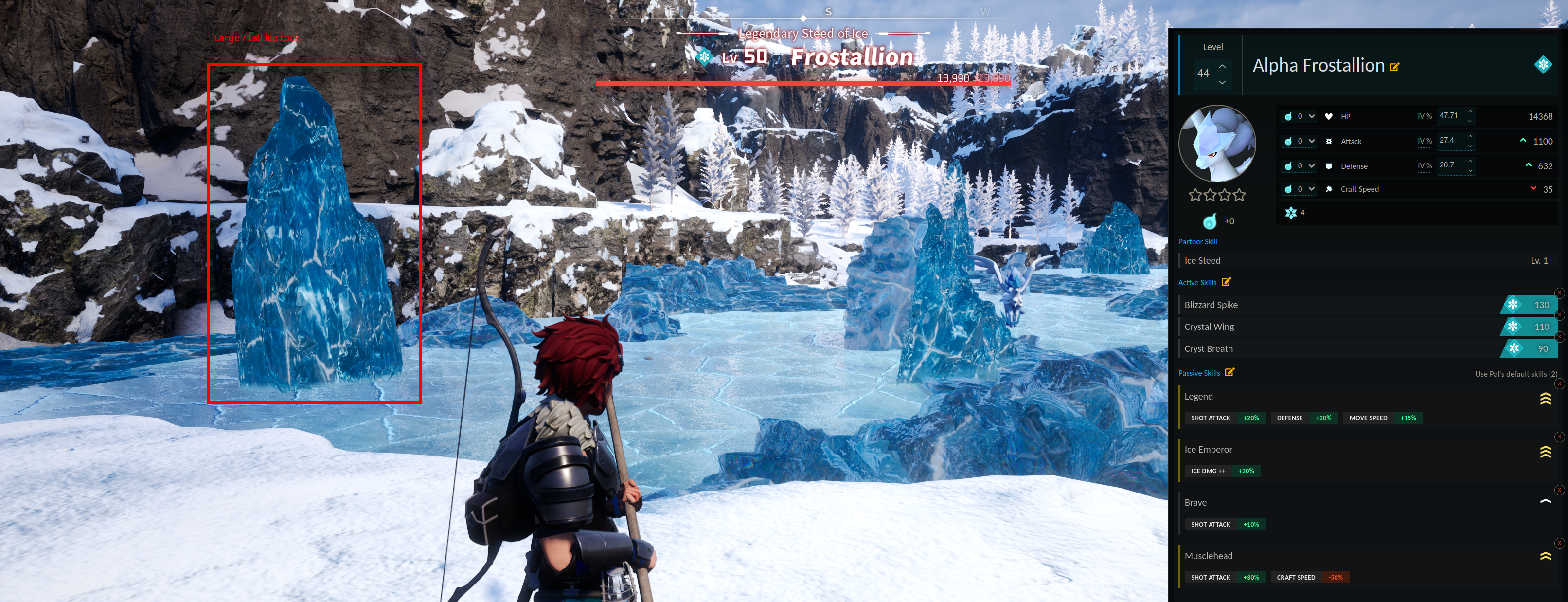
Cheese method for Alpha Frostallion:
Install one of following mods:
They both will show you the passive skills a pal has,
allowing you to check em out before catching the pals,
so you don't waste sphere's
Travel to Frostallion,
check his passive skills without battling,
if they're not as desired, exit / re-enter your world,
that will re-spawn / re-roll in a new one with new passive skills, repeat till you find a desired one.
Start battling as soon as you find a desired one,
took me 20-30 minutes for mine.
There will be a large / tall ice rock in the area
(Coordinates X: -349, Y: 519),
just start circling around it,
always keep the large / tall ice rock between you and Frostallion
Eventually he'll climb up the ice rock,
and will fall down from it eventually as well,
which will hurt him through fall damage for about 300 - 3000 HP!
Rinse and repeat until his HP is low,
then start throwing your legendary sphere's 😄