The super key
post
I used to have this really awesome early 2000's transparent blue plastic keyboard with all the newest media keys. The only problem was that it had 4 windows keys on it! One on either side of the spacebar. The right side of the spacebar was Alt, Windows, Context menu, CTRL. That was a bit weird but it was alright. The next placements were crazy though. Someone figured there was space for more keys right below the Delete, End and Page Down keys but I guess they couldn't really figure out what would be best for there so they put a 3rd Windows key, a 2nd Context Menu and then a 4th Windows key right there. This was pretty close to the arrow keys and if anyone remembers gaming in the early 2000's, pressing the windows key accidentlly would often just crash your game completely. If you could get back into it, it could take quite a while for it to respond again. So if you were playing something like Warcraft 2 multiplayer, that button was a fucking nightmare.
Ugh, I loved the colour of that keyboard so much I put up with all those windows keys.
edit: I can't believe I found it! I've tried searching for this keyboard a few times, but finally found proof on this site!
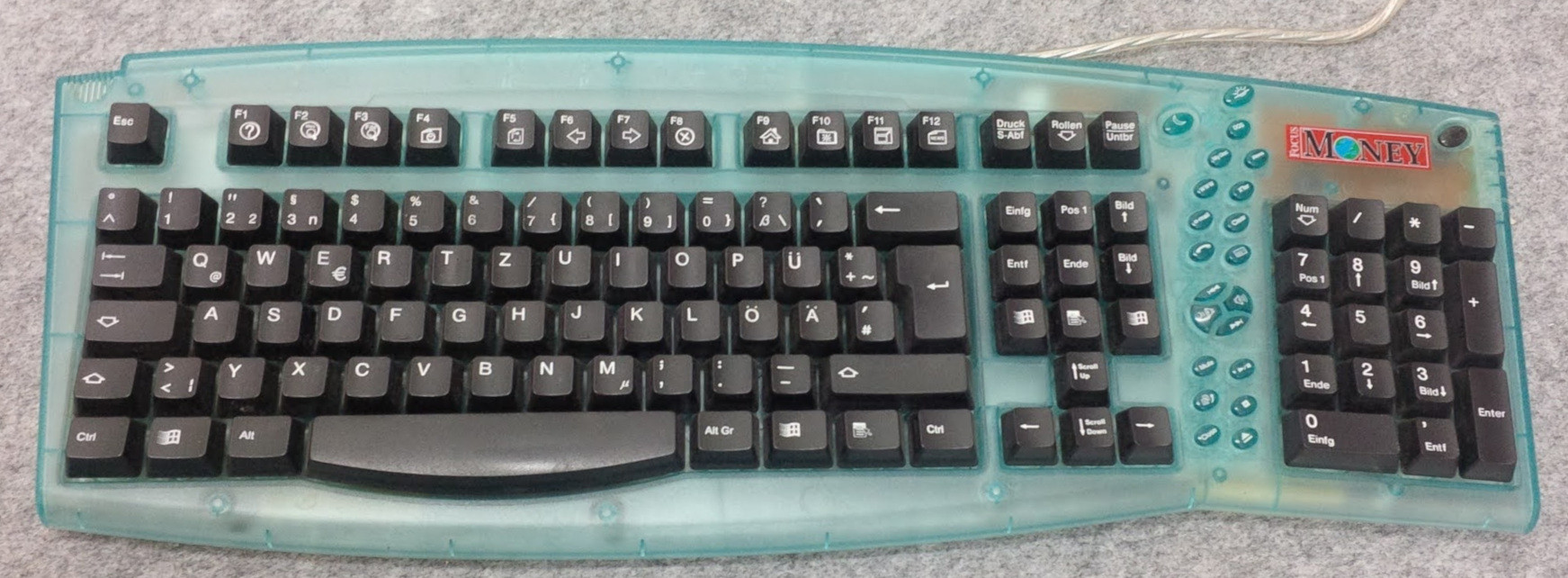
Wow, Win98 logo and media buttons? Truely between eras.
I actually like the context key above the arrow keys, another method of effectively right-click is nice. Those Win keys are crazy though, that's the perfect place for extra function keys. Imagine having f13 & f14 that you can bind to anything without worry!
I wish I could change the keycap of this key on every keyboard I own.
Just put a lil bit o' tape over it. I'm actually insane and put tape over most of the logos around my house hahahah
heres a sticker if your really dedicated
"Cute little thing like that, yeah, I'll grab 20, one for each keyboard in the house, a few at work, a few left over for harmless pranks SEVENTY NINE DOLLARS clooose tab"
I'm sure the quality is nice but I'm just gonna scribble Tux in with sharpie.
Interesting website; I did not know New Hampshire has a secessionist movement.
You can but unless they're easily swapped with a ready made key it's usually not worth the time effort and cost.
Couldn't you just place a sticker on top? I know that you'll either not get the led light or it's gonna look a bit funny in the dark if part of the windows logo shines through if the sticker is not thick enough, but you can place a tiny tux sticker there!
That'll work, as long as you never touch it. Between skin oil and just the physical touching it wouldn't last long.
One option is to pull the keycap off and paint over it. If you feel really crafty you can sand off the coating to make whole keycap translucent and use a stencil. Personally I don't look my keyboard that much that it'd bother me and it's made by microsoft anyways, their ergonomic keyboard is the best one I've used so far.
For anyone interested, this is a tuxedo laptop

Why they use derpy Tux? or is it you choosing it I think they let you do that, but atleast it's not a Windows logo
I've had this laptop for some years now and I don't remember why it has the derpy cute Tux, but I think it's the default one.
https://www.tuxedocomputers.com/en/Individual-Keyboards.tuxedo
I'm petty enough to put stickers over mine.
If you want an alternative, lab label tape is a bit pricy but is super durable, comes in fun colors, doesn't leave residue, and sticks for practically forever.
My keyboard came with both windows and Mac keycaps, so I put the mac one since it isn't a corporate logo. Plus the symbol signifies a culturally significant sight in my country.
And soon, new laptops will have a second forced stupid Microsoft key. The copilot key.
Not even joking.
GET THE SANDPAPER
Let's pray for the day that future generations will know that to be the Super key, but like the floppy disk icon for 'Save' they won't know why it is what it is.
I've noticed libreoffice has changed their save symbol. It's a grey rectangle (taller than it is wide) with a darker grey arrow pointing down.
I hate that shit so much. I don't buy keyboards with the Windows key logo on it anymore.
Tips for coping:
- Call it the Super key (actually the correct label I think)
- Bind window management related hotkeys to it
Ooh the key that wrecked video games for decades!
I still don't get this I don't think I've ever accidentally pressed it while playing a game, and I am someone who constantly presses every wrong key while typing
CTRL and ALT is used a lot in strategy games for example.
I remember playing an FPS game.. Heretic? Shadow Warrior? I would play it without a mouse. Alt would be a modifier on the arrow keys for strife (sidestepping). Spacebar to shoot, and you're set for disaster.
Space Cadet Pinball was another one. It was nice playing with Ctrl, on the corner. But hit the Win key and you instantly lost focus of the window.
I recently bought my first mechanical keyboard, after having used my razer for 8 years, and i was looking into different keycaps, but i ended up having a hard time finding a good keycap set that is of good quality, and that i also liked in terms of colors, and has a super key or something like that. The keycaps that i ended up settling on didn't have a super key, so i just ended up putting the windows menu key on the super key, so that it atleast looks a bit more generic than the actual windows key. It's too bad they're hard to find, but i guess it makes sense since there is probably very little demand for it. Another idea is to maybe put a sticker on it or something.
You wouldn't think it would be that rare, I've found there's a huge overlap between keyboard nerds and linux users.
True, I've been looking through AliExpress for a good Linux based keycaps but didn't find anything, sticker is probably my only option
I have both the windows key for meta and the apple key for alt on my keyboard which balances eachother out I think
same…. and that stupid “copilot” button thing… (this is so useless)
i’m gonna turn it to a hotkey or something lol.
my kb came with mac keys too so i replaced win key with command, i hate it less
I don't know what I do to keyboards when I use them for a really long time, but I have the exact same laptop frame and keyboard and most modifier keys are unrecognizable and half of the WASD keys are rarely used keys because I fucked up the keycaps while cleaning and I got other keys off the keyboard in place of them. So anyways, my Windows key is abused beyond recognition and you can't tell it was a Windows key.

Holy smoke, that's one well used laptop, I hope my laptop can last as long as yours
4 years and 3 months still going strong. I use the touchpad a ton too and that coating on it has come off too, but it's perfectly usable. It also surprisingly lasted two pretty bad falls with just 1-2 minor cracks that I had to open the laptop up so that i can super glue the cracks just to ensure the cracks won't spread from future vibrations.
Visual condition is pretty unappealing, even a bit bad: the erased keycaps, the lifted coat off the touchpad and one visible crack, but it runs just as it did the day I got it
Why are you going right so much more than left
I mean, if you think about it you tend to go right in 2d games, so I'm guessing he's a fan
My bad, didn't explain it well in my initial comment
I broke my A and S keys when cleaning: because the WASD keys on these keyboards are transparent, I could see all the hairs or dirt under them and once every 4 months let's say, I was pulling them off
And one day they didn't wanna reliably clip back in place anymore
So now I have Right Ctrl on A and Right FN on S to replace the keycaps
So, they're basically newer keys in there, and also they are not transparent like A and S were
Loos kinda dope, ngl
I might scratch mine now after seeing this. I prefer personalisation over most things honestly.
Yep, I have a Framework 16 that was ordered with no OS and yet it came with that key on the keyboard.
Ok now remove fast boot and TPM
Throw away that key and get another one with a pinguin instead ;)
could just replace it, no? Unless your keyboard is weird, the size of window key is pretty standard right?
If I cared that much, I could have bought a blank keycap for an extra buck when I bought my keyboard and banished that thing forever. (I own a Unicomp New Model M 103-key, which only has one Windows key to begin with, and the manufacturer will happily sell you blank or custom-text keycaps. Unfortunately, while they do sell a set that includes Tux keycaps, they're sized for a 104-key.)
Hmm but it doesn't force ads down your throat so can you really say it is part of Windows?
I've put a GNU sticker over one, and a Tux sticker over another. I should see if there's a Debian spiral sticker I can get (or even custom keycaps) for future keyboards.
Keyboard ?
Found the real programmer
I don't even have that. !modelm@lemmy.world users rise up!
top 99 comments