Thread view redesign in Catodon Microblog News & Update Threadiverse UI & Feature (hel1.your-objectstorage.com)
submitted 4 weeks ago by to c/fediverse@piefed.social
 

Today I merged many UI changes, mostly around how threads are viewed and navigated.

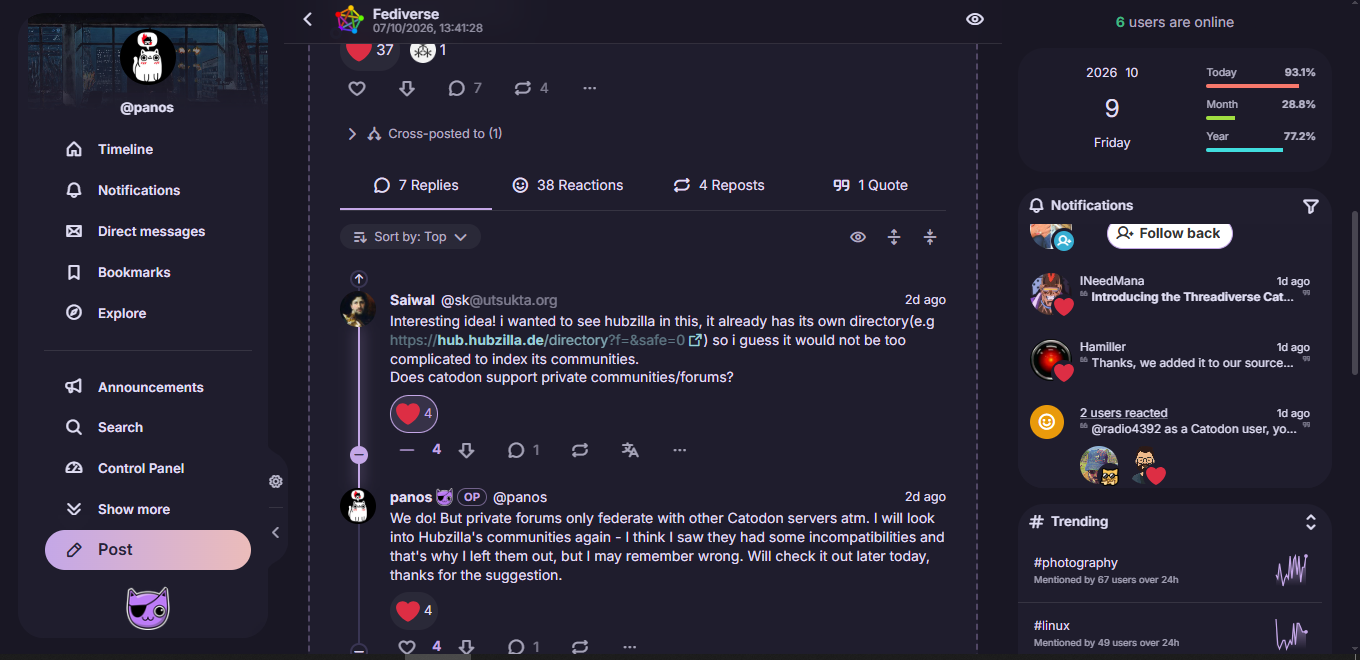
I took some of the good elements of Reddit, so now we have sorting by Old/New/Top (the default for the microblogging timelines is Old, and for forums it's Top - both can change in settings) and a flexible replies section with collapsible/expandable branches.

Top-level posts now show the total number of replies under the whole thread, not just the direct/first level replies (but again you can change it back in Settings). I also saved much vertical space, so now you can read long threads with less scrolling.

If I may say so myself, I honestly believe it's one of the best UIs on fedi, especially for reading conversations. I think that if anyone tried it, they would agree. Really, really happy with the results. It's still fresh, so I will probably refine things here and there, but it's pretty much exactly as I envisioned it.

Let us know what you think!

#catodon
you are viewing a single comment's thread
view the rest of the comments
[โ€“] 1 point 4 weeks ago (2 children)

the right panel is for notifications (when logged in) and widgets for the page you are visiting. I'm not exactly sure what you mean by 'focus box' but it might be a widget(category/tag filter).

  • source
  • parent
  • hideshow 2 child comments
  • [โ€“] [S] 1 point 4 weeks ago* (1 child)

    screenshot of the theme solidified for hubzilla. There are 3 collumns. On the left it is a tabbed menu. The middle it the timeline. The right is for notification

    I'm interrested on the focus box on the right with the start and resset button. There is the number 25 on it.

    I'm curious to see what it does because piefed has something similar. we can define a time limit. So the box gave me some idea, that we could define time limit, then start it. I even have a wild one, nuking the CSS ! So we are forced to take a break. :3

  • source
  • parent
  • hideshow 1 child comment
  • [โ€“] 1 point 4 weeks ago

    oh thats are pomodoro timer. a countdown timer widget also exists that the user can place where they want. the layout is editable by the user. Currently they dont do anything on expiry but your idea is interesting, a countdown timer that makes you take a break from being online ;)

  • source
  • parent