the creases in the tape you just posted is not great and would give the noise you are seen on the screen. the tape is usually under some tension when playing. there is a brake band on the supply spool of the vcr (left if looking from front of machine) this would pull some of the minor creases out but heavy creases will not. Edit: FYI video tracks are diagonal on the tape
comments
Thanks! The VCR is an LG RC185 and the make of the tape is unknown. The underside of the tape lid say P-55. Also, I noticed these fairly evenly distributed physical lines/indentations on the tape:

Could they be related to the noise?
Oh! Thanks! I didn't even think about checking the condition of those! Different tapes have slightly different noise and artifacts. I'll examine this some more.
does it do this with a different tape? if so capstan speed is very slightly out, or maybe pinch roller has gone hard and not pulling the tape well enough?
AVM Fritz!Box. They have always been on top of the technology, having taken part in the definition of both ISDN and DSL.
Of course, they are no longer available in the US, because the US government can't just plant backdoors in them.
I'm thinking of it happens at the same time in the video it's the vhs. If not, its the vcr.
I can highly recommend a unifi setup. Mine has been stable and reliable. The aps are really all about as good, just price whatever you need and the controller software can be ran in a vm but they also sell dedicated appliances.
Going to need more information on the make/model of both the tape and the player to assist. There are a lot of bespoke implementations that could present similar issues for different reasons.
Give us the square meterage. 😊 Meanwhile, I love my two RT-AX58Us. A v1 and a v2. Both have support for partially open source Asuswrt-Merlin (v1) and Asuswrt-Merlin NG (v2). I use them as access points. Mind you, I live in 36m².
Pretty much all modern wireless setups are controlled via the browser. I use ubiquiti since we use it for clients at work and I love it. Got the gateway, 2 APs and a switch. But any reputable setup will work great and should be expandable if necessary.
I use TP-Link Omada EAP-650's with the OC200 controller (there is a new version of the controller that is supposed to be better) and OpnSense as a router. Grab a POE switch and run wired cables if at all possible, yes they can mesh... wired > wireless and they still need power. With POE they are easy to ceiling mount, I have 2 and can access my wifi from 1/2 a block from home with one mounted near the front door and one near the back. You can use an app or the web interface, you can also forgo the controller and run the software on an always on computer.
Devices that combine the wifi and router are underpowered, designed to be replaced in 2 years or so, and don't get updated enough to truly protect a network in the AI age which is where OpnSense is amazing. The Omada series allows you to literally drop in an extra AP or replace an old one, adopt and apply the setup, and be off and running. Combined with a managed switch and you can create separate vLAN's that will isolate devices until they touch the router and then you can decide what to do with it.
Tplink Omada. Deploy a controller on-prem and configure it. It has a web interface but I use the mobile app.
It has a cloud service to aid in connecting to your controller, or to act as your controller, but its not required.
I do use its cloud service, but I know in the app it gives me the option to access the controller locally or through their cloud relay. When i configure things using the browser its local only.
comment on
Digitizing VHS
You should watch a YouTube on the Betamax mechanism. The mechanics packed into a small package was crazy.
comment on
Digitizing VHS
The flaking is tiny like dust. Do a head clean. I used to use Isopropyl and a qtip but Google says that's bad because you could accidentally leave fibers on the head so suggests printer paper soaked in iso.
comment on
Digitizing VHS
Man, watching a vhs sounds like such a violent act!
comment on
Digitizing VHS
That allegory (?) was hilarious and amazing at the same time!
comment on
Digitizing VHS
I don't know how S-VHS worked but it was like writing the word Titanic on a piece of paper, and getting back a 4K version of the movie instead.
But don't trust me on that, there is a more realistic explanation for how it worked.
comment on
Digitizing VHS
Holy crap. Now I'm terrified to eject the tape in 2 hours 30 minutes 😱 if that has indeed happened to this one, I hope the flakes are removable buy compressed air and/or a vacuum.
comment on
Digitizing VHS
Thanks! Now I have to get myself one of those S-VHS players! 🤣
This makes me believe, that some of the material that I'm digitizing as we speak was originally recorded on some variation of 8-mm tape, because the label says "1962"!
comment on
Digitizing VHS
Yes they lose charge but a bigger problem is the glue that holds the iron oxide weakens and flakes off over time because of the bending and stretching of the tape being unwound, wrapped over the heads, and the heads scraping the tape.
comment on
Digitizing VHS
Does this mean that VHS tapes lose magnetic charge over time?
I don't know, but I have seen old VHS that looked like shit on a screen. The only way to play them properly was to use a Super VHS player. The player itself was some kind of magical enhancer.
You DO have a S-VHS player, right? Right?
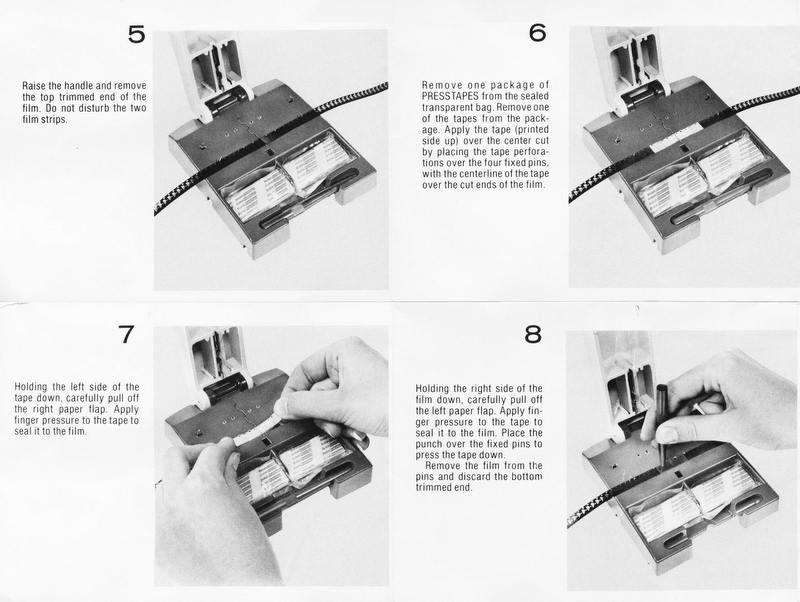
Also I have never seen Hi8 before but it reminded me of the Super 8 which was great for home movies. Since you could see all the frames, you could cut it physically and glue the pieces of tape to do whatever you wanted. Something like that, it was fun: http://www.mondofoto.com/manuals/kodakpresstapesplicer/kodak_presstape-universal-splicer_03.jpg
Yes, depth of field is directly correlated to focal length but also distance to the objective. The closer the front of your lens is to the subject the less depth of field you'll get. I don't know the math for that offhand. The relationship is geometric somehow, I'm sure. What I do know is that using e.g. my 100mm macro lens and with the subject only a couple of inches away, my effective depth of field is only a couple of millimeters. Focus stacking is your friend if both you and your subject are the sort that can hold still.
No optics, just extensions.
You're a living library of optics and photography. 🤣 I did actually wing it today, just using the same values regardless of having put on the tubes. The image was a bit more shaky handheld, but it did alright. The magnification wreaked havoc on the depth of field though. We were talking millimeters even at the smallest physical aperture. The leaf above was shot at f11. 😱
Anyway, thanks!
There are just extension tubes, right? None of them are a teleconverter, i.e. there are no optics inside?
If that is the case, they do nothing except add to your existing lens' focal length. That's it. Light loss incurred is only due to the increase in focal length because your aperture obviously still has the same maximum diameter.
The only Fun aspect of this that I am aware of is that the ƒ number markings on your lens will now be wrong, because they were calculated by the manufacturer using the lens' original focal length.
For those of us whose minds are regularly blown by this math, including mine, ƒ-stop numbers are literally the fraction of your lens' focal length divided by the iris diameter. The markings do not tell you the actual iris diameter, which to be fair would not be actually functionally useful information when you're standing there trying to take a picture in the field, but it's a number you then need to back figure when you start doing stuff like this. The entire point of this kerfuffle is that any given setting, say ƒ/1.7, should allow the same amount of light to hit your sensor/film regardless of what the focal length of the lens you have attached actually is. But that's only true until you start mucking around with changing the focal length with extension tubes and the like. Digression concludes.
You can calculate this by first determining the magnification factor of the tubes you've installed, which is the extension length divided by your original focal length. Let's call that m.
You can then calculate the effective aperture by:
ƒ x (1 + m)
Determining the actual light loss requires logarithms. You probably want to make sure your calculator has enough buttons for this one:
2 x log2(1 + m)
...Or you can just compare the new effective ƒ number versus the old one. Or use your camera's light meter if it has one. Or just declare the heck with it, and use any of the available calculators for this sort of thing.
Or wing it. Winging it is what I usually do.
Do you require any particular features from Obsidian or Logseq? If not, what you need may just be a synced, shared folder and a naming convention for your notes.
For my personal use (which is, admittedly, less complex than a collaborative note system) I simply sync a folder across devices, using Syncthing. Markdown files are sorted by subject into subfolders. I can them open them in my editor of choice on the given device and platform.
Again, this may be too bare bones for what you have in mind, but sometimes when advanced services don't quite work out, it can be worth a try to scale back to the simplest DIY method and build from that.