1
2


The backup, verify, then destroy-with-purge routine for clearing out stopped guests safely, including the linked-clone check that stops you deleting something a running VM depends on.

Free weekly email with the week's posts, videos and one tip: https://chartmann1590.github.io/homelab-the-right-way/newsletter/

Disclosure: this is my own article (Charles Hartmann, Homelab the Right Way). Written with AI help and edited by me; the setup described is mine.

3


With two Proxmox nodes, losing either one leaves the survivor with one vote out of two, so it loses quorum and /etc/pve goes read-only. Here is how a QDevice adds a third vote without a third server, plus the Wi-Fi trap and the emergency lever.

Disclosure: this is my own article (Charles Hartmann, Homelab the Right Way). Written with AI help and edited by me; the setup described is mine (Proxmox, OPNsense, Home Assistant at home). Happy to answer questions about QDevice setups here.

4


I'm running a fediverse instance in a Cloud VM. I would like to migrate the instance into my homelab, but there's another admin involved who needs to be able to create and restore from backups/snapshots. I would keep a cloud VM to tunnel to my local VM so I don't need to use my resident IP for the instance and some other reasons. That would also allow to give the other admin ssh from the cloud vm into the local vm without being able to touch my other stuff.

My initial thougt was to create some wrapper tool that can be triggered from inside the VM, just create a snapshot and restore from the latest, but I'd have to develop and run that one somewhere. Maybe there's a better solution like creating an actual Proxmox user for the other admin with permissions just for that vm? I don't want to expose Proxmox publicly of course, but there could be a solution via the cloud vm.

Looking for ideas here, keeping the hassle for the other admin low, while minimizing security risks.

5
 
 
6


I have an lxc running a VPN, and where the host needs to access the internet (e.g. doing updates) I want to force that through the lxc VPN.

I dont want to interfere with local lan or cluster traffic - so just setting a default route isn't appropriate. Likewise I'm not sure just installing the VPN on the host is the right idea.

I'm pretty sure there is a way of doing it... its just not coming to me 😅

7


Now that I know a LITTLE about what I’m doing (and with help from Claude & Gemini), my new server will be MUCH improved over the current one.Now containers will be organized into proper stacks that can talk to each other and share resources, I’m following some security best practices, EVERYBODY GETS A BIND MOUNT, and I’m beginning to develop the faintest understanding of just how powerful #Proxmox is.#Homelab #SelfHosting #Linux @proxmox #Docker

8
[meta] Low effort mastodon posts (lemmy.nocturnal.garden)
submitted 5 months ago by to c/proxmox@lemmy.world


This community is not super active in general, but a good amount of posts are mastodon posts where people do something which is usually not related to Proxmox other than their VM being on it. These usually come from mastodon etc, don't spark discussions and usually get downvoted, which the authors don't notice since mastodon doesn't show that.

There's no specific rule for that (it seems like this community doesn't have rules at all), but I find it mostly annoying and wanted to vibe check what other subscribers of this community think about it. Maybe a rule could be implemented and those removed for being off topic?

I'm perfectly fine with mastodon users posting to this community, don't get me wrong. I just don't like using this community handle like a hashtag for everything that's barely seen proxmox relevance.

9


Eben mal meinen @proxmox server mit #opencode und #deepseek v4pro wieder in Ordnung gebracht.... Nach ändern des Hostname ging waren VMS und Webinterface weg... Aber nach 5 Minuten wieder alles entspannt Back 😉

10
11


Eine weiteres Projekt ist mal abgeschlossen: Ab sofort läuft #whatsapp in einer Android VM auf @proxmox Auf einem separaten LXC läuft ein Proxy, der den gesamten Internet-Verkehr über das TOR-Netzwerk leitet. Die Proxmox-Firewall verhindert bis auf AdGuard Home jegliche andere Verbindungen als diesen Proxy. Mit @watomatic werden alle einkommenden Nachrichten automatisch beantwortet, mit dem Hinweis, mich auf Signal/Threema zu erreichen.

12


Patchday im Hause Oswald:@proxmox @homeassistant #WireGuard auf den neusten Stand gebracht.Nur von #Windows komm ich immer noch nicht ganz weg.Das muss so eine Sado-Maso-Sache sein.

13


I’m in the process of migrating to Proxmox for my media streaming and other services, as I’ve found myself increasingly limited on the Windows platform.

One of my primary concerns involves my current media storage setup. I have a 10TB external drive formatted with an NTFS partition (fully backed up), and I would like to continue writing new data to this drive within the Proxmox environment.

What would be the most appropriate approach to handle this transition? My initial assumption is that converting or migrating to a Linux-native filesystem may be the best long-term solution, but I do not yet have extensive Linux experience. I would appreciate guidance on the most reliable and efficient way to proceed.

14
PVE Service Reset (pve.proxmox.com)
submitted 8 months ago by to c/proxmox@lemmy.world


This little code snip can help you out in a pinch.
Try this if you have an unstable server with running guests and reboot is not an option.

service pve-cluster restart && service pvedaemon restart && service pvestatd restart && service pveproxy restart

If you do it in the shell window, it will disconnect the shell, but seems to complete the command just fine.
You should see the nodes briefly grey out and come back.

I've read that you need to reset all of those, in that order. See the linked wiki article for more info.

15


Gawd that is a hell of a ride. Very interactive. I"ve done the in-place upgrade on about 8 servers now. Frequent surprises.

(Chickin pic tangentally related.)

16
submitted 8 months ago by to c/proxmox@lemmy.world


What's a cheap starter requirement to have a personal proxmox rig at home?

17
[Microblog] (social.vivaldi.net)
submitted 10 months ago by to c/proxmox@lemmy.world


.. @scenesat @dream210 works as it should now poked Ziphoid that had to fix stuff with older @ubuntu but its switching to @proxmox@lemmy.world @proxmox@lemmy.ml @debian any day now (TM) for the past many months people busy with real world life (tm) but @lemonzest @Lenovo@fosstodon.org @lenovo@bird.makeup @lenovous and @Vivaldi helped me #demoscene #demoparty #lastof2025 #2025 #germany #sweden #xmas #christmas #newyears #new #year #year2025

18
19


I have a 3 node HA cluster of enterprise hardware which runs a small home business and a bunch of personal VM's backed by iSCSI ZFS LUNS. It's extremely underutilized at this point, but I'm looking to expand my usage.

I have a bit of money to spend on upgrades, and I am looking into the feasibility of procuring some GPU's. My budget is in the neighborhood of $600-1000. The main factor is I have 3 hosts. Because I have HA (and have experimented with ProxLB, which I am not using right now) all of my VM's are built as if they can freely migrate, and that's been fine so far, but all my reading about adding GPU's has left me more confused than when I started. As for starting goals, I want to add GPU transcoding to my Jellyfin instance, dedicate a GPU to immich for doing ML on my library, add a GPU to a VDI VM I use as a virtual workspace, and potentially use local language models for some development which is not yet defined.

I've read a ton on using nvidia GPU's with vGPU's, but I have a lot of concerns. I do not have the funds to buy an actual vgpu license, and doing the fastapi-dls thing feels a little too unreliable to justify a large spend. A P40 would be in the budget range, but without tensor cores and with the licensing complexity I'm not sure it's a good investment. Additionally, the documentation on how that would work with HA hasn't clicked; I don't even see HA mentioned here: https://pve.proxmox.com/wiki/NVIDIA_vGPU_on_Proxmox_VE . Most threads on using non-nvidia GPU's has led me to believe it isn't really worth it.

Another option I though of was using multiple lower-cost GPU's (like a Tesla P4) and just assign full cards to the VM's; my reading though is I'm going to break things with HA, and I'll have to use resource mapping which is more complex and outside my comfort zone: https://pve.proxmox.com/wiki/QEMU/KVM_Virtual_Machines#resource_mapping I also don't have the tensor cores with this option.

It seems like I have a lot of options, but at this point I'm not sure what's the best way to proceed. I don't want to spend $600 and end up with something causing more headaches than it's bringing value. I'd like to hear people's advice, experience, and recommendations especially if there's something I'm missing here that my reading hasn't uncovered.

20
Hookscripts article (www.xda-developers.com)
submitted 11 months ago by to c/proxmox@lemmy.world


I had to lookup how to do hookscripts today, and came across this excellent article with explicit directions.

21


Bought two Teamgroup 2TB device with SLC "crash". The cache was so tiny it wore out with almost no usage from repeated writes.

Just a warning.

22
23


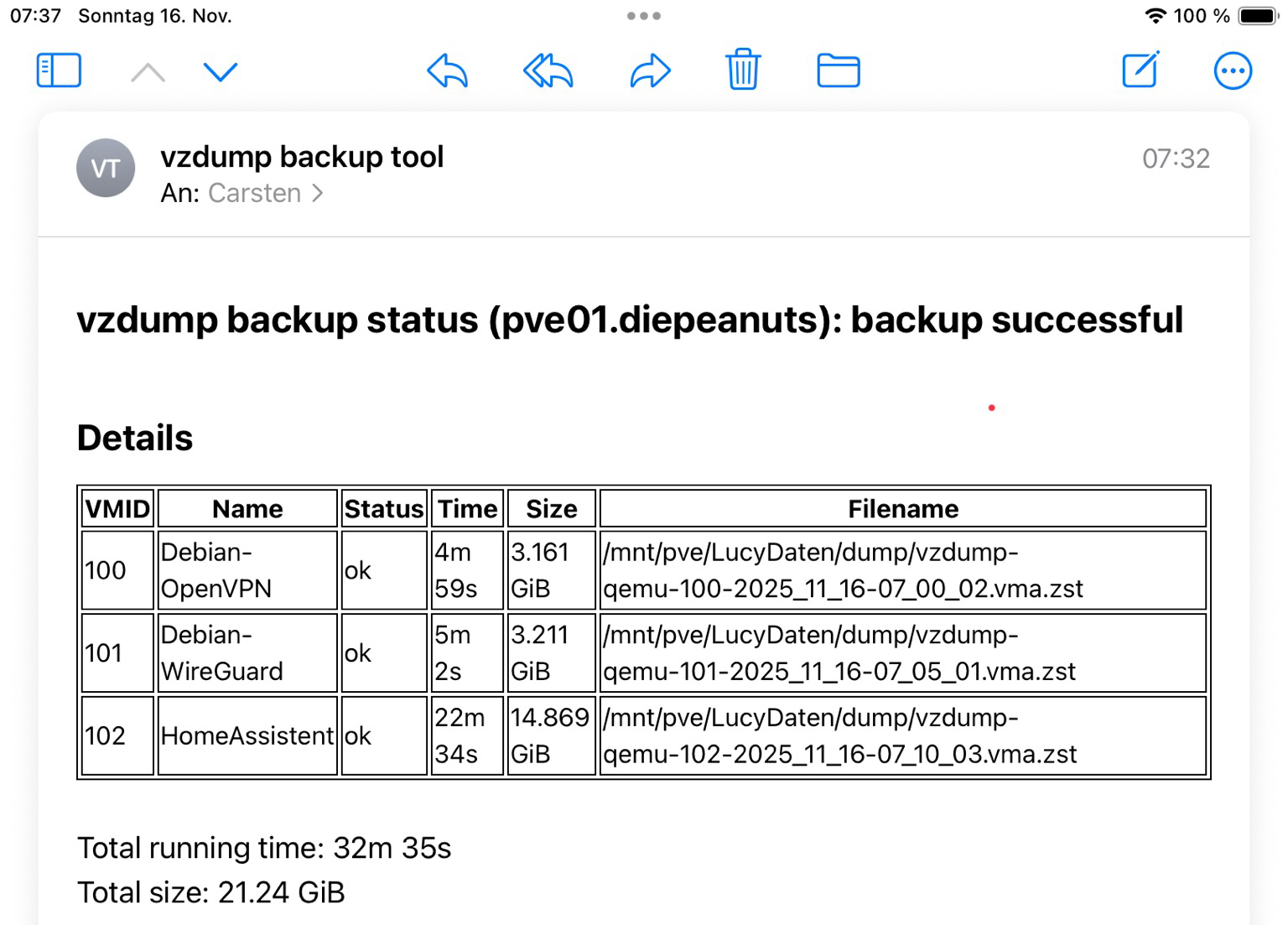
Kein #backup ? Keine Gnade!Nach diesem Motto die freundliche Erinnerung sich um das Thema auch im privaten Umfeld zu kümmern.Mit @proxmox ist es aber auch sehr einfach, dafür zu sorgen, dass man die #VM s im Zweifel wieder auf die Beine gekommt.Ja, ein ordentlicher #Cluster wäre auch eine Lösung. Der kommt auch, aber so geht es auch.Als 2nd Stage gehts von der Lucy per #veeam auf die USB Platte und die pendelt zum Wohnwagen.#proxmox #homeassistant

Screenshot der Email, die mitteilt, dass die virtuellen Maschinen für VPN und HomeAssistant erfolgreich auf einen externen Rechner gesichert wurden.
24


Upgrades to @debian Trixie 13.2 on Lenovo T470 and @proxmox VM successful.

25


I'm running Proxmox 9 on a server with currently a single LXC running. On no apparent time schedule, within a day but frequently within an hour, the host will stop responding to SSH, pings and the web UI stops updating. However, the LXC continues to run happily. The only way to bring the host back up is to power cycle the server.

Has anyone got any troubleshooting tips?

view more: next ›