1


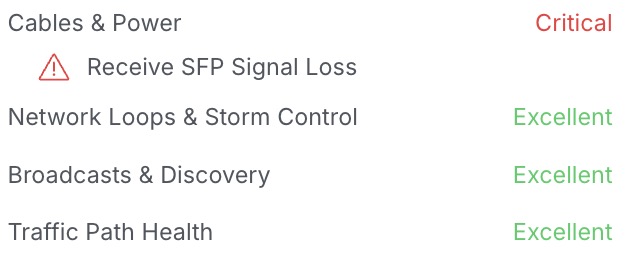
My house has frequent power blips, where the power flickers off and back on again within a few seconds, after which I have to reset my router. I'm also running my ISP-supplied router, which is kind of a no-no in techie circles, so I'm debating picking up either a laptop or mini PC so I can install an open source router OS and take back some control over my own network infrastructure.

Can someone help me weigh the pros and cons of laptop vs mini PC + UPS? This project will start out as just a network router but might grow into other boxes for various things. I already have another old/jank laptop serving as my POC media streaming box, and I enjoy the fact that I don't have to also restart that mf'er every time the power flickers.

I feel like the main selling points of laptops are that they are low powered by design (for always-on use cases), and they come w/ built-in batteries (to get through those power blips). I also appreciate that they come with a built-in keyboard and screen, so I can log in and troubleshoot without having to ssh in. The only downside I can think of is that most laptops are not very upgradable, although I've read/seen good things about the old Lenovo Thinkpad business grade laptops as far as durability and upgradability.

Anything else I'm not considering? Thanks in advance.

2
Opinions on OPNsense DEC850 (shop.opnsense.com)
submitted 3 days ago by to c/homelab@lemmy.ml


I have been looking at replacing my L3 switch at the gateway of my network & the OPNsense DEC850 seems to have all the features I want, mainly, vlans, 10 GB wan, multiple 2.5 GB lan, & open firmware. Does anyone have experience with this router/ are there better routers out there that do similar setups? I have experience with Cisco hardware and am willing to learn new syntax so I am not too worried about the CLI, but I heard that opnsense's docs are a bit thin.

3


A turbidity sensor runs on 5 V and outputs up to about 4.5 V, but an ESP32-C3's pins only take 3.3 V. Here is why it needs a voltage divider, how to wire it, and the checks to do before you plug in USB.

Free weekly email with the week's posts, videos and one tip: https://chartmann1590.github.io/homelab-the-right-way/newsletter/

Disclosure: this is a Homelab the Right Way article by Charles Hartmann, written with AI help and edited by him; the setup described is his own.

4


What actually counts as a copy under the 3-2-1 rule, why a RAID mirror or a snapshot only protects against one kind of failure, and the one-page inventory that exposes the gaps.

Free weekly email with the week's posts, videos and one tip: https://chartmann1590.github.io/homelab-the-right-way/newsletter/

Disclosure: this is my own article (Charles Hartmann, Homelab the Right Way). Written with AI help and edited by me; the setup described is mine.

5
 
 
  • two wans
  • lots of vlans
  • 32vcpu hypervisor with gpu passthrough
  • 25gbps san running off the nas

Everything I do is mostly with VMs, the hypervisor is diskless pxe booting off the SAN. I've been cleaning up my lab, it used to be a plank of wood https://discuss.online/post/44690398

There is a nanokvm hanging off the hypervisor (rs232,atx header, hid) which makes remote rebuilds quite painless. I love my inexpensive nanokvm.

What does your homelab look like?

6


I've started a homelab a few months ago, and since then it looked more or less like this:

  • DNS server - with one wildcard record "*.srv.lan" pointing to my reverse proxy (I don't have a proper domain yet)
  • Proxy (traefik) - forwards the requests to specific services (nas.srv.lan -> NAS, photos.srv.lan -> Immich etc.)

An issue showed up when I got around to setting up samba, where because I have a single wildcard DNS record, and the proxy runs on http(s), I cant forward SMB requests to the server, other than using its ip. The same issue arose when I wanted to get dns-based ssh working (even though I have nas.srv.lan set up, ssh-ing that gets me onto the proxy instead of the nas, which makes sense with the dns setup)

One solution that came to my mind would be making each service (I'm using vms, so each service is a different host) have a separate reverse proxy, as well as making the DNS server have all the records separately (nas.srv.lan -> NAS ip, photos.srv.lan -> Immich ip etc.) and then perform the proxying on the hosts. That would lead to me having a dozen different reverse proxies, wasting resources and making managment more difficult.

Are there any other things I could try?

7


Pretty much what the title says. I added an OPNSense router to my homelab about a month or two ago, along with a Ubiquiti Managed Layer-2 Switch and a Linksys AP with Openwrt flashed onto it so I could get the full modem --> router --> switch --> AP combo and freedom to do what I want (VLANs, real firewall rules, eventual IDS/IPS and QoS planned).

But for the last two/three weeks or so, every week at least once a day will the Internet go down for some reason, leaving my family without internet for an hour or more. The catch is, this is happening even when my family is connected to the Wi-Fi provided by the original ISP modem-router and not my new network running on OPNsense. A few weeks ago, we had an outage, but my mom thought it was my fault at the time, so I took the modem out of bridge mode so that they would switch to that Wifi if one of my devices had an issue for some reason.

I know it's not overlapping networks, OPNSense's WAN uplink is set to dhcp, and the LAN is 192.168.1.0/24 while the original Cox WiFi LAN is 192.168.0.0/24. The Wi-Fi frequencies aren't overlapping either (although 2.4 GHz is the only one that problem anyway right? My 5GHz freqs are different anyway), but once again, it seems like the Cox modem literally shits itself and that it's not just a network issue. The same amount of devices are connecting, I haven't added 100+ devices to the OPNsense network that would cause the modem to overload.

We have a Cox Technicolor CGM4331. When operating normally, the router's color is solid white, but when it's having these issues, I'm pretty sure it turns solid orange/amber, which apparently means it's powering up. I'll verify if it's solid orange or blinking though, as blinking amber means downstream is being registered (flashing green is upstream). Sometimes rebooting/unplugging it works, but today my mom said it didn't.

We've had some confirmed ISP outages within the month, even on days without bad weather, and Cox got bought by Spectrum, so I wonder if there's something there. But it's reaching a point where I'm about to just turn off my networking stuff to see if it's still shitting itself, but I don't want to have to do that since I'd have to fix my homelab service IPs again...

I just don't want my parents to get sick of my shit man 😭

EDIT

I'm a dumbass and forgot that I plugged it into this new UPS that I got, but it also has my Proxmox Dell and OPNsense HP plugged into it, which draw more power. So if any sort of power blip happened, it probably affected the modem and made it get stuck during bootup (hence the orange color). I've plugged it back into a regular power socket and will see if the issues stop! Thanks everyone :)

8


Reading about Christians PLC homelab and it made me wonder about how/if any others have them in their labs.

Other than some power controllers on home assistant I hadn't gone into the PLC world.

I'd like to learn more about PLC networking protocols (MMS, GOOSE, DNP3, etc) but it's slow sailing as getting hold of relay or rtu for playing can be an expensive exercise.

I've bought some railway surplus routers and switches to teach myself specific vendor networking OS's because I couldn't find a way to virtualise and this has been great but now I want to see the controls over the network.

I'm wondering if anyone here has had experience building up their own ICS lab at home?

9


I've had a plank of wood as my computer case for a few years now, easy to move around - good airflow.... It has some downsides, looks messy, required me removing the GPU slot coverings so it fit on the wood, and it uses lots of horizontal bench space.

I've migrated everything over to a open bench table today! I was able to reattach the GPU slot coverings, I was able to retire my structural chopstick preventing the gpu from falling over on the pci-e riser, and now my riser network card looks less hodgepodge.

So far I like the new case, no blood was lost today, but I did acquire a splinter!

I'm using a nanokvm to validate the computer booting and getting the screen output / mess with bios.

10


At the time, I wanted to upgrade my small homelab with another machine. Prices seem out of this world right now…

11


I was moving a shelf, i put it right ontop of a floor om3 cable run... everything was find for about a hour, then i lost signal on the cable and couldn't re-establish! It's taken alot of abuse, but I guess a entire bookshelf was a bit too much for it.

Luckily i had some om4 fiber ready, and i re-ran it, but that was fun to debug, i had dangled all my wifi off the fiber run!

12
13


I’ve wanted to try using a laptop as a server for my nas. On face value it seems lime a good idea to me:

  • built in battery backup
  • built in keyboard and trackpad for manual configuration
  • relatively low power
  • use my usbc drive enclosure
  • doesn’t take up very much space (important since downsizing to 1bd apartment with partner who for whatever reason doesn’t think my second hand rack from the 90s is “aesthetic” (joke))

I actually do this for work sshing as the build environment for some firmware is on a very specific version of ubuntu. (Which shall not be changed for reasons that are beyond me but i digress)

However, the thing that has generally annoyed me is battery management. Letting it sit at 100% all day is not great for it.

However each laptop vendor (at least to my understanding) seems to have their own hooks (often via a closed source windows program x.x) or none at all for stopping and starting charging etc.

Could just wire up a relay controlled over usb; or a smart home plug, but takes away from the encapsulation.

Any recommendations or good standards for laptops which have these hooks would be much appreciated. Thanks!

14
submitted 2 months ago by to c/homelab@lemmy.ml


Just don't pay attention to the absence of cable mangement (i'll do it later) and the few loose screw (it needed an electric screwdriver and all i got was a shitty ikea screwdriver)

15


I currently have an old Cisco Catalyst 2960. I'm limited by the 100Mbps speed and it's starting to really bothering me. I was thinking of maybe switching to a Mikrotik CRS112-8P-4S-IN but i'd like to you know what you folks are using.

16


After coming close to running out of resources last week and having to re-purpose another device turning it into a 3rd Proxmox node, it got me thinking about how easily ZFS ARC cache and VM overhead sneak up on you.

So, I built a basic tool for rough guidance.

It calculates vCPU overcommit ratios and RAM allocation locally in your browser. Just pure client-side math so you don't accidentally OOM your hypervisor like I almost did. Inputs stay right in your browser and aren't saved anywhere.

Feedback or sanity checks on the math are welcome.

https://unknownuniverse.uk/tools/proxmox-calculator/

17


Omada platform was found to be vulnerable in several ways

18


It's all in the title :) Personnally, i'd say my old Cisco Catalyst 2960. Totally EOL but it's my first managed switch.

19


I'm the developer. Some of you saw my earlier posts about DeviceShelf, the local-first network scanner with a headless server edition. The iOS app just cleared App Store review, so you no longer need TestFlight to run it.

It's the same scanning engine as the desktop app: network scan, device identification, open ports per device, a security report, presence alerts, and export/share from the phone. Apple's multicast entitlement is active in this build, which means SSDP/UPnP discovery works on iOS as well.

The download is free with a trial. Full features unlock with a DeviceShelf license (one license covers desktop, mobile and server) or through an in-app purchase. Scans stay on the device; the AI device ID is bring-your-own-key.

App Store: https://apps.apple.com/app/deviceshelf/id6779666567

Still a young app. If it mislabels something on your network, tell me and I'll fix it.

20


I'm the developer. DeviceShelf scans your LAN and tells you what each device is: vendor, type, open ports, and a per-device security report. It runs on macOS, Windows, Linux, iOS and Android, and there's a headless server edition (Docker + .deb) for 24/7 monitoring with ntfy, Gotify or webhook alerts.

It's local-first: nothing about your network leaves your machine unless you turn on an opt-in feature, there's no account, and the AI device ID uses your own API key. One-time purchase, with a trial.

It's still a young project, so bug reports and feedback are very welcome. If something looks off on your network, tell me and I'll fix it. Happy to answer questions too.

21


Hey y'all, I have a small network with opnsense firewall, a unify ap, some client in different subnets, vpn, DNS and some servers.

As I am completely self thought, I got everything to run reading the docs and forums, but I have no idea how to test if what I build is safe and stable.

Are there good up to date tools, or checklists one could follow to audit the different parts of the network (most important the opnsense config)?

What do you check if looking for security issues?

The network mostly relies on client separation through different subnets on different vlans, but I fear I dont understand how for example the vpn and the nas work together in detail to be sure there is no security implication I oversee.

Also: how do you handle client authentication for devices on the same subnet? I know IP/mac-adress ARP entries are easily spoofed and therefore not secure, but I haven't seen how to do it correctly

22


Question in the title. Feel free to include details, like what networks have wifi, what kinds of devices are on what, etc etc.

Right now I have 4 VLANs, each with a separate wifi SSID:

  1. Base - servers, workstation, and any trusted devices
  2. Business - work laptop, dock, and phone - enforces network and device isolation - lighter adblocking settings, so that work programs and services aren't nerfed
  3. Isolated - visiting friends and family use this one - again, enforces network and device isolation
  4. Security - for cameras, doorbell, and other security devices - strongest security settings, isolation, and no direct internet access

Looking forward to hearing what others are doing, to see if I can improve my setup.

23


I'm self hosting a lot of small apps that require databases to function. So far, each stack has its own database, but I'm wondering if it would be better to centralise the data into one single database instance

All the apps are low traffic (it's just me), and security concerns are minimal (no sensitive data)

Does anyone have any advice on this?

24


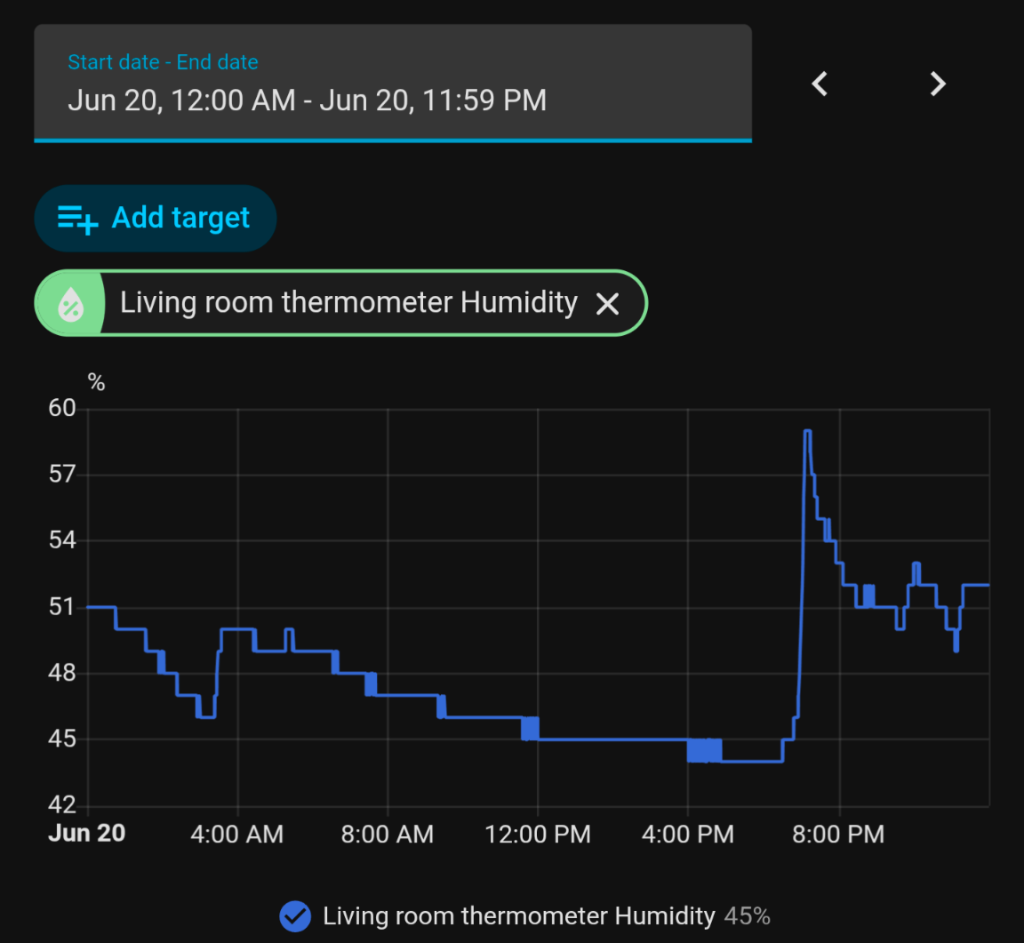
I made some pasta after work yesterday, and you can clearly see the humidity spike in the house when boiling the water. Gotta remember to turn the extraction hood on if I don't want mold!

As much as I love automations, I think my favorite part of Home Assistant is the insights it can givr
25
DIY NVR Recommendations (lemmy.dbzer0.com)
submitted 4 months ago by to c/homelab@lemmy.ml


I'm looking to buy a couple of ONVIF/RTSP IP cameras to hook up as part of a home security system and could use some help with the programming side of things. I've looked around a couple of Youtube guides but they all seem to skip over some minor but important details needed to install and run an open source NVR.

Could someone point me out to an online guide that's easy to follow? I'm still very much a beginner with Linux and don't know much about how to set up Docker or HomeLab as part of the NVR's installation process. I also need to remotely access my video feeds when not at home and would like to ask for some guidance on how one can go about setting that up on both the NVR and phone side.

Below is a diagram of the planned setup. Any information would be appreciated!

view more: next ›