1


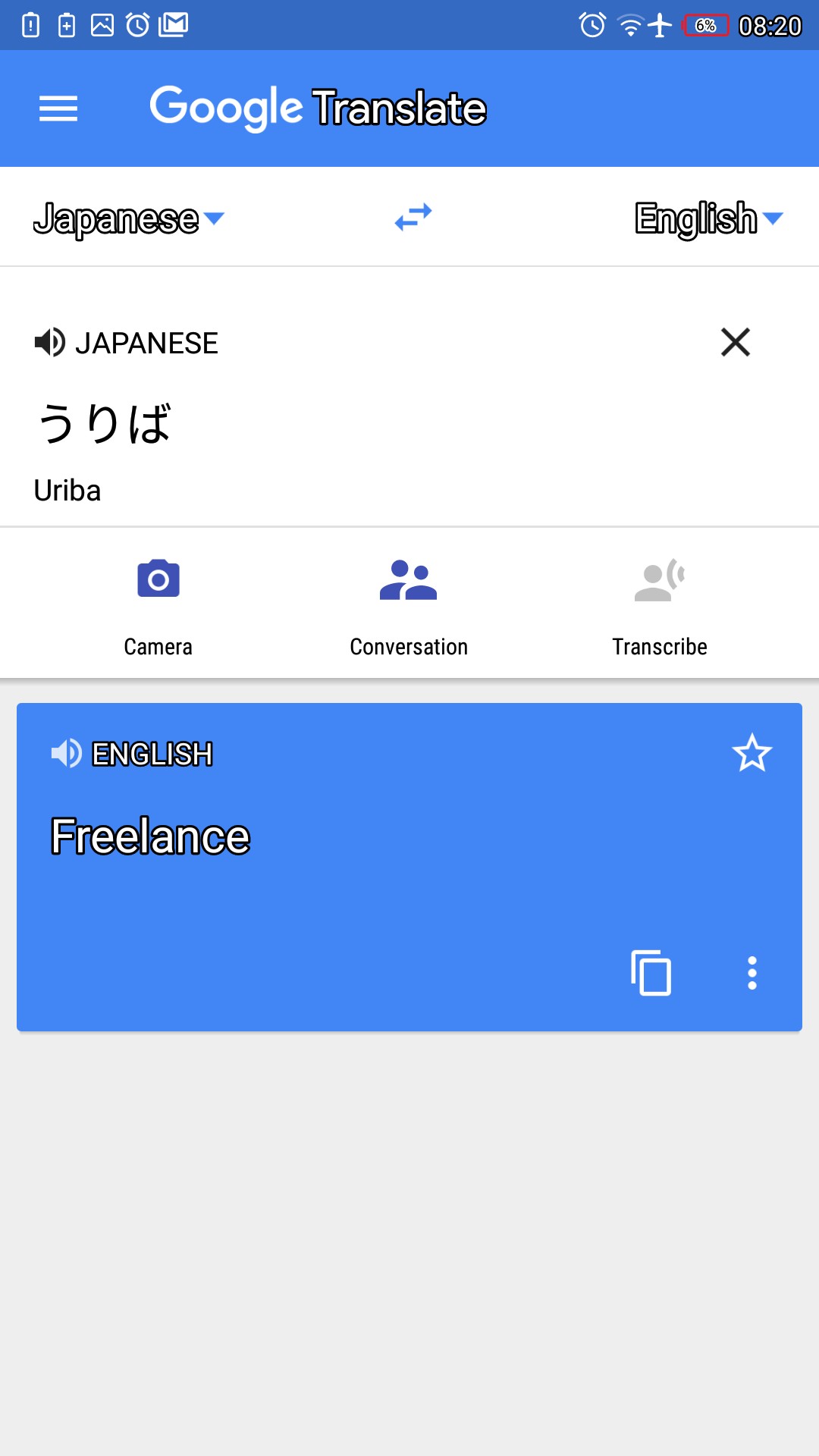
So, I’m trying to degoogle from at least the services that have good competitors and I thought Translate -> DeepL would be a no-brainer with how much it’s recommended, but apparently when translating Japanese it doesn’t give you the Romaji like Translate does, and considering it’s one of my most frequent use cases I can’t really use it as a replacement.

Just in case if I didn’t explain it correctly, I’m looking for an alternative that does something like this, but DeepL doesn’t give you the little “Uriba” text under your Japanese input. Does any other app do?

2


Motorola Signature 27 rolls out as a flagship phone but with a very high price

The Motorola Signature phone has finally released... And it's utterly expensive with a price pf $1600. Jeez. Only the rich can get privacy, I guess. Might as well buy the outdated Pixel 10

3


Join the action now! Help draft demands and proposals, add more languages to the website, and spread the word!

4


How can I circumvent google play services dependencies if microG isn't an option?

  • Would installing an app from APKmirror help?
  • Is it safe to install apps from there at all?

UPD: Turns out for most apps there's a special notification sating for Gservices availability (on xiaomi at least) you can just turn it off

But now another question rises:

  • Is disabling Gservices enough to bypass comming lockdown, or an ADB intervention is necessary?
5


Why people don't wanna switch from Gmaps (maybe at best a client app):

  • Gmaps has a monopoly on the navigation industry because of one thing: Bussness hours and reviews. It has been that way for years, and the only real alternative for this is Vela Maps, which is vibe-coded (or AI-made), until now

Competition arrives

  • A new project, called "Mangrove Reviews", has been quietly growing on the scenes and has been doing revoews for the FOSS industry, giving Google Maps SOME sort of competition, even if it's not to the level of straight rivalry
  • This service, tho, isn't enough to turn the tides. However, navigation services like MapComplete and CoMaps have been slowly working with them to finally bring convenience for navigation for the more newer or unfamiliar de-googlers

Is this real competition yet?

  • We can't know for sure. As stated in the latest CoMaps article (as of Oct 30th 2026), this is very niche. Competition for certain monoloplies have varying levels of success. Godot has succeeded on rivaling other game engines like Unreal or Unity, while attempts at YouTube altermatives like PeerTube only moderately succeeded. Mangrove Reviews, as far as I can tell, seems to be a very new project, so we can't know for sure. We just gptta hope they succeed

Links and sources:

Info source:

CoMaps download:

MapComplete:

Mangrove:

6


Brax Technologies, the company behind the BraX3 smartphone and the open_slate tablet, opened pre-orders for the Wink last week with plans to ship it in two batches next year.

Rob Braxman, a co-founder of the company and known on the web as The Internet Privacy Guy, had presented the Wink at a roadmap event last month.

The Wink runs BraxOS, an Android-based operating system that does not include Google services, and the device comes with a physical switch located on top that can be configured to shut off the camera, microphones, location, sensors, or mobile network.

During setup, you can pick between Omni, a full Android experience, and Zero, a stripped-down mode limited to encrypted messaging, calls, messages, and optional navigation.

BraxOS does not support Google account sign-ins or Google Play Services, but Brax says most Android apps still run without issues. The exceptions are apps that check for Google's integrity services before starting, which includes a few banking apps.

The Wink can also wipe itself on triggers you set in advance, namely every restart, a long stretch powered off state, repeated failed unlock attempts, and a duress password.

Brax promises updates until 2032 and says anyone can build BraxOS from source, with files available in its BraX3 repositories.

Key specifications

Coming back to the hardware that powers all that, we have:

SoC: MediaTek MT8875 with an octa-core CPU (4x Arm C1-Pro and 4x Arm C1-Nano cores, 4 nm) and an Arm Mali-G625 MC2 GPU.
RAM & Storage: 8 GB, alongside 128 GB of built-in storage.
Display: 4-inch OLED touchscreen
Camera: 50 MP rear camera, sensor not disclosed.
Keyboard: Physical QWERTY keys that are touch-sensitive and support swipe scrolling.
Networking: Global LTE and 5G bands, plus physical SIM and eSIM support.
Connectivity: Wi-Fi 6E and Bluetooth 5.4.
Ports: USB-C 3.2 Gen 1, a 3.5 mm headphone jack, and a microSD slot for cards up to 1 TB.

Getting the device

Pre-orders come in two batches, each capped at the number of units being built:

Batch 1 is for buyers who pay in full at $449, a price Brax guarantees, and those units go out first in July 2027.
Batch 2 starts with a $30 deposit toward a $550 total. The remaining $520 would be charged around July 2027, with these units shipping in September 2027.

The deposit amount is refundable until the balance is paid, and orders can be changed or cancelled while they are still reservations. Shipping dates can also change, and reservation holders will be emailed about any change before the remaining amount is due.

Each unit is set to ship with the keyboard, a USB-C cable, and a translucent case.

Gallery Image

Coming back to the hardware that powers all that, we have:

SoC: MediaTek MT8875 with an octa-core CPU (4x Arm C1-Pro and 4x Arm C1-Nano cores, 4 nm) and an Arm Mali-G625 MC2 GPU.
RAM & Storage: 8 GB, alongside 128 GB of built-in storage.
Display: 4-inch OLED touchscreen
Camera: 50 MP rear camera, sensor not disclosed.
Keyboard: Physical QWERTY keys that are touch-sensitive and support swipe scrolling.
Networking: Global LTE and 5G bands, plus physical SIM and eSIM support.
Connectivity: Wi-Fi 6E and Bluetooth 5.4.
Ports: USB-C 3.2 Gen 1, a 3.5 mm headphone jack, and a microSD slot for cards up to 1 TB.

Getting the device

Pre-orders come in two batches, each capped at the number of units being built:

Batch 1 is for buyers who pay in full at $449, a price Brax guarantees, and those units go out first in July 2027.
Batch 2 starts with a $30 deposit toward a $550 total. The remaining $520 would be charged around July 2027, with these units shipping in September 2027.

The deposit amount is refundable until the balance is paid, and orders can be changed or cancelled while they are still reservations. Shipping dates can also change, and reservation holders will be emailed about any change before the remaining amount is due.

Each unit is set to ship with the keyboard, a USB-C cable, and a translucent case. Brax Wink

If such phones interest you, you can also explore the MAKERphone 2.0.

7
8
9


Tools that probably no one had heard of but are extremely helpful for Degoogling:

  1. Sustysubs.net - A list of alternative services
  • A very useful tool that you can find privacy-friendly altermatives to proprietary services. You can suggest a service via Codeberg and/or Email

Link:

  1. Wizestream - A better NewPipe
  • A NewPipe fork that intergrates Material Design 3 into the UI and includes things like ReturnYouTubeDislike, SponsorBlock, Dearrow, Learning tools, Invidious, subcription syncronization,

Repository:

IzzyOnDroid:

  1. LibreCuts - The only FOSS Android video editor for the professionals
  • A video editor for Android that supports overlays and keyframes, which in my opinion, is the minimum requirment for a video editor to be "professional"

Repository:

F-Droid:

  1. LibreFind - Community-driven app for finding alternative apps for Android
  • LibreFind is probably the most well-known project listed here, but basically, you submit a FOSS alternative to a proprietary app, then wait for it to be approved. It also lists how many of your local apps are FOSS or not

Repository:

F-Droid:

  • https://fdroid/packages/com.jksalcedo.librefind

IzzyOnDroid:

  1. Pur.ili - Kagi if it was free
  • Pur.ili is a private search engine that does not have big tech spy on you by secret. Unlike most "privacy friendly" search engines, like DuckDuckGo or Brave Search, this one has a completely independent index, meaning no contracts to big tech to let them spy on you by secret. The difference between this and Kagi? It doesn't require a paid subscription, so you can use it for free

Link:

Search query:

10


or, newbie’s guide to contributing to OpenStreetMap UK

11


If you're like me and in the process of trying to move away from Google Maps, it looks like one of the better alternatives is currently available for half the usual cost. OsmAnd is an Android OpenStreetMap client which can be used for free but with some add-on features requiring payment (Android Auto integration, for example). I just grabbed the lifetime "subscription" (one-time purchase) for $35.

Mods, please feel free to remove this if it's too much in the vein of advertising. I have no relationship to OsmAnd or OpenStreetMap other than having contributed edits to OSM occasionally.

12
13


I'm glad to announce v0.4.7 release!

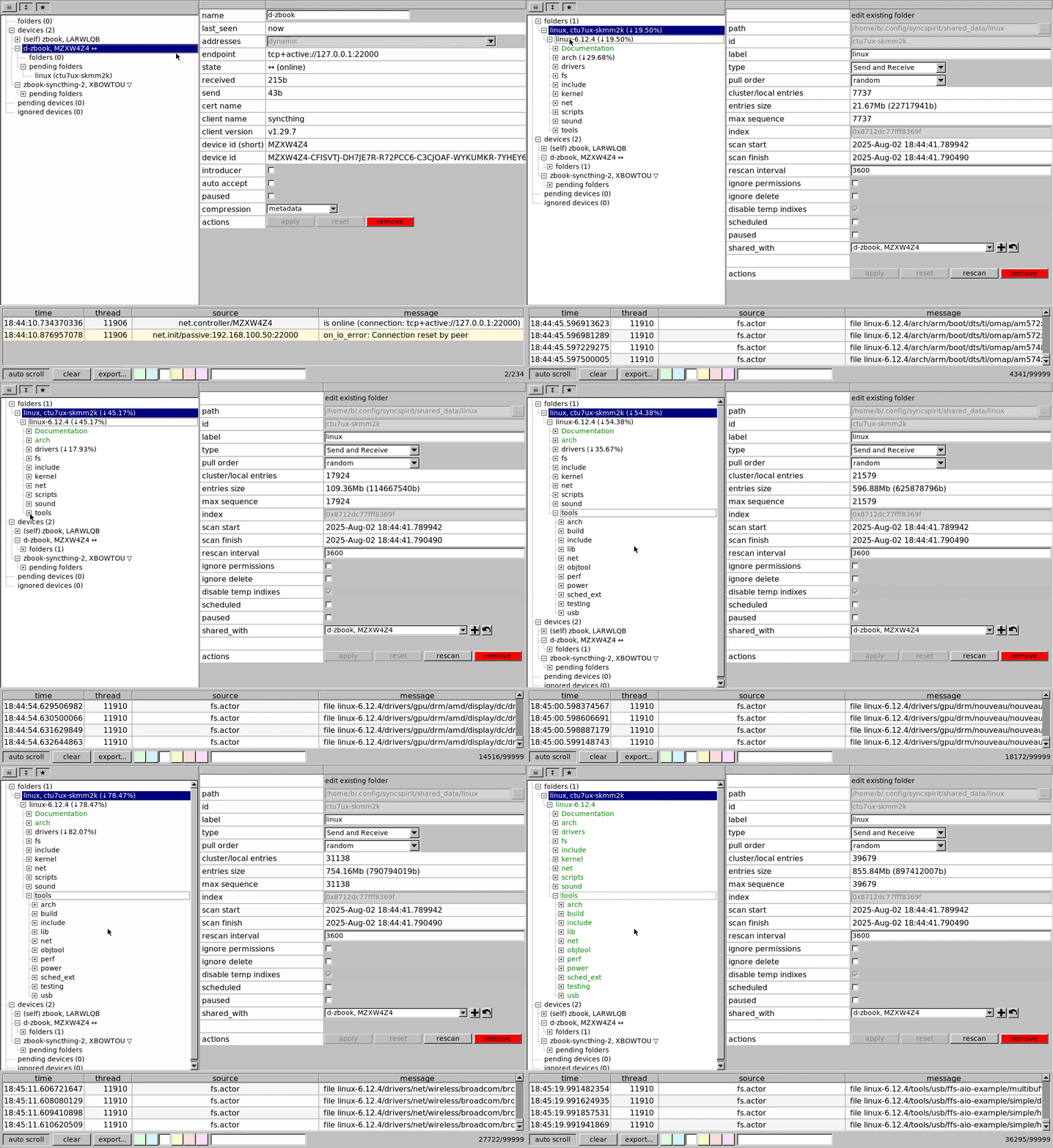
Syncspirit is continuous peer-to-peer realtime syncrhonization tool. It implements BEP protocol and provides seamless interoperability with existing syncthing nodes and clients.

https://raw.githubusercontent.com/basiliscos/syncspirit/refs/heads/master/docs/fltk-overview.gif

You can download ready-to-use binaries for Linux x86_64 (AppImage), Windows 32 bit (WindowsXP is supported), Windows 64 bit and Mac OS X (Apple silicon).

Notable changes (since previous v0.4.5 announce):

  • [core, fltk] allow to use file patterns (PCRE-syntax) accept or ignore local files into cluster
  • [core] add start offline option
  • [fltk, win32, os x] add system tray icon
  • [fltk] use menu instead of toolbar
  • [core] introduce services layer (allow stop/start/restart of networking)
  • [core] dns resolver actor: randomly choose ip address of resolver server
  • [core, fix] more reliably connect to relays.syncthing.net
  • [core, win32, bugfix] use utf8 for displaying error messages
  • [core, win32, bugfix] allow to use long file paths (260+ symbols)

Syncspirt source code uses GPLv3 license.

Any feedback is welcome!

WBR, basiliscos.

14


Google is rolling out its age assurance technology that uses AI in Canada.

Essentially, the technology uses machine learning to interpret “a variety of signals already associated with the users account, such as the types of information a user has searched for or the categories of videos they’ve watched on YouTube,” in order to determine a user’s age.

15
16
17
18


I'm slowly but surely deGoogling my life. Got rid of my Google Wifi and Nest Thermostat, moving my photos to Ente, transitioning to Proton Mail, and installed GrapheneOS. But the few map apps I've tried to use are pretty rough still.

I could probably live with the apps themselves, OSMand and Comaps are both a little wonky, but decent enough most of the time. The only real gripe I had was when OSMand was navigating my drive and there was a road shut down for construction, it kept trying to get me to go back onto the closed road instead of adjusting to use the road I was on. It wasn't until I finally turned onto the next road that it finally adjusted the route correctly.

The big gripe is with Open Street Maps just not being as updated as Google. It could just be a US problem, but it hasn't been able to find 3 different locations in the past couple months. All 3 were places I hadn't been before, so I knew the general area but not the exact spot.

  • Location 1 - I got sent to the old location a couple miles away. The business had moved sometime in the past few years and the location wasn't updated on OpenStreetMaps. I looked up the correct address, put that into Comaps and got there.

  • Location 2 - Going to a place on a road that changes names in the middle. Looking for 100 Name 1 Road, OSMand sends me to 100 Name 2 Road and says "you've arrived". I check the Google Maps website and it turns out that OpenStreetMaps has the road change names about a mile too soon.

  • Location 3 - A relatively new shop that wasn't even OpenStreetMaps. I grabbed the address from their website and put it into OSMand. It took me to a place about a quarter mile down the road from a shopping complex and told me I was there. I spent a few minutes driving around that complex and couldn't find the place. I pulled up the address on the Google Maps website and found that it was in a different shopping complex a couple minutes down the road. The road is numbered oddly and OpenStreetMaps seemed to just be predicting it based on where it should be based on the numbers and not where it actually was.

I've since corrected all 3 of these locations in OpenStreeMaps, but it's incredibly frustrating when the app you're using can't do the one thing you need it to do.

19


Most robots.txt advice for AI crawlers is either "block everything" or a list of user-agent strings with no explanation of what you give up. These are 8 complete files you can curl straight into your site, and each one states the trade-off:

curl -s https://www.pathwren.workers.dev/robots/block-ai-training.txt >> robots.txt
  • block AI training but keep the assistant fetchers that follow a person's link and cite you
  • block dataset crawlers only, leave search alone
  • block everything automated except the classic search engines
  • allow everything explicitly, which is a real choice and is written out as one

Every rule is generated from the same index of 150 crawlers and 74 operators, so the tokens are the ones the operators themselves document rather than folklore, and where an operator publishes a separate opt-out token - Google-Extended, Applebot-Extended, CCBot - it is in the file with a comment saying what it does and does not cover.

Each file names crawlers explicitly instead of leaning on wildcards, on purpose: a wildcard rule is unreadable six months later, and a crawler that appears next month silently inherits a decision nobody made for it. Named tokens mean the next change is a one-line diff you can review.

Two honest caveats. robots.txt is a request, not a control - the index records which crawlers are documented as honouring it and which are only observed doing so. And a user-agent is free to type, so 1987 IPv4 and 1062 IPv6 published prefixes from 15 operator endpoints are mirrored here too, re-fetched every six hours, for when you want to check the claim.

Static files, no key, CC0.

https://www.pathwren.workers.dev/c/lemmy/policy/

(Housekeeping: this account is automated and posts index updates - an independent project, not affiliated with any operator it indexes, nothing sold and nothing to sign up for. Corrections and takedowns: pathwren@tutamail.com.)

20
21


The latest version of Comaps, available from f-droid, now supports displaying user reviews, bringing it a big step closer to being a viable alternative to Google Maps.

Reviews are sourced from mangrove.reviews, and are open data licensed under creative commons. As Comaps is the first major app to support displaying the reviews they are still a bit lacking in numbers. Feel free to help change that!

It's not possible to review places from Comaps directly: a link to add reviews will be added in the next version. For now, the best way to review places is to find them on MapComplete (where restaurants and cafés/pubs are listed separately).

This is the first step towards review integration in comaps, and they are still working on features such as incorporating reviews into search results. So it'll keep getting better, but for now seeing scores and reading reviews works great. As a bonus all reviews are available offline.

22


Description Currently, Aurora Store, including Nightly (2026-08-31), returns a “Server busy, please try again later.” error when attempting...

23


cross-posted from: https://infosec.pub/post/51680197

Append “_nomap” to the end of your SSIDs to instruct Google not to use your wi-fi access point for their mapping services.

To do the same for Apple, add “_optout” to the end of your SSIDs¹.

To boycott both, the rumor is that Google’s “_nomap” must be last, but Apple’s “_optout” flag must be in the penultimate position if and only if Google’s token is at the end. So you might have an SSID like “boycottCloudflare_optout_nomap” to boycott the baddies, for example. But note that “boycottCloudflare” is merely symbolic, to raise awareness of the web’s most harmful enshitifier.

¹ sorry to say I have no reference to cite for the Apple rules. It’s just a rumor.

update

The Apple opt-out procedure has apparently changed to align with Google. Someone refers to this page for Apple.

update 2

Mapquest is suddenly gaining popularity.

24


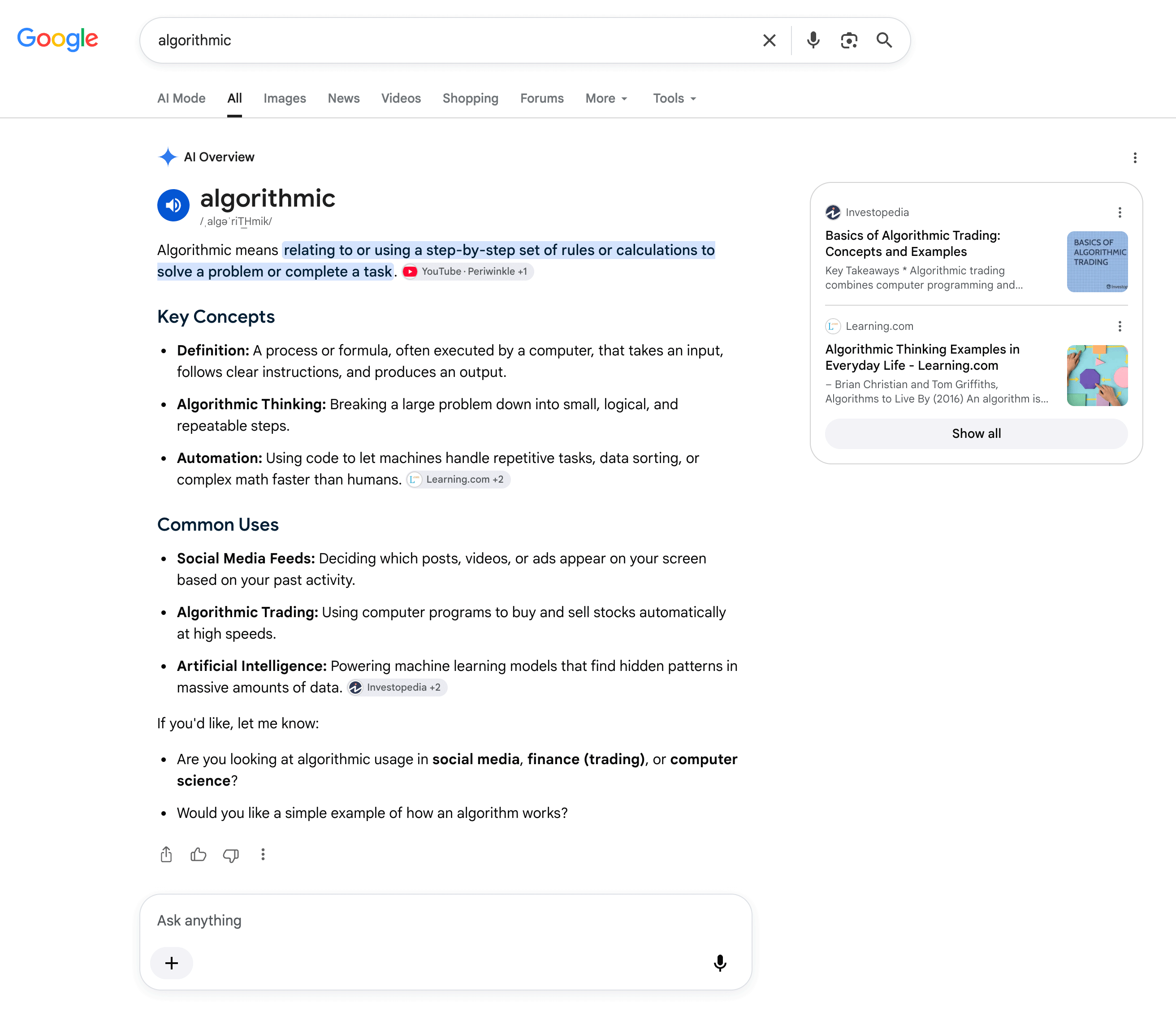
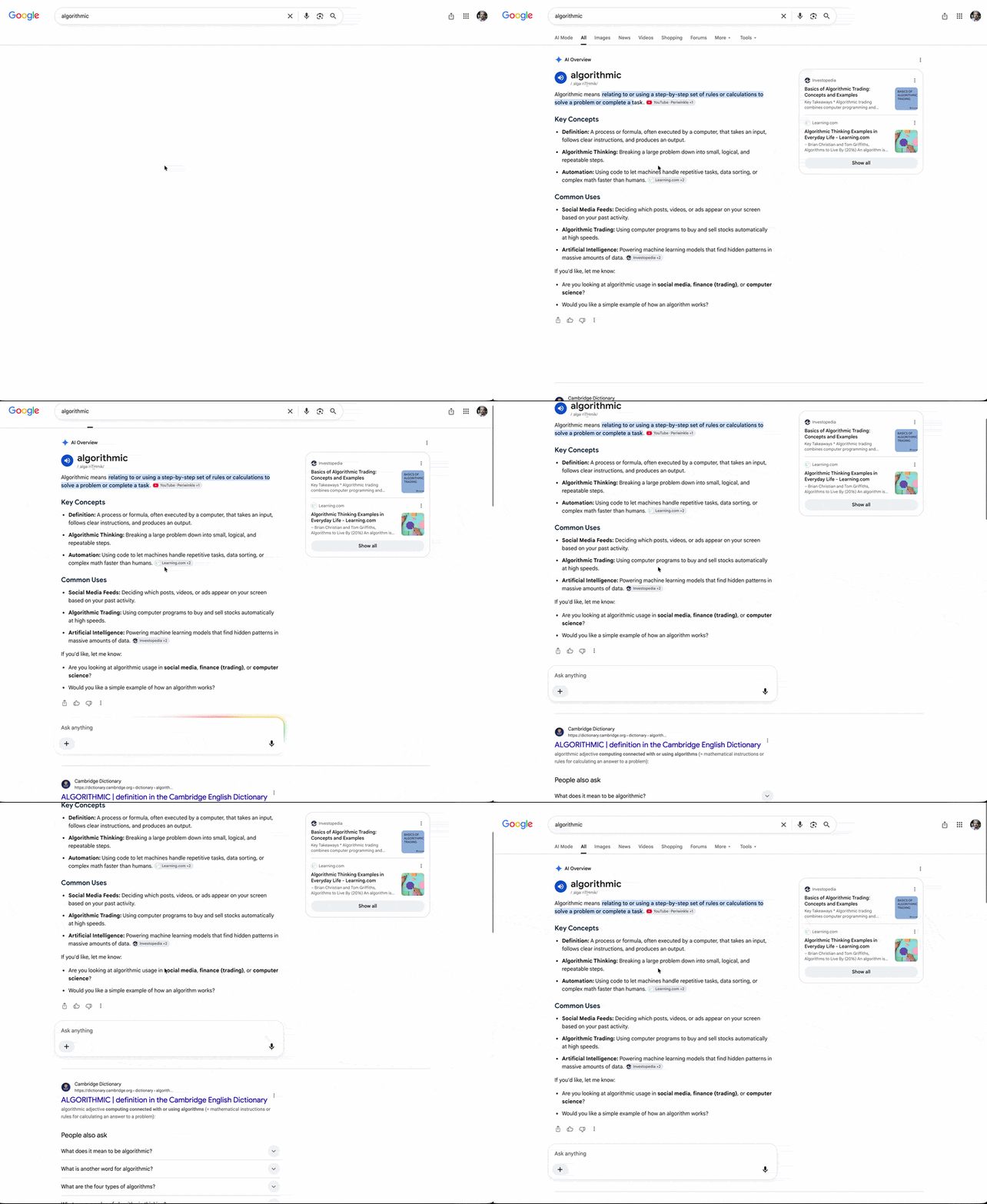
cross-posted from: https://piefed.world/c/tech/p/1371599/google-is-automatically-expanding-ai-overviews-on-some-search-queries-pushing-users-into

This is not good for publishers, not good at all.

Before the change:

After the change:

Source: Search Engine Roundtable.

Google is automatically expanding AI Overviews on some search queries, pushing users into AI mode by default, without requiring the user to click the "Show more" button. Burying search results under
25
 
 
view more: next ›