all 16 comments

sorted by: hot top controversial new old
[–] 2 points 4 months ago

Just type rm -rf f and use tab to auto complete.

  • source
  • [–] 3 points 4 months ago (2 children)

    It's just not escaped properly.

    You can probably just get away with putting a backslash \ before the $ so it looks like \$.

  • source
  • hideshow 2 child comments
  • [–] [S] 2 points 4 months ago (1 child)
  • [–] 1 point 4 months ago

    I'm unfamiliar with fish but that $'\003' also looks a lot like how bash escapes unprintable control characters (ASCII 3 is 'end of text' apparently).

    You probably have sh or bash available. Try the same command in that.

    sh -c "rm -rf 'folder'$'\003'"
    

    Or just delete all directories that start with folder with confirmation (no -f):

    rm -r folder*
    
  • source
  • parent
  • [–] 2 points 4 months ago (5 children)

    The quotes and escapes are mangled.

    cd into the directory with the folder to remove, type rm -rf ./ then press tab until the folder you’re looking for is autocompleted after the ./

  • source
  • hideshow 5 child comments
  • [–] [S] 1 point 4 months ago (4 children)
  • [–] 1 point 4 months ago (3 children)

    If you’re struggling, might as well either open a file manager like midnight commander to make your life easier.

  • source
  • parent
  • hideshow 3 child comments
  • [–] 1 point 4 months ago*

    Are you sure the name is 'folder'$'\003'? I think the outer quotes might be added by ls. I would try rm -rf 'folder\'\$\'\\003'

    Edit: Or rm -rf 'folder\'$\'\\003'

  • source
  • [–] 1 point 4 months ago
    [–] 0 points 4 months ago (3 children)

    You probably don't own the folder. Use sudo.

  • source
  • hideshow 3 child comments
  • [–] [S] 1 point 4 months ago (2 children)
  • [–] [S] 2 points 4 months ago (1 child)
  • [–] 1 point 4 months ago

    Oh. Sudo is the special word meaning admin. So if you have a command like rm and it fails due to permissions you simply add sudo. sudo rm. But I see that your problem is the folder name. So nevermind. Maybe look at the spaces? Maybe you have tab$tab instead of space$space?

  • source
  • parent
  • 16 comments in c/linux4noobs@programming.dev view that post
    [–] 20 points 4 months ago (3 children)

    Tab Completion if you're unsure how to escape characters in this case. Start the name of the folder, then hit TAB a couple times

  • source
  • hideshow 3 child comments
  • [–] 5 points 4 months ago* (2 children)

    ⬆️⬆️⬆️This⬆️⬆️⬆️

  • source
  • parent
  • hideshow 2 child comments
  • [–] 5 points 4 months ago (5 children)

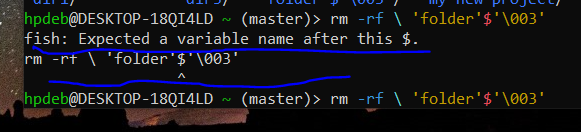
    Fish is the command line shell your using (similar to bash). Usaslly the $ symbol perceeds a variable name, hence the error. Do you have a folder with a $ in the name?

  • source
  • hideshow 5 child comments
  • [–] [S] 3 points 4 months ago (3 children)

    'folder'$'\003'

    That's the name of the folder.

  • source
  • parent
  • hideshow 3 child comments
  • [–] 8 points 4 months ago

    What does ls show?

    you can escape special charcters with \ something like \'folder\'\$\'\\003\' might work

    be careful with rm -rf as you might delete your entire disk if done badly. use some other command to test if it targets the correct directory like ls \'folder\'\$\'\\003\'

  • source
  • parent
  • [–] 5 points 4 months ago*

    Yep as others have noted put a \ in front of each special character. The \ tells the system to treat the following character as a alphanumeric character in the string and not as a operator or a command. Since ', $ and \ are all special characters you will need a \ just before each when typing this name. Also as mentioned do this with a benign command like ls first to make sure your only acting on that specific directory or you might have a bad day.

    Edit: How the heck did you get some of those folder names? Looks like a script with incorrect variable/macro substitution made these.

  • source
  • parent
  • [–] 4 points 4 months ago

    ‘folder’$‘\003’

    Oh that is unpleasantly fiddly to insert all the backslashes to escape the bits. Testing here, (fiddly to even make a dir called that, lol), for fun, instead of just pressing tab, ... is it just the $ and the \ you need to escape? and the ' are fine? Results here are inconclusive, not sure I managed to make a file with the same name, it showing here with extra outer '.

    Probably easier to just interactively.... but yeah, in case needing to have it written for a script... probably easiest still to just press tab, to see how it arranges the escape syntax, and paste that into your script. ;)

    The fi in fish is friendly interactive, after all.

  • source
  • parent
  • [–] 4 points 4 months ago (1 child)

    Is this homework of some sort?

    By default, GNU ls will quote entries containing certain special or unprintable characters. For example, if a file name contains the space character, GNU ls will print e.g. 'hello world'. This quoting is done using Bash syntax.

    In Bash, 'folder'$'\003' (or $'folder\003') represents the text folder followed by octal byte 3. Because you use Fish instead of Bash, this doesn't work­—it has a different syntax to specify unprintable/special characters.

    I can tell you how to refer to this file in Fish, but I hesitate to do it if it's for homework. What I will do is point you to the part of the Fish documentation where this is (kind of) explained: in Fish for bash users#Quoting.

  • source
  • hideshow 1 child comment
  • [–] 4 points 4 months ago

    Can you not rm -rf then tab and select the folder automatically formatted as needed?

  • source
  • [–] 2 points 4 months ago* (last edited 4 months ago) (1 child)

    As others have said, tab-complete should be able to do it. If not, here are two other options:

    Is it the only "folder*" in the directory?

    $  ls *folder*
    ‘folder’$‘003’
    

    If you only have that, you should be able to use the wildcards to delete it:

    rm *folder*
    

    Another is just find the inode and delete using that:

    $  ls -li | grep folder
    5120013  .rw-rw-r-- user user  0 B  Fri Jun 19 21:09:02 2026 ‘folder’$‘003’
    
    $ find . -inum 5120013 -delete
    
  • source
  • hideshow 1 child comment
  • [–] 1 point 4 months ago*

    Nobody's getting into the real issue lol. Yes, yes, tab completion. But all you need to do is escape the dollar sign: \$. Or include it inside the single quotes.

    👍👍

  • source