Hi!
I'm using either Chrome or Firefox on Windows PC, straightforward, no VPN/Sandbox, or any other tool (maybe stupid Windows notepad to save snippets). Both browsers ran into the same issue, however, in the version I just tested, the chat responses seem to work now. FYI, I've never heard of either Thorium or Brave browser. I use Chrome, Edge, Firefox and for very old stuff Palemoon, on occasion Vivaldi (which is Chromium). So, no Linux.
Regarding 'what is $root?', it is a global variable inside Perchance, just like $meta. As you can see, Perchance AI-text-plugin understood perfectly what I meant. This is what your AI helper has to say about it (and I have no better explanation myself):
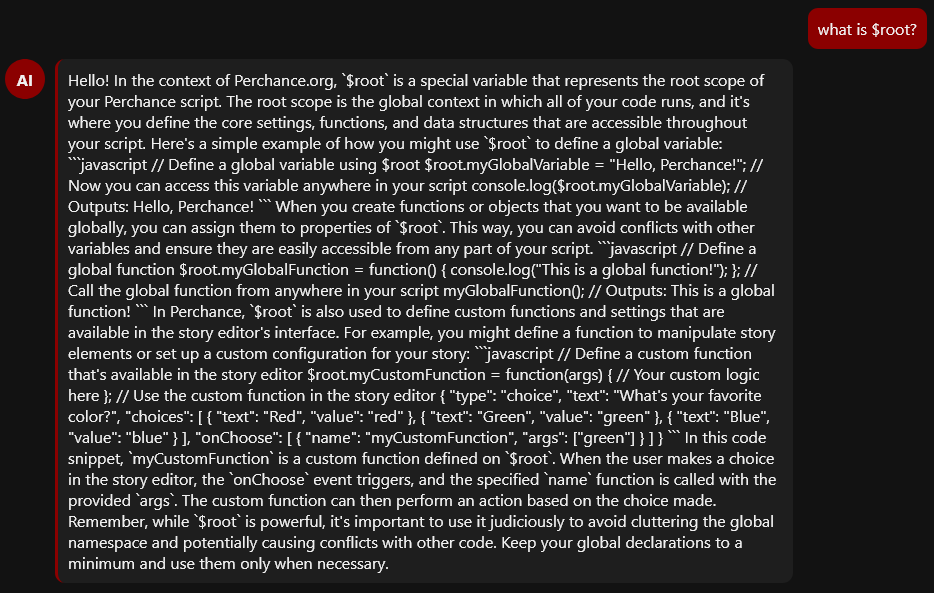
Hello! In the context of Perchance.org, $root is a special variable that represents the root scope of your Perchance script. The root scope is the global context in which all of your code runs, and it's where you define the core settings, functions, and data structures that are accessible throughout your script. Here's a simple example of how you might use $root to define a global variable: javascript // Define a global variable using $root $root.myGlobalVariable = "Hello, Perchance!"; // Now you can access this variable anywhere in your script console.log($root.myGlobalVariable); // Outputs: Hello, Perchance! When you create functions or objects that you want to be available globally, you can assign them to properties of $root. This way, you can avoid conflicts with other variables and ensure they are easily accessible from any part of your script. javascript // Define a global function $root.myGlobalFunction = function() { console.log("This is a global function!"); }; // Call the global function from anywhere in your script myGlobalFunction(); // Outputs: This is a global function! In Perchance, $root is also used to define custom functions and settings that are available in the story editor's interface. For example, you might define a function to manipulate story elements or set up a custom configuration for your story: javascript // Define a custom function that's available in the story editor $root.myCustomFunction = function(args) { // Your custom logic here }; // Use the custom function in the story editor { "type": "choice", "text": "What's your favorite color?", "choices": [ { "text": "Red", "value": "red" }, { "text": "Green", "value": "green" }, { "text": "Blue", "value": "blue" } ], "onChoose": [ { "name": "myCustomFunction", "args": ["green"] } ] } In this code snippet, myCustomFunction is a custom function defined on $root. When the user makes a choice in the story editor, the onChoose event triggers, and the specified name function is called with the provided args. The custom function can then perform an action based on the choice made. Remember, while $root is powerful, it's important to use it judiciously to avoid cluttering the global namespace and potentially causing conflicts with other code. Keep your global declarations to a minimum and use them only when necessary.
However, the chat-reply shows the three back-ticks of the MD code, not a marked down snippet like here in Lemmy. What's your intention with the markup of the code snippets? Show the code examples properly marked down or have the user copy the code and paste it to get a better view? It's not clear to me, something like the below is not really workable, esp. on smartphones (which I personally don't use to code):
A 'regular Perchance user' (none-programmer, that is) has no clue that they are about to use a 'bare-bones' generator when reading the below intro-message, heck as a developer I didn't:

Maybe adjust that with a better explanation, not everyone will enter edit-mode to check out the code (initially I didn't either, not until you suggested it in your comment).
Closing, I am not sure what this is about, the error occurs when the chat-reply finishes:
