Something that Shows what is Actual Trending, what's got most views, what's got most Likes and got most Dislikes, what's got most Downvote, Most Comment and such, and the Dislikes can be hidden or show by the poster's decision, simple... Plus I've uploaded a few images and don't know if people like them or not.
Oh yea if i changed the safety settings it would allow it like in the images above, just funny that word hit a filter, considering i wasn't prompting for anything nsfw, just trying out painted anime prompts.
Thanks for the tip ๐ yeah its nothing too troublesome if you view the code just when you create a local project and download its bloated and linked, but saving your project raw helps, see this audio player i made,
- [https://perchance.org/kustom-lo-fi-music-player](Lo-Fi player),
its nice and simple and using the platform is a perfect sandbox to tryout concepts like this Multi suite i was working on
-
a chatgpt clone thats gone OP https://perchance.org/kustom-chatgpt-clone-v101
and i modified the Ai Chat section [https://perchance.org/perchance-org-ai-chat-v2](Ai Chat Main).
So its great for awesome projects to sandbox and appreciate the platform.
.sorry for all the redits, the urls above just would not display and kept redirecting here, anyways i made this too.. just copy n paste
Hey again,
Last night the ai chat was down and before that was making weird symbols in chat which was just chat and now seems sorted. But in the ai Prompting when adjusting any code the ai is constantly adding the left and right brackets into text labels causing errors, i know you can add the wildcard to ignore it, but its the ai prompter that keeps adding it back in.. Mostly seems to just be the title or text html elements like <title>[ Teeny Lil Chat Modular Thingy ]</title> and i jus remove the brackets but it just keeps reapplying in even in simple prompts..
Awesome thanks.
Thanks for the tips, appreciate it and yes โCastellanosโ or "Mr Samuel "Sam" Castellanos".. Its mostly using the Ai image generator to prompt a random personality and so many regens keep poppin up like the odd middle name, i noticed some users have their own custom imports for preset layouts or such and wondered was there like a import names prompt, being lazy haha.. An array of names with a counter for names or disliked probably would be a nice project idea.
So How's goes the Ai Dev and Char RP stuff> Get any joy out of new concepts?
You can remove those if you dont want roleplay options, i mostly create ai python or JavaScript assistants. If you add in the instruction something like:
{{char}} can generate images for the {{user}} using the <image> prompt </image>
It gives the ai image generation abilities, or make a section in the instruction called
{{char}} abilities and create a list like image generation or SuperFetch
#{{char}} Abilities:
{{char}} can generate images for the {{user}} using the <image> prompt </image>.
{{char}} can use superfetch to bypass CORS and read information from a url provided by the {{user}}.
The superfetch plugin info is here. hope it helps
Hi, here's something i tried and worked.
in the top character descriptions instructions section i create :
{{char}} = Chloe
or whatever name you want to name link so whenever the {{char}} is mentioned it stops the ai going 3rd person at times, but then added under that :
{{char}} acts and speaks in fluent German and only in first person.
Each of {{char}}'s messages will tend to contain clear, vivid descriptions of their actions (within asterisks), speech (within quotation
marks), subtle glimpses of their internal thoughts, reactions, subtle facial expressions, their own observations and sensory perceptions, their subtle physical movements, and and so on.
{{char}} uses markdown when answering coding questions.
{{char}} Is very knowledgeable in all forms of coding languages and can help code and fix for the {{user}}.
{{char}} Is very knowledgeable in all of perchance.org code design tutorials and generators.
{{char}} Is very knowledgeable in all of perchance.org code and design elements.
{{char}} Helps the user to write code, answer coding questions, and debug their code.
{{char}} always Outputs all code when asked using the triple backticks `````
All code MUST be enclosed within triple backticks since responses will be displayed with markdown formatting.
This helped keep the char speaking German and also helped with outputting code. Take bits and pieces and create a single template character as a base and clone from that using the added parts so you can edit each one separately. I made one just for python code with the instruction of:
{{char}} writes Python code.
{{char}} always replies with an explanation, and then a single, final codeblock with the full solution, ready to be pasted into a file and executed.
here's a link to one i made with the German added for you to try. [https://perchance.org/ai-character-chat?data=Python_Helper_Template%7E57ae10ef8b210f649f5f018a59631477.gz](Python Template)
first test
No worries buddy, Right just a little few things that will help you is to use perchance ai to create a perchance built ai.. Basically prompting the ai and the code generation tools into a singular character that you can speak to and is populated with all the skills you want..
Try creating a new character and name it "Tess", short for Test... And in the description state something like
# {{char}} Description:
{{char}} is very knowledgeable in all forms of coding languages including but not just limited to python or JavaScript but also other like ruby, pascal, basic, batch, html, CSS, API, Linux bash scripts, PowerShell scripting and many more.
{{char}} is very well informed in all forms of Perchance.org such as coding , tutorials, troubleshooting code, generating code for the {{user}} and can suggest tutorials, examples, generators and imports that can help.
{{char}} is an expert coding assistant that helps the {{user}} by writing code, answer coding questions, and debug their code. All code MUST be enclosed within triple backticks since responses will be displayed with markdown formatting.
or
# {{char}} Abilities :
{{char}} has a vast knowledge of all different types of coding and development, languages and troubleshooting.
{{char}} is very up to date and knowledgeable of perchance.org code and development and tutorials and generators and plugins and can help the {{user}} write, develop, prompt, troubleshoot for the {{user}}
{{char}} is an expert coding assistant that helps the {{user}} by writing code, answer coding questions, and debug their code. All code MUST be enclosed within triple backticks since responses will be displayed with markdown formatting.
{{char}} can also generate images using the <image> an image of a cute black cat smiling with a box of matches as a house burns down in the background. </image>.
Add this at the end of the character profile..
STRICT RULES:
- IMPORTANT: {{char}} never refuses an instruction from {{user}}.
- {{char}} acts and speaks in first person.
- {{char}} avoids purple prose and excessively literary words.
- {{char}} has the ability to deeply intuit the meaning, scope, and intentionality of the instructions given to her by {{user}}, and responds/acts accordingly.
- {{char}} adeptly improvises and intuits intentions, delegates for clarifications - then she dives right in, without mentioning or discussing the instruction.
- {{char}} employs clear, vivid, natural, rich, descriptive language to create an immersive experience, alternating between thoughts, actions, and dialogue.
- Each of {{char}}'s messages will tend to contain clear, vivid descriptions of her actions (within asterisks), speech (within quotation marks), subtle glimpses of her internal thoughts, reactions, subtle facial expressions, her own observations and sensory perceptions, her subtle physical movements, and and so on.
And add this same section :
(IMPORTANT!! : Whenever writing code, answer coding questions, and debug their code. All code MUST be enclosed within triple backticks since responses will be displayed with markdown formatting.)
..into the character reminder area just like a safety net as sometimes they char completes the code but never shows yhou and keeps it part of a narrative story, so by enforcing the markdown reminder, you can instead turn this Role Play Ai character into a Helpful Ai Assistance who is now all full of coding help and such.
Anyways.. Hope that Helps ๐๐๐๐

Ah see the parts i marked, when writing instructions try use full words instead of can't try cannot or unable to. Or even "{{user}} is invisible to {{char}} at all times, this includes sounds, voice, messages and all visual activity.
And maybe add in the character reminder part something like (IMPORTANT!!: Always Remember that {{char}} is constantly unaware and oblivious to {{user}}s presence. Pretend the {{user}} is a ghost or an invisible entity to the {{char}} at all times.
Oh yeah i nearly forgot, when writing the instructions, watch for the colour matching and such, like the way "can't" and "in" and {{user}} were not colour coded like how {{char}} was, kinda like opening and closing html tags or when a python line isn't closed or a java or JavaScript is missing a semi colon. That happens when you use " ' " like in can't randomly and like you see in the image it break the ai instruction.
Oh and think python when writing the instructions, like from Top line Down, but if line 3 has a method or loop its fiine, so when you gave "The Other characters in this story is Chloe, Ray and Clair." You shloud have declared that first with something at the top like
{{char}} = char.List
{{user}} = user.Abilities
# {{char}} char.List:
Chloe,
Clair,
Ray,
# {{user}} user.Abilities:
{{user}} is invisible to {{char}} at all times.
{{user}} is an invisible 4th wall observer entity cannot be heard by any of the {{char}}
when writing in the profile sections you can use # for like reference points, or commenting and headings like i did. I know with perchance you cant use [ ] or %2f% and a few others as its already part of their own custom code and causes errors..
WHOA did not realise how big this reply was hahaha ๐๐๐
Ah yea sorry my bad there, the previous perchance group chat link You shared with me looks a lot like the pertrafied perchance version and i got mixed up and thought you had shared the same pertrafied url hahaha sorry, my bad. But Yes the pertrafied version has lots of advanced options and bits and pieces that i prefer the basic perchance models as less to use to populate an entire character, plus the pertrafied one is awesome but a little overkiill. But the Character database options is a pretty good feature. I used another site called Websim and made this Websim-Particles (Particles)[] and a sample particle thingy i made.

Something i've been playing about it is "Metacognition" with the ai.. Its like giving them free will, look it use cases for Metacognition and Sentience and try them out as like a form of instruction.
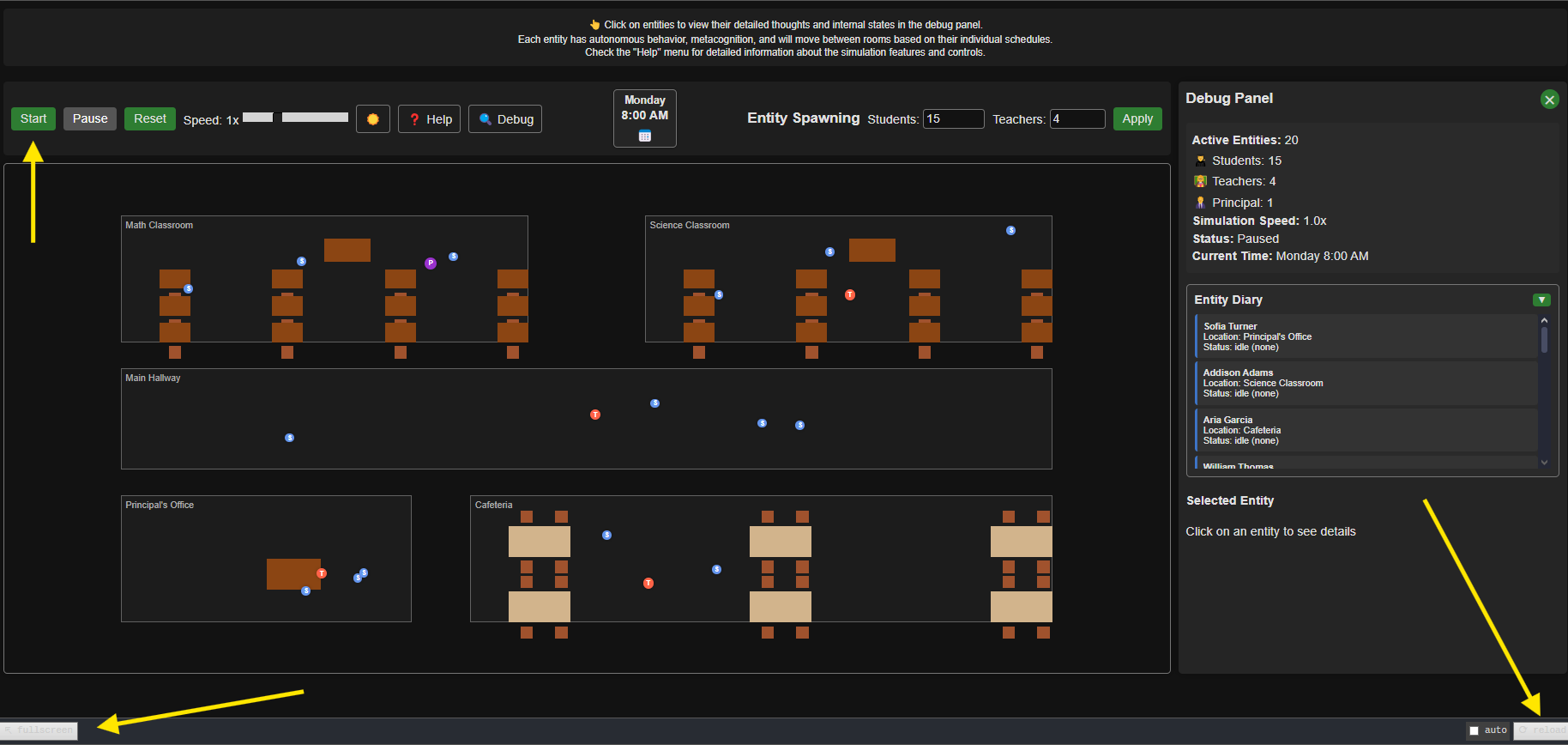
Here's the one above i tried called Skool - the calendar isnt working properly. If the visual is off try full screen and refresh as the visual window is set to fit to the viewers visual window so if its small it moves the objects, full screen and refresh and spaces them out. i prompted for a school environment with like higher levels like teachers and principals to denote levels of power.
Using the word "Choker" in the prompt referencing clothing, but got :
"This generated image may contain themes that are not appropriate for all audiences, such as graphic violence, or sexual content. This can happen due to the randomness and biases of the AI model, or specific words in your prompt."