▲ 436 ▼ Windows 11 is failing as an operating system (tilvids.com) submitted 1 month ago by SocialistVibes01@lemmy.ml to c/linux@lemmy.ml 167 comments fedilink hide all child comments Timestamps: 00:00 Intro 00:46 Sponsor: TuxCare Radar 02:23 Windows 11 is failing right now 05:20 What's the job of an OS? 06:51 Updates break systems. Often. 10:53 You have to adapt to it 15:14 It's highly intrusive 17:44 Debloating tools don't make it good 20:19 Windows fails at being an OS 21:33 Alternatives are better, but not perfect 27:23 Windows is a sales platform, not an OS
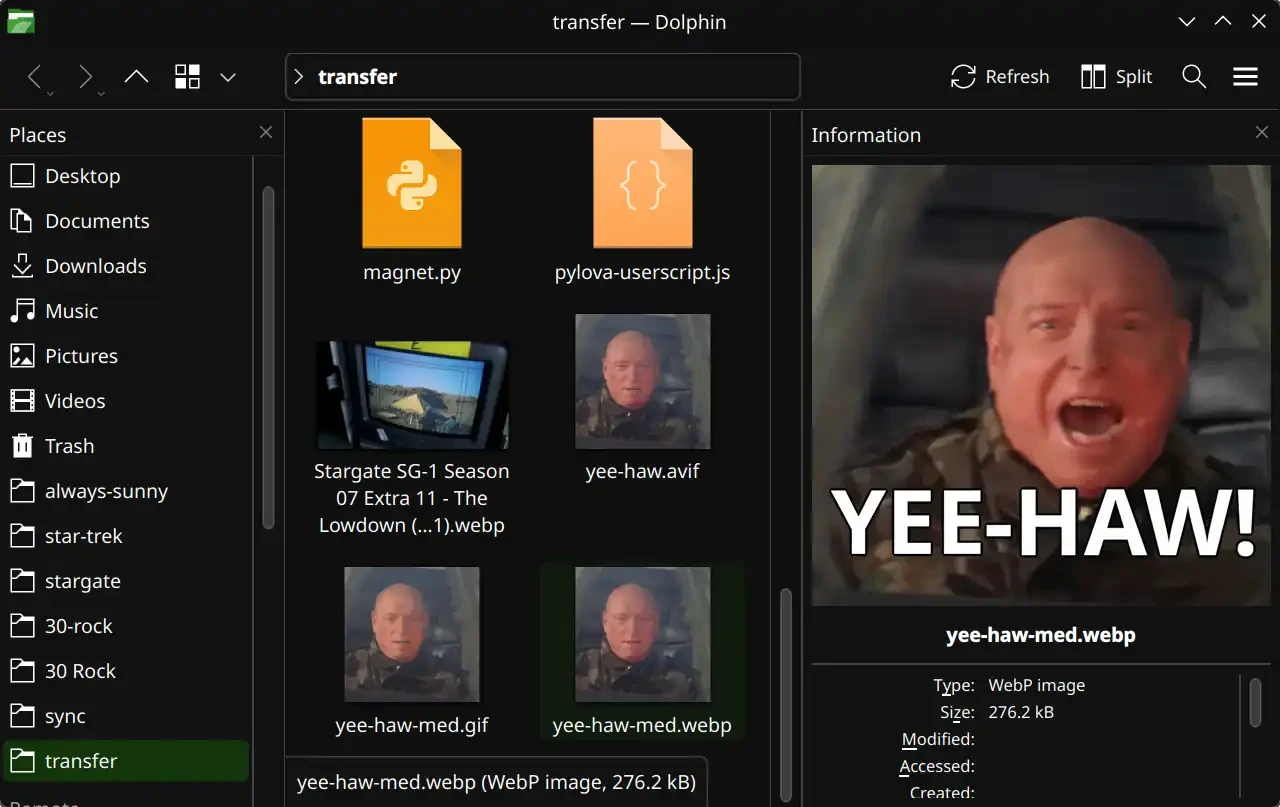
[–] SatyrSack 44 points 1 month ago (5 children) Dolphin seems to have that feature. Menu (the three lines button in the top right) > Show Panels > Information permalink fedilink source parent hideshow 5 child comments replies: [–] wax@feddit.nu 11 points 1 month ago permalink fedilink source parent [–] pbhj@lemmy.world 4 points 1 month ago To be fair Dolphin's defaults are insane, they seemed to have approached it as 'how can we allow file/folder navigation but hide as much information as possible'. If you're a minimalist you might like it, if you want to use a file manager to manage files I can't really see how the defaults are useful. permalink fedilink source parent [–] TrackenDaKracken@lemmy.world 3 points 1 month ago* (last edited 1 month ago) (2 children) I remember finding this out a while back. I tried to install it, but had some problem I don't recall. I'll try again. Thanks. EDIT: Ah, right. It doesn't find my mounted drives nor my shared drives from my server. Nor does it show previews of any filetype but images (which IS nice), just a big icon for text files, for instance. I suppose there are fixes for these things, but I didn't find anything in configuration or in the help section of the website after a quick search. That's as far as I'm willing to dive into this, because I know I could spend hours on this, and still not find a solution from past experience. Thanks, anyway. permalink fedilink source parent hideshow 2 child comments replies: [–] wax@feddit.nu 3 points 1 month ago Dolphin is plugin based. So there's plugins for adding previews for more file formats. For network share stuff you may want to check if "kio" is installed and any optional dependencies on your distro for more functionality permalink fedilink source parent [–] SatyrSack 3 points 1 month ago Mounted drives They should show up in the bottom of the Places pane on the left, in the "Devices" section. If it literally cannot find them, then I can't say anything about what is wrong. Shared drive You should be able to add a network folder in Places (the left pane) > Network > Add Network Folder (in the top menu). If that wizard doesn't work, you should be able to do it manually by typing sftp://trackendakracken@192.168.1.123 or whatever into the URI bar and press enter. Enable text preview Menu (the three lines button in the top right) > Configure Dolphin > Interface > Previews > Text Files permalink fedilink source parent
[–] pbhj@lemmy.world 4 points 1 month ago To be fair Dolphin's defaults are insane, they seemed to have approached it as 'how can we allow file/folder navigation but hide as much information as possible'. If you're a minimalist you might like it, if you want to use a file manager to manage files I can't really see how the defaults are useful. permalink fedilink source parent
[–] TrackenDaKracken@lemmy.world 3 points 1 month ago* (last edited 1 month ago) (2 children) I remember finding this out a while back. I tried to install it, but had some problem I don't recall. I'll try again. Thanks. EDIT: Ah, right. It doesn't find my mounted drives nor my shared drives from my server. Nor does it show previews of any filetype but images (which IS nice), just a big icon for text files, for instance. I suppose there are fixes for these things, but I didn't find anything in configuration or in the help section of the website after a quick search. That's as far as I'm willing to dive into this, because I know I could spend hours on this, and still not find a solution from past experience. Thanks, anyway. permalink fedilink source parent hideshow 2 child comments replies: [–] wax@feddit.nu 3 points 1 month ago Dolphin is plugin based. So there's plugins for adding previews for more file formats. For network share stuff you may want to check if "kio" is installed and any optional dependencies on your distro for more functionality permalink fedilink source parent [–] SatyrSack 3 points 1 month ago Mounted drives They should show up in the bottom of the Places pane on the left, in the "Devices" section. If it literally cannot find them, then I can't say anything about what is wrong. Shared drive You should be able to add a network folder in Places (the left pane) > Network > Add Network Folder (in the top menu). If that wizard doesn't work, you should be able to do it manually by typing sftp://trackendakracken@192.168.1.123 or whatever into the URI bar and press enter. Enable text preview Menu (the three lines button in the top right) > Configure Dolphin > Interface > Previews > Text Files permalink fedilink source parent
[–] wax@feddit.nu 3 points 1 month ago Dolphin is plugin based. So there's plugins for adding previews for more file formats. For network share stuff you may want to check if "kio" is installed and any optional dependencies on your distro for more functionality permalink fedilink source parent
[–] SatyrSack 3 points 1 month ago Mounted drives They should show up in the bottom of the Places pane on the left, in the "Devices" section. If it literally cannot find them, then I can't say anything about what is wrong. Shared drive You should be able to add a network folder in Places (the left pane) > Network > Add Network Folder (in the top menu). If that wizard doesn't work, you should be able to do it manually by typing sftp://trackendakracken@192.168.1.123 or whatever into the URI bar and press enter. Enable text preview Menu (the three lines button in the top right) > Configure Dolphin > Interface > Previews > Text Files permalink fedilink source parent