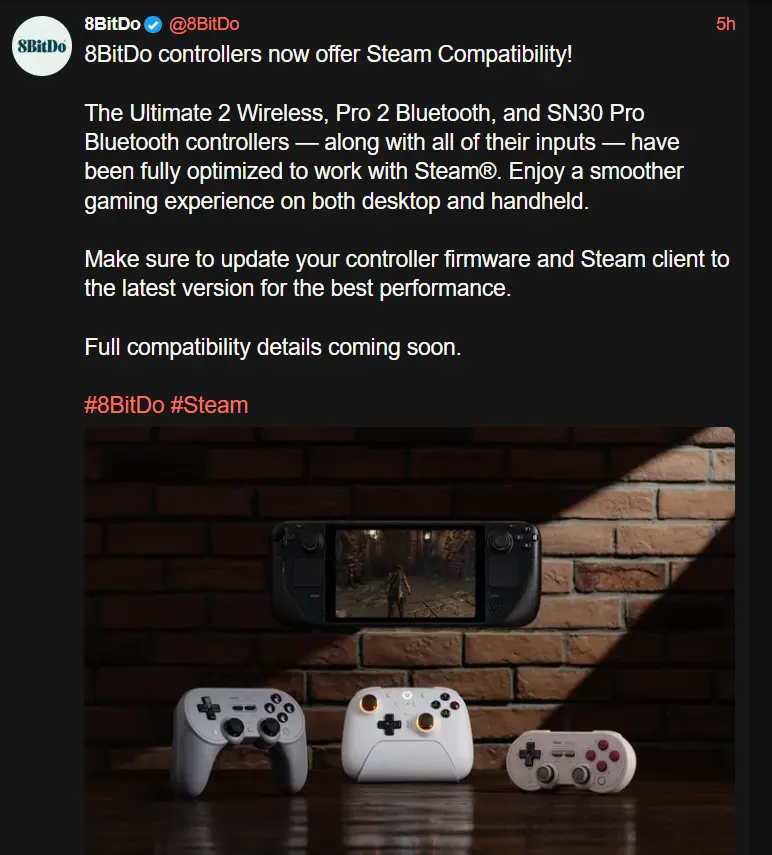
These controllers were all working on SteamOS before as far as I know, so I'm interested to see what this changes. My understanding is that previously their controllers just show up as generic xbox controllers, and now they will be properly recognized. We'll see if this has any other benefits like custom bindings for back buttons and things like that.

Source

Edit:

According to @dualpad@lemmy.zip

got the 8bitdo Ultimate 2 wireless controller with the latest firmware update, and can confirm dinput mode lets me map the back buttons and extra bumpers to different inputs through Steam Input. Analog triggers and gyro work too.
you are viewing a single comment's thread
view the rest of the comments
[–] [S] 7 points 1 year ago (9 children)

I only use controllers when docked personally

  • source
  • parent
  • hideshow 9 child comments
  • [–] 1 point 1 year ago (8 children)

    Nice, thanks. How has your docked experience been? I've only been able to get it working well with low-power games like Monster Train. Any 3d game seems to run horribly, even older titles.

  • source
  • parent
  • hideshow 8 child comments
  • [–] [S] 4 points 1 year ago (7 children)

    Recent updates have caused some crashes actually when docking to my TV, but I'm on beta OS updates and have a lot of deck plugins, so it might not be affecting other people.

    Other than that docked play is pretty good in my experience. There's a major performance hit if you have upscaling set to use fsr though, especially on 4k monitors.

  • source
  • parent
  • hideshow 7 child comments
  • [–] 2 points 1 year ago (6 children)

    Interesting, I'll have to play around with it. I've been docking it to my 4k TV so maybe I need to force a lower res.

  • source
  • parent
  • hideshow 6 child comments
  • [–] 3 points 1 year ago (4 children)

    No wonder performance has been bad! The Deck is not meant to be a 4k system.

  • source
  • parent
  • hideshow 4 child comments
  • [–] 1 point 1 year ago (3 children)

    1080p looks abysmal on my 65" though. Is there any solution?

  • source
  • parent
  • hideshow 3 child comments
  • [–] 1 point 1 year ago (1 child)

    That doesn't make a lot of sense. 3840x2160 is cleanly divisible by 1920x1080. You should just have pixel doubling happening. Check that you don't have some sort of scaling turned on in the TV.

    It wont magically look high res, it'll be 1080p, but there shouldn't be any blurryness, just the blockiness of 1080p on a large display.

  • source
  • parent
  • hideshow 1 child comment