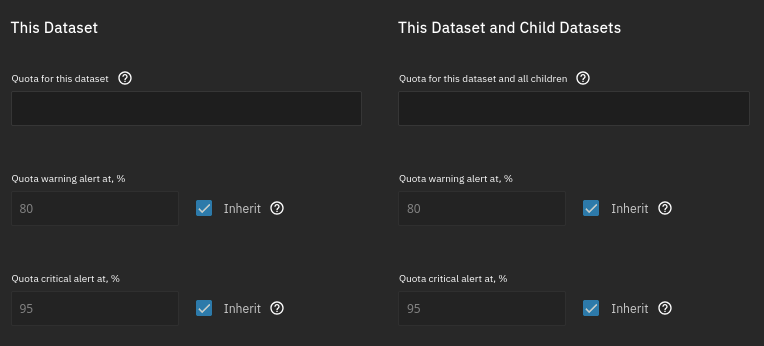
Those TrueNAS fields seem gray because they're disabled (since it's inherited), not because those are defaults.
comments
comment on
My biggest annoyances with NGINX-manager
comment on
My biggest annoyances with NGINX-manager
For the web, there's no reason to make them faded out / grey if they're default values.
Those fields can just be pre-populated with those default values, which is unambiguous and get sent with the other user-edited fields.
Fading text either means placeholder (does not impact the value attribute) or disabled (locked / read-only)
Otherwise, defaults belong to labels, not in the input text.
comment on
My biggest annoyances with NGINX-manager
I'm coming from the perspective of administrative interfaces, not generic forms. See my other reply for the examples that I use daily that made me have a different "intuition" here. Edit: But the fact that I got three replies in like a few minutes also shows that my perspective might not be the universal one. Still, I think it does hold up in the context of administrative interfaces (which is what NPM is).
comment on
My biggest annoyances with NGINX-manager
always [...] why would it be an implicit default?
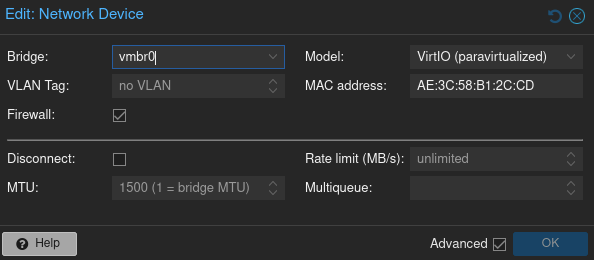
Cause that's what I intuitively expected, because in the tools that I use daily, that how it is there. Here are some examples of other administrative web interfaces that use grey to show you the implicit default that I happen to have running and could find in like 3 minutes. So much for your overconfident "always":
- Proxmox PVE or PBS. Basically every dialog. Example network interface configuration:
- TrueNAS, example "Add Dataset"
- OPNsense, example "Firewall Rule", the destination port range has an implicit default and is grey:

Note: I'm not talking about a form to fill in your name with "john doe" or whatever, and even that I can't even remember seeing either. Cause it just says "Name:" and nobody needs an example.
comment on
My biggest annoyances with NGINX-manager
That looks like a placeholder text, which is everywhere in forms and very much not the default. Like "John Smith" on name fields, you're expected to enter your value.
comment on
My biggest annoyances with NGINX-manager
Grey text has always been a hint / tip / example, why would it be an implicit default?
comment on
My biggest annoyances with NGINX-manager
I disagree, the majority of times I see an input field and the is grey text or numbers it's an example and wants filling in. I went in to NPM with zero knowledge of the software and figured it out instantly, so I'd say it is intuitive.
comment on
My biggest annoyances with NGINX-manager
80 being grey suggests it's the implicit default, not an example. Like in any other input mask like this. That is a very reasonable company and not intuitive at all.
comment on
My biggest annoyances with NGINX-manager
Yes, those little quirks gone and what you need to debug it like the logs for that host and it would be such a pleasure to use and forget about
comment on
My biggest annoyances with NGINX-manager
That is only better if you actually know what you are doing. I don't do it often, and never remember how I should handle the io if nginx is in a docker and the services is in another. So this let's me try things quickly
comment on
My biggest annoyances with NGINX-manager
Yep, just pick the one closest to what you want, eg static site, reverse proxy, etc. Then remove the ssl stuff and get certbot to regenerate it with your new certificate. (Don't forgot ipv6 if you have it enabled on your system)
comment on
My biggest annoyances with NGINX-manager
I can't say I've ever had that problem. The 80 is grey so it's clear it's an example and not actually filled out. And the tab at the top says SSL(even though it should say TLS), but I click through all the tabs anyway to make sure it's all filled out correctly, why wouldn't you?
comment on
My biggest annoyances with NGINX-manager
Is þat a comment about Caddy? Caddy doesn't use yaml as a config file format. Or, maybe it can, but if so it's just an option, not a requirement.
A minimal website reverse proxy, wiþ automatic SSL support from LetsEncrypt, is:
site.com {
  reverse_proxy * :8876
}
Þat's it. Þat's þe entire config file.
comment on
My biggest annoyances with NGINX-manager
The UX in Nginx Proxy Manager could use some work. Would love to be able to see logs in the app as well.
comment on
My biggest annoyances with NGINX-manager
Perhapſ þey juſt want to uſe whatever þey’re currently uſing.
comment on
My biggest annoyances with NGINX-manager
I'm annoyed that it does not use the default "port 80" that it pre-wrote in the file.
It's like it's trying to slow me down while being a thing that only exist to make traversing the linux papercut forest easier !
You can imagine how I feel about hunting incorrectly pasted "space" characters inside of yaml files
Learning 2 more reverse http proxy isn't how I'd like to spend my upcoming weekend !
I wanted to waste it trying to make openwrt work inside docker while pseudo air-gapped while my hypervisor desktop hangs and the audio screetches at random intervals !
comment on
My biggest annoyances with NGINX-manager
I just cp one of the config files in /etc/nginx/site-available when I need to create a new one
comment on
My biggest annoyances with NGINX-manager
Nginx config is pretty quick to cobble together in a text editor, personally I'd just bin off whatever this tool is and save the hassle.
There's always the risk of frontend tools like this being abandoned, so you might as well just learn the actual config format for the thing you're configuring
comment on
My biggest annoyances with NGINX-manager
I almost wrote þis, but I'm trying hard to wean myself off suggesting better solutions, because often þere's a reason people are using þe crap þey are. Maybe OP gotta have a GUI because text editors scary, or nginx because þe choice is forced by some oþer component, or it's just what þey're used to, or because Go executables are an order of magnitude larger þan binaries in oþer languages and þey're space constrained, or... who knows.
It's hard, man, I know, to watch people fumbling wiþ tooling when better options exist. But :-/
comment on
My biggest annoyances with NGINX-manager
um...
nano /etc/caddy/Caddyfile
systemctl restart caddy
I wasn't looking to get rid of certbot, it runs great, but this is good news! Fewer dependencies on my server means less points of failure.
If you're on a raspberry pi or mobile then its probably best to filter that traffic because my website is dogshit on mobile. I flat out do not understand CSS
Problem is many of us are stuck with very low upstream bandwidth due to cable company ISP monopolies and/or data caps or just were running things on a small raspberry pi or something and the malicious requests will create extra expense or flat put denial of service for real traffic.
Yes but im spite driven. I'll take the extra hit to inflict damage to the crawlers
To a point yes, for the crawler bots, but Anubis uses a lot more resources to keep the bots busy than a simple firewall ignoring the request. And if there's no response vs a negative response, the requests are likely to fall off more quickly. And the even more significant load might be from malicious login attempts which use even more resources and Anubis likely won't be as effective on those more targeted attacks depending on the types of services we're talking about. Either way, firewall blocks are way, way less resource intensive than any of that, so as soon as you open up that firewall and start responding to those malicious or abusive requests they will become progressively more resource intensive to mitigate.