1
2
3
4


Video of me explaining the project and what I am trying to do. https://www.youtube.com/watch?v=XDXg9e9IdSI

I am looking for anyone with some free time who likes tackling electronics/programing projects to potentially lend me some guidance.

The project is basically turning a USB keyboard into a single button that can be triggered by a cat walking on it. and this button press would trigger a transmitter to send a signal to a plug-in door bell system. A cat door bell.

I made a video explaining my project I am working on because that is a little easier for me to show what I am trying to do.

But here are the main points:

  1. I need to know if the boards I have will work or if I need something else. Or what other components I may need. (y splitter?).

  2. I need help with wiring and programing for this project. I am a novice and this is my first program board project. (I realize this is asking a lot so looking for someone with free time who is bored. I am also willing to barter my skills for yours).

  3. I have considered alternative sensors like motion, microchip scanning, and Bluetooth tags to create a doorbell alert but these are not the best choice for my situation. I am looking to potentially having this doorbell sensor on the porch all year round so durability is also a concern.

  4. I want to find the best sensor type for this job. I believe a silicone keyboard would be perfect as the price is right, it’s waterproof-ish, cats like it, size is perfect and it works in all weather temperatures. I am open to other suggestions but see the video for my review of alternatives and why I don’t think they are the right choice.

Found one like this one on amazon. but on aliexpress its about $10. https://www.amazon.com/Sungwoo-Foldable-Silicone-Keyboard-Waterproof/dp/B06XHBQ4MB

  1. I have some skills with making things. A small amount of experience with programing and a little bit more with electronics though mostly that’s been powering small motors or LEDs directly without boards. -Also I can 3d model and have a 3d printer. I forgot to mention that in the video but I can make any housing for the components.

  2. I am asking quite a lot from a stranger and realize that most people wont have the time or energy to help me with a project that I have only been able to do the bare amount of work on. But I certainly appreciate anyone who can.

Perhaps we can make a trade arrangement of skills. I am decent at 3d design. Perhaps I could help you with something that needs housing or a case. I could design something to be 3d printed. I am a crafty person and know how to do a lot of things including leather repair, zipper repairs. I am also a hobby artist and have been since i was a kid so I know a decent amount about different mediums and am decent at making designs for things. I am also in academia and teach at college level so I can help with writing or any homework around psych topics. Idk, what do you need help with?

I realize im asking a lot for this project so I am offering something in return.

*in the video I kept forgetting what the meter thing was called. I was referring to a voltage meter.

I misspoke about the very last sensor type I mention. Amazon does sell a pressure pad door bell. Its over priced, apparently doesn't work well and is not very responsive to pets. and lacks durability/longevity. It is not marketed as a pet doorbell per se but does have product images implying it can be used for dogs. but reviews say it is not reliable.

Other companies do sell Indoor pressure mats with alarms or notification systems for elderly care and such but these are $$$$ and also have poor reviews. I figured I would make my own. how hard could it be?

I think there is a demand for such devices. For dogs and cats. Assuming its not too hard to make and cost is low.

If this project is successful, I plan to post this on instructibles.com so other people can make one. I would be happy to mention your names as co-creators of the project.

5


Follow-up: a Raspberry Pi setup can be spacious indeed

Had the opportunity to test the #RaspberryPi 5 as a laptop, separately from everything else, and now I agree with the previous response saying it can be as big as a laptop:
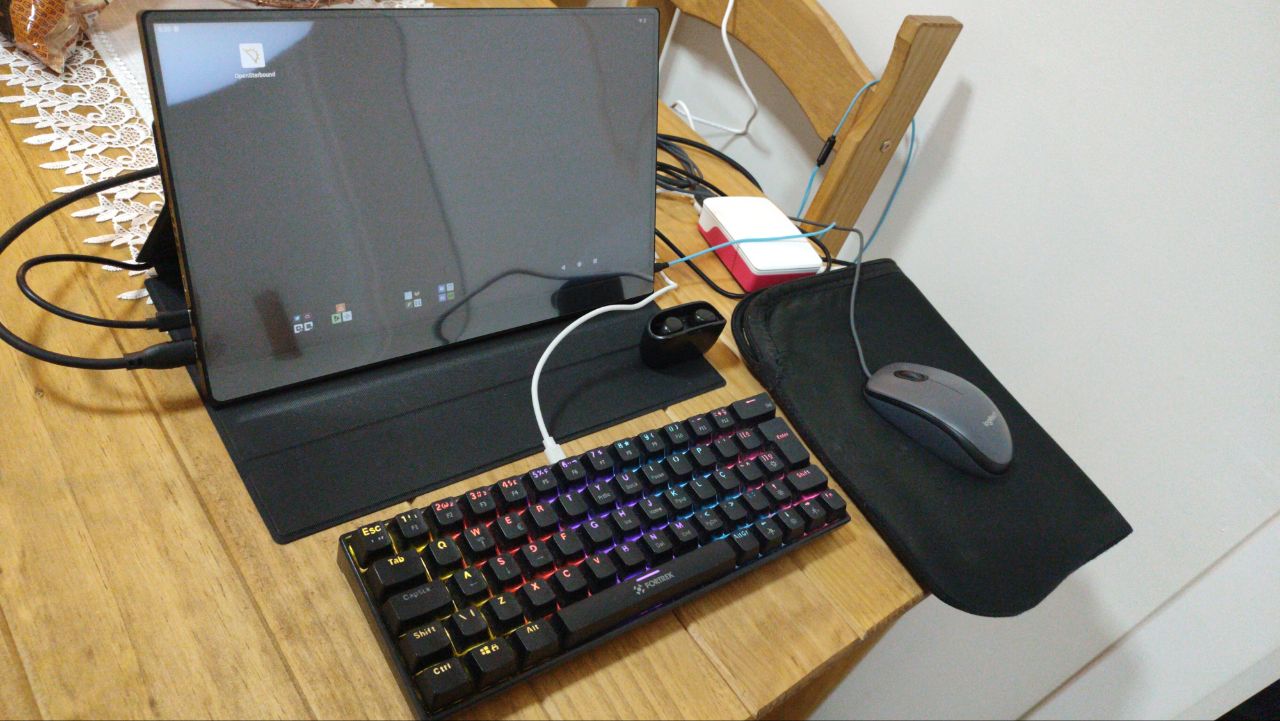
https://thebrainbin.org/m/raspberrypi@lemmy.ml/p/655390

6
7


I've been wanting to get a Zero 2 but they're basically nonexistent. How likely do we think the Zero 1 to stay in supply? And are they worth getting or should I hold out for the Zero 2 to return? I kinda want to use it in a project but I don't want em to go dead before I can make a couple of units. thoughts?

8


I'm considering a project that would involve locating a camera in a high humidity environment, 90% range. The only waterproof case I've found that's waterproof is the entaniya in the attached pic but that may be overkill and I'm not sure where to source one in the US anyway.

Any suggestions? The pi will be ina different enclosure from the camera.

9


I accidentally screwed up /boot and /boot/firmware, to the point where I have to reset it, since it will not boot, I will have to do this via mounted microsd card on my laptop, I cant exactly run apt or such on there, atleast I dont think, plus I dont know if I can chroot since my laptop is x86, what is the easiest way to reset both /boot and /boot/firmware?

10


Hello recently I tried compiling the rpi kernel with a specific config option now the modules are now not matching the installed kernel so now anything that uses the overlay filesystem does not work, or certain networking features which is needed for things like cf tunnels I tried all of this to compile: https://pastebin.com/gmkNu2rL https://pastebin.com/9Ap4J7Yw and:

sudo cp /boot/firmware/$KERNEL.img /boot/firmware/$KERNEL-backup.img
sudo cp arch/arm64/boot/Image.gz /boot/firmware/$KERNEL.img
sudo cp arch/arm64/boot/dts/broadcom/*.dtb /boot/firmware/
sudo cp arch/arm64/boot/dts/overlays/*.dtb* /boot/firmware/overlays/
sudo cp arch/arm64/boot/dts/overlays/README /boot/firmware/overlays/

but I accidentally did it to /boot/* too How do i fix this? Kernel version: 6.12.30-v8+ Example for module:

spiderunderurbed@raspberrypi:~ $ sudo modprobe overlay 
modprobe: ERROR: could not insert 'overlay': Exec format error
spiderunderurbed@raspberrypi:~ $ 

I tried running make modules_prepare and rebuilding the kernel, did not fix it

11
12


Would it be reasonable to expect a Raspberry Pi 4 to run Nextcloud and manage a photo backup of +100 Gb?

The Raspberry Pi is from 2020, running Raspbian, and it was used as an intervalometer with the help of gphoto2 (meaning no great efforts were demanded from it).

The pictures are on two external hard drives

*1Tb WesternDigital SATA (bought second hand, but "like new" according to the sales guy.

*320Gb WesternDigital SATA (inherited from an AcerOne laptop once I realized it could not even handle lubuntu)

My very limited knowledge on the subject tells me I need to:

*Get rid of Raspbian and install Raspberry Pi OS

*Install Nextcloud (and upgrade an existing account)

*Upload +100 Gb

Would the aforementioned steps allow me to access the files on Fedora/Kubuntu (two separate hard drives on a desktop) and openSUSUE (on a laptop)?

I’m also testing a filen.io account and a sync.com account. All three services (NextCloud, Filen, and Sync) work as I expect on an Ipad.

Filen and Nextcloud have Linux applications, and both have been working without problems on test backups of 100 pictures.

Sync is CANADIAN but not Linux friendly (I tried Wine, didn’t work, gave up)… I’m accessing a free account via Firefox only, so I’m not counting on them for this journey.

So, long story short, I want to back up my files (mostly pictures/scans and some pfd documents) on someone else's computer and locally.

Now the question. Can anyone recommend a guide to achieve what I want?

I’m a cook by trade without any technical (software/hardware) training who has been using Linux (openSUSE, Ubuntu, Arch, Mint) since 2012. Please forgive any mistakes on terminology.

I included a picture of my intervalo-Frankenstein-meter from 2020.

Thank You.

13


Anyone else seeing this?

sudo apt update
Hit:1 https://download.docker.com/linux/debian bookworm InRelease
Hit:2 http://archive.raspberrypi.com/debian bookworm InRelease
Ign:3 http://deb.debian.org/debian bookworm InRelease
Ign:4 http://deb.debian.org/debian-security bookworm-security InRelease
Ign:5 http://deb.debian.org/debian bookworm-updates InRelease
Ign:3 http://deb.debian.org/debian bookworm InRelease
Ign:4 http://deb.debian.org/debian-security bookworm-security InRelease
Ign:5 http://deb.debian.org/debian bookworm-updates InRelease
Ign:3 http://deb.debian.org/debian bookworm InRelease
Ign:4 http://deb.debian.org/debian-security bookworm-security InRelease
Ign:5 http://deb.debian.org/debian bookworm-updates InRelease
Err:3 http://deb.debian.org/debian bookworm InRelease
  Temporary failure resolving 'deb.debian.org'
Err:4 http://deb.debian.org/debian-security bookworm-security InRelease
  Temporary failure resolving 'deb.debian.org'
Err:5 http://deb.debian.org/debian bookworm-updates InRelease
  Temporary failure resolving 'deb.debian.org'
Reading package lists... Done
Building dependency tree... Done
Reading state information... Done
All packages are up to date.
W: Failed to fetch http://deb.debian.org/debian/dists/bookworm/InRelease  Temporary failure resolving 'deb.debian.org'
W: Failed to fetch http://deb.debian.org/debian-security/dists/bookworm-security/InRelease  Temporary failure resolving 'deb.debian.org'
W: Failed to fetch http://deb.debian.org/debian/dists/bookworm-updates/InRelease  Temporary failure resolving 'deb.debian.org'
W: Some index files failed to download. They have been ignored, or old ones used instead.

Anyone know how to solve it?

Turns out it was Unbound doing shit. Thank you everyone that helped.

14
15
16
17
submitted 2 years ago by to c/raspberrypi@lemmy.ml


I've set up a "headless" Raspberry Pi Zero to monitor my little garden, using a humidity/temperature sensor and a camera, it runs a minimal webserver (lighttpd) so I can view stats/images anywhere in the house from a web-browser.

Assuming you have the tools, the whole thing should cost less than 20 Euro.

You don't need to know anything about Linux or Raspberry Pi to build this, but you will need to do some soldering, thou there might be a way to avoid this by using dupont-wires.

I'm not be an expert in the field, but if you have any questions, feel free to ask them in this thread, I'd also like to hear from you if there are details missing, or if you have an idea to improve the project.

The project is GPL3 and hosted on gitlab: https://gitlab.com/wildflower/rpi-garden

18
RDP stopped working (lemmy.giftedmc.com)


Hi folks, I'm running a pi4 with rpiOS and had been using rdp to log into my pi that has no peripherals connected. I can still ssh in and I do have physical access but this kinda bothers me.

I know rpi connect is a thing but I'm not too comfortable using another "cloud service" to connect to something on my homenetwork from my homenetwork.

The rdp service does not seem to run anymore and I am unsure how to search for the culprit. I did search for a service resembling rdp on the journal but it doesnt turn up. what could be the correct service name?

Thanks for reading. have a good one.

19
20


I didn't realise BlackBerry owned QNX.

21
22
23
Pi Zero Webcam (lemmy.zip)
submitted 2 years ago by to c/raspberrypi@lemmy.ml


I remember the last time I tried to find a cheap webcam that works on linux, I gave up pretty quickly and just used my laptop for video calls. Saw this guide to build one with a zero 2, had a spare board in my parts drawer so thought why not. I'm surprised by the quality of it. I've been using it for work meetings.

24
25
Introducing Raspberry Pi Pico 2 (www.raspberrypi.com)
submitted 2 years ago by to c/raspberrypi@lemmy.ml


cross-posted from: https://wired.bluemarch.art/post/306975

We’re happy to announce the launch of Raspberry Pi Pico 2, our second-generation microcontroller board, built on RP2350: a new high-performance, secure microcontroller designed here at Raspberry Pi.

With a higher core clock speed, twice the memory, more powerful Arm cores, new security features, and upgraded interfacing capabilities, Pico 2 delivers a significant performance and feature uplift, while retaining hardware and software compatibility with earlier members of the Pico series.

Pico 2 is on sale now, priced at $5.

view more: next ›