These are all ingredients to release the Kraken in my DnD game, and they’re probably trying to avoid that because NYC knows what happens when I release the Kraken. NYC would prefer I do not do that.
comments
Wish I got some of those last ones - like what does holding a TI-83 sideways accomplish? What's with a Firby's unresolved father issues? etc. Guess I'll be spending some time researching later.
I wanted to make a snarky comment about smartphones, but the writer pretty much nailed it
Today it’s Raspberry Pi and Flipper Zero. Tomorrow it’s BeagleBone Blacks, Arduino Qs, ESP32 dev boards, Teensy boards, Pine64s, Orange Pis, Jetson Nanos, USB logic analyzers, SDR dongles, Bus Pirates, Defcon badges, hotel keycards, garage door openers, Tamagotchis, graphing calculators, old Nokias, Game Boys with link cables, a TI-83 held sideways, a Pocket Operator making beeps too abrasively, a Furby with unresolved father issues, and some guy’s wristwatch that definitely has a microcontroller in it. Meanwhile, everyone walks through holding a smartphone that can film, scan, transmit, triangulate, and livestream the entire event in 4K.
Very nice!
No need. I have better than that: dev file aliases. So I have for example
/dev/crs1, the device
/dev/crs1_pwr, the PSU for that device (if it's powered alone)
/dev/crs1_snoop_rx, the serial cable that snoops on the device's Rx line
/dev/crs1_snoop_tx, the serial cable that snoops on the device's Tx line
/dev/crs1_jtag, the JTAG adapter that programs / debugs that device
/dev/crs1_tilt_x, the X axis of the tilt table the device is mounted on
/dev/crs1_tilt_y, the X axis of the tilt table the device is mounted on
Each point to some nondescript /dev/ttyUSB? or /dev/ttyACM? but the aliases have meaningful names, so I don't need to remember anything.
That's the power of udev 🙂 And also one of the many reasons why Linux is better than Windows.
I hope you have a spreadsheet of all that. I'd smoke something pretty quick trying to remember which port has the power supply for X device.
Because 14.
At one point I was running a laptop with x4 USB connections (KB, Mouse, laptop cooler and an HDD), x1 HDMI and x1 ethernet and I though that was rather quaint.
staring at the 19 ports attached to my laptop
Yep, knew it was worth asking that question.
Why 14 and not 16 though?
I work in a company that makes a range of measurement devices that talk over serial port. Some talk UART, some talk RS232, others talk RS422. I need to be able to test several of those at the same time - or maybe not, but when I'm sitting at home and working remotely, I like to have one of each kind already connected, ready to use. That's one USB port (for a FTDI USB-to-serial converter cable) or real RS232 port connected per device.
All those devices also have a second UART serial port to dump tracing information onto. Most of my test devices have the trace serial port connected also. That's another USB port per device.
And then most - not all, but most - have a JTAG programmer attached to them, to debug then and reflash their firmwares. That's one USB port for each JTAG programmer.
And I have several programmable bench power supplies controlling power to several batches of those devices. Each one of those power supplies uses one USB port.
And I have 3 cameras watching the goings on with those devices, one per USB bus (Linux won't allow more for bandwidth reason) to make alignment easier.
And to debug some of the devices, I have them talking through "snoop cables", i.e. a regular serial cable to control the device, but with the Rx line connected to a second cable's Rx line, and the Tx line connected to a third cable's Rx line, so that, by watching what comes through the 2 snoop cables, I know exactly what gets transferred to / from the device, if I have any doubt about what goes on at the hardware level.
And then I have a couple of USB-controlled precision tilt tables to align 3 of the devices. That's 3 more USB ports - although the tilt table's controllers also act as USB hubs, so I get two USB ports back for every main one I use.
And then I have oddball devices connected, like a servo controller for another application, a USB-to-serial cables out of which I only use the RTS line to turn a laser pointer on and off.
And then a trackball, a keyboard, a 3D Space Mouse for CAD'ing...
This is one of my USB hubs:
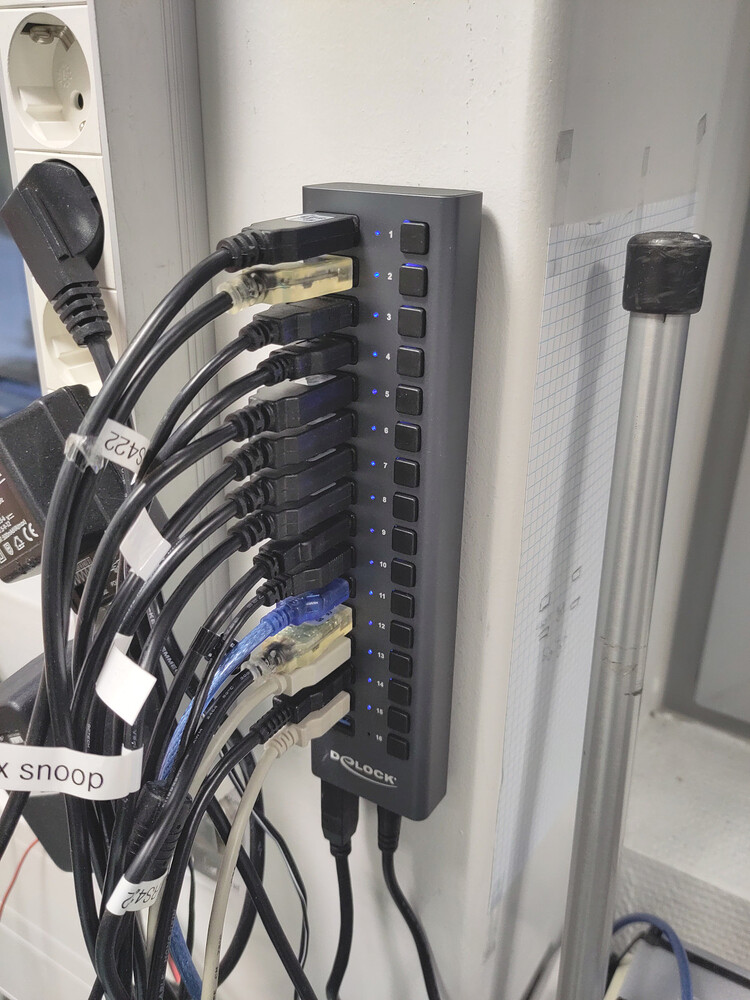
I've been at the same company doing this stuff for years. Things add up over the years 🙂
I'm interested in why you need all those ports.
I have 55 USB ports and 16 RS232 ports on my machine at work.
So yes, I'm interested in this. Thanks!
Do they have a search function on their images? Because it's bloody annoying to try to find specific images like HASS in their weird categories.
Let me guess, $200?
Covid turned me into an ABRP (Anything But Raspberry Pi). They fucked us to make sure their business customers could get supply; they're on the list now.
comment on
An alternative way to power Raspberry Pi 5
I have a few, those things are so cheap and so good for the price!
I was just shocked at their convenience when I first discovered them
comment on
An alternative way to power Raspberry Pi 5
Another option is a Mean Well power supply. Most of them have a pot that can adjust the voltage by 10-20%. They are more expensive than the official power supply, but if you need to run more than just the Pi from it, they are a good option.
comment on
An alternative way to power Raspberry Pi 5
If you happen to be using an ethernet cable, a PoE hat can work great as well. Just be sure to check the voltages and wattage compatibility, as there are multiple specs for PoE.
comment on
An alternative way to power Raspberry Pi 5
I did this on an embedded project a few years back.
Put a header for the rPi to mount on, and the motherboard powered the rPi (as well as everything controlled by the rPi).
Worked a treat.
Night and day difference Pi 4 vs Pi 5. Pages on Pi 5 load almost instantly, scrolling is not always smooth in Firefox. Video playback still sucks though, watching Youtube in 1080@30 VP9 draws more power than prime95.
Not for me (4GB Pi5). I watch a lot of full screen video and Firefox just can't handle it at all even if it's the only application running and with only one tab. I tried all the "fixes". In the end I gave up, tried a few, and settled on Brave, which still gets a bit confused coming out of full screen which "F11 F11 restart" fixes.
Thanks, yeah, I've been using Ublock Origin plus some local DNS blackholing when browsing on my laptop, and will do the same on a pi if I use one.
Maybe I'll now see if I can figure out if something is misconfigured on my 400, instead of buying a 5 or 500. I have some FOMO because of expected further increases in ram and ssd prices, but meh.
It did load homedepot.com when I tried it just now, but I don't have a mouse or keyboard attached, and the monitor isn't touchscreen, so I have no idea how it performs when scrolling. Probably terribly.
IIRC, mine is an earlier version of this one: https://www.raspberrypi.com/products/raspberry-pi-3-model-b-plus/. It has 1GB of RAM, and a 64GB sdcard (which is honestly bigger than it needs), with basic Debian Bookworm installed. It runs essentially nothing except sshd, xwindows, and Openbox configured with the following autostart script:
xset -dpms
xset s off
unclutter -display 0:0 -noevents -grab
export DISPLAY=:0 && firefox-esr --kiosk $URL_TO_VISIT &> /dev/null & disown &> /dev/null
Where $URL_TO_VISIT is a panel on my local Home Assistant.
Granted, it's not exactly doing much other than showing a single page all the time, and sometimes it does freeze and require a manual restart every few weeks (hence why I said it's only "running okay"). It does work though, and I expect that an rPi 5 would be a good experience for actual browsing, especially if you used one of the 4GB or higher versions.
If you aren't already, I recommend running a blocker like adguard on your network. Aside from making the internet more pleasant to look at overall, it might help with making sites more responsive.
Remember to check of you are using hardware acceleration.