You may have to enable HDR for Linux on each monitor individually from the display settings, and then enable HDR for the game itself from within its own settings.
comments
comment on
What about HDR?
comment on
What about HDR?
You’d gain HDR!
Windows is nearly effortless to maintain if you only use it for entertainment.
Maybe we just have different priorities, but right now, I’d be miserable and wasting so much time if I was stuck on Linux only, even though I use Linux like 90% of the time. Some media and some games just won’t look right.
And to emphasize, it would take sooo much time to massage this issue on Linux. Dual booting saves me a ton of maintenance and tweaking.
comment on
What about HDR?
Here’s an interesting test:


Say what you will about Safari and iOS, but it rocks with image format support. HDR JPEG XL and AVIF render correctly, and look like the original HEIF file from the camera.
Helium (a Chrome fork) is on the left, Firefox on the right, running CachyOS Linux with KDE on a TV, HDR enabled from AMD output.

Firefox fails miserably :(
Chrome sorta gets the AVIF right, though it seems to lose some dynamic range with the sun.
comment on
What about HDR?
[deleted]
comment on
What about HDR?
Oh yes, sorry. I've been team AMD for so long I forget lol.
comment on
What about HDR?
[deleted]
comment on
What about HDR?
I don't really see the logic to that, as switching is near effortless. It takes a couple of seconds to reboot and select the other OS. Ditching HDR, on the other hand, is painful.
Each to their own though.
comment on
What about HDR?
Completely disagree.
Even setting gaming aside, I've started taking family/fun photos in HDR instead of JPEG, and on things that can render them (like smartphones and TVs), they are gorgeous. I can't imagine going back now.
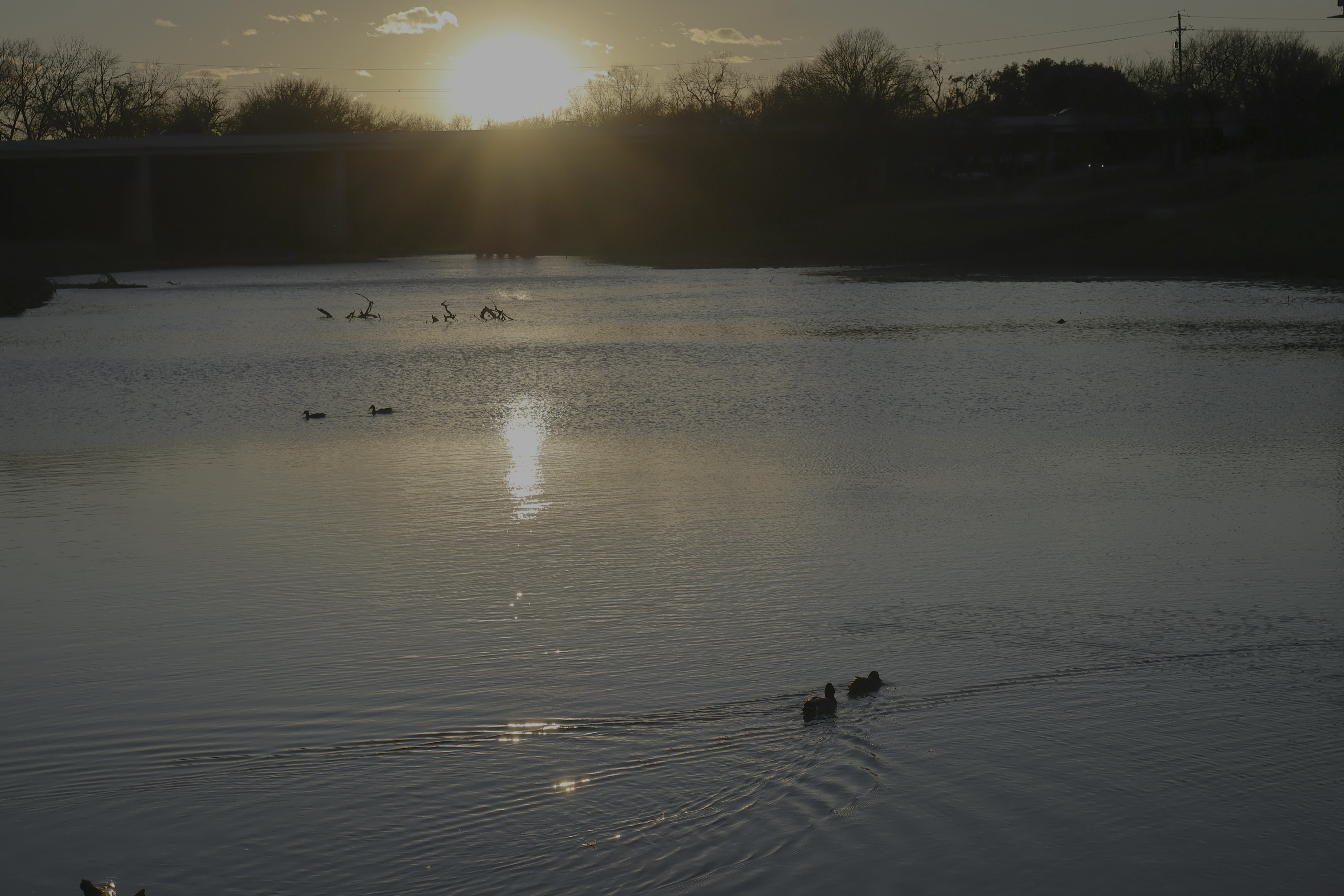
I took this on a walk this week, completely unedited:
If your browser doesn't render that, here's my best attempt at an AVIF conversion:
And JPEG-XL:
On my iPhone or a TV, the sun is so bright it makes you squint, and as yellow-orange as real life. The bridge in shadow is dark but clear. It looks just like I'm standing there, with my eyes adjusting to different parts of the picture.
I love this! It feels like a cold, cozy memory.
Now if I crush it down to an SDR JPEG:

It just doesn't* look* right. The sun is a paper-white blob, and washed out. And while this is technically not the fault of encoding it as SDR, simply being an 8 bit JPEG crushed all the shadows into blocky grey blobs.
...This is the kicker with HDR. It's not that it doesn't look incredible. But the software/display support is just not there.
I bet most browsers viewing this post aren't rendering those images right, if at all.
Lemmy, a brand new platform, doesn't even support JXL, HEIF, or AVIF! It doesn't support any HDR format at all; I had to embed them from catbox.
comment on
What about HDR?
I have the same issue with HDR on Linux I had on Windows - support. But, on KDE Plasma it works well enough that I usually forget it's working. Before I switched to KDE Plasma though I was on Gnome and it was a tad more difficult.
comment on
What about HDR?
[deleted]
comment on
What about HDR?
[deleted]
comment on
Is there a FOSS bulk downloader for GOG?
Nice. I read elsewhere that it has a "dryrun" option that will calculate the total storage requirements for the library. That way I can buy a dedicated drive for it.
comment on
What about HDR?
It is.
If you're on cachy you should be able apply any relevant changes same as arch.
But if I'm reading the wiki right, you should already be good to go, provided you're on a DE that supports HDR.
comment on
Is there a FOSS bulk downloader for GOG?
gogrepoc works for me.
comment on
What about HDR?
With my configuration, it does. Though it likely also depends on GPU drivers, Monitor, etc. I'm just speculating as I have no clue beyond "works for me".
Any games that have an HDR option in their graphics settings would support HDR I hope. Maybe if the display is already in HDR while in desktop mode, it's possible that launching the game isn't able to toggle it off?
comment on
What about HDR?
Dual booting is not bad!
What I do is share an NTFS partition between Windows and Linux for bulk data. If they’re DRM free, you can literally run the same games off the same drive.
Something goes wrong? I can just delete the windows partition and start over in 30 minutes, without losing hardly anything. It’s so much better as a “disposable” OS.
I also use two EFI partitions (the default Windows one and a new one for Linux) so there is zero possiblity of the OSes interacting.
To be blunt, I would never do banking in Windows if you can do linux. It’s just too much of a risk.
comment on
What about HDR?
15 machines? Do you use a rack? Seriously though much like the other responder hdr and actually most video things are not important to me and I tend to adopt them only when they are on the most affordable of options. Granted there are certain things important to me that I will go for earlier. Energy efficiency or more environmental disposal wise (have not yet encountered anything that significantly is but it would sway me). Also I have wanted to get organic leds because having very black blacks is a big deal for me. So basically I guess im saying I mostly don't care about that stuff.
comment on
What about HDR?
[deleted]
comment on
What about HDR?
I suggest you strip Windows to the bone (including Defender), dual boot Linux, and delegate Windows as a “HDR media OS”
This is what I do, and it works well. Sufficiently neutered, Windows if really quick and out of the way.
comment on
What about HDR?
[deleted]
comment on
What about HDR?
I’m on a Sony OLED with a 3090. I game some, and color grade photos/videos in HDR.
…And I can’t get HDR to look right in KDE, even with the display running off my AMD IGP. It has basically zero options for me to tweak.
So I use Windows for that.
Honestly, it’s hard enough on Windows. It’s a coin flip as to whether apps works or not, and the TV needs adjustments for some, lest they crush black or blow out highlights/colors. Many games, specifically, need configurable mods to look right.
One of my saddest video workflows is transcoding on Linux, and downloading the result to my iPhone to see if it looks right.
comment on
What about HDR?
https://wiki.archlinux.org/title/HDR
Arch wiki says NVIDIA should now work, too.
As of Mesa 25 it should just work. Even if you're on a distro that doesn't have it working yet, seems HDR on NVIDIA is not far off, and can be made to work right now if you know how with arch.
For my setup, I literally just enable the setting in the KDE display settings.
comment on
What about HDR?
[deleted]
comment on
What about HDR?
My screen only does HDR600, but it does work.
It looks a little nicer than with it off, so I do keep it on. SDR content does not suffer.
I'm on KDE wayland with an AMD GPU.
comment on
What about HDR?
I do know that Valve have been working closely with KDE to get it working there. So you should check if you're on the latest Plasma desktop and you probably need Wayland.
Beyond that I have no idea. I don't have any HDR capable device.