Damn man, like if it bothers you THAT much, either log off or stop using AI.
comments

Last week I heard someone call local LLMs "house clankers" so gonna say there is at least a connection.
My guess is it won't... Signed modules only, so since third party modules typically aren't... One can guess eac2 wouldn't allow it... I'm glad people will be able to play fortnite on Linux but near kernel anti-cheat is still a hard no for me
As I understand the current intended implementation and constraints: no. Anything not signed with keys trusted by EACv2 will prevent it from running if loaded. Your MOK while fubctional for secure boot, won't be on the list of trusted keys. Additionally, if MOK-signed modules were allowed, it largely defeats the security model EAC seems to be expecting. Ultimately, if your distro's kernel is trusted by EAC, they would also need to either bundle or provide non-dkms signed builds of the kernel module you need.
comment on
What Thinkpad Model
I almost bought a Yoga with 16GB ram and a very fast AMD processor on black friday sale at bestbuy for $500 a couple years ago. A friend talked me out of it because the 16GB ram was soldered in and not expandable. Similar machine is around $1000 now. Oh well.
Yeah get something sort of recent. Depending what you're doing 16GB ram is more than plenty. 8GB is ok, 4GB is marginal.
My 2011(?)-vintage T510 is ok for most of my purposes, but youtube has been migrating to cpu-hungry codecs so videos these days bog down the cpu and look janky. Maybe I can change some settings to fix that.
I do like the idea of a yoga-style tablet for use as an e-reader.
1.7 cm
comment on
What Thinkpad Model
I picked mine by referring to the Wikipedia articles for the "good" Thinkpad series (T, P series mainly). Here's the one for T series: https://en.wikipedia.org/wiki/ThinkPad_T_series
Under "Lenovo branded models" is a giant table of all the variants of each model (CPU, display, etc). It also tells you whether the RAM is socketed or soldered, and whether they have external batteries. To gauge performance I just look up the CPU for the model I considered on a CPU benchmark site. Take those with a grain of salt, but they are good for generalizing performance.
I ultimately settled for a Thinkpad T580 (instead of the smaller T480), since I like large 15" laptops, I liked the port layout, and I liked the hot swap dual battery system (also available on T480, T570, T470, and other earlier models). It also has socketed ram and USB C charging. Performance isn't great for most gaming, but it is very good for browsing and office work.
I'm guessing this belongs in linuxgaming or similar.
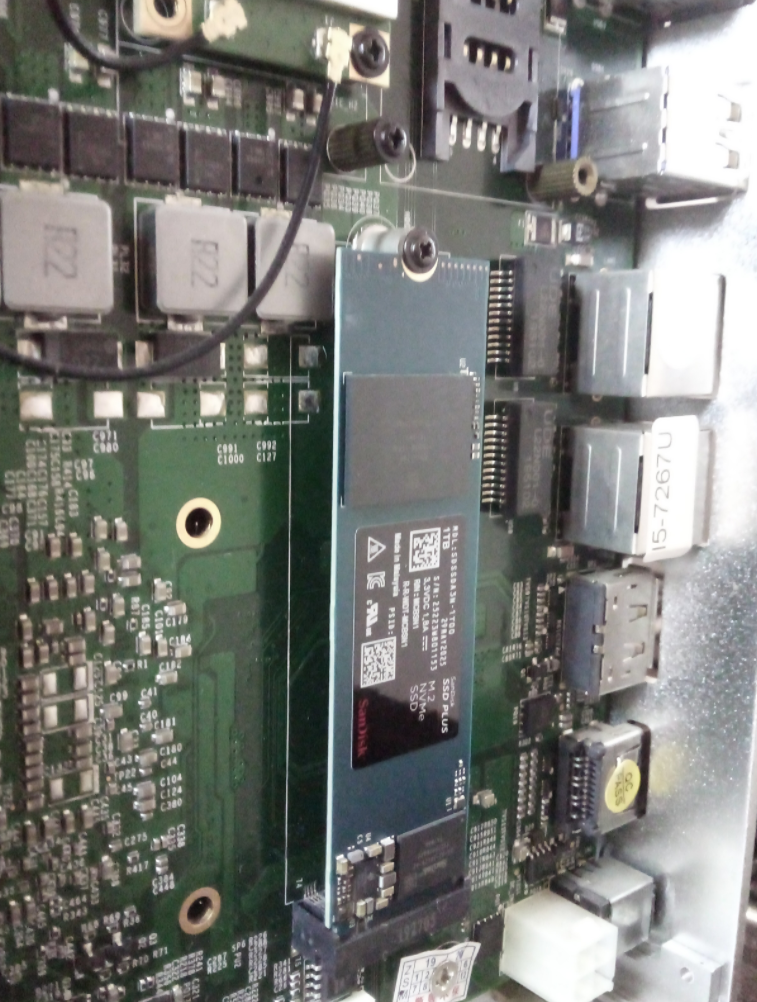
How much distance would you say is there between the ssd top surface and the case panel?
And how's that working out?
Unless the lid is thermally bonded to the CPU or GPU, it's unlikely to be contributing much. And if that is the case, there must be places you can add ventilation.
I’m gonna start off with an apology because my flippant tone may have made it seem like I was targeting you when really I’m running on all eight cylinders trying to blast out accurate, useful posts that are fun to read. I’m sorry I hit you with a little friendly fire, that wasn’t my intent.
Working backwards: ca glue doesn’t make a chemical bond with the plastic of a semiconductor package, it creates a solid material out of itself using water that relies on the surface dressing of the stuff it’s being used on for mechanical purchase. That’s why you gotta use sandpaper to rough up stuff you’re trying to glue together first. That also explains why supergluing a nut to an ic doesn’t hold like you’d think it would and in the case of for example the big boy fets and voltage regulators of a video card creates a weaker bond than the solder to the pcb (I was carrying a mining gpu by the bolt glued to the vrm and the glue failed and the card dropped three feet onto concrete).
Removal of ca glue can be easily accomplished with acetone. Be careful using acetone on or around electronics because it will eat certain plastics (the “a” in ca glue stands for acrylic!).
What you do need to be careful with when using ca glue is natural fibers. For reasons I have never felt (see what I did there?) the need to investigate, it reacts with them and can get really hot.
I’m gonna combine the other two sections of what you wrote into one because there’s a misconception there.
Based on the ops own post, the ssd is idling at 67 or so c. We wanna keep it below 90 for [explanation redacted].
That doesn’t mean there is 67c air inside the pc case. That would be crazy. It means the ssd can’t effectively dissipate its heat into the surrounding air at idle until it reaches 67c.
The equation for that is (kATd)/l.
K is the ability for the material to conduct heat, A is the area over which it’s happening, Td is the difference in temperature and it’s all over l, the distance it’s happening across.
Basically every part of that equation is bad numbers when we’re using a bare die into the ambient air.
But why?
Well straight off the bat, air sucks. Heating it up is way harder than heating up for example plastic, water, oil, metal or human skin. That’s why when you run out of heating oil for the furnace and use the coil stove burner to heat the house you can keep your hands cozy by rubbing them over it but get a crazy burn when you put them on the coil. Air is such a bad conductor of heat that the difference between “ahh” and “AUGH!” Is a couple of inches.
But plastics suck too! Remember that the part of the ssd that gets hot is the big ol chip and the part of the chip that gets hot is the silicon die inside it. Plastics are in general so bad at conducting heat that in many cases we use them explicitly for that purpose in industrial engineering. If you’re worried that some parts variable temperature will have an effect on some other part then you can plop a chunk of nylon or something down in between em and suddenly the temperature shifts are good enough for government work!
So the ssd is getting too hot before it can transfer its heat to something else (the air). It’s being hampered by how shitty the two materials plastic and air involved are at doing this job but that isnt the whole story! We havent even talked about surface area or thermal mass!
The chip could effectively conduct away more of its heat if it were bigger. If you have a one inch square chip it can only radiate (I’m playing fast and loose with the words here but all throughout this post I’m actually only talking about conduction, the amount of joules lost to terahertz radiation in a ssd chip is negligible) into the air close to the surface of the 1 square inch chip. If it were three square inches it would be able to heat up three times more air! A heatsink will usually have a knurled surface with fins and other hard to dust features that raise its surface area super high. It’s not uncommon to see a little bitty heatsink with an effective surface area of a foot square!
We can also solve for bigger in a different direction, and imagine a chip with a one inch cubed package size as opposed to one inch square. Now not only do you get to take advantage of the 5x increase in surface area, but you have much more mass to mess with. If it takes one joule of energy generated in the ssd chip die as it recalls futa SpongeBob memes to heat up the normal 1 inch square package surface one degree, the one inch cubed package can take much more bikini bottom dick pics before it heats up one degree. Because it’s bigger. See what I did there? Futa, bigger? Never mind.
That’s called thermal mass.
Oh yeah and I guess in a heatsink there’s usually some kind of conductive material to make a good connection between the package and the heatsink surface. I didn’t talk about that but I’m running out of energy so just imagine a good explanation of why even something not specifically engineered to do the job like ptm is still better than shitty ol microscopic air pockets.
So to recap: the heat is coming from inside the ssd. We want to get it away from the ssd. We can use a big thermal mass to the a huge surface area made out of a material that conducts heat really well coupled to the die with some solid or liquid to both reduce the effect a joule of heat generated has on the die temperature and increase the rate at which that heat is conducted into the air.
Adding a heatsink improves literally every part of the math for getting parts cool and if that doesn’t convince you I encourage you to experiment on your own with your hair dryer and see what happens.
E: I didn’t even talk about the duty cycle of the chip getting hot. Unlike your computer cpu which even in a real low pee state still does something, an idle ssd controller is pretty much off (they still fiddle fuck around with blocks and do other dumb shit but they’re consuming less energy than an idling cpu and therefore need to dissipate less heat. The point stands.). It’s only under some load that heat gets generated and needs to be dissipated.
So if you’re just looking through your futa SpongeBob memes folder and having a chuckle the spikes of load are probably not enough to even heat up the heatsink appreciably while transferring your friends usbc futa SpongeBob memes folder on to your ssd would result in the need to rely on the thermal mass of the heatsink and its big surface area and its much better ability to transfer heat into itself from the chip and from itself into the air.
I think that's distinct from what the user is trying to do. They are trying to play audio and video on the machine that's running the ssh server, by outputting video over HDMI from the graphics card and sound over the 3.5 mm jack. There's no X forwarding to the ssh client going on.
Thanks. I just don't get this part:
Also make sure there’s something making contact between the SSD and the motherboard.
What do you mean?
Aha, ok, so it's using pipewire when logged in locally, and it can't find it when using it remotely.
Can you try logging in via ssh again and checking if there's a /run/user/$UID/pipewire-0 (or other pipewire-<NUMBER> sockets)?
If there isn't, that means your pipewire service isn't running, you can try starting it with systemctl --user start pipewire wireplumber. You may need a loginctl enable-linger $USER and a re-login for that to work. You can also do systemctl --user enable pipewire wireplumber so that it auto-starts them whenever you log in, if that's not already the case.
If/once that socket is there, you may need to export XDG_RUNTIME_DIR=/run/user/$uid so that mpv can find the socket. You should probably do that in your .profile so it's set automatically.
Here's the inside:
I tried for literally an hour or so to redirect mpv's output from host A (laptop) to host B (phone/termux) using all conceivable combinations and variations of
cat /dev/tty1
cat /dev/tty1 > /dev/pts/0
cat /proc/[pid]/fd/[1-3]
And adding 2>&1 to the above for good measure, but also the program reptyr and simply kill -STOP [pid] kill -CONT [pid] to absolutely no avail, so here's a picture. Please forgive my lazy ass.
ao at the bottom.

comment on
is linux a hard os to use?
well, that's a terrible idea. you'll get much better results in the long term by learning how the config actually works, and probably in the short term too.
indeed i haven't
I rest my case.
indeed i haven't, because the title is such absolute bullshit and AI propaganda that there's no point entertaining it.
It’s a passive cooled PC. The lid is mostly how it cools itself. Removing the lid would be counter productive.
You need contact in between the SSD and the case. Most cheap mini PCs like that don’t cool their drives well. You can try getting thermal pads to make good contact between the SSD and the case. Or if it’s too big and you’re stacking multiple then get a block of copper and put it in between.
Also make sure there’s something making contact between the SSD and the motherboard.
Also also flip than fan around so it’s blowing air into the PC and not sucking air past it.
Can you show the output for when you're running it while physically logged in, particularly the AO: output?
comment on
is linux a hard os to use?
OP's core issue is a botched installation. You cannot rehearse the install process with a live stick. You can only do that in a VM.
view more:
next ›