@MorrisRF what seem to be wrong?
comments
comment on
Unit testing in Godot + Rust
I've only spent a little bit of time on godot-rust myself, but from what I hear you have to use some sort of third-party library to help out. I've heard gd-rehearse might be what you're looking for, but never got it working myself (though I didn't try very hard).
I've resorted to mostly using gdscript, and in rust just making my structures normal rust structs which I can unit test, just adding thin wrappers which use Gd<T> which call into my standard tested rust code. As long as what you're testing doesn't touch Gd<T> it seems to be testable in the normal way without crashing, using #[test]... but I admit it's not ideal
Edit: there's a godot-rust discord linked from their main docs page which is much more active than this place could be, you might get a better answer there
comment on
Godot showcased at Battlefield 6 reveal
It, being the game, will certainly run through proton... basically everything does, just give it 3 to 6 months for patches to happen.
What won't run is their entirely unneccesary kernel level anti cheat.
Because running a closed source game as root is a fucking terrible idea, that compromises your system's security and integrity.
comment on
Godot showcased at Battlefield 6 reveal
They plan to actively block Linux players
comment on
Godot showcased at Battlefield 6 reveal
Seems to be that you'll be able to run scripts, and maybe import custom assets. In which case it'll be like the fortnight editor in UE5.
comment on
Godot showcased at Battlefield 6 reveal
Neat. But I doubt battlefield will run through proton so I will not be deving for it 😂 wild to see from EA though
comment on
Godot showcased at Battlefield 6 reveal
That’s awesome! I wonder if disable the asset library tab before release 😆
comment on
Godot showcased at Battlefield 6 reveal
Wow, I knew godot had a lot of potential for general app usage too (its a great Dev environment in a lot of ways) but I hadn't predicted "AAA games use Godot as mod editor." The idea of just using it as an open source interchange format for loading into proprietary engines is... blowing my mind a little. I kind of hate it.
comment on
Godot showcased at Battlefield 6 reveal
Googled around. Looks like Godot is being used as the basis for user created content. So I imagine they updated Frostbite to be able to ingest Godot formatted level files and whatever other needed Godot exported files into their "User Generated Content" portal. It's not clear to me how much power they'll give users for what users will be able to import from Godot created content. This is all supposed to be a part of the live service aspect of the game so it sounds like monetized user mods/content. I imagine that the scripts they'd support would be limited
comment on
Godot showcased at Battlefield 6 reveal
The video won't play unless I sign in, which I don't want to do. How is Godot being showcased? Is the new Battlefield made in Godot?
comment on
Godot showcased at Battlefield 6 reveal
Not exactly sure what this entails, but here's a little bit more info:
While detailing what needed to change with the series to stay current in the face of evolving multiplayer games, the developers explained how Battlefield 6 aims to leverage the modern live service experience—and the growing power of user-generated content (UGC)—to create a platform called "Battlefield Portal" for greater opportunities.
And it turns out that platform is powered by Godot. - Source
comment on
Godot 4: Magic portal shader (tutorial)
Thank you. 😎
comment on
Godot 4: Magic portal shader (tutorial)
Wow, I don't think I've seen anyone go into this much detail explaining writing a fragment shader before, especially not one so ... well, the code is actually not too complex, but the result is intricate!
Reminds me of the old days of custom screensavers and music visualizers like milkdrop, haha!
I will also have to check out the lightning effect, that also looks extremely neat =D
on a base object of type 'null instance'."
Null instance means there's no instance. If $Beacon gives you this, it means that such node doesn't exist.
As a side note, I dislike hardcoding nodes like this. Consider getting the beacon instance beforehand with @onready var or such. If the beacon doesn't exist, you'll then see the error immediately instead of later when the script tries to use it.
makes the character rotate around the world origin.
You're using position, which is the relative position to the parent node. I don't know how your node structure look like, but chances are that you should be using global_position (absolute world position) instead.
and then adding or subtracting to its X and Y positions with beacon's movement keys
oh boy. When find yourself building something like your own position tracking code instead of using builtin systems, it's best to scrap it and rethink what you need.
how to either make TestChar use that that variable from Beacon's script
Same was as position: look_at(beacon.look_here_P1). Add a class name for the beacon script and type your variable as such (var beacon: Beacon = ...) to get editor hints.
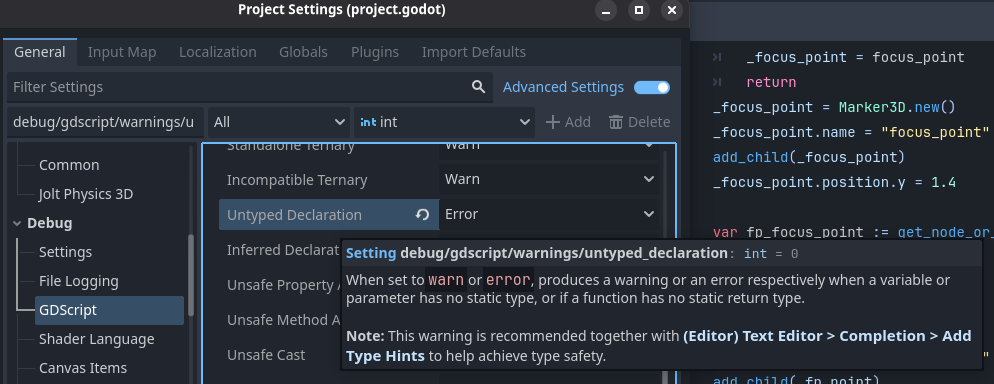
Protip: speaking from experience, you might want to enable this setting:
screenshot
Making Beacon emit a signal every time it moves in a particular direction and then using those signals to update a Vector3 variable in TestChar's script doesn't seem to work
Rube Goldberg machine much? It should work though. Your problem is probably still relative vs absolute position.
Hope this helps
You certainly want look_at.
I use c# for scripting so I'm not super familiar with the gdscript nomenclature but it looks like youre not referring to beacon properly.
Keep in mind look_at uses global coords. You probably want to be looking at the globalposition of beacon. This might be why you find yourself looking where you don't expect. "Position" is relative a nodes parent node. Globalposition is absolute position in worldspace
Heartbeast is porting his veeeery detailed action rpg course to 4, he’s a great teacher and explains things well. The 2nd episode is already out!
Nice, glad it was easy!
[deleted]
You can simplify your rng by using global randomize(). Then you won't have to remember to create a new random generator, and you can generate random stuff with randi_range() instead of rng.randi_range(). That is, if you don't need several differently-seeded random generators.
Couldn't read through the whole code because of messed up formatting.
Im curious why did you pick 3.6 over 4.4 or 4.x?
You can only get the window size after the window is ready, if you were on godot 4 that’d be with an @onready var but I don’t remember how to do that in 3
Ah ok that makes sense. Very cool. I’ll probably just stick with my system, since it works for me :D
The main benefit of keys for each dialogue only comes into play for localization. You could send your ridiculously long map to a translator and nothing else. When loading the dialogue, simply read a global language variable and change the file you read from.
There are a few other benefits of having every line of text in the same place. For starters, you could drop the entire thing into a spell checker. You can quickly change a few lines while having the entire exchange in view to make sure it flows right.
Lastly, you can add keys for common names. Assume you have a very important collectable, let's say 'bread'. You could write your dialogue with placeholders like 'You have to find the %s to save the world!'. Then in you dialogue object, you use an array like '[dialogue-key, word1-key, word2-key, ...]' and apply them, which is done with a '%' in Godot. That's more initial work, but now you could change the name by only editing a single value. Also useful for stuff the player can name.
But of course, game dev has no rules. If it works for you, that's all your system needs to do!
If there was a “key” for every dialogue, that table would get ridiculously long. All the dialogue text is only being used once anyways, so it’s just making it more complicated for, in my opinion, little to no reason.
Using a lookup table for the emotions and character could be interesting though. I prefer my solution of just having all those dialogue objects since it’s simple and works for my use case. In Godot with the “quick load” feature you can find the different sprites very fast. Also, not changing the dialogue system means I can keep using the same one for all my games, so less work to do :D