comments
Sublime Merge is what I use, mostly for dealing with merge conflicts. For more complex operations I just do it in the terminal, even though I'm sure it supports way more features than I use it for.
It's not FOSS, but it's also not Electron.
comment on
15+ years later, Microsoft morged my diagram
be like Tim
Isn't it common for enterprise level paid services to have credits (or refunds) backing published SLAs?
comment on
15+ years later, Microsoft morged my diagram
The Microsoft page is somewhere in that bluesky thread, but the image has been removed already. Here's an article that has a copy of the image: PC Gamer
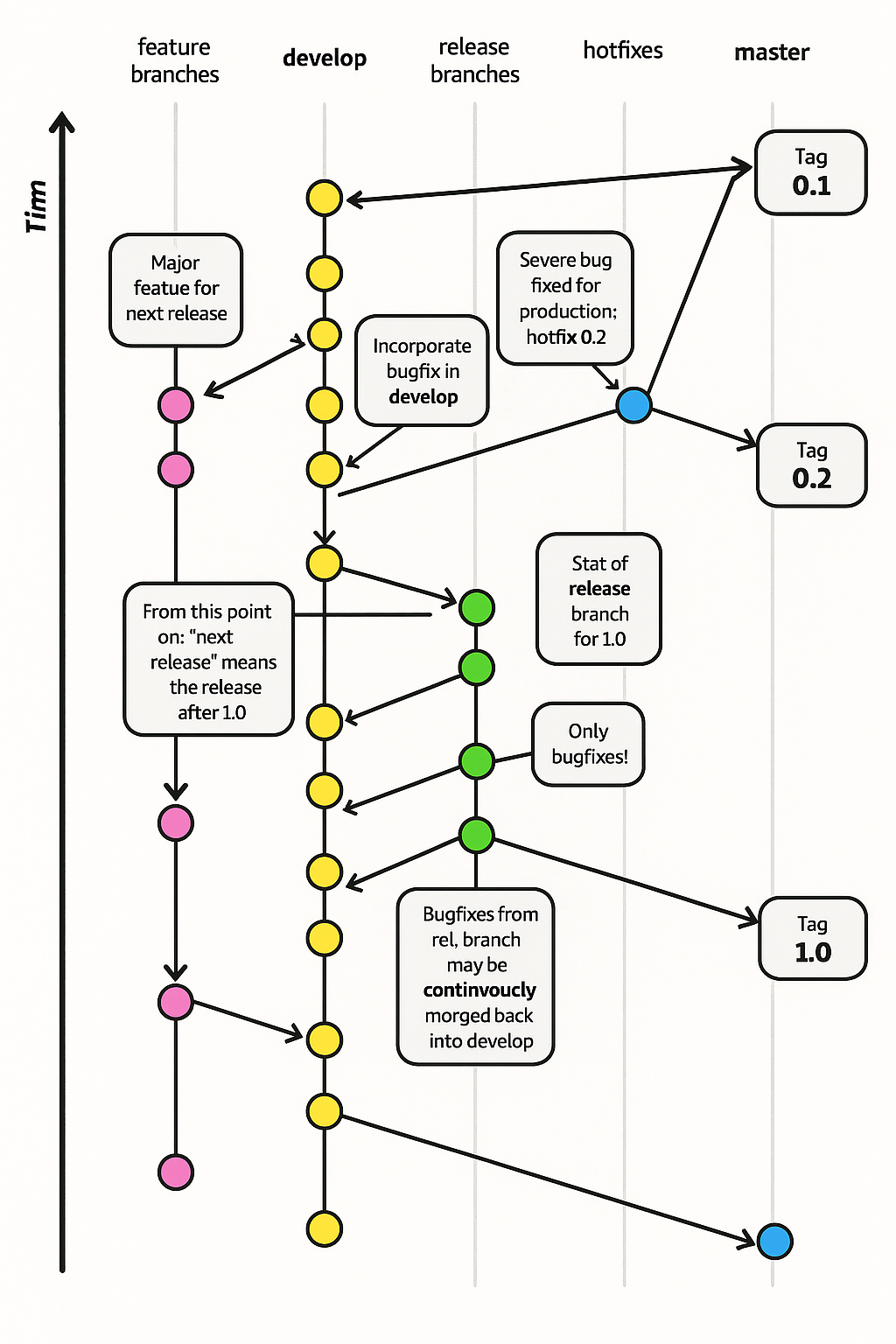
I'd say that it isn't the original ran through the machine, but an "original" work that just so happens to take 90% from this one source image. Probably because graphs aren't like dogs where they're all subtly different and you can take properties from ten dogs and recombine them into a new valid dog. Once the neural net commits to a certain graph it will finish that exact graph.
comment on
15+ years later, Microsoft morged my diagram
Why does nothing link to the content/MS page in question? Not this article, nor the Bluesky post or replies.
I would have liked to see and verify the context, and explore the git history which should lead to some context that may give some context to what the author asks at the end: How did it come to be, with what ideas or goals, or justification, etc.
The Bluesky replies mention(/claim) that the image has been replaced, now seemingly copying a graph from Atlassian docs.
3 9's is not bad, that's less than nine hours a year in downtime.
comment on
git recent: what branch did I work on?
Oh nice.
Although it is not much of a problem for me now, since I get to see the branch name at the start of every prompt and can just scroll up to see the previous branch, it should be pretty useful for when I am not doing that or maybe closed my terminal.
comment on
git recent: what branch did I work on?
I like this. Some of my projects I'm working on 5-6 branches at once (ADHD) and I'll forget which branch had that "cool new feature" I came up with spur of the moment.
In my experience unless you are pretty much immediately popping the stash it's much better just to make a branch and do a normal commit. I would recommend avoiding git stash in general.
This sounds all well and good. But I find in practice it never works very well. Too easy to gain a conflict which then messes with the stash (things remain in the stash and need to be dropped if you remember to). I always found it a pain to manage.
These days I just commit everything to master. When I start work on one feature to realise I need something else or to refactor something else first the I do that work, patch commit the changes, create a branch and checkout a new worktree, cherry pick the changes and push that branch to create a pull request. Then continue with the previous work while I wait to get the previous work merged.
Have a script which basically lets me do all that with a single command. And I never need to manage the stash. The only time I use the stash is with a rebase or pull etc with the --auto-stash flag. Which pops things off when it's done anyway. The stash only really works for very temporary stuff like that.
comment on
Rebase vs Merge guide
This is just straight up "ChatGPT write me an article about merge vs rebase".
It's also missing any discussion of squashing, CI, git blame, git bisect etc.
comment on
Rebase vs Merge guide
I was prepared to use my Cunningham Law mental model to correct your article, but no. I have nothing to say 😊
I've seen way too many wrong usage of git merge/rebase in lots of article but you get the point and clearly explained it.
Maybe just at the end, instead of
git checkout main
git pull
git checkout feature-branch
git rebase main
I would just do:
git fetch
git rebase origin/main
This avoid checkout main and checkout back to working branch, which may takes times on big repos.
comment on
difi: Git diff TUI
What benefits does this bring versus git add -p? Also why do I need an alias? Couldn't I just have the binary named git-difi?
comment on
I made my own git
This is a pet project I've been meaning to try for a while, especially to get some more rust on the github, but I was caught up on whether it made sense without git compatibility.
comment on
git-pkgs: explore your dependency history
That's really cool.
Repo already archived, only 26 days after the linked post?
Oh, they rewrote the ruby tool into Go. Even better.
https://github.com/git-pkgs/git-pkgs
Looks like it probably lost some dependency manager systems support through that.
comment on
Archiving git branches as tags
You add more tags?
In my main work projects I regularly archive tags into refs/archive/tags/* - which is hidden from normal tooling, but still accessible in Git and (some?) Git tooling and UIs.
Branches get "path" prefixes like draft/* or other longterm category indications. I don't archive them, but if I would, I would put them into non /refs/heads like /refs/archive/heads/*.
comment on
It's time to mirror you project on Codeberg
What's Codeberg's stance on this? Do they advocate for this, accept it, or dislike it?
Their FAQ talks about having disabled mirroring because of resource use of abandoned mirrored repos. Their blog post about the drop of mirroring says that manual mirroring is still possible.
comment on
It's time to mirror you project on Codeberg
I would love to do it this way but so far for any of my projects, github is the only platform that I received contributions (issues, code contributions, etc).
Unfortunately I feel this missing critical mass is a real sticking point for many small projects (think 10-100s of github ‘stars’). I hosted the projects simultaneously on other platforms and other projects exclusively on other platforms and never got engagement from the community except for a single heroic individual sending a patch per email.
I get that breaking this critical mass is part of the point and I am the dude complaining that my friends are all on whatsapp but it seems even more deeply entrenched here to me, starting with service-dependent issue collaboration. Only ways out I see currently are decentralised issue discussion à la sr.ht mailing lists, direct tracking in the repo like git-bug or federation/2-way mirroring of the centralised ones.
Until then, I don’t foresee this monopoly budging.
comment on
It's time to mirror you project on Codeberg
Very good solution. All developers should do the same. But in reality, this is not the case. We need to open developers' eyes and explain to them how to proceed.
comment on
It's time to mirror you project on Codeberg
I much prefer to use Codeberg as the primary and mirror the repos to github
Sounds like you got it sorted but heres what i do:
- setup new repo in codeberg but don't check the box to initialize the repo
- for existing project, use
git remote -vto verify your remotes. Update as necessary (git remote set-url [remote] [url]). If it's a new project you can justgit initand add your remote. - first push you'll need to specify the remote such as
git push originand after that you'll be fine to use justgit push
Thanks - I figured out how do to it - I had to use git remote set-url origin.
Ok, I figured it out - I needed to
$ git remote set-url origin ssh://git@codeberg.org/OrgName/repoName.git
-and then I could push.
Have a look at this guide. You need to create the repo first I think before you push. Theres even a note talking about push to create