[–] 9 points 10 months ago (8 children)

I'll join the chorus recommending Godot. A lot lighter than Unity or Unreal, it's open source, well documented and quite capable. It's got a lot of features, in a lot of ways it isn't "dead simple."

I might recommend starting off using Python's Pygame library. Do something like create Flappy Bird in it, that will give you a pretty good idea of how a video game works under the hood, and it'll run on a potato.

For pixel art you might go with LibreSprite or Pixelorama. These will allow you to create tile sets for backgrounds as well as character sprites.

If you're looking to get into 3D art, you've basically got to go with Blender.
  • source
  • [–] 4 points 10 months ago* (1 child)

    Godot. You could try to see if Godot 3 will work better than Godot 4.

    Godot 3 is a bit older but still is getting fixes and some new features. (long term support driven by community)

  • source
  • [–] 4 points 10 months ago (2 children)

    Probably not what you are looking for, but I think a great place to start is Pico-8, there is an education version, but it only costs $15 to start making games in Lua with the real version on your machine. Although it's very limited (think like Game Boy color games) you will learn a lot of the basics, there's 1000's of games you can look at the code of, and a good community and learning resources.

    It's a quick easy way to get started in game creation, and if you're new to programming it will be a while before you run out of challenges.

    Like a number of commenters have said, it depends on what type of games you want to make - Pico-8 is limited, deliberately.

  • source
  • [–] 12 points 11 months ago

    If you know a bit of Python then Godot is a good place. It's GDScript is very similar.

    Godot is an open source game engine that is rising after Unity keeps shooting themselves in the foot with price changes and pricing structure changes.

  • source
  • [–] 1 point 11 months ago (3 children)

    You're paying for it. This pack costs money.

    And even if it was free, the problem with AI isn't that you're not paying for it. It's that you are ripping off artists without their consent. All artists that are in this asset pack consented to their work being used.

  • source
  • parent
  • context
  • [–] 1 point 11 months ago

    A nice trailer, but there's a couple of things I found a bit off: the voice of the mage sounded too weak and distant, maybe the mic settings are too different, I don't know; I expected the mage to object after the last line of trailer 😅 still, it looks interesting

  • source
  • [–] 1 point 11 months ago

    Visual scripting tools like Unity and Unreal Engine were supposed to speed up development and let designers think more about their game and less about blocks of code. Why would we go back to a world where everyone's building their own game engines?

    A number of reasons I can think of.
    One: debloat and performance. Unreal and Unity are extremely bloated. As much as I enjoy Godot, the bare minimum executable that it produces is over 20MB. Less bloat means less code being shipped which typically translates into better performance.
    Two: better control of what's going on. Sure, UE's source is open for you to peek in and see what's going on, but it has literal decades of baggage. Unity has its way of doing things and, other than plugins, you're stuck with it. The point that Dean Hall makes of these engines all working based on scenes^["If you take Unity or Unreal, you have this editor scene and push play, it becomes a game scene and everything in it is relative to 0-0-0 of that scene," said Hall. "That's how you draw things, and it's so ingrained that people have a hard time imagining something that's different." (...) The thinking wasn't "Unity can't do this, I need a tool that can do this." It was "our game needs floating origin to work this way, how do we do it?"] and not every game needing that is spot on.
    Three: Visual scripting isn't new and it leaves you stuck with the tool. There are several engines that offer visual scripting, some decades old (Clickteam Fusion, GameMaker, RPG Maker, Construct), being widely used for simpler games, but never for stuff that "thinks outside the box", so to speak.

    Hall made a rather bold prediction: frameworks like Brutal, not game engines, will be the future of the game development.

    I wouldn't go that far. A lot of big budget games will still use ready-made engines like UE and Unity simply due to cost and time, others will do things on their own "hard" way. CDProjekt ditched their own custom engine that powered Witcher 3 and Cyberpunk 2077 to work with UE going forward.

    The only thing the LLM does for Brutal developers is speed up access to information, letting them research without watching a 40 minute YouTube video. (...) You can boil down Hall's theory about what he calls "the death of big engines" to this: if LLMs make language-based coding more accessible, than visual-based scripting loses its edge.

    Not going to be the "death" of big engines because he's putting waaaay too much faith in people bothering to even search "how to do X using Y framework".

    Hall's vision of the future game industry is almost the polar opposite of the one pitched by UGC platforms and AI boosters. Instead of a world where game development becomes easier through simplified tools, it becomes more accessible through easier understanding of language-based programming through LLMs.

    In other words, it's a StackOverflow that won't berate you for "a stupid, repeated question" which should, in theory, help out with new stuff so long as it is properly documented, which seems to be the case with the Vulkan API

  • source
  • [–] 2 points 11 months ago

    When it comes to game development, engines usually have their own IDE and have many tools ready that make it so you don't have to code everything - in Godot, for instance, you can create AnimationPlayer and AnimationTree to handle animations.

    Frameworks (MonoGame for C#, libGDX for Java, LOVE2D for Lua) can be understood as "pre-engines" or libraries for those coming off webdev, they offer lots of ready made functions to make your life easier (input handling, loading and handling most types of data, showing stuff on screen), but you'll still need to code pretty much everything else.

  • source
  • parent
  • context
  • [–] 2 points 11 months ago* (last edited 11 months ago) (1 child)

    I guess just the color tag on the character is enough, though will likely need to manually enter the color-code each time (I have my own palette, even worse if I even need to change* it). Also neat that the outline can be change this way too (not shadow?), though seems a bit messy to stack these in BBCode.

    I'm guessing custom effects might be the thing that would allow me to make my own color map. Not sure if that would always apply or if I'd have to wrap any icon in custom BBCode for that to apply, and either way still not textmesh (or label3d).

    Also for my complaint on the node itself, I guess it's the same as a normal label with font scaling, just throws me off with the small default font size looking blurry in the editor (and existing fonts probably make more sense for smaller text, or even 2D text in general)

    * shader globals don't seem to work here (unless I'm missing something), though also my palette is ordered (7x5) so a vertical list isn't great anyway. OTOH I did use 3-digit hex codes, so it's not difficult to type in (remembering/interpreting, not so much)

    What’s your game about? 👀

    No game yet (and maybe never), currently have mainly messed around with models+vertex colors (Blender, not good with that either), not quite happy with the gridmap node.

    With my world so far I guess it has sort of a low-poly dream-core aesthetic, but without a pixel filter (nor textures mostly). Tile floors, purple sky and glowing moon, random stuff everywhere, and it's all on a floating island.

  • source
  • parent
  • context
  • [–] [S] 2 points 11 months ago (2 children)

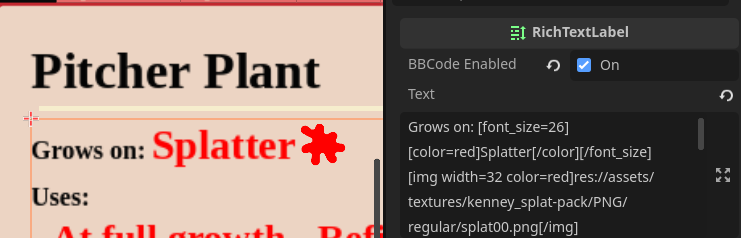
    I see now, those stacked effects are pretty cool! You might be able to top-left-align a child RichTextLabel with just the icon if you wanted to use an img tag, the coloring works pretty well:

    What's your game about? 👀

  • source
  • parent
  • context
  • [–] 2 points 11 months ago* (3 children)

    It's more obvious with the image (which should be loading now) but I'm talking about custom icons. Like having a fire icon be red/yellow while the rest of the text has its own color.

    The richtextlabel does font+sizing etc differently*, I don't like seeing pixels (can be dialed in, but not my favorite to require) though at least for the standard label the new stacked effects are a bit snazzy (and theme-like) so I guess I don't hate it now that I do have it dialed in.

    * which does not surprise me given the other text methods all have benefits and drawbacks (and even with the 2D label, color emoji can kinda look off with outlines but that might be down to the font?)

  • source
  • parent
  • context
  • view more: ‹ prev next ›