1


Hi everyone,

I just recieved my 13 pro, Intel version, running Nobara and so far everything is working great except I am having issues with the 1tb module. I can put files and movies on the drive no problem but when I tried to make the module a second steam library and I keep getting write errors. I can download steam games to the drive fine, but they won't launch and when I try to install any of the proton versions they all fail due to write error. I'm not sure what the issue is, my internal NVMe has no issues running steam games.

EDIT: the issue was the file system for the drive. I didn't think to format it when I got it. The drive shipped as exfat. Formatting to ext4 fixed the issue.

2
3
4


Framework says it's replacing some out-of-warranty AMD mainboards.

5
6
7
8


Thinking about leaving Mac behind? Michael from our Linux team is here to help you make the jump from macOS to Linux on Framework Laptop 13 Pro. The key to a successful switch is remembering that Linux isn't trying to be a clone of macOS, it's its own thing, with its own strengths.

In this video, Michael walks through what feels familiar coming from macOS, what's different, and where Linux pulls ahead for developers, all on our first Ubuntu-certified system, the Framework Laptop 13 Pro.

Want to learn more? Comment below with what topic you'd like to see Michael dive into next.

Get the Framework Laptop 13 Pro → https://frame.work/laptop13pro

Chapters

  • 0:00 Intro
  • 1:18 Meet the Framework Laptop 13 Pro
  • 1:53 Should a developer switch to Linux?
  • 2:19 Being fair to macOS
  • 3:01 Why the hardware matters (Linux-first design)
  • 3:53 Battery life
  • 4:38 Which distro should I use?
  • 6:13 Which desktop environment?
  • 7:51 The Touchpad
  • 8:39 Scrolling: Natural vs Traditional
  • 9:19 Keyboard shortcuts & remapping your modifier keys
  • 14:49 Installing apps: App Centers, Snaps, Flatpaks, AppImages & Homebrew
  • 17:36 Firmware updates & LVFS
  • 19:08 Apple accessories on Linux
  • 19:30 Apple services & iCloud on Linux
  • 20:20 Safari Alternatives
  • 20:30 Password Management
  • 20:51 FaceTime on Linux & alternatives
  • 21:12 Storage solutions
  • 21:30 AirDrop alternatives (LocalSend)
  • 21:56 iMessage alternatives
  • 22:46 KDE Connect
  • 24:09 The invisible tech: printers, Wi-Fi, displays & docks
  • 25:59 Audio & PipeWire
  • 27:02 Backup strategies
  • 28:06 "Is there a catch?"
  • 29:04 Share your thoughts

Tools & software mentioned

9
submitted 3 months ago by to c/framework@lemmy.ca


I just received this email

Dear Valued Framework Customer,

We are writing to inform you of a data breach at our business intelligence database provider Metabase that resulted in an attacker accessing customer names, email addresses, phone numbers, and addresses. Your information was in the database that was accessed in this breach. This breach did not include order or payment information.

We have full details on the incident below. We are deeply sorry for this breach of information, and are reviewing and improving our methodology for data storage in external database vendors.

We are also in the process of notifying the regulatory authorities in each region where relevant regulations exist. Note that while regulations in most regions do not require notification for breaches of names, email addresses, phone numbers, and addresses, we are sending this email to you regardless to ensure you have visibility and can take any actions needed.

What happened?

On August 6th, 2026 at 9am Pacific Time, Metabase notified us of a breach of their systems with the following email message:

On Monday, August 3, we discovered that Metabase Cloud was attacked by someone utilizing an unknown (“0-day”) security vulnerability in versions 1.58 and above. We immediately blocked the endpoints used for the attack, then quickly identified and patched the vulnerability. We notified law enforcement, and we have engaged with a third party forensics firm to conduct an independent investigation.

Your instance of Metabase was vulnerable to this 0-day. Therefore, to protect your company, we recommend you:

Rotate the credentials for every database connected to your instance; and

Review the admin accounts on your instance and remove anything you don't recognize.

We also discovered that the attacker was able to gain access to your instance. We created a report on the actions we believe the attacker took on your instance, which includes log files, and which you can get from the Metabase Store at [removed url].

(If you do not have access to the Metabase Store, are having issues accessing the report, or do not want to click on a link in an unexpected email, you can log into your instance directly and reach us at Help > Get help in the grid menu in the upper right hand corner. We'll confirm this message is from us and email you the report.)

This report is based on our own application logs. We did not query or read the data in your connected databases.

Depending on the jurisdictions in which you operate and kinds of data your instance connects to, you may have notification obligations under applicable laws. If you have concerns in this regard, we recommend you assess potential notification obligations with your company’s legal or compliance experts.

We regret any inconvenience this incident may cause you, and we are here to support you. If you have questions, please reply to this email or email us at [removed email address], and we'll get back to you as quickly as we can.

Sameer Al-Sakran

Founder and CEO

Metabase

We immediately investigated the logs Metabase provided to us and confirmed that our database instance was accessed by the attacker. We confirmed that the following information was accessed:

  • Full name
  • Email address
  • Login IPs
  • Billing and shipping address information
    • Country
    • Address
    • City
    • State
    • Zip code
    • Phone number
    • Company

For Framework for Business customers, we are investigating whether the following information may additionally have been accessed:

  • Company
  • Phone
  • VAT
  • EIN
  • Billing Email

No other personally identifiable information, order information, or payment information was accessed.

Note that Metabase has additionally flagged:

Important: This is a preliminary update based on our current knowledge.

We are working with a third-party forensic investigation firm to understand the full nature and scope of the event.

We are providing you this interim update in advance of completing our investigation to allow you to better understand any potential impact and secure your data.

Our investigation is ongoing and the information shared now is preliminary.

Please look at the application logs as well as the queries executed that are provided as separate files in the zip file for detailed activity and a potential timeline.

We’re providing you notice of the breach in the meantime to ensure you have the earliest possible visibility. In the event Metabase notifies us of additional information that impacts you, we will send a follow-up email.

What was done to resolve the issue?

After we were notified of the breach by Metabase, we rotated credentials on all databases associated with our Metabase instance and confirmed that there were no changes in admin access or access to systems outside of Metabase.

What steps have you taken to ensure this doesn’t happen in the future?

We are evaluating the breadth and depth of data shared with business intelligence platforms, and scoping down their access to only the columns required for analysis.

Nirav Patel and the Framework Team

10
11
12
13


Am a sort of digital nomad (travel OS 8 months a year, home for 4) , and my Surface Pro 7 (running LMDE) just crapped itself while I am travelling. Hard to do any diagnostics while travelling and it won't boot from my LMDE USB thumb drive.

I had thought to replace it with either a System 76 or Framework when i got home and while I have never owned an Apple product, perhaps even a Macbook Air as there is always Apple repair places everywhere.

And god help me, I'd run MacOS on the Apple

14
15
16
17
submitted 5 months ago by to c/framework@lemmy.ca


That is the exact title of the YouTube video. Keep in mind I do not actually have any connection to Framework.

18


The response to our Framework Laptop 13 Pro launch last week was bigger than we ever could have imagined. Far more of you pre-ordered than we had originally forecast, and we’re already into Batch 10. We’re just wrapping up validation and final software and firmware for the Pro now, and our operations team is getting ready to ramp into manufacturing. In addition to Framework Laptop 13 Pro, we got a ton of positive feedback around the improvements to Framework Laptop 16, the OCuLink Dev Kit, and the Framework Wireless Touchpad Keyboard. If you missed the announcement, we have it up on our YouTube Channel, along with a recording of the community Q&A we did later in the event.

We built Framework Laptop 13 Pro to be the “MacBook Pro for Linux users”, and the initial sales metrics and post-purchase survey results are showing we’ve landed that. Configurations with Ubuntu pre-loaded are vastly outselling Windows ones, and we’re seeing >1/3rd of pre-orders come from people moving off of MacBook Pro’s. We got some excellent feedback from developers in the Linux space who we seeded pre-production hardware to, like this run-down from the team at CachyOS. We also saw a number of excellent hands-on videos and write-ups from reviewers, community members, and YouTubers who came to the event. Some of our favorites are:

There is one announcement that we couldn’t share during our launch event. Today, NVIDIA introduced a 12GB version of the NVIDIA GeForce RTX™ 5070 Laptop GPU, and we’re happy to share that we have variants of Framework Laptop 16 available for pre-order with it. Shipments start this June alongside the One Piece Haptic Touchpad and Keyboard. We also have the Graphics Module itself available for pre-order in the Framework Marketplace for those of you who already have a Framework Laptop 16. We’re continuing to live up to graphics upgradeability in a laptop, now with our third discrete GPU option!

We also snuck in one other mini product launch last week that we didn’t get a chance to share much detail about, which is the USB-A (2nd Gen) Expansion Card. This has a custom USB-A receptacle that detects whether a device is plugged into it. When nothing is plugged in, the card is invisible to the system. This improves power consumption specifically on AMD systems, where the rear two Expansion Card slots have retimers that can’t otherwise automatically enter a lower power state if an empty 1st Gen USB-A Expansion Card is plugged in. The 2nd Gen card is available with pre-orders of Framework Laptop 13 Pro, and will be coming to other systems and the Framework Marketplace later this summer.

If you want to try out Framework Laptop 13 Pro and our other new products too, we’ll be at a few events over the coming months:

19
20
21
22


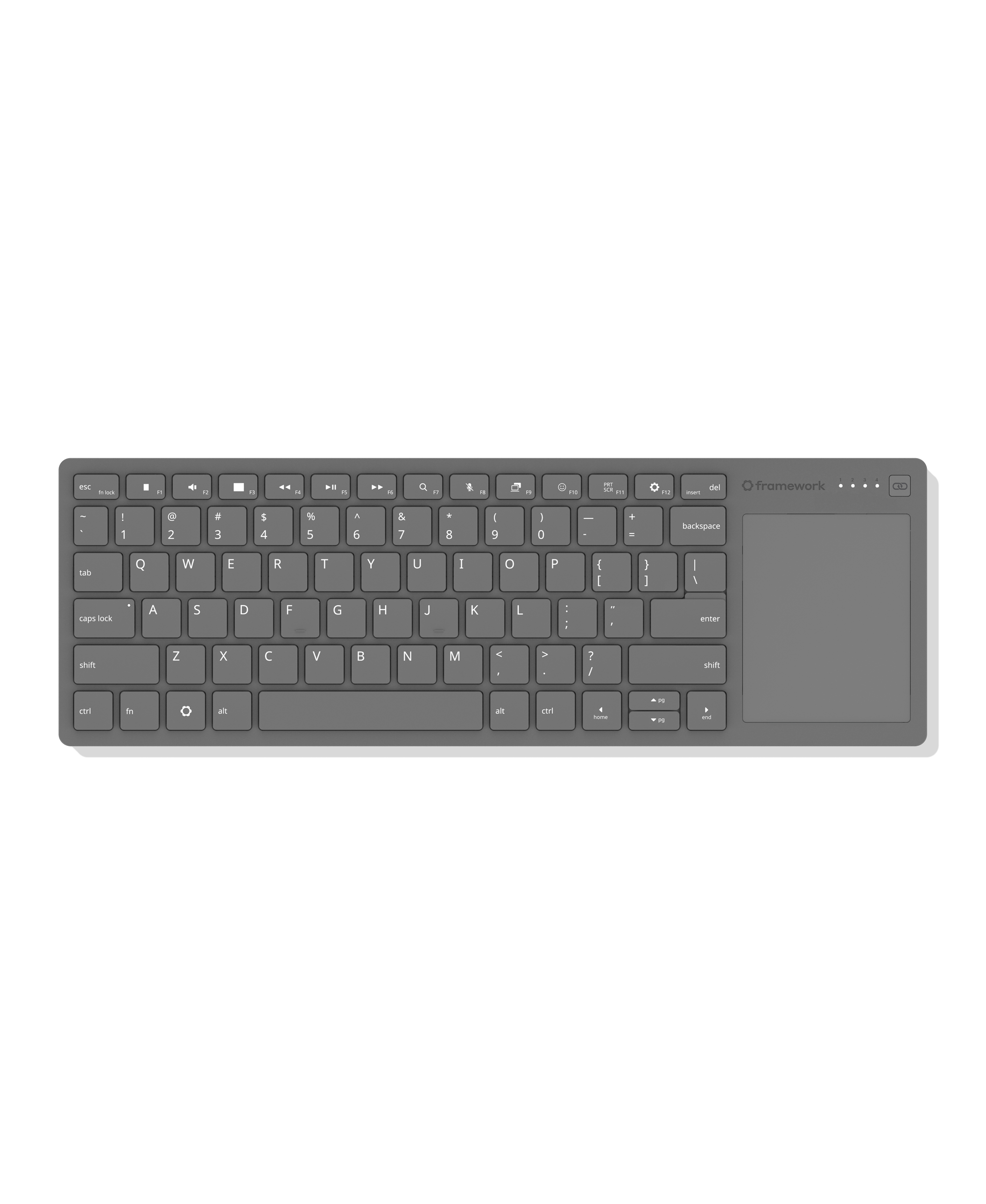
Finally, a wireless keyboard with an integrated touchpad that you don’t hate.

Super slim and durable, it's ideal for HTPCs, sim rigs, and single-board computer setups, using the same keyboard and touchpad design as Framework Laptops.

Features a 68.8 × 85.6mm precision touchpad with multi-touch gesture support and 1.5mm key travel for a responsive typing experience. Connect via wired, Bluetooth, or USB-A dongle, and switch between up to four wireless devices. Compatible with the USB-A Adapter Expansion Card for added flexibility.

Powered by Nordic’s ultra-low-power nRF54L20 wireless SoC. Open-source CAD design and firmware based on ZMK Firmware allow for endless mod potential. The control board is available for purchase separately with breakout pinouts designed for DIY keyboard builds and custom projects.

Available later in the year

23
24


Earlier today, we hosted our Framework [Next Gen] Event, where we announced Framework Laptop 13 Pro, updates to Framework Laptop 16, and previews of the OCuLink Dev Kit and the Framework Wireless Touchpad Keyboard. You can watch a recording of the full event livestream on the Framework YouTube channel. Six years into our existence as a company, these new products represent a step change in our capabilities. We have the scale and resources to build the products you want from us and to deliver on our mission of remaking consumer electronics. Each one of the updates is in response to the asks you’ve made of us over the years.

First, Framework Laptop 13 Pro is a complete ground up redesign that brings a massive leap in battery life with Intel’s Core Ultra Series 3 Processors, a 74Wh battery, and LPCAMM2 memory, a new full CNC aluminum chassis, our first purpose-built power-optimized display with touch support, an excellent feeling haptics touchpad, an option for pre-loaded Ubuntu, and much more. In many ways, this product has been six years in the making. We’ve taken all of the feedback you’ve given us on the first seven generations of Framework Laptop 13 to make this the ultimate portable developer and power user machine. Battery life is what you’ve asked for most, and we’ve delivered on this. On Netflix 4k streaming for example, we’re getting over 20 hours of battery life, which is not only 12 hours longer than we got on the previous-generation Framework Laptop 13, but it’s actually slightly longer than a 14-inch MacBook Pro M5! With all of this, it’s still a Framework Laptop, meaning it's repairable, upgradeable, customizable, and entirely yours to do what you want with. Framework Laptop 13 Pro is available to pre-order today, starting at $1,199 USD for DIY Edition and $1,499 USD for pre-built configurations, with first shipments in June.

We posted two videos on Framework Laptop 13 Pro to the Framework YouTube channel, a deep dive on the product, and a side-by-side comparison and upgrade guide with the original Framework Laptop 13. You can also check out the blog post we published for more detail on it.

Next, we introduced the latest updates to Framework Laptop 16, bringing one piece haptic touchpad and one piece keyboard options, along with a new Bezel color and a Ryzen 5 processor configuration. We’re also previewing a new OCuLink Dev Kit that enables extremely high throughput peripherals like eGPUs. Framework Laptop 16 is truly the ultimate portable workstation platform, with the flexibility of a desktop PC in a thin, robust magnesium and aluminum 16” chassis. All of the new updates take in the feedback you’ve given us over the last two years to both extend on modularity and level up performance and refinement. You can learn more on both the updates to Framework Laptop 16 and the OCuLink Dev Kit in this blog post.

Finally, we’re excited to preview the Framework Wireless Touchpad Keyboard, a compact keyboard with integrated touchpad that is excellent for living room use, setting up computers, and mounting into sim rigs. As we were developing Framework Desktop and using it in these scenarios, we found that there was just one popular keyboard in this segment, and it was one that neither we nor the broader community particularly liked. We knew we could do better, and so we did! Our keyboard uses the same great-feeling mechanical key structure and touchpad architecture that we put in Framework Laptop 12. A highly power-efficient Nordic nRF54 radio and open source ZMK Firmware enable pairing four BLE and USB-A Dongle hosts along with wired USB-C connectivity. In addition to the dongle, which is storable in the back of the keyboard, we’re developing a USB-A Adapter Expansion Card that allows it to sit flush in a Framework Laptop or Desktop. We’re sharing this preview of Framework Wireless Touchpad Keyboard to give developers an early start on building around it. You can learn more about this in the blog post we published.

Six years in, we’re not only continuing to deliver on the original promise, we’re bringing it to an entirely new level. We wanted to prove that you can have products that are refined, robust, and high performance, that still respect your rights through repairability, upgradeability, and the power to choose the software you want to run on them. We’re confident we have achieved this, but more importantly, we’re excited to see if you agree!

25


Hello, I have been using Framework 13 for 2 years now and this is the 3rd time I have to replace my screen. My screen is black partly with pixel lines etc. First time was 1.5 months after buying, second time was 6 months after the first one and this time is right after the waranty date.

I just want to ask how are your experience with your screen ? Is it a general issue or just me being unlucky, it has been a pretty rough month for me so far :-(

Thank you very much!

view more: next ›