[–] [S] 5 points 3 months ago* (last edited 3 months ago) (3 children)

For items that might need sorting by name or date - like file names, or spreadsheet or database entries - I entirely agree.

But my question was not, "What is a sensible date format?"

It was, "How can I get Mbin to show dates in a monotonic format."

Most forum software lets users choose locale, which takes care of this. Mbin doesn't, AFAICT.

  • source
  • parent
  • context
  • [–] 2 points 3 months ago (4 children)

    YYYY-MM-DD HH:MM:SS.MS

    Because it’s fucking sortable. Milliseconds optional.

    This is the only timestamp you should ever use and you should make choices based on them being better or more efficient not just being from a place you want to dislike at the moment.

  • source
  • [–] [S] 1 point 3 months ago*

    if you follow a user their future posts will be sent to your server. We were talking about implementing a backfill option, but there is no eta yet

    Thank you for explaining. That must indeed be the reason I couldn't see those toots on Mbin.

    so no guarantee it will be implemented at all. But since it is an annoying problem, maybe it will

    Backfill would be great! Server capacity concerns notwithstanding.

    In the meantime, clearer wording for the info banner would be an easy, helpful UX improvement:

    • Before subscribing: "This Fediverse profile is hosted on a different server than yours. If you, or another user on your server, were to subscribe to this profile, the profile's subsequent posts would be displayed here. The profile's older posts can be viewed on their server"

    • After subscribing: "This Fediverse profile is hosted on a different server than yours. Now that you have subscribed, the profile's future posts will be displayed here. The profile's older posts can be viewed on their server"

  • source
  • parent
  • context
  • [–] 2 points 3 months ago*

    Though about the instance itself doing backfilling by an automated worker, it could be pretty taxing on both the requesting and requested instances, so I worry communications may get timed-out or the requesting instance may inflate to the point storage becomes a big concern.

  • source
  • parent
  • context
  • [–] 1 point 3 months ago (1 child)

    About backfilling, if @modem_down@thebrainbin.org come across any yet unfederated links in the wild, maybe worth mentioning search links are standardized and hard-coded, making even redirect scripts efficient. Like e.g. https://thebrainbin.org/search?search[q]=https://mastodon.social/@artologica@chaos.social/116986639666818550 yielding https://thebrainbin.org/m/random/p/829840 (and using a remote link from a third instance to further make my point hehe).

  • source
  • parent
  • context
  • [–] 2 points 3 months ago (3 children)

    You could type in the url of the post in the search bar, but if you follow a user their future posts will be sent to your server. We were talking about implementing a backfill option, but there is no eta yet, so no guarantee it will be implemented at all. But since it is an annoying problem, maybe it will

  • source
  • parent
  • context
  • [–] [S] 1 point 3 months ago (4 children)

    Thanks for your reply. I should have been clearer!

    It's not the banner that bothers me, it's the fact that that microblog's posts (toots) aren't being displayed when viewed from Mbin!

    Is there anything I can do in order to get those posts to propagate through to Mbin? Would I have to contact the admin for the Mbin instance hosting my account? Something else?

  • source
  • parent
  • context
  • [–] 2 points 3 months ago*

    A lot in Mbin can be improved with Ublock Origin's custom filters, by the way. Like auto-hiding posts you like/dislike, or hiding from the main feed and magazine feeds replies appearing as posts.

    But I'd suggest not using the infinite scrolling option if using custom filters as that's a massive load on the server and Ublock Origin after enough matches in a single page are done starts misbehaving.

  • source
  • parent
  • context
  • [–] 5 points 3 months ago* (6 children)

    Not an issue but a standard warning. Fediverse instances don't auto-populate, and the author of the original project¹ must have thought it was a good idea to raise awares of that by putting this warning.

    But if it bothers you and you use Ublock Origin, though no native option to dismiss it are availabe, you can put this in a new line of Ublock Origin's custom filters tab:

    thebrainbin.org##.alert__info.alert

    ¹Mbin's a fork, and the original software's no longer worked on

  • source
  • [–] [S] 2 points 3 months ago*

    @Auster@thebrainbin.org

    one thing you can do is to browse the subscribed microblog feed, https://thebrainbin.org/sub/microblog

    Thanks, this is the kind of thing I hoped for!

    you can also go to the general settings, https://thebrainbin.org/settings/general, and set "Homepage" as "Subscriptions", and "Front page default view" as "Microblog", so https://thebrainbin.org/ becomes a mirror of https://thebrainbin.org/sub/microblog

    Excellent tip, thank you!

  • source
  • parent
  • context
  • [–] 2 points 3 months ago (1 child)

    @modem_down@thebrainbin.org So, let me reexplain, since there's also some inaccuracy in what I said in the last message.

    When you go to the frontpage of your instance, https://thebrainbin.org/, it lists all the posts your instance is aware of. You can switch between microblog posts, Lemmy threads, and a combined view in the top bar.

    Above the list of posts, but below the top bar, there should be another bar with a few dropdown options. I can see it when I visit that URL on your instance.

    From left to right, those options are:

    • the list's sorting method (default depends on the instance I assume, you can set your own in the settings)
    • how old listed posts are allowed to be (defaults to no limit)
    • What kind of posts you want to see (links vs text vs images vs videos, defaults to all)
    • The list type of you want to see (this is the one you want)
    • The federation option, which lets you choose to see federated content from other instances or only content from your own instance

    The one we want is the fourth dropdown, and it's only visible when logged in. The dropdown lets you choose between viewing all the posts on the instance (that fit the other filters), only posts from communities or users you're subscribed to / following, only posts from communities you're a moderator of, or only posts you upvoted.

    Contrary to what I said earlier, it seems that while the dropdown does exist in magazines, there's no subscribed option there, only all and upvotes.

    Those options exist on all of the threads, microblog, and combined views. Except for the post type filter, that one isn't available for microblogs.

    If you want a direct link, this should get you to the subscribed list: https://thebrainbin.org/sub It's what selecting the option in the dropdown loads up.

    You can change some of the defaults in the settings. Like what sort to use and whether the frontpage should load up all posts or just subscribed ones by default without the /sub attached.


    This used to be simpler in my opinion. Back on /kbin (but I forgot if it was /kbin later on or Mbin that changed this), Mbin was forked from /kbin, this dropdown was actually placed next to the search button in the top bar, and visible anywhere on the site. Acting as a shortcut to those lists. I'm not sure why they changed its location.

    None

  • source
  • parent
  • context
  • [–] 2 points 3 months ago* (1 child)

    To see only followed people's posts, without seeing subscribed communities' posts, I don't think there's much of a way.

    However, since microblog posts on communities are still rare, one thing you can do is to browse the subscribed microblog feed, https://thebrainbin.org/sub/microblog, as then mostly the people you follow should appear on, and rarely posts to communities.

    In that line, you can also go to the general settings, https://thebrainbin.org/settings/general, and set "Homepage" as "Subscriptions", and "Front page default view" as "Microblog", so https://thebrainbin.org/ becomes a mirror of https://thebrainbin.org/sub/microblog.

  • source
  • parent
  • context
  • [–] [S] 1 point 3 months ago* (last edited 3 months ago) (4 children)

    @Pamasich@kbin.earth thanks. Unforunately, I can't see a globe icon or the word "All".

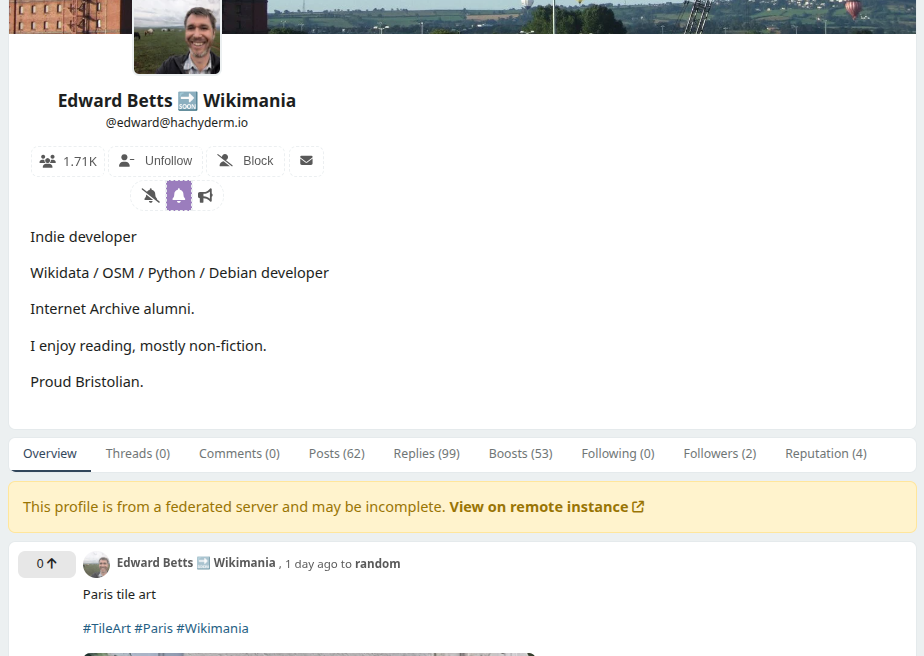
    Here's a screenshot showing Edward Betts's Mastodon profile as viewed from Mbin. As you can see, I follow his Mastodon account from my Mbin account.

    I can see his posts on that page. But what I can't figure out is how to see his posts, and posts from other Mastodon accounts I follow, in a single page or feed on Mbin.

    Screenshot of Edward Betts's profile as viewed from Mbin.

  • source
  • parent
  • context
  • view more: ‹ prev next ›