Why was I banned from GrapheneOS? That’s a good question.
 |
|---|
| Why I was banned from GrapheneOS by Daniel Micay) |
𝐒𝐨𝐜𝐤·𝐩𝐮𝐩·𝐩𝐞𝐭
/ˈ𝘴ɑː𝘬 ˌ𝘱ʌ𝘱.ɪ.𝘵𝘳𝘪/
(n.) An online identity created, and used, for purposes of deception. A sockpuppet purports to be an independent party that supports, approves of, or agrees with some agent (a person, organization, agency, or state), but is in fact created and controlled by that agent, and has no independent existence. Common uses of sockpuppets include plausibly deniable hacking or information operations, provocation, and astroturfing (creation of the illusion of grassroots support).
𝐒𝐨𝐜𝐤·𝐩𝐮𝐩·𝐩𝐞𝐭
/ˈ𝘴ɑː𝘬 ˌ𝘱ʌ𝘱.ɪ.𝘵𝘳𝘪/
(n.) An online identity created, and used, for purposes of deception. A sockpuppet purports to be an independent party that supports, approves of, or agrees with some agent (a person, organization, agency, or state), but is in fact created and controlled by that agent, and has no independent existence. Common uses of sockpuppets include plausibly deniable hacking or information operations, provocation, and astroturfing (creation of the illusion of grassroots support).
Daniel Micay = the (former?) lead dev of GrapheneOS who did the banning
Michael Altfield = the author and person who was banned
Why was I banned from GrapheneOS? That’s a good question.
|
|---|
| Why I was banned from GrapheneOS by Daniel Micay) |
Why was I banned from GrapheneOS? That’s a good question.
|
|---|
| Why I was banned from GrapheneOS by Daniel Micay) |
Why was I banned from GrapheneOS? That’s a good question.
|
|---|
| Why I was banned from GrapheneOS by Daniel Micay) |
Why was I banned from GrapheneOS? That’s a good question.
|
|---|
| Why I was banned from GrapheneOS by Daniel Micay) |
 |
|---|
| PSA: VEGN (Vegan ETF) holds Tesla, United Health. Contact them |
This article will describe how to download an image from a (docker) container registry.
 |
|---|
| Manual Download of Container Images with wget and curl |
Remember the good `'ol days when you could just download software by visiting a website and click "download"?
Even apt and yum repositories were just simple HTTP servers that you could just curl (or wget) from. Using the package manager was, of course, more secure and convenient -- but you could always just download packages manually, if you wanted.
But have you ever tried to curl an image from a container registry, such as docker? Well friends, I have tried. And I have the scars to prove it.
It was a remarkably complex process that took me weeks to figure-out. Lucky you, this article will break it down.
Specifically, we'll look at how to download files from two OCI registries.
First, here's some terminology used by OCI
This guide was written in 2024, and it uses the following software and versions:
Of course, you'll need 'curl' installed. And, to parse json, 'jq' too.
sudo apt-get install curl jq
OCI stands for Open Container Initiative.
OCI was originally formed in June 2015 for Docker and CoreOS. Today it's a wider, general-purpose (and annoyingly complex) way that many projects host files (that are extremely non-trivial to download).
One does not simply download a file from an OCI-complianet container registry. You must:
 |
|---|
| One does not simply download from a container registry |
In order to figure out how to make an API call to the registry, you must first read (and understand) the OCI specs here.
OCI maintains three distinct specifications:
To figure out how to download a file from a container registry, we're interested in the "distribution spec". At the time of writing, the latest "distribution spec" can be downloaded here:
The above PDF file defines a set of API endpoints that we can use to query, parse, and then figure out how to download a file from a container registry. The table from the above PDF is copied below:
| ID | Method | API Endpoint | Success | Failure |
|---|---|---|---|---|
| end-1 | GET |
/v2/ |
200 |
404/401 |
| end-2 | GET / HEAD |
/v2/<name>/blobs/<digest> |
200 |
404 |
| end-3 | GET / HEAD |
/v2/<name>/manifests/<reference> |
200 |
404 |
| end-4a | POST |
/v2/<name>/blobs/uploads/ |
202 |
404 |
| end-4b | POST |
/v2/<name>/blobs/uploads/?digest=<digest> |
201/202 |
404/400 |
| end-5 | PATCH |
/v2/<name>/blobs/uploads/<reference> |
202 |
404/416 |
| end-6 | PUT |
/v2/<name>/blobs/uploads/<reference>?digest=<digest> |
201 |
404/400 |
| end-7 | PUT |
/v2/<name>/manifests/<reference> |
201 |
404 |
| end-8a | GET |
/v2/<name>/tags/list |
200 |
404 |
| end-8b | GET |
/v2/<name>/tags/list?n=<integer>&last=<integer> |
200 |
404 |
| end-9 | DELETE |
/v2/<name>/manifests/<reference> |
202 |
404/400/405 |
| end-10 | DELETE |
/v2/<name>/blobs/<digest> |
202 |
404/405 |
| end-11 | POST |
/v2/<name>/blobs/uploads/?mount=<digest>&from=<other_name> |
201 |
404 |
| end-12a | GET |
/v2/<name>/referrers/<digest> |
200 |
404/400 |
| end-12b | GET |
/v2/<name>/referrers/<digest>?artifactType=<artifactType> |
200 |
404/400 |
| end-13 | GET |
/v2/<name>/blobs/uploads/<reference> |
204 |
404 |
In OCI, files are (cryptically) called "blobs". In order to figure out the file that we want to download, we must first reference the list of files (called a "manifest").
The above table shows us how we can download a list of files (manifest) and then download the actual file (blob).
Let's look at how to download files from a couple different OCI registries:
To see the full example of downloading images from docker hub, click here
To see the full example of downloading files from GitHub Packages, click here.
I wrote this article because many, many folks have inquired about how to manually download files from OCI registries on the Internet, but their simple queries are usually returned with a barrage of useless counter-questions: why the heck would you want to do that!?!
The answer is varied.
Some people need to get files onto a restricted environment. Either their org doesn't grant them permission to install software on the machine, or the system has firewall-restricted internet access -- or doesn't have internet access at all.
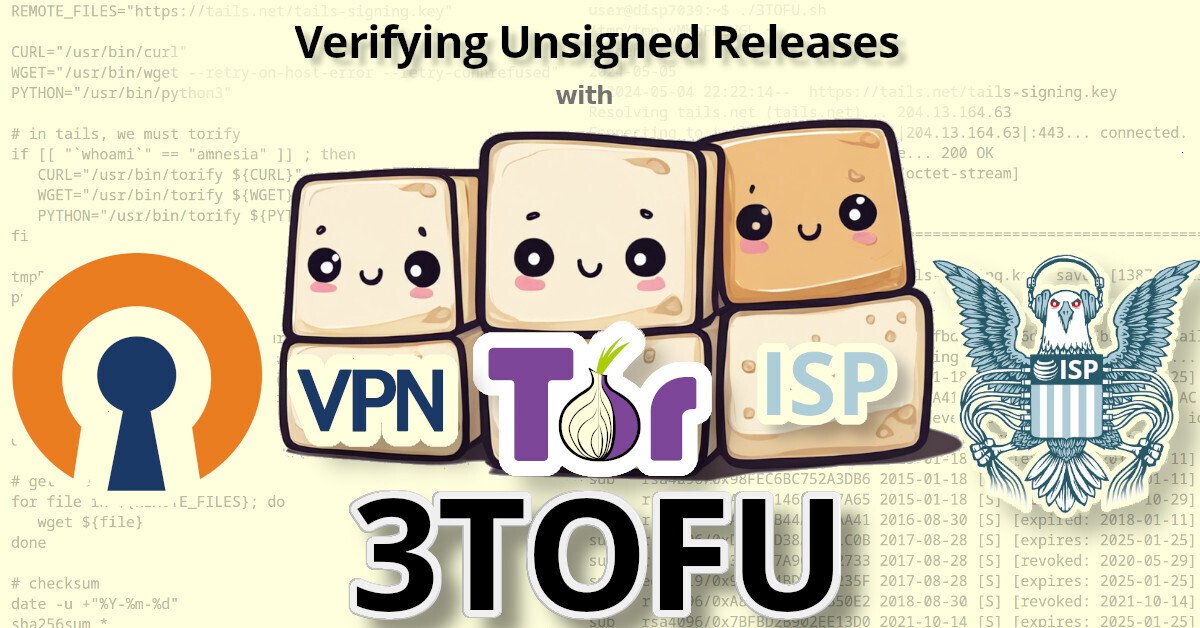
Personally, the reason that I wanted to be able to download files from an OCI registry was for 3TOFU.
 |
|---|
| Verifying Unsigned Releases with 3TOFU |
Unfortunaetly, most apps using OCI registries are extremely insecure. Docker, for example, will happily download malicious images. By default, it doesn't do any authenticity verifications on the payloads it downloaded. Even if you manually enable DCT, there's loads of pending issues with it.
Likewise, the macOS package manager brew has this same problem: it will happily download and install malicious code, because it doesn't use cryptography to verify the authenticity of anything that it downloads. This introduces watering hole vulnerabilities when developers use brew to install dependencies in their CI pipelines.
My solution to this? 3TOFU. And that requires me to be able to download the file (for verification) on three distinct linux VMs using curl or wget.
⚠ NOTE: 3TOFU is an approach to harm reduction.
It is not wise to download and run binaries or code whose authenticity you cannot verify using a cryptographic signature from a key stored offline. However, sometimes we cannot avoid it. If you're going to proceed with running untrusted code, then following a 3TOFU procedure may reduce your risk, but it's better to avoid running unauthenticated code if at all possible.
Container registries were created in 2013 to provide a clever & complex solution to a problem: how to package and serve multiple versions of simplified sources to various consumers spanning multiple operating systems and architectures -- while also packaging them into small, discrete "layers".
However, if your project is just serving simple files, then the only thing gained by uploading them to a complex system like a container registry is headaches. Why do developers do this?
In the case of brew, their free hosing provider (JFrog's Bintray) shutdown in 2021. Brew was already hosting their code on GitHub, so I guess someone looked at "GitHub Packages" and figured it was a good (read: free) replacement.
Many developers using Container Registries don't need the complexity, but -- well -- they're just using it as a free place for their FOSS project to store some files, man.
This article will describe how to download an image from a (docker) container registry.
 |
|---|
| Manual Download of Container Images with wget and curl |
Remember the good `'ol days when you could just download software by visiting a website and click "download"?
Even apt and yum repositories were just simple HTTP servers that you could just curl (or wget) from. Using the package manager was, of course, more secure and convenient -- but you could always just download packages manually, if you wanted.
But have you ever tried to curl an image from a container registry, such as docker? Well friends, I have tried. And I have the scars to prove it.
It was a remarkably complex process that took me weeks to figure-out. Lucky you, this article will break it down.
Specifically, we'll look at how to download files from two OCI registries.
First, here's some terminology used by OCI
This guide was written in 2024, and it uses the following software and versions:
Of course, you'll need 'curl' installed. And, to parse json, 'jq' too.
sudo apt-get install curl jq
OCI stands for Open Container Initiative.
OCI was originally formed in June 2015 for Docker and CoreOS. Today it's a wider, general-purpose (and annoyingly complex) way that many projects host files (that are extremely non-trivial to download).
One does not simply download a file from an OCI-complianet container registry. You must:
 |
|---|
| One does not simply download from a container registry |
In order to figure out how to make an API call to the registry, you must first read (and understand) the OCI specs here.
OCI maintains three distinct specifications:
To figure out how to download a file from a container registry, we're interested in the "distribution spec". At the time of writing, the latest "distribution spec" can be downloaded here:
The above PDF file defines a set of API endpoints that we can use to query, parse, and then figure out how to download a file from a container registry. The table from the above PDF is copied below:
| ID | Method | API Endpoint | Success | Failure |
|---|---|---|---|---|
| end-1 | GET |
/v2/ |
200 |
404/401 |
| end-2 | GET / HEAD |
/v2/<name>/blobs/<digest> |
200 |
404 |
| end-3 | GET / HEAD |
/v2/<name>/manifests/<reference> |
200 |
404 |
| end-4a | POST |
/v2/<name>/blobs/uploads/ |
202 |
404 |
| end-4b | POST |
/v2/<name>/blobs/uploads/?digest=<digest> |
201/202 |
404/400 |
| end-5 | PATCH |
/v2/<name>/blobs/uploads/<reference> |
202 |
404/416 |
| end-6 | PUT |
/v2/<name>/blobs/uploads/<reference>?digest=<digest> |
201 |
404/400 |
| end-7 | PUT |
/v2/<name>/manifests/<reference> |
201 |
404 |
| end-8a | GET |
/v2/<name>/tags/list |
200 |
404 |
| end-8b | GET |
/v2/<name>/tags/list?n=<integer>&last=<integer> |
200 |
404 |
| end-9 | DELETE |
/v2/<name>/manifests/<reference> |
202 |
404/400/405 |
| end-10 | DELETE |
/v2/<name>/blobs/<digest> |
202 |
404/405 |
| end-11 | POST |
/v2/<name>/blobs/uploads/?mount=<digest>&from=<other_name> |
201 |
404 |
| end-12a | GET |
/v2/<name>/referrers/<digest> |
200 |
404/400 |
| end-12b | GET |
/v2/<name>/referrers/<digest>?artifactType=<artifactType> |
200 |
404/400 |
| end-13 | GET |
/v2/<name>/blobs/uploads/<reference> |
204 |
404 |
In OCI, files are (cryptically) called "blobs". In order to figure out the file that we want to download, we must first reference the list of files (called a "manifest").
The above table shows us how we can download a list of files (manifest) and then download the actual file (blob).
Let's look at how to download files from a couple different OCI registries:
To see the full example of downloading images from docker hub, click here
To see the full example of downloading files from GitHub Packages, click here.
I wrote this article because many, many folks have inquired about how to manually download files from OCI registries on the Internet, but their simple queries are usually returned with a barrage of useless counter-questions: why the heck would you want to do that!?!
The answer is varied.
Some people need to get files onto a restricted environment. Either their org doesn't grant them permission to install software on the machine, or the system has firewall-restricted internet access -- or doesn't have internet access at all.
Personally, the reason that I wanted to be able to download files from an OCI registry was for 3TOFU.
 |
|---|
| Verifying Unsigned Releases with 3TOFU |
Unfortunaetly, most apps using OCI registries are extremely insecure. Docker, for example, will happily download malicious images. By default, it doesn't do any authenticity verifications on the payloads it downloaded. Even if you manually enable DCT, there's loads of pending issues with it.
Likewise, the macOS package manager brew has this same problem: it will happily download and install malicious code, because it doesn't use cryptography to verify the authenticity of anything that it downloads. This introduces watering hole vulnerabilities when developers use brew to install dependencies in their CI pipelines.
My solution to this? 3TOFU. And that requires me to be able to download the file (for verification) on three distinct linux VMs using curl or wget.
⚠ NOTE: 3TOFU is an approach to harm reduction.
It is not wise to download and run binaries or code whose authenticity you cannot verify using a cryptographic signature from a key stored offline. However, sometimes we cannot avoid it. If you're going to proceed with running untrusted code, then following a 3TOFU procedure may reduce your risk, but it's better to avoid running unauthenticated code if at all possible.
Container registries were created in 2013 to provide a clever & complex solution to a problem: how to package and serve multiple versions of simplified sources to various consumers spanning multiple operating systems and architectures -- while also packaging them into small, discrete "layers".
However, if your project is just serving simple files, then the only thing gained by uploading them to a complex system like a container registry is headaches. Why do developers do this?
In the case of brew, their free hosing provider (JFrog's Bintray) shutdown in 2021. Brew was already hosting their code on GitHub, so I guess someone looked at "GitHub Packages" and figured it was a good (read: free) replacement.
Many developers using Container Registries don't need the complexity, but -- well -- they're just using it as a free place for their FOSS project to store some files, man.
This article will describe how lemmy instance admins can purge images from pict-rs.
 |
|---|
| Nightmare on Lemmy Street (A Fediverse GDPR Horror Story) |
This is (also) a horror story about accidentally uploading very sensitive data to Lemmy, and the (surprisingly) difficult task of deleting it.
Happy 2024! The Eco-Libre project published our 2023 Annual Report for last year.
Eco-Libre is a volunteer-run project that designs libre hardware for sustainable communities.
Eco-Libre's mission is to research, develop, document, teach, build, and distribute open-source hardware and software that sustainably enfranchises communities' human rights.
- Eco-Libre's mission statement
We aim to provide clear documentation to build low-cost machines, tools, and infrastructure for people all over the world who wish to live in sustainable communities with others.
Michael Altfield registered the domain-name eco-libre.org on June 24th, 2023, a few weeks after arriving to Ecuador.
Over the next 6 months, Eco-Libre committed research and designs to our GitHub org for four projects (licensed CC BY-SA) which address some of the essential requirements for a new community's basic human needs: clean water, shelter, electricity, and ecological processing of waste. By releasing these designs under a libre license, it allows for other communities to build their own infrastructure with minimal effort, and it encourages collaboration on standardized design concepts.
As Eco-Libre's projects mature, we will build experimental prototypes in our own community. To that end, Michael is currently traveling around Ecuador by bicycle in-search of land to found Eco-Libre's first physical site.
In December, Eco-Libre was joined by Jack Nugent, who has since committed contributions to the Eco-Libre Life-Line project.
The priority focus for Michael in 2024 is to determine the best region in Ecuador to buy land where Eco-Libre can physically iterate on projects.
The priority focus for Jack in 2024 is to finish the research, design, and documentation of the Eco-Libre Life-Line project.
Eco-Libre was founded this year (in 2023). In our first 6 months, we've begun work on four libre hardware projects. All of them are currently in the early research stages.
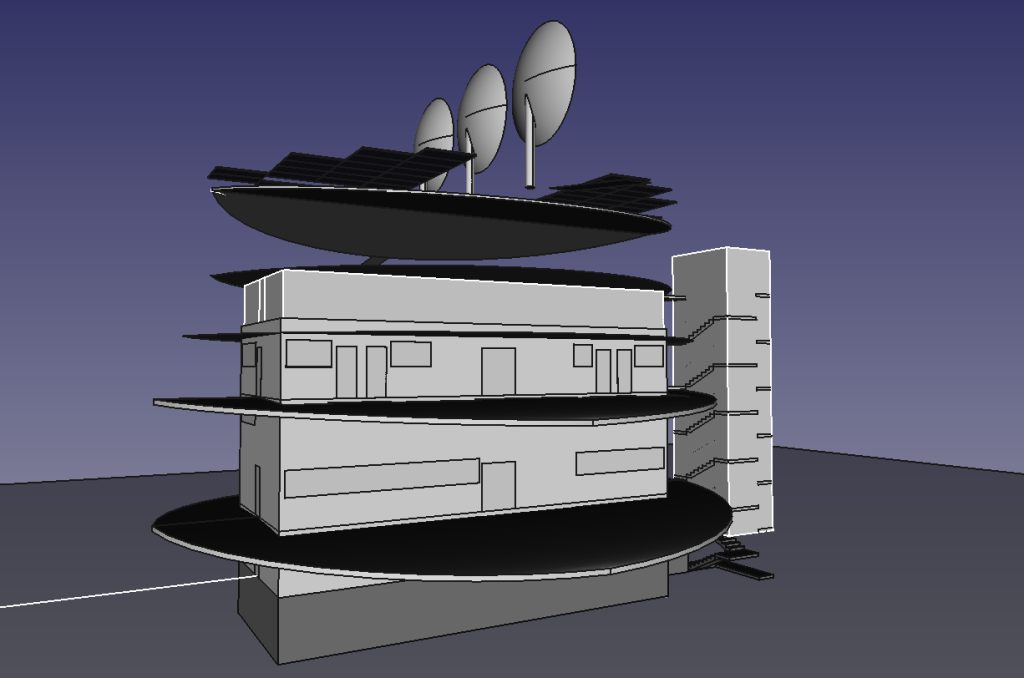
The Eco-Libre Launch-Nest was our first project. The concept is to build a small-footprint, high-occupancy structure for sustainable living of 30-people.
 |
|---|
| Eco-Libre Launch-Nest 2023.09 |
The rooftop has sufficient space for 72 solar panels (2 meter x 1 meter) and 3 parabolic solar concentrators (16 square meter).
The structure is six-stories above-ground, which is the recommended maximum height of a confined masonry structure in an earthquake zone. It also has a basement.
The building is designed with external, enclosed, firewalled staircases on either end. These are symmetrical and designed such that the building design can be rotated around a center courtyard to have four Eco-Libre Launch-Nest structures that share the same stairwells.
Currently only basic, incomplete architectural design-work has been done in CAD. Before a structural analysis can be assessed (eg to determine the location of columns), further work needs to be done on finishing the placement of windows, doors, and dividing walls.
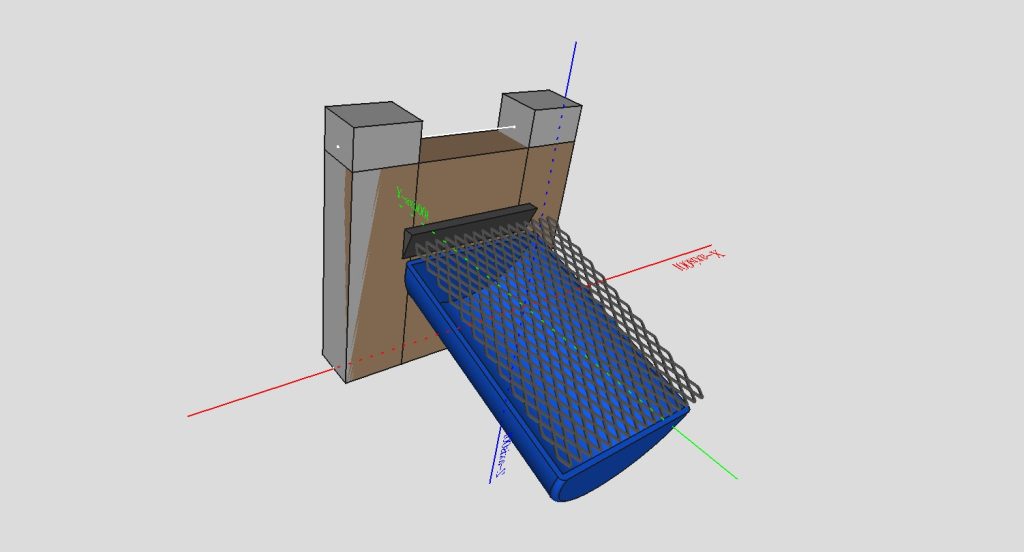
The Eco-Libre Life-Line project is a series of components making up an infrastructure to deliver a clean water pipeline to a community. This includes:
 |
|---|
| Eco-Libre Life-Line 2023.12 |
Michael started the Life-Line project after visiting a number of communities who had constant issues with their water systems breaking or failing to provide clean water. The goal is to design a low-cost, self-cleaning pipeline of systems that require minimal human intervention (max routine maintenance twice per year).
This year we have half-finished the "intake" component in CAD, which consists of building a weir in a stream that funnels turbulent water onto a downward-sloped HDPE barrel with a fine-mesh screen atop it. This design exploits the energy in falling turbulent water to clean the intake screen, and it prevents the intake from being clogged by organic debris during heavy rainfall.
Special thanks to Jack Nugent, who joined Eco-Libre in 2023 and has contributed to research, design, and documentation of the Eco-Libre Life-Line project.
The goal in 2024 is to finish the "intake" component in CAD and also to design the "settling tank", "pre-filter", and "sand filter" components in CAD.
How do you sustainably begin to build a community on land without electricity and without any structures?
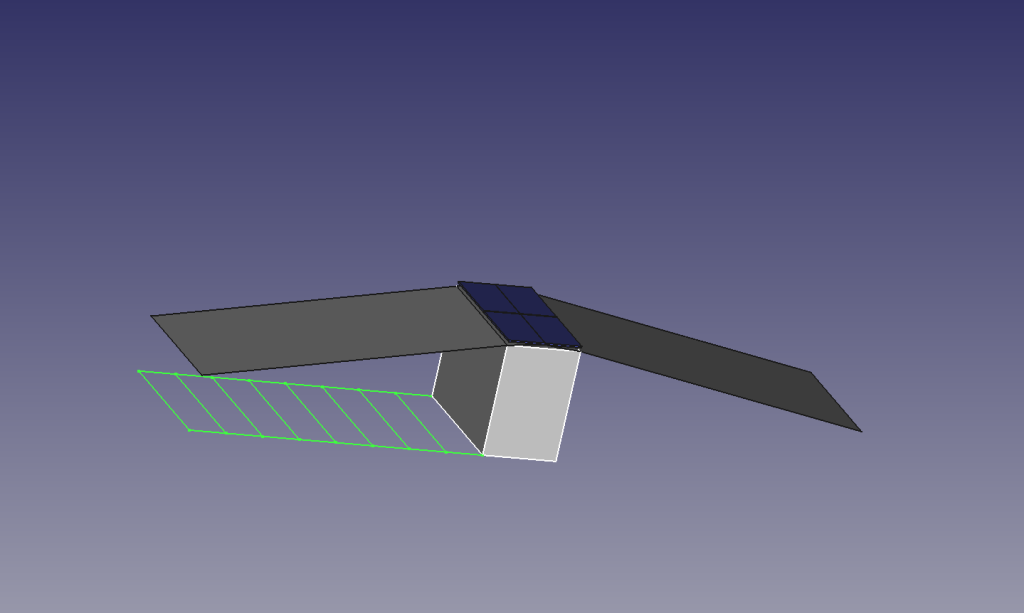
The Eco-Libre Genesis-Booth is a simple storage shed with >1 kW of PV solar panels on the roof. This is the first structure to be built when jumpstarting a new off-grid community. It provides the power, storage, and outdoor workshop space needed to build-out the community.
 |
|---|
| Eco-Libre Genesis-Booth 2023.06 |
This year we've made a simple footprint for the Genesis-Booth in CAD that's 4 meters x 2 meters -- just large enough to fit 4 solar panels (2 meters x 1 meter each). Further work is needed in CAD, but this year we also delved into making a framework for our documentation.
The Eco-Libre documentation is written in reST, generated by Sphinx, and (currently) hosted by GitHub. This is an exceptionally flexible continuous documentation solution that allows for versioned documentation matching versioned releases, works well with git, can be exported to many different flexible formats, and can be extended with custom directives written in python.
The highest priority for the Genesis-Booth is to finish this documentation as a template for other projects. Ideally this should be designed in such a way that information about Eco-Libre in general is seamlessly added to all project's documentations in a reusable way.
The Eco-Libre Treasure-Tower project is a 7 meter x 6 meter structure for storing and processing a community's waste, most importantly their food & fecal compost.
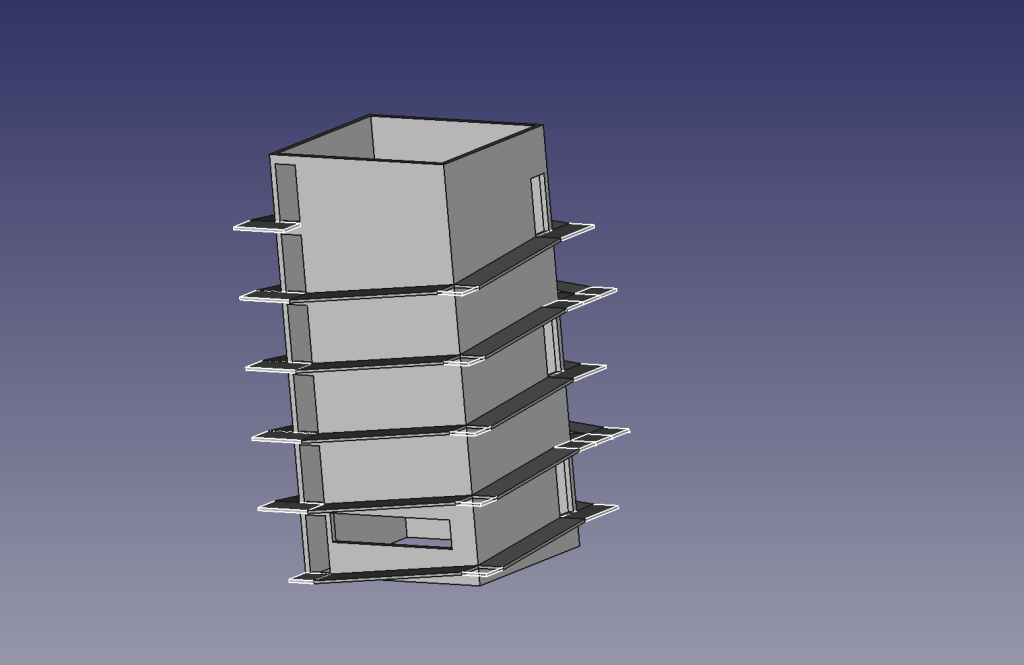 |
|---|
| Eco-Libre Treasure-Tower 2023.07 |
This structure is 6-stories high and barrier-free, with a wrap-around ramp. All but the top-floor have three doors:
Each deposit closet contains facilities for the collection of human urine and feces and is slightly staggered in elevation so the user's deposits fall by gravity into their designated collection areas for processing.
Separately from compost, this structure also serves as a storage area for recyclable waste materials, such as metal.
This year a first-draft design of the structure has been designed in CAD, but it's very premature.
Next, a second design prototype (where the two deposit closet entrances are on the same side) should be drafted in CAD and compared to the existing design.
If you'd like to help Eco-Libre reach our mission to enfranchise sustainable communities' human rights with libre hardware, please contact us to get involved :)
Cheers,
The Eco-Libre Team
https://www.eco-libre.org/
We're happy to announce that we were successfully able to initiate a BusKill lockscreen trigger using a 3D-printed BusKill prototype!
 |
|---|
| Watch the 3D Printable BusKill Proof-of-Concept Demo for more info youtube.com/v/Q-QjHelRvvk |
BusKill is a laptop kill-cord. It's a USB cable with a magnetic breakaway that you attach to your body and connect to your computer.
 |
|---|
| Watch the BusKill Explainer Video for more info youtube.com/v/qPwyoD_cQR4 |
If the connection between you to your computer is severed, then your device will lock, shutdown, or shred its encryption keys -- thus keeping your encrypted data safe from thieves that steal your device.
While we do what we can to allow at-risk folks to purchase BusKill cables anonymously, there is always the risk of interdiction.
We don't consider hologram stickers or tamper-evident tape/crisps/glitter to be sufficient solutions to supply-chain security. Rather, the solution to these attacks is to build open-source, disassembleable, and easily inspectable hardware whose integrity can be validated without damaging the device and without sophisticated technology.
Actually, the best way to confirm the integrity of your hardware is to build it yourself. Fortunately, printing your own circuit boards, microcontroller, or silicon has a steeper learning curve than a BusKill cable -- which is essentially just a USB extension cable with a magnetic breakaway in the middle.
Mitigating interdiction via 3D printing is one of many reasons that Melanie Allen has been diligently working on prototyping a 3D-printable BusKill cable this year. In our latest update, we hope to showcase her progress and provide you some OpenSCAD and .stl files so you can experiment with building your own and help test and improve our
designs.
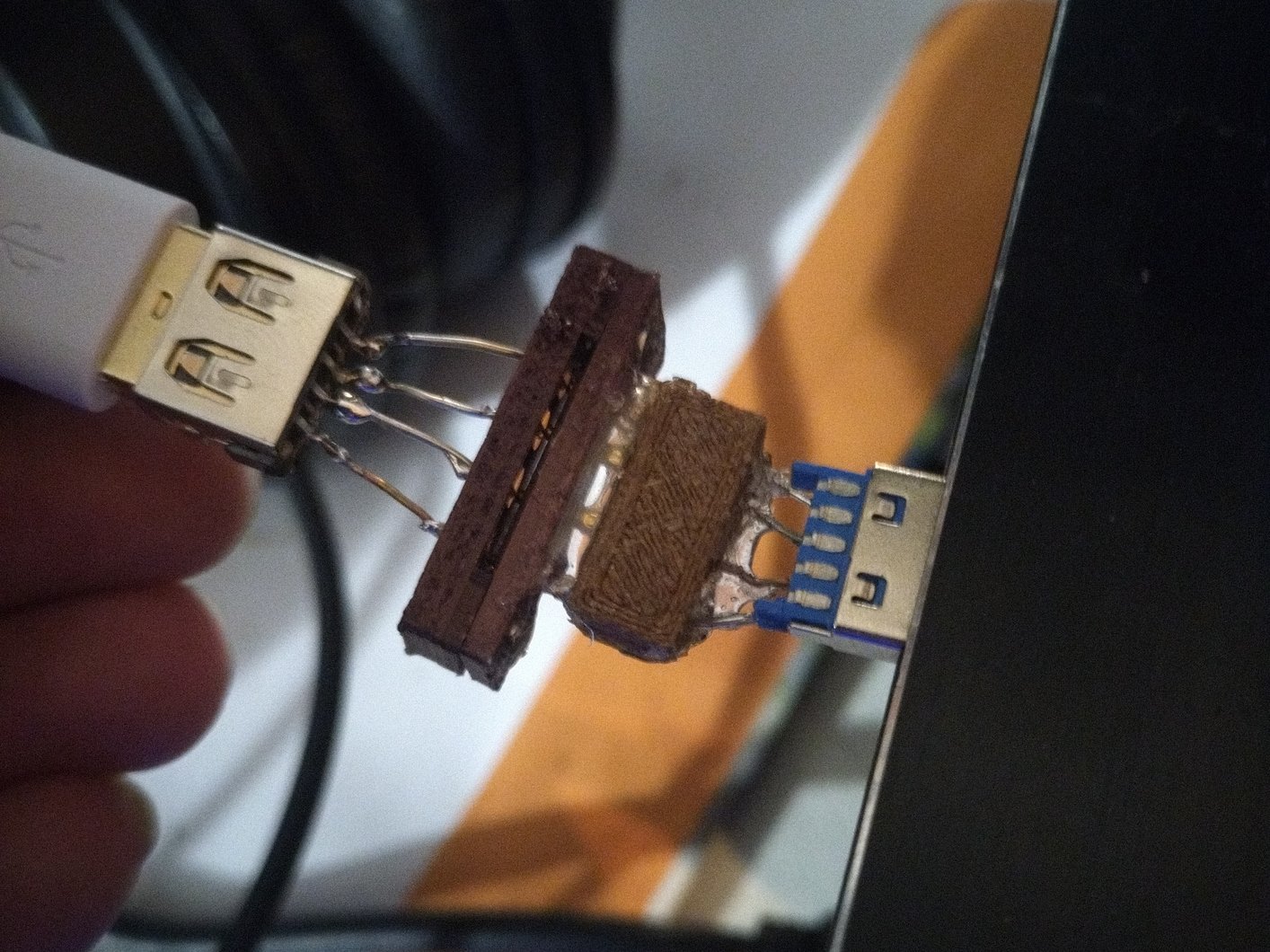
If you'd like to reproduce our experiment and print your own BusKill cable prototype, you can download the stl files and read our instructions here:
If you have access to a 3D Printer, you have basic EE experience, or you'd like to help us test our 3D printable BusKill prototype, please let us know. The whole is greater than the sum of its parts, and we're eager to finish-off this 3D printable BusKill prototype to help make this security-critical tool accessible to more people world-wide!