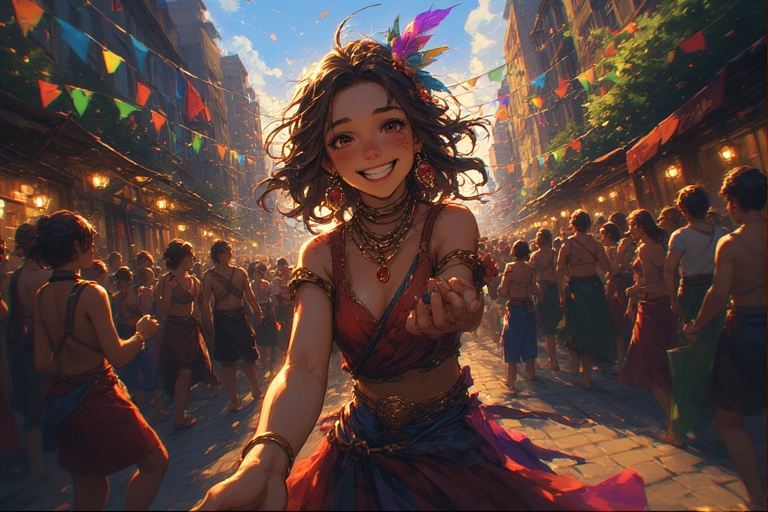
Streetside Sorcery

Link to Events in Perchance Hub

Seventh Character Jam. Create and share characters for the ai-character-chat that is within the given theme/scenario.

Scenario: A bustling metropolis with a hidden network of street performers, each with a unique talent.

As the sun sets and the urban sprawl is bathed in an ethereal glow, the true magic of the city awakens, revealing a world where talent and imagination reign supreme in the most unlikely of places.

When: 11 August 2025 12:00:00 GMT to 1 September 2025 12:00:00 GMT

Rules

  • Limit NSFW Characters
  • Preferably OC Characters

Submission Comment Format:

# Character Name - by Author
Description...
[Character Chat Link](https://perchance.org/ai-character-chat...)

You can also now directly submit on the comments plugin on the event page @ Perchance Hub.

Perchance Metadata

// This Part is Required for the Perchance Hub
// This would be where the Event Organizer would change the data to update the Hub
// Remember to indent with two spaces!

// List About the Event to be displayed on the Hub
metadata
  title = Streetside Sorcery
  description = Seventh Character Jam. Create and share characters for the `ai-character-chat` that is within the given theme/scenario. Scenario: A bustling metropolis with a hidden network of street performers, each with a unique talent.
  type = Character Jam
  image
    https://lemmy.world/pictrs/image/4a39ccd2-6da9-44fc-ad99-ff478f399662.png
    // Can be multiple pictures to randomize the banner image :)
  start = Mon, 11 Aug 2025 12:00:00 GMT
  end = Mon, 01 Sep 2025 12:00:00 GMT
  color = linear-gradient(233deg, #dc4dc8, #3b9db7)
  rules
    Limit NSFW Characters
    Preferably OC Characters
    
  commentOptions
    adminPasswordHash = cd3bce589c429d57ccea830700cd0141ce7b799a4682c3f5428f8d2b07d9ec9b
    // Other comments options here...

chars
  // Character Name
    // link = https://perchance.org/ai-character-chat?data=CharName%7E12345.gz // ai-character-chat share link
    // avatar = https://image-url.png/ // or any valid image format
    // author = Author
    // description = Description

Want to host your own Community Event? Check out this related post!

[–] 1 point 1 year ago
There is no "Image to Image" or "AI Image Editor" working in Perchance.

Looking at the code, it is generated through the AI code helper in which there are these sections:

  // AI Remove Object
  removeBtn.addEventListener('click', async function() {
    showLoading('Removing objects with AI...');
    
    // Simulate AI processing
    setTimeout(() => {
      if (selectedArea.isActive && selectedArea.width !== 0 && selectedArea.height !== 0) {
        // For demo: fill selection with a gradient (simulating AI inpainting)
        const gradient = ctx.createLinearGradient(
          selectedArea.x, selectedArea.y, 
          selectedArea.x + selectedArea.width, selectedArea.y + selectedArea.height
        );
  ...
  // Simulate AI object extraction
    setTimeout(() => {
      const img = new Image();
      img.onload = function() {
        // Scale the image

Which is why it doesn't work.

  • source
  • [–] 1 point 1 year ago

    You can set the href through your code, not directly on the HTML e.g.:

    // function generateMisquote()
      ...
      // Select quote from array if necessary
      const original = selectQuote(quoteEntry.original);
      const misquoted = selectQuote(quoteEntry.misquoted);
      const source = selectQuote(quoteEntry.source);
      const url = quoteEntry.url // get the url link
      ...
      // Update after a short delay for the fade-out effect
      setTimeout(function() {
        // Display the misquoted quote and source
        quoteTextEl.textContent = misquoted.text;
        quoteSourceEl.textContent = `— ${source.text}`;
        quoteSourceEl.href = url; // set the href based on the url link
      ...
    
  • source
  • parent
  • context
  • [–] 2 points 1 year ago* (1 child)

    What you can do is this:

    // Lists Editor
    movieTitlePrompt
      instruction = Make a title for a [g = genre.selectOne] movie with a length of [l = length.selectOne] and an age rating of [ar = ageRating.selectOne]. Only include the title, nothing else. No subtitle.
    
    title
      [ai(movieTitlePrompt)]
    //
    ***
    // HTML
    <p>Title: [title]</p>
    <p>Genre: [g]</p>
    <p>Length: [l]</p>
    <p>Rating: [ar]</p>
    
  • source
  • [–] 1 point 1 year ago

    Having the generator 'private' only delists them from the /generators page. If someone else knows what the URL is (or has saved the URL before you've privated the generator), they can access it. The gallery is also quite buggy in which some images aren't saved, and some images just pop up of nowhere. Can't really tell what problem is occurring there.

  • source
  • parent
  • context
  • [–] 2 points 1 year ago*

    Well, the purpose of the showFeedback property is to 'show' the actual comments sent on the feedback comments section, not to 'hide' the button. On the fork that you mentioned, the feedback button is deliberately commented out, which is why it is hidden.

  • source
  • [–] 2 points 1 year ago

    Almost all AI Text on Perchance uses the same model. Some are calling other through external API. But based on both that you've linked, yes, they are using the same LLM. From what we know from the plugin page ai-text-plugin it is a LLaMa based model, but the specific model is unknown.

  • source
  • [–] 2 points 1 year ago (2 children)

    On the edit generator screen, you can click the 'settings' on the top right, and you can change the URL. Images are bound to the URL of the page, meaning if you change the URL, then those images are also gone, but you can revert the URL back to get back the images.

    By private gallery do you mean the gallery below the generator (I'm assuming that you are using a generator using the t2i-framework-plugin-v2 based generator like ai-text-to-image-generator), then it isn't a private gallery, it is the public gallery. If you changed the gallery destination, into a different name (other than public), there might be a case in which other people are also using the same gallery e.g. even if you changed the gallery name into private it wouldn't be private, it would just be sent to the gallery named private.

    You cannot perma delete images from the gallery by yourself, you need to block and have other people block that specific poster for their images to not display on the public gallery (see this related thread).

    I would recommend using the actual 'private' gallery option that saves the data in your local storage. This is enabled with by adding the following on your settings (assuming you are using the t2i-framework):

    settings // This is the main settings list that is passed to `t2i-framework-plugin-v2` to generate the interface.
      ...
      imageButtons
        personality = true
        privateSave = true // Make sure to have this line.
    

    Then you can click the 🛡️💾 to save it locally on your browser.

  • source
  • [–] 3 points 1 year ago (1 child)

    You can have each of the suits into a single list, then control that parent list. E.g.

    Uniform
      https://user.uploads.dev/file/53321b33603b8f9f386fb870db73ad65.png
      [Top] ^[camera.includes("top") && actor != "dryad"]
      [Mid] ^[camera.includes("mid") && actor != "angel"]
      [Low] ^[camera.includes("low") && !["mermaid", "minotaur"].includes(actor)]
      [Rear] ^[camera.includes("rear") && actor != "angel"]
      [TopMidLow] ^[["top", "mid", "low"].some(a => camera.includes(a))]
    
    
    Top
      batman mask ^[specificCostume == "batman"]
      ...
    
    Mid
      batman suit with batman logo on the chest, batman gloves, batman belt ^[specificCostume == "batman"]
      ...
    
  • source
  • parent
  • context
  • [–] 1 point 1 year ago (1 child)

    If you are using HTML inputs, you can easily access their values like checkbox.checked for checkboxes and radio buttons, textinput.value for input values and select dropdowns, in which you can also set their default values for each one natively, unless the function that you've made is for 'resetting' to default values.

    I would also go with the way that you have a single global object for all of your variables, just for organizing and ease of access.

  • source
  • parent
  • context
  • [–] 2 points 1 year ago (3 children)

    I think I see the idea you have. What is the scope of the variable you are trying to set it to? You currently have it as:

      for (const [key, value] of Object.entries(variablesMapping)) {
        if (this[key] === undefined || this[key] === null) {
          this[key] = value;
        }
      }
    

    You are using this, which refers to the function. It should probably be set into what you have your initial variables, e.g. if you have your variables as properties in a variable called inputs, then it should be:

      for (const [key, value] of Object.entries(variablesMapping)) {
        if (inputs[key] === undefined || inputs[key] === null) {
          inputs[key] = value;
        }
      }
    

    So that if you use it like inputs.charNum, it would be set to the default that you have set with the defining() method.

  • source
  •  

    Welcome to the Perchance Community!

    Perchance.org is a platform for sharing and creating random text generators.

    This Lemmy community is for:

    • Asking for help with problems, issues, or requests about generators in Perchance
    • Sharing and showcasing your created generators, templates, plugins, or pages in Perchance
    • Starting friendly discussions about topics related to Perchance
    If it is your first time in using Lemmy, please check out this message from Lemmy.World and the Support Page from Lemmy.World to get started on using Lemmy.

    Posting from Mastodon

    Feel free to checkout this post to know how to post in this Lemmy Community through Mastodon.

    Other Community Links

    Rules

    Here are some rules in this community:

    • Please follow the lemmy.world instance rules.
    • Be kind and friendly.
      • Please be kind to others on this community (and also in general), and remember that for many people Perchance is their first experience with coding. We have members for whom English is not their first language, so please be take that into account too :)
    • Be thankful to those who try to help you.
      • If you ask a question and someone has made an effort to help you out, please remember to be thankful! Even if they don't manage to help you solve your problem - remember that they're spending time out of their day to try to help a stranger :)
    • Only post about stuff related to perchance.
      • Please only post about perchance related stuff like generators on it, bugs, and the site.
    • Search through the Community Before Posting
      • Please Search through the Community Posts here (and on Reddit) before posting to see if what you will post has similar post/already been posted.

    Posting

    Here are some optional tags to add in your title to categorize the posts. These are merely tags, you still need to title your post effectively.

    • [Bug] - if you think you find any bug in Perchance, use this tag.
    • [Question] or [Help] - this is to denote that your post is a question or requesting for help
    • [Suggestion] - for any suggestions in Perchance
    • [Feedback] or [Appreciation] - for any feedback or appreciation to any generator or to Perchance in general.
    • [{Generator Category}] - Used to share any generator with the specified category
      • Text, Image, Template, Hub, Plugin, Preprocessor, Community/RP, Game, Experiment, Useful Generator
    • [Fluff] or [Non-Generator] - Non-generator posts but about Perchance
    • [Tutorial] or [Guide] - for any Perchance related tutorials or guides to help others

    AI Plugins Posts

    Here is a FAQ for the AI tools in Perchance.

    We would like to ask to refrain from posting here needing help specifically with prompting/achieving certain results with the AI plugins (text-to-image-plugin and ai-text-plugin) e.g. "What is the good prompt for X?", "How to achieve X with Y generator?"

    There are guides, tutorials, and resources on the internet that can be applied when prompting in the AI tools in Perchance.

    We will still be helping/answering questions about the plugins as long as it is related to building generators with them.

    If you need help in prompting, please post on the 'sister' forum at Casual Perchance

    Getting Started with Perchance

    To get started with Perchance, check out the Perchance Tutorial or the Beginner Tutorial at the Perchance Hub Learn Tab to get to know the website.

    Asking for help

    Feel free to ask for help but please check out these tips on searching for an answer:

    • Check the following pages, to see if your question has already been answered or talked about or a plugin has been made for it. We recommend using the browser's search function (ctrl+f) and searching for similar keywords to your question/problem.
    • If you didn't find anything about your problem there, feel free to search through the posts/articles here:
    • If you can't still find anything related to your problem, feel free to post a thread here.
      • Please title your post effectively.
      • Please provide a link to your generator with your attempts of solving the problem.
      • Try to explain what you want it to do and what example output it should be doing.
    view more: next ›