[–] 2 points 10 months ago (2 children)

Seconding the other user's recommendation of an unmanaged switch.

If your goal is to add more ethernet devices to your network, adding an unmanaged switch to your router is the simplest way to do it. Anything plugged into the switch will operate on the same network as your router and, as a pure hardware solution, it will never need software maintenance.

If your goal is to learn how to build a router-oriented linux install from scratch, then go ahead with your original plan.
  • source
  • [–] 1 point 10 months ago* (last edited 10 months ago) (1 child)

    The main issue here is that you essentially just want it to be a switch and not a router, which is going to be problematic if you intend to pass traffic amongst them in different ways.

    The way you're describing this working would be routing traffic on the uplink port to your router from the other interfaces. You'll need this because a stock Debian install runs network interfaces as clients and not routed interfaces that pass traffic. You're basically building another router and making certain other ports switch interfaces.

    This is a bit more complex than just getting a $10 cheap unmanaged switch and hanging that off your router for extra ports, but if you're determined to go this route, you basically just need to look up routing traffic in Debian and you'll find some guides.

  • source
  • parent
  • context
  • [–] [S] 1 point 10 months ago (2 children)

    I tried openwrt first, and indeed, the network configuration was much easier, but then everything else was much more difficult and time consuming. Even system updates seemed overly complicated. I plan on running a few things on it, like zoneminder and syncthing, that will be much easier to maintain on debian

    As for the reason, I got no more free ports in my router, and If I added another regular router, I wouldn't be able to run software on it, and would need an additional device, so this one allows me to add just one more device to the network. Well, considering that I manage to properly configure it...

  • source
  • parent
  • context
  • [–] 2 points 10 months ago* (3 children)

    Okay...so you're kind of using this as a switch then? Any reason you want these devices plugged directly into this board instead of all of them directly to your router or just a regular switch?

    In your use case, I'd still default to OpenWRT, regardless. It's going to be a LOT easier for you manage.

  • source
  • parent
  • context
  • [–] [S] 1 point 10 months ago (4 children)

    Sorry, I'm really bad at explaining things, and I'm also confused with this.

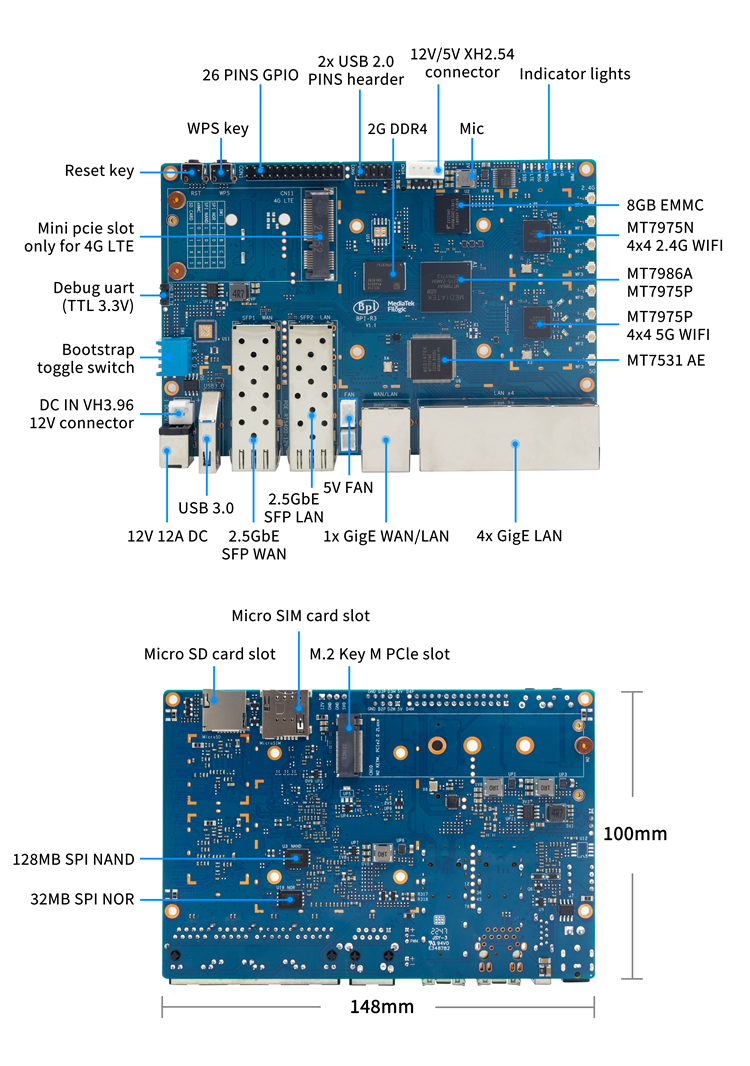
    I'm using this device (a banana pi r3):

    image

    The 4 ports marked as 4x GigE LAN are shown in ip addr as lan0@eth0 up to lan3@eth0. The GigE WAN/LAN port is shown as wan in the ip addr output. (I will post the full ip addr output soon, because I locked myself out from ssh access >.<)

    The wan port is connected to my home router, and in the lan ports, I have 4 other devices connected. I want to have all devices connected to the banana pi lan ports available for accessing from any device connected from my home router. I also want the banana pi board to be accessible via ssh from some static ip

  • source
  • parent
  • context
  • [–] 2 points 10 months ago* (last edited 10 months ago) (5 children)

    I'm super confused here...

    Can you detail all the devices involved here, the ports they have, and where you want them connected to?

    In general, there's zero reason a single machine would have two ports connected to the same network. If they were part of DIFFERENT networks like a WAN/LAN split, then it would make sense.

    Edit: Was unfamiliar with this board. Honestly, I'd bootstrap it with OpenWRT and skip the manual Debian route if you intend to use this as a gateway router. If you're not familiar with the networking side of things as it is, you're going to introduce some serious lapses in security most likely.

  • source
  • [–] [S] 1 point 10 months ago

    When I run inxi -G I get the following output

    Graphics:

    Device-1: Intel Mobile 4 Series Integrated Graphics driver: i915 v: kernel

    Display: x11 server: X.Org v: 21.1.21 driver: X: loaded: modesetting dri: crocus gpu: i915 resolution: 1: N/A 2: 1366x768~60Hz

    API: EGL v: 1.5 drivers: crocus,swrast platforms: gbm,x11,surfaceless,device

    API: OpenGL v: 4.5 compat-v: 2.1 vendor: intel mesa v: 25.3.3-arch1.1 renderer: Mesa Mobile Intel GM45 Express (CTG)

    Info: Tools: api: eglinfo,glxinfo de: xfce4-display-settings

    x11: xdpyinfo, xprop, xrandr

    It seems like I am using the laptops integrated graphics. I don't think it has any nvidia graphics.

  • source
  • parent
  • context
  • [–] 3 points 10 months ago* (1 child)

    depending on how bad its smashed, using scrcpy might help you back things up and use the phone with your computer, until you've accomplished everything you needed to. It mirrors your phone screen to your computer and you can use your computer mouse/touchpad to interact with the phone mirror.

    It saved me when i broke my screen and it started to turn purple and then black, spreading from the top side of the screen to the bottom. In a few hours the entire screen was black and I couldn't use the phone anymore. I thankfully got scrcpy working before that, and could back up all my app data.

    Disclaimer, I've only used this with a Linux computer so I have no idea how well the windows or macOS versions work.

    https://scrcpy.org/download/

  • source
  • [–] 2 points 10 months ago* (last edited 10 months ago) (1 child)

    There might be the option to exchange the screen, depending your model and availability of repair shops in your area.

    The anectode part: Happened to me last friday, went to a shop next day in the morning and received my now repaired phone back early evening. Cheaper and environment-friendlier than investing in a brand new one.

  • source
  • [–] 1 point 10 months ago* (1 child)

    Arch recently moved legacy Nvidia support to the AUR. That might have left you with a broken install.

    You would probably have an easier time with a mainstream distro like kubuntu LTS. They tend to be better suited for older equipment.

    It can be challenging to fix the bootloader once it dumps you into this situation. On a UEFI secure boot installation the EFI shim is responsible for allowing the modules to load each time there's a change.

    If you have a legacy MBR installation the Nvidia modules might just need to be reinstalled. This was a common issue when updating the kernel.

    Edit: switching it to the Nouveau drivers might get you back into the OS. Would need to tweak your environment from a working one with a live environment potentially.

  • source
  • parent
  • context
  • [–] [S] 2 points 10 months ago (2 children)

    Thanks for replying.

    Most of the information I’m finding about this flavour of arch doesn’t reveal much about libreboot’s role in this issue. I’m not familiar with the device and online results are vague about what the specs are.

    My main thought is If you’re using a Nvidia GPU or other proprietary software to run hardware, did you reinstall its software after changing the kernel? I’m not sure if your distro automatically does that for you.

    I do not believe I reinstalled any Nvidia drivers but I am unsure. I do have the linux-firmware-nvidia package installed. I am just using the integrated graphics that are on the X200S. Maybe that's part of the issue considering it released around 2008?

    Are you using shim for anything?

    I’m wondering if something went funny with your mok enrolment or if it failed to use the key to sign the module? Could test by temporarily disabling secure boot. (But would continue to fail if not the problem; such as the modules are compiled against the wrong kernel)

    If by shim you are referring to the EFI preloader I do not have it installed.

    My other thought was that I’m under the impression that endeavourOS uses pinned versions and swapping out the kernel puts you in an undefined state.

    You might have some luck jailing it on an working os with the configuration you desire and regenerating the boot files. Same idea as using the rescue environment on a livecd. The last time I had this idea it was a big waste of effort. When I realized I could just roll back using a backup.

    I am not too sure about how to test this.

    Edit: maybe the drive is dying try testing it?

    I have my doubts that it is the drive considering it seems to work fine within initramfs. I can run my X200S for days without issues as long as I boot that way.

  • source
  • parent
  • context
  • [–] 2 points 10 months ago* (last edited 10 months ago)

    Forget using an SD card.

    Install either Syncthing or Resilio Sync on both devices (or your phone and PC, which is what I do) and simply let it sync the folders you want (for Windows use SyncTrayzor, Android use Syncthing-Fork, iOS use Möbius).

    They're both robust and tolerate network disconnects fine, can be confugured to use only WiFi.

    Best part, if you sync important folders to your PC, you always have that stuff, and new phone can just sync from there (which is faster and not dependent on old phone being on or even existing).

    Syncthing is better on battery in my experience, Resilio is a little more robust but requires more RAM while running as it keeps the sync index in memory.

    I use Syncthing on all mobile devices, any photos sync to home nearly instantly, other folders are set to sync only on WiFi or charging, depending on size and importance. It hardly affects battery after initial sync.

  • source
  • [–] 3 points 10 months ago* (last edited 10 months ago) (1 child)

    And sometimes phones encrypt external storage. So if that's enabled, the SD card will be unreadable once pulled out from the phone. That's by design to protect personal information. Can be avoided by either formatting the sd card on a computer, or disabling that default setting.

  • source
  • parent
  • context
  • [–] [S] 1 point 10 months ago (3 children)

    Is there a reason why it shouldn't go back and forth between devices? Also, I end up trying to use LocalSend instead of KDE connect, as it allows for full folder transfers, but my wifi sucks so it takes hours no matter what.

  • source
  • parent
  • context
  • [–] 1 point 10 months ago* (3 children)

    This issue feels like a stack problem, peeling back the layers.

    Most of the information I'm finding about this flavour of arch doesn't reveal much about libreboot's role in this issue. I'm not familiar with the device and online results are vague about what the specs are.

    My main thought is If you're using a Nvidia GPU or other proprietary software to run hardware, did you reinstall its software after changing the kernel? I'm not sure if your distro automatically does that for you.

    Are you using shim for anything?

    I'm wondering if something went funny with your mok enrolment or if it failed to use the key to sign the module? Could test by temporarily disabling secure boot. (But would continue to fail if not the problem; such as the modules are compiled against the wrong kernel)

    My other thought was that I'm under the impression that endeavourOS uses pinned versions and swapping out the kernel puts you in an undefined state.

    You might have some luck jailing it on an working os with the configuration you desire and regenerating the boot files. Same idea as using the rescue environment on a livecd. The last time I had this idea it was a big waste of effort. When I realized I could just roll back using a backup.

    Edit: maybe the drive is dying try testing it?

  • source
  • view more: ‹ prev next ›