1


Original question by @POTOOOOOOOO@reddthat.com

2
3
4
Kitty 0.50 (sw.kovidgoyal.net)
submitted 2 days ago by to c/linux@programming.dev
5
Bazzite 45 is here! (universal-blue.discourse.group)
submitted 3 days ago by to c/linux@programming.dev
6
7
8
9
10


Okay, killed by Ubuntu is an exaggeration, as Ubuntu is not the only Linux distro doing this.

Still, the big news is that Linux Mint is bringing hibernation back.

In a recent blog post, the Mint team previewed a new Sleep Modes page in the System Administration tool. It's meant to make enabling hibernation and setting it up correctly easy, without you editing config files by hand. The feature is planned for the upcoming Mint 27 release coming in December.

Mint hasn't magically fixed the problems that made Ubuntu drop hibernation. What it does is give you the choice, along with two hybrid modes that sit between suspend and hibernation.

Hibernation vs suspend: What's the difference?

Both features are about saving your session, which simply means everything you have open like your apps, windows and documents.

When you suspend (also called sleep), your computer keeps your session in RAM and powers down almost everything else. Waking up takes a couple of seconds. The catch is that RAM needs power to hold that data, so a suspended laptop keeps draining its battery.

If the battery dies while suspended, your session is lost, along with any unsaved work.

Hibernation copies your session from RAM to your disk and then powers off the machine completely. It uses no power at all. When you turn the computer back on, the session loads back from disk and your apps and windows are exactly where you left them.

In short, suspend is fast but needs power. Hibernation is slow but survives a dead battery.

Why Ubuntu and other distros dropped hibernation

Ubuntu disabled hibernation by default back in Ubuntu 12.04, I think. The reason was that it was unreliable slow, and that having two suspend modes confused people.

Every Ubuntu-based distro, including Linux Mint, inherited that decision. Actually, it's not just Ubuntu. Many other Linux distros also do not offer hibernation option anymore.

Speed is indeed a problem. Writing gigabytes of RAM to disk and reading it back can take longer than a full reboot, especially on older hard drives.

Hibernation also needs a lot of swap. Your swap space has to be at least as large as the RAM in use so the whole session fits. Ubuntu ships a small swap file by default, and Fedora uses zram, which lives in RAM and is useless for hibernation.

Then there's Secure Boot. With Secure Boot enabled, the Linux kernel runs in lockdown mode, and lockdown blocks hibernation because the saved image on disk isn't signed and could be tampered with.

Since most new computers ship with Secure Boot on, hibernation simply doesn't work for a large chunk of users. This is one of the main reasons Fedora Workstation doesn't offer hibernation out of the box either.

The three sleep modes in Linux Mint

The new Sleep Modes page gives you three options. You pick the one that suits how you use your computer. You can enable all of them and choose which one to use from the power menu (at least that's what it looks to me).

New sleep modes in Linux Mint 27

Hibernation

This is the classic mode. Your session is saved to disk and the computer shuts down completely, using no power. It's slower than suspend and can take longer than a reboot to hibernate and resume.

Hybrid Sleep

Hybrid Sleep suspends your computer and saves the session to disk at the same time. Most of the time, you get the quick wake-up of suspend. If the battery runs out, you'll need to plug in the charger, but your session is still there to resume from disk.

Suspend-then-Hibernate

This one suspends first and switches to hibernation only when the battery level gets critical. I think this is the most practical option for laptop users. You get fast resume in normal use and a safety net when the battery is about to die.

What Mint's new sleep mode doesn't fix

None of this removes the old limitations. You still need plenty of swap, and the tool flags a lack of swap as a problem. If Secure Boot is enabled, the tool lists it under Detected Problems. The good thing is that the tool writes its settings to its own systemd file, so you can turn these modes on and off without messing up your system.

I like how Mint takes a subtle approaches to "new features". Not every new feature needs to have AI in it. This is not a shiny new change but it's one of those changes that everyday Linux users are likely to use. Am I right?

11
 
 
12


Valve just published their Steam Survey results for October and point to a small uptick in Linux gaming use on a relative basis.

According to today's published Steam Survey figures, for October 2026 the Steam on Linux use was up 0.05% and taking it to 3.95% overall. This is quite a bit different from the original Steam Survey figures for September that showed Linux diving down to 3.05% as a 0.85% decline over August. But as noted in that article last month, it was closely associated with a strong shift in Simplified Chinese use. When that occurs in the Steam Survey, Microsoft Windows typically sees large upward swings against Linux.

In any case Valve revised their September numbers to 3.9% and now for October are reporting 3.95% for their overall Linux customer base. Apple's macOS is at 2.35% and Windows at 93.7%. In comparison, this time last year we were celebrating Steam on Linux finally cracking 3% during October 2025.

Among the Linux distributions, Arch Linux based CachyOS remains most popular at 16.3% and even outpacing SteamOS at 13.89% in second place.

AMD CPU use by Linux gamers remains at just under 70%, driven in part by the Steam Deck and Steam Machine using custom AMD SoCs.

All the Steam Survey results in full for October can be found at SteamPowered.com.

13


Full articleKDE developer Nate Graham published his monthly blog post on Sunday to outline the current state of KDE Linux and some of the changes made to this in-house Linux distribution over the course of October. Additionally, KDE Linux is nearing its beta milestone after beinbg in development for over one year as a reference Linux distribution for KDE.

For those installing KDE Linux for the first time, one of the improvements made in October is that KDE Linux's installer now has a basic slideshow. The KDE Linux installer slideshow is similar to the operating system installers for other Linux distributions.

On the kernel side, KDE Linux now enables the NTSYNC kernel module by default. With NTSYNC by default it enhances the out-of-the-box experience and performance for those gaming on Linux via Wine/Proton.

On the desktop side, wayland-protocols is added to the KDE Linux base image to broaden the OS support for some KDE projects depending upon it.

KDE Linux is nearing its beta milestone and is roughly 85% of the way there as of the start of November. The milestones page shows work still needing to be done on the swap support, improving the update experience within Discover, KDE infrastructure changes, improved dual booting experience, better handling Flatpak crashes, and other improvements.

More details on these recent KDE Linux changes via the October 2026 report.

14


Trinity Desktop Environment (TDE) R14.1.7 desktop environment has been released today for nostalgic KDE 3.5 users as the seventh maintenance release of the R14.1.x series, adding new features and enhancements.

Coming seven months after Trinity Desktop Environment R14.1.6, the Trinity Desktop Environment R14.1.7 release introduces support for recent GNU/Linux distributions, such as Ubuntu 26.10, while dropping support for older, unsupported Linux distros, including Ubuntu 24.10, Fedora 42, Mageia 9, and openSUSE Leap 15.6.

Trinity Desktop Environment R14.1.7 adds support for bracketed paste mode, SGR 1006 mouse reporting, SGR 58/59 underline colors, colon-separated sub-params in CSI/DCS, Select All/Paste Selection actions to the Konsole terminal emulator, adds support for AES-256 decryption to KPDF, and adds 7-Zip fallback for RAR extraction to the Ark archive manager.

It also adds lzip support across tdelibs/tdebase and Krusader, improves the file chooser portal to preserve filenames when saving, improves visibility of the selection window in KMag, adds a new categories dock to KCharSelect for easier table selection, and enhances renaming mode in icon view for Konqueror.

On top of that, this release adds support for scrolling with the mouse wheel to the Kicker taskbar, along with ‘Raise All/Lower All’ for window groups, keyboard navigation in Kickoff search results, and configurable menu button text color. It also adds support for imlib2 to Kuickshow, while improving smooth resizing and reducing distortion on zooming.

The Twin window manager now lets users override window defaults with the “noBorder” setting, adds “Keep above” and “Keep below” buttons to the Laptop decoration, and improves screen index validation and Xinerama handling. Moreover, KMail and KOrganizer now embed event attachments by default.

Trinity Desktop Environment R14.1.7 also fixes various issues, including a mutex/data race in TQt’s meta objects and the incorrect width of multiple vertical panels on hi-DPI displays, as well as scrolling to first line/history size, multiline scroll-up, and OSC parsing with digit ‘9’ in Konsole.

Moreover, Krusader gets fixes for bzip2 detection and the opening of compressed files, Ark received fixes for recursive RAR addition, RAR7 listing, duplicate TAR entries, archive format selection, and a temporary workaround was added to the kdesktop menu to show after resume from suspend.

Last but not least, Trinity Desktop Environment R14.1.7 fixes Kaffeine’s mute icon state, a KSim crash when libsensors fails to load, a Kopete crash after an SSL failure, dbus-1-tqt using 100% CPU because of recursive dispatch, and tdehw exhausting RAM when reading lxcfs’s large /proc/cpuinfo data.

Under the hood, Trinity Desktop Environment received support for OpenSSL 1.1, Python 3.15, libical 4, libpqxx 8, and Poppler 26.06. Autotools support for Krusader and KVIrc was removed, Kipi-plugins was converted to CMake, Kate DCOP setCursor now uses 1-based indexes, and KOrganizer embeds attachments by default.

Check out the full release notes for more details about the changes included in Trinity Desktop Environment R14.1.7, which you can download for Linux distros, as well as BSD and DilOS systems from the official website. Upgrading from Trinity Desktop Environment R14.1.6 should be straightforward.

15


The Buddies of Budgie team released Budgie 10.10.4 today as the fourth maintenance update in the Wayland-only Budgie 10.10 desktop environment series, bringing more improvements and some new features.

Coming a month after Budgie 10.10.3, the Budgie 10.10.4 release overhauls panel automatic hiding and dock mode as hidden panels now stay above windows and reappear when you move the mouse to the screen edge, panels set to hide no longer reserve screen space, and a new Super+T shortcut shows the panel in full-screen apps.

Budgie 10.10.4 also updates Raven to let you switch between its widgets and notifications views with the Super+A and Super+N keyboard shortcuts, while the Labwc bridge brings back Super+Shift+arrow keys for moving windows between monitors, keeps Picture-in-Picture windows on top, and prevents opening the root menu when left-clicking the desktop.

On top of that, this release introduces new options for setting the screen dimming delay from 30 seconds to 30 minutes (or turning it off completely), as well as the option to choose between the gtklock and swaylock screen lockers. For now, both options can be set with gsettings.

Among other noteworthy changes, Budgie 10.10.4 makes panel startup faster as the list of installed apps is now loaded once and shared across the panel, improves the Bluetooth applet to open Bluejay, Blueman, or Budgie Control Center from its settings button, and improves Crystal Dock to handle JPEG XL wallpapers on more distros.

Budgie 10.10.4 also fixes various issues with applets disappearing from the panel after updating to Budgie 10.10.3 when using a language other than English, panel staying hidden when one of its applets fails to load, panel moving off the primary monitor after changing its edge, and a startup crash when a panel has no stored position.

Last but not least, Budgie Menu no longer covers panels that don’t reserve screen space, clicking a dropdown inside a popover no longer closes it, the mouse pointer is visible again in VMware virtual machines, and older Qt applications and AppImages without Wayland support can launch again by falling back to XWayland.

Check out the release announcement page for more details. Budgie 10.10.4 will soon arrive in the stable software repositories of popular GNU/Linux distributions, so make sure that you update your Budgie Desktop installation as soon as possible to enjoy the new features and improvements.

16
17


I've been using TUXEDO OS's Debian Testing rebase beta on a ThinkPad for almost a month now. This distribution is honestly great, its easy to use I think I could recommend this to a beginner (except for this on going beta of course) and the software is more up to date than distros like Linux Mint or Zorin and is still stable.

18
19


Alternative Imgur version for the main image

Previously I was using Samsung N150P (netbook) as my home server and it served me around 6 years. >> https://programming.dev/post/708584

Though after upgrading to Debian 13, additional 90 packages were installed just with the upgrade. I also had a little adventure with it :) >> https://programming.dev/post/708488

Anyway, this new mini PC I got is from 2016 and surprisingly it has 8GB DDR3 RAM (I'm rich now). It's generally in good condition. Even though it's Celeron N3000, this one doesn't have hyperthreading so only 2 cores. Still it's a real upgrade over Atom N450 CPU.

Since last year, I was planning to get a Raspberry Pi and moving from there. However thanks to AI overlords it got so expensive I had to bail from that fantasy. I got this for 40$ and with 8GB RAM I think it was a good deal.

I was already planning to change my home server to Alpine for a while but I just couldn't touch a perfectly fine system because lazy. So this time I went with Alpine and I already love how small it is. I just installed a couple monitoring tools and packages like sudo along with Pi-hole so currently it has quite few packages.

Don't worry though, I'm planning to use that RAM, with time. :)

20


I'm not an IT professional or even expert. I've been using Geany for a decade, but recently I switched from a frugal setup to KDE Plasma, and decided that I want to use everything KDE has to offer as far as possible.

I've been using Kate for almost 3 months now, mostly for web development (Jinja), shell scripting and Markdown writing. It's been a good experience overall, but it seems to have one or two shortcomings compared to Geany, which makes me wonder how Kate fares in the landscape of Linux code editors/IDEs.

To give a concrete example, Geany has this great feature for HTML that automatically creates a closing tag once I finish the opening one. E.g. I type <div>, and as soon as I type the >, a closing </div> appears. Neat. That's more than just automatically closing brackets. I see no Kate plugin that would do that.

There've been a few more niggles, I'll edit the post - which I hope makes sense as a general question - when I remember them.


edit: Thanks for putting it all into perspective. Takeaways for me: 1) there's also kdevelop, 2) need to figure out what LSP is, and 3) regarding alternatives it's interesting to see which Archlinux has in its repositories and which are only AUR.

21


Ubuntu Core Desktop is Canonical’s (currently unreleased) immutable and attestable Linux desktop. It represents the most fundamental shift in Ubuntu’s desktop architecture to date, and will mature into the default experience for Ubuntu Desktop over time.

...

With this transition comes the promise of greater resilience, better security, more composability, but also more engineering complexity. In this post I’ll outline the vision, roadmap, and some of the complexities we hope to tackle.

...

We want to build a modular desktop architecture that defines clear interfaces between components. Components such as the display manager, desktop environment, multimedia servers, networking and other core capabilities should adhere to well-defined interfaces and remain implementation agnostic.

The result will be a desktop whose constituent parts can evolve independently, without forcing the rebuild of the entire operating system image every time something changes - one of the key differentiators from other immutable operating system implementations.

22
23


I still used to frequent it all the way up to last month, for some interesting discussions. But now... it's really become AI-pro^[Yes, I know it's been that way for a while, but either I'm feeling it more or the bots have gamed the website to the point that all you see are announces from big tech companies or people going on about their AI solutions] and any post that even hints about AI existentialism gets immediately cut down.

I find it hard to browse the site anymore, and lament the loss of expert tech discussion in my weekly routine.

24


People mostly seem to like KDE Plasma more than GNOME, but Ubuntu still seems way more popular. Will Kubuntu ever overtake Ubuntu? Will people ever default to saying Kubuntu instead of saying Ubuntu even when speaking generally about *buntus?

Same questions for other distros like Fedora/Fedora KDE

25


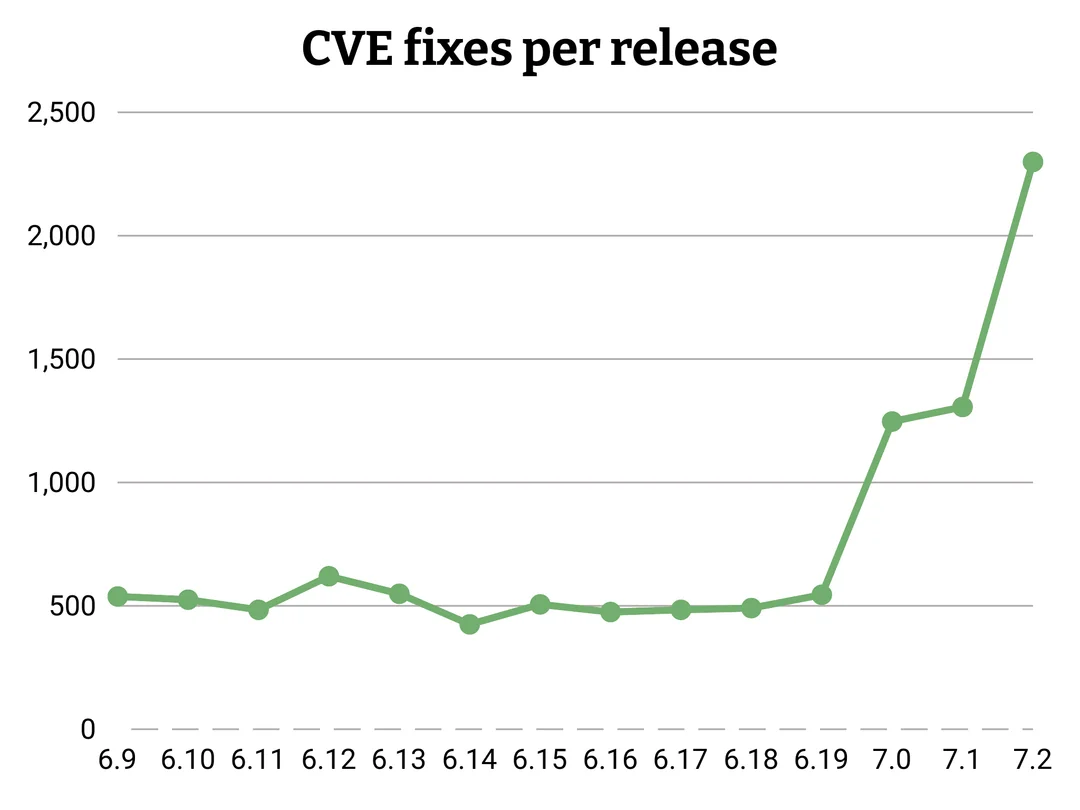
Source: https://github.com/gregkh/kernel-development/blob/master/graphs%2Fpatches_per_release%2Fcves_fixed_per_release.png

AI coding tools are pretty good at finding bugs and make it easier and faster to fix them.

Importantly, security vulnerabilities in new releases seem to stay roughly the same and the change to which bugs count as CVEs was around version 6.8 already.

view more: next ›