I think that's distinct from what the user is trying to do. They are trying to play audio and video on the machine that's running the ssh server, by outputting video over HDMI from the graphics card and sound over the 3.5 mm jack. There's no X forwarding to the ssh client going on.
comments
Thanks. I just don't get this part:
Also make sure there’s something making contact between the SSD and the motherboard.
What do you mean?
Aha, ok, so it's using pipewire when logged in locally, and it can't find it when using it remotely.
Can you try logging in via ssh again and checking if there's a /run/user/$UID/pipewire-0 (or other pipewire-<NUMBER> sockets)?
If there isn't, that means your pipewire service isn't running, you can try starting it with systemctl --user start pipewire wireplumber. You may need a loginctl enable-linger $USER and a re-login for that to work. You can also do systemctl --user enable pipewire wireplumber so that it auto-starts them whenever you log in, if that's not already the case.
If/once that socket is there, you may need to export XDG_RUNTIME_DIR=/run/user/$uid so that mpv can find the socket. You should probably do that in your .profile so it's set automatically.
Here's the inside:
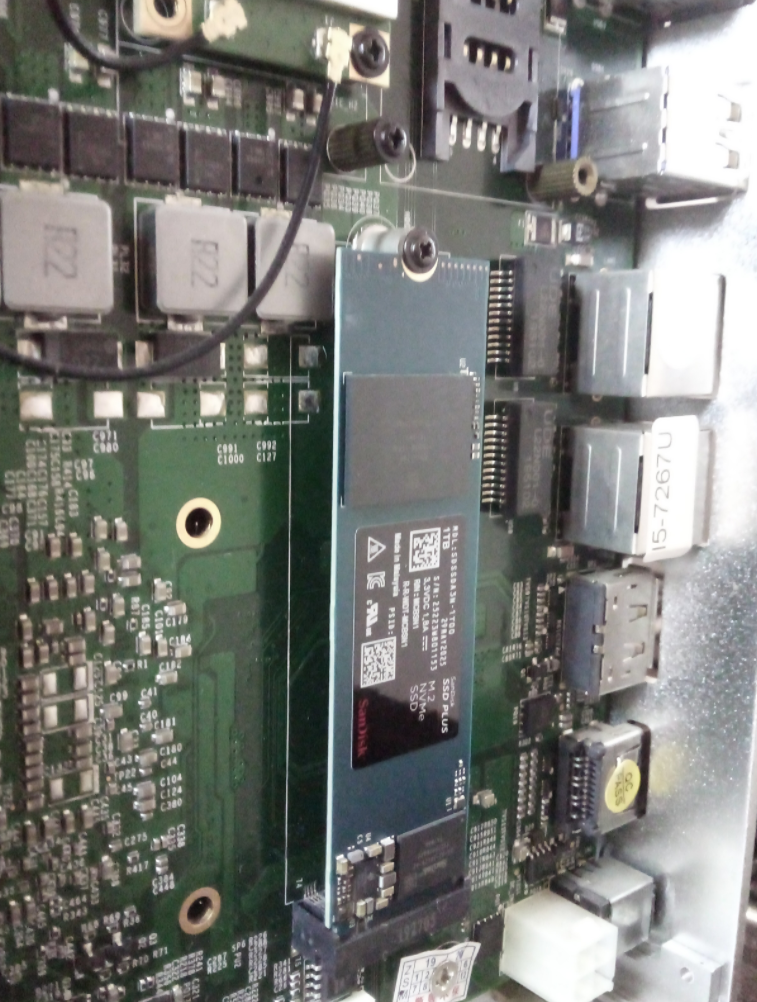
I tried for literally an hour or so to redirect mpv's output from host A (laptop) to host B (phone/termux) using all conceivable combinations and variations of
cat /dev/tty1
cat /dev/tty1 > /dev/pts/0
cat /proc/[pid]/fd/[1-3]
And adding 2>&1 to the above for good measure, but also the program reptyr and simply kill -STOP [pid] kill -CONT [pid] to absolutely no avail, so here's a picture. Please forgive my lazy ass.
ao at the bottom.

comment on
is linux a hard os to use?
well, that's a terrible idea. you'll get much better results in the long term by learning how the config actually works, and probably in the short term too.
indeed i haven't
I rest my case.
indeed i haven't, because the title is such absolute bullshit and AI propaganda that there's no point entertaining it.
It’s a passive cooled PC. The lid is mostly how it cools itself. Removing the lid would be counter productive.
You need contact in between the SSD and the case. Most cheap mini PCs like that don’t cool their drives well. You can try getting thermal pads to make good contact between the SSD and the case. Or if it’s too big and you’re stacking multiple then get a block of copper and put it in between.
Also make sure there’s something making contact between the SSD and the motherboard.
Also also flip than fan around so it’s blowing air into the PC and not sucking air past it.
Can you show the output for when you're running it while physically logged in, particularly the AO: output?
comment on
is linux a hard os to use?
OP's core issue is a botched installation. You cannot rehearse the install process with a live stick. You can only do that in a VM.
comment on
is linux a hard os to use?
You didn't give enough info for me to know what happened but generally imo Windows is harder than Linux. Full disk encryption really isn't needed for most people. What you should do is HOME encryption. Or have a 2nd partition on your ssd that you keep sensetive things in and is encrypted and you keep that unmounted when not using it.
man ssh
-C Requests compression of all data (including stdin,...)
comment on
is linux a hard os to use?
Might also want to look into Aurora as that's meant as a beginner friendly immutable out of the box.
comment on
is linux a hard os to use?
Don't even bother with a VM. Just use a live USB. And then if you like it, you can install straight from the live environment.
Plenty of tutorials on YT showing how it's done (reputable channels are a lot more reliable than LLMs).
The problem is, the copyright advocates already dehumanize the people behind the machines by default, equating them to the machines, so when they use a slur against "machines" they target the people utilizing the machines, not the actual machines.
Using "acceptable slurs" and dehumanizing is the default modus operandi of radlibs.
comment on
What Thinkpad Model
I really really like my 2019 X1 Carbon I got from a business auction on eBay for a little over $250 a few years back. Perfect for productivity and light gaming pre 2019 titles. Mostly morrowind, Skyrim and oblivion. It’s got an i7 and runs vms well.
comment on
is linux a hard os to use?
Well if ChatGPT can't figure it out then its for sure too hard
Comparing people experiencing racism with computers does not sound like the appropriate opinion you think it is.
I'm starting a new job where I expect having to use Windows again. This might make it a bit more enjoyable.
comment on
is linux a hard os to use?
I don't care because chatgpt writes my config until it generates a working configuration
Why do people performatively reply to comments to self-righteously nitpick about the terminology someone used?
comment on
is linux a hard os to use?
You may also enjoy duck.ai
Other people have already answered, but here is where things can get very weird. You can stream the raw video file out of your remote server and pipe it straight into local mpv to decode it at the same time.
ssh user@example.org cat ~/movie.mp4 | mpv -
You can also add compression if you want by extending this technique.
ssh user@example.org "gzip -c ~/movie.mp4" | gunzip | mpv -