Cool, good to know. Thanks!
comments
Openwrt seems to be more popular
Doesn't even feel warm to the touch. I got a ugreen aluminum one with built in heat spreader & thermal pad for the optane m.2 I use 24/7 for truenas
How's that doing for heat dissipation? I've read M2's can overheat in some external enclosures.
comment on
new mint install drive full of .ecryptfs
I did the reinstall. I saw the option to encrypt my home directory, but none for full disk encryption. For now I left it unencrypted. Once I figure out how to get the sims 4 to run (the entire point of the endeavor is so my wife can play the sims) I will deal with the encryption.
comment on
new mint install drive full of .ecryptfs
You probably enabled home directory encryption on install. If you do that, your personal files get stored in the .ecryptfs folder, and get decrypted at runtime. So maybe doing an ncdu inside your home folder reveals some big files there.
And honestly, if you have the time for it i recommend a reinstall with no home directory encryption but full disk encryption. That way you don't have to deal with ecryptfs since you whole disk is encrypted and mounted as one single thing. PS: I had problems with ecryptfs when i wanted to install something with a very long folder name, which is the main reason i now use full disk encryption.1
You made me remember college, when we'd carry Knoppix on a thumb drive to use on university shared computers.
comment on
new mint install drive full of .ecryptfs
Caution! .ecryptfs is used for an encrypted home directory. I would assume the size is because of Sims 4. Check with mount whether your real home dir is mounted via ecryptfs.
If you want to be sure, delete some big files in your home dir and check if ecryptfs gets smaller. If you delete it, you lose all personal files on that machine.
comment on
new mint install drive full of .ecryptfs
Not looking to delete '/home/' but '/home/.ecryptfs'
comment on
new mint install drive full of .ecryptfs
If you are asking if you can delete /home - NO. /home is where all of your user files are, and without it even logging in might fail.
Ecrypt files are containers for encrypted disks, so if you delete them then you could lose so lme encrypted stuff.
I have never used Mint, so I don't know what it uses for installs.
comment on
new mint install drive full of .ecryptfs
What’s the full path to it? Is it just in /home? Or is it in /home/ somewhere?
/home/.ecryptfs
I’d say try running du -csh .ecryptfs and post the output.
95G /home/.ecryptfs 95G total
I did run the utility suggested in the thread I linked as well and posted a screenshot of the output in the op. It showed roughly the same thing as the disk analyzer. But after suspending the laptop to come home from work it appears the folder is shrinking.
I ran ncdu again, it looks like home/.ecryptfs and home/user are duplicated in terms of file size.
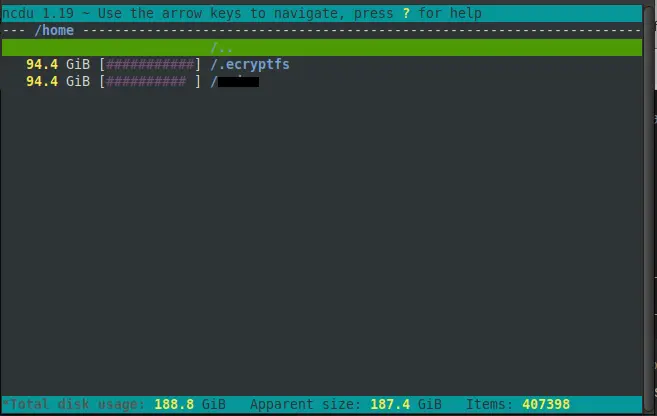
Edit: as far as the usage going down, I forgot I deleted some downloads before I left work
comment on
new mint install drive full of .ecryptfs
What's the full path to it? Is it just in /home? Or is it in /home/<your username> somewhere?
I'd say try running du -csh .ecryptfs and post the output. The thread you shared mentioned that it's a known bug with that disk usage tool. du -csh .ecryptfs shouldn't have the same issue and will at least rule out the possibility that the disk usage tool you're using is misreporting and presenting a red herring.
If you don't need a bunch of space, you can get a 32gb optane m.2 and put it in an enclosure
I've got my truenas server running on one
If it ever had a model name on it, it has long been worn down.. it's a 30 gig kingston one tho.. I think those are like 10-20 bucks
what’s the product, if you don’t mind me asking?
yes, it's stick. thanks for the resources!
okie
already have one, some times i'm just lazy to bring my laptop when i go out
Can you switch to an M2 external drive?
I've used old laptop (2.5") drives in compact enclosures as my "build anything" tool since forever.
My two current ones are old 500gb drives from dead laptops. I have multiple ISO's and tons of software on them. Latest one is SSD, so that's for travel.
Bigger than a pen drive, but they don't need external power.
Is there anything preventing you from installing it in your main drive?
There are too many variables to give you a direct answer for measuring lifespan, but as you suspect, degraded performance is an indicator of failure.
If this is a USB disk drive (and not a "stick"), Smartmontools is your friend and there should be a package for your distro.
If it is a stick, you're much more limited and testing, such as it is, is data destructive. https://superuser.com/a/376278
To maximize life of solid state media, reducing the number of writes is key. Here's an article to get you started with the basics, but do look into the implications of changes to some of these before jumping.
There is such a thing as industrial-grade flash chips, they have better specs and durability. I am familiar with them in terms of using the chips directly in circuit boards, and also industrial grade SD cards. But I bet if you look for industrial USB 3.0 sticks, you will find them. Industrial flash vendors may also have free utilities available that can help you better diagnose failures if you care to.
They will be more expensive, but if you are only buying low quantities you can probably invest another $40 or $50 per device (just my guess) to get more longevity out of it.
The USB I use is like.. 7 or 8 years now I think? It is a USB 3 one, but that thing had everything from windows ISOs to linux ones, and from school projects to pirated media, and it's still going strong
Haven't used USB for this in years, USB flash drives just aren't reliable.
Maybe worth trying a USB SSD, it might give you much better performance and reliability.
yes but I suggest running simulation first on a virtual machine or at least take a backup first